1. Sarrera
Thank you for choosing the AgfaPhoto Powerstation PPS 600 Pro. This portable power bank is designed to provide reliable power for various devices during outdoor activities, travel, and emergency situations. This manual provides essential information for safe operation, setup, maintenance, and troubleshooting. Please read it thoroughly before using the product.
2. Segurtasun-argibideak
- Ez desmuntatu, konpondu edo aldatu unitatea. Berriro muntatzeak sutea edo lesioak eragin ditzake.
- Do not expose the unit to fire or extreme temperatures (above 60°C / 140°F).
- Ez erabili edo gorde unitatea komunean edo uraren edo hezetasunaren eraginpean dagoen eremu batean.
- Do not drop, hit, or subject the unit to strong impacts.
- Mantendu haurren eskura.
- Use only recommended accessories and charging cables.
- Berotu gehiegi berotzea saihesteko, ziurtatu aireztapen egokia erabiltzean eta kargatzean.
- In case of leakage from the battery, avoid contact with skin and eyes. Rinse affected areas with water and seek medical attention.
3. Paketearen edukia
Egiaztatu elementu guztiak kutxan daudela:
- AgfaPhoto Powerstation PPS 600 Pro
- Power Cord (for AC charging)
- Car Cigarette Lighter Adapter
- Erabiltzailearen eskuliburua
4. Produktua amaitu daview
Familiarize yourself with the ports, buttons, and display of your Powerstation PPS 600 Pro.

Image: Front panel of the AgfaPhoto Powerstation PPS 600 Pro, showing the LCD screen, DC output, USB-A ports, USB-C port, and AC output switch.
The unit features a clear LCD display that shows battery level, input power, and output power. Various ports are available for charging different devices simultaneously.
- LCD pantaila: Shows battery status, input/output wattage, and error indicators.
- DC irteera: For devices requiring DC power.
- USB-A atakak: Smartphone-ak, tabletak eta bestelako USB bidez elikatzen diren gailuak kargatzeko.
- USB-C ataka: Kargatze azkarreko gailu bateragarrietarako.
- CA irteera: Standard wall outlet for appliances.
- Sarrerako ataka: For charging the power station itself.
5. Konfigurazioa
5.1 Hasierako karga
Before first use, fully charge your AgfaPhoto Powerstation PPS 600 Pro. This ensures optimal battery performance and longevity.
- Connect the provided power cord to the AC input port on the power station.
- Entxufatu kablearen beste muturra hormako entxufe estandar batera.
- The LCD display will show the charging status. The unit is fully charged when the battery indicator shows 100%.
Charging can also be done via a solar panel (sold separately) or a car cigarette lighter adapter.

Image: Illustration of the three charging methods for the power station: via car cigarette lighter, AC wall adapter, and solar panel.
6. Funtzionamendu-argibideak
6.1 Piztu/Itzaltzea
- To turn on the unit, press and hold the main power button for a few seconds. The LCD display will illuminate.
- Unitatea itzaltzeko, sakatu eta eutsi berriro pizteko botoia pantaila itzali arte.
6.2 Kanpoko gailuak kargatzea
The Powerstation PPS 600 Pro offers multiple output options:
- USB irteera: Connect your USB-powered devices (smartphones, tablets, drones, cameras) to the USB-A or USB-C ports. The unit will automatically detect and begin charging.
- CA irteera: For devices requiring standard wall power (laptops, mini-refrigerators, LED TVs), press the AC ON/OFF button to activate the AC outlet. Plug your device into the AC outlet. Remember to turn off the AC output when not in use to conserve battery.
- DC irteera: For 12V DC devices, connect them to the DC output port.

Image: The AgfaPhoto Powerstation PPS 600 Pro connected and charging a laptop, demonstrating its use for portable electronics.

Image: The power station in use during a power outage, providing light and charging a smartphone, highlighting its emergency backup capability.
7. Mantentzea
7.1 Biltegiratzea
- Store the power station in a cool, dry place, away from direct sunlight and heat sources.
- Epe luzerako biltegiratze baterako, kargatu unitatea % 50-80ra gutxi gorabehera 3-6 hilabetero bateriaren egoera mantentzeko.
- Avoid storing in environments with high humidity or extreme temperatures.
7.2 Garbiketa
- Erabili zapi leun eta leuna unitatearen kanpoaldea garbitzeko.
- Ez erabili garbitzaile edo disolbatzaile urratzailerik.
- Ziurtatu portu guztiak hautsik eta hondakinik gabe daudela.
8. Arazoak
If you encounter issues with your Powerstation PPS 600 Pro, refer to the following common problems and solutions:
| Arazoa | Kausa posiblea | Irtenbidea |
|---|---|---|
| Unitatea ez da pizten | Bateria guztiz deskargatuta dago. | Kargatu unitatea korronte alternoko egokitzailea erabiliz. |
| No output from AC port | AC output not activated. Device exceeds power limit. | Press the AC ON/OFF button. Check device wattage against unit specifications. |
| Slow charging of external devices | Device requires higher current. Cable issue. | Ensure you are using the correct USB port (e.g., USB-C PD). Try a different cable. |
| Unitatea gehiegi berotzen ari da | Poor ventilation. Excessive load. | Ensure vents are clear. Reduce the number or power of connected devices. Allow unit to cool down. |
Arazoak jarraitzen badu, jarri harremanetan bezeroarentzako arreta-zerbitzuarekin.
9. Zehaztapenak
Technical details for the AgfaPhoto Powerstation PPS 600 Pro:
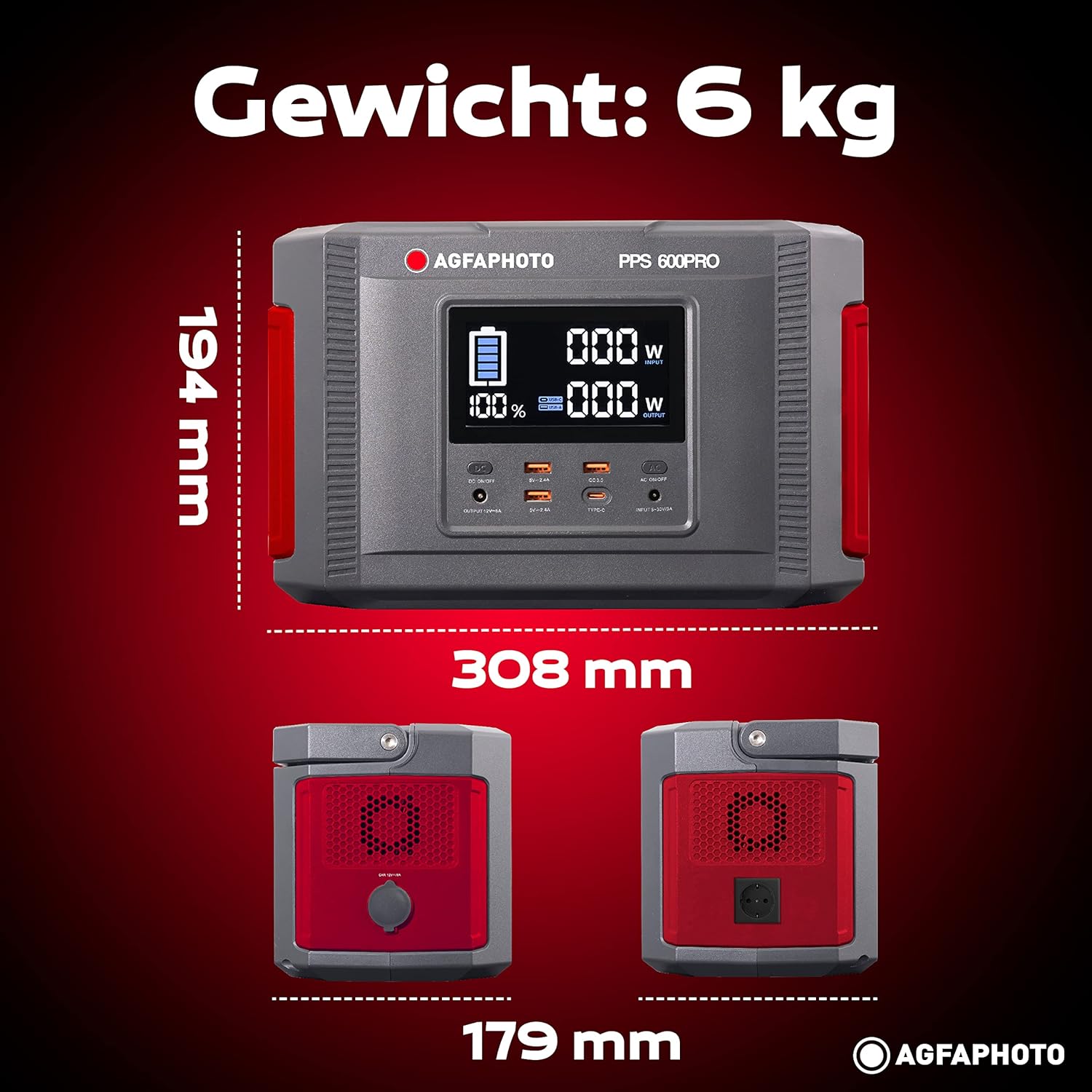
Image: Visual representation of the AgfaPhoto Powerstation PPS 600 Pro's dimensions (308 x 179 x 194 mm) and weight (6 kg).
| Ezaugarri | Zehaztapena |
|---|---|
| Marka | AgfaPhoto |
| Modelo zenbakia | 717-854742 (PPS600) |
| Bateria Edukiera | 644 Wh |
| Irteerako potentzia (jarraitua) | 600 W |
| Irteerako potentzia (gailurra) | 1000 W |
| liburukiatage | 220 Volt |
| Elementuaren pisua | 6.1 kilogramo |
| Neurriak (L x W x H) | 308 x 179 x 194 mm |
| Energia iturria | Battery Powered (Solaire, électricité) |
| Gomendatutako Erabilerak | Mobile phones, cameras, laptops, tablets |
| Dakarten osagaiak | Power cord, USB ports, LCD screen, car cigarette lighter adapter |
| Ezaugarri Berezia | Diseinu trinkoa |
10. Bermea eta Laguntza
AgfaPhoto products are manufactured to high-quality standards and are covered by a manufacturer's warranty. For specific warranty terms and conditions, please refer to the warranty card included with your product or visit the official AgfaPhoto webgunea.
For technical support, troubleshooting assistance, or spare parts inquiries, please contact AgfaPhoto customer service. Contact details can typically be found on the product packaging or the official brand webgunea.


