1. Sarrera
Eskerrik asko erosketagatik.asing the Thomson Soundbar System. This manual provides essential information for setting up, operating, and maintaining your soundbar, subwoofer, and wireless microphones. Please read these instructions carefully before use and retain them for future reference.

Image 1.1: Thomson Soundbar System components including the soundbar, subwoofer, two wireless microphones, and remote control.
2. Paketearen edukia
Egiaztatu behean zerrendatutako elementu guztiak zure paketean sartuta daudela:
- Soinu-barra (unitate 1)
- Subwooferra (unitate 1)
- Urruneko kontrola (unitate 1)
- Wireless Microphones (2 units)
- Energia egokitzailea (unitate 1)
- Audio kablea (unitate 1)
- Coaxial Cable (1 unit)
- Optical Fiber Cable (1 unit)
- Wall Mounting Kit (includes padlocks, gel column, screws)
- Erabiltzailearen eskuliburua (dokumentu hau)
3. Produktua amaitu daview
3.1 Soinu barra
The soundbar features four built-in full-frequency speakers with sound guide enhancement holes for stereo sound. It also includes an LED strip lamp for visual effects.

Image 3.1: Internal structure of the soundbar highlighting the 4 full-range driver speakers, guide holes, and LED strip lamp.
3.2 Subwoofer-a
The external subwoofer is designed to deliver deep bass. It incorporates a bass diaphragm with high-roll foam surrounds for extended excursion and vibration-absorbing feet for stable performance.
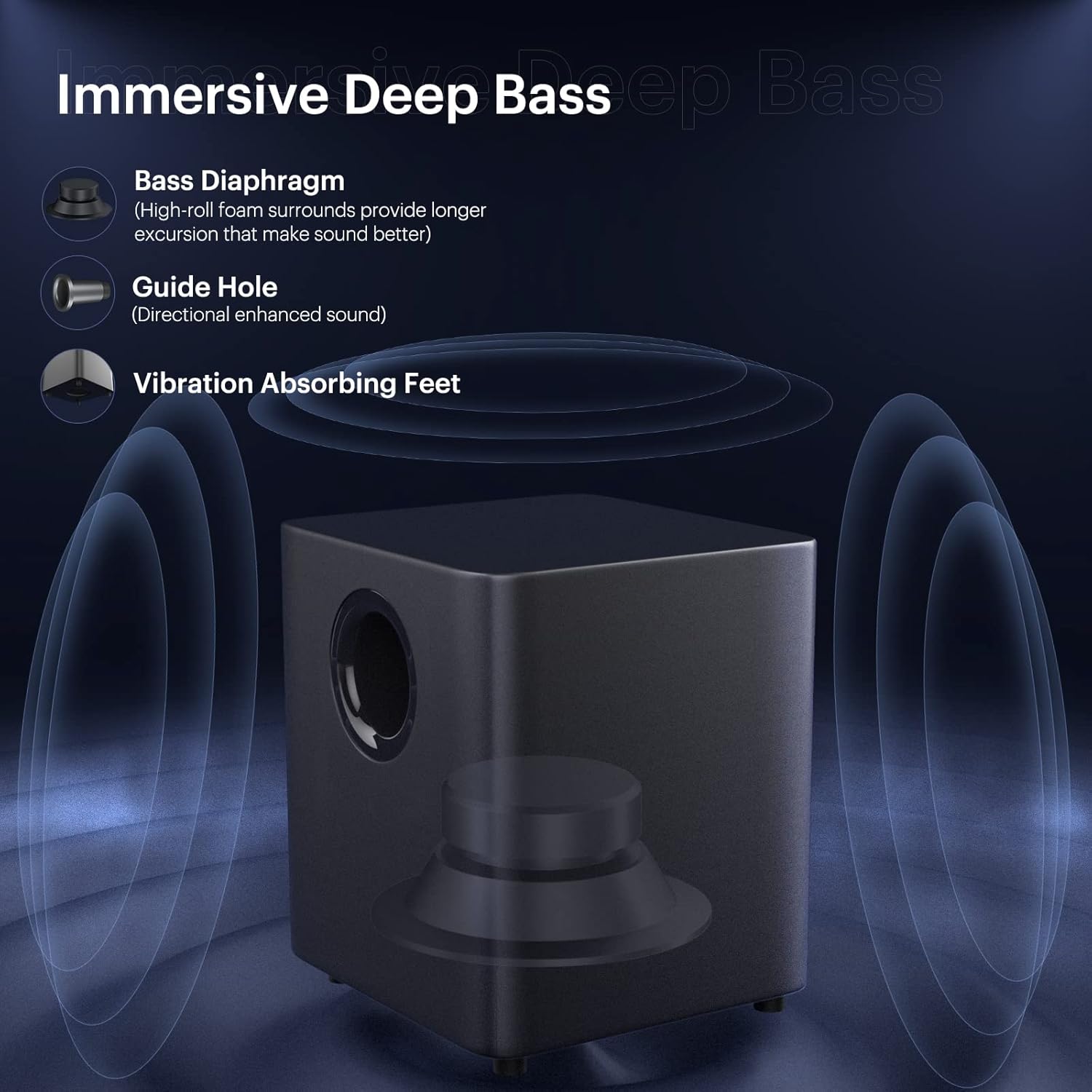
Image 3.2: Subwoofer design elements for immersive deep bass.
Haririk gabeko 3.3 mikrofono
Two wireless microphones are included for vocal applications. They operate on UHF frequencies and feature individual displays.

Image 3.3: Dual wireless microphones.
3.4 Urruneko kontrola
The included remote control provides full functionality for operating the soundbar system, including power, input selection, volume, sound modes, and microphone adjustments.
4. Konfigurazioa
4.1 Jartzea
Place the soundbar on a stable, flat surface in front of your television or mount it on the wall. Position the subwoofer on the floor near the soundbar for optimal bass performance.
4.2 Connecting the Subwoofer
Connect the subwoofer to the soundbar using the provided SUB OUT cable. Ensure a secure connection.
4.3 Energia-konexioa
Connect the power adapter to the DC IN port on the soundbar and then plug it into a power outlet. Ensure the subwoofer is also connected to a power source if it has a separate power input.
5. Konektibitate-aukerak
The soundbar offers various wired and wireless connection methods:

Image 5.1: Available wired and wireless connectivity ports on the soundbar.
5.1 Bluetooth konexioa
- Press the 'Bluetooth' button on the remote control or soundbar to select Bluetooth input.
- The soundbar will enter pairing mode, indicated by a flashing LED.
- On your device (smartphone, tablet, computer), search for 'THOMSON Soundbar' in the Bluetooth settings and select it to pair.
- Once connected, the LED indicator will become solid.
5.2 HDMI ARC konexioa
Connect an HDMI cable from the HDMI ARC port on the soundbar to the HDMI ARC port on your TV. Select the HDMI ARC input on the soundbar.
5.3 Konexio optikoa
Connect an optical cable from the OPT port on the soundbar to the optical output port on your TV or audio source. Select the Optical input on the soundbar.
5.4 AUX konexioa
Connect a 3.5mm audio cable from the AUX IN port on the soundbar to the audio output port on your device. Select the AUX input on the soundbar.
5.5 USB erreprodukzioa
Insert a USB drive into the USB port on the soundbar. The soundbar will automatically switch to USB input and begin playing compatible audio files.
6. Funtzionamendu-argibideak
6.1 Piztu/Itzali
Press the 'Power' button on the remote control or the soundbar to turn the system on or off.
6.2 Sarrera iturriaren hautaketa
Press the 'Input' or corresponding source buttons (e.g., 'Bluetooth', 'HDMI ARC', 'Optical', 'AUX', 'USB') on the remote control to switch between audio sources.
6.3 Bolumen kontrola
Use the 'Volume +' and 'Volume -' buttons on the remote control or soundbar to adjust the master volume.
6.4 Soinu moduak
The soundbar offers five equalizer modes to optimize audio for different content types:
- Films: Enhanced dialogue and cinematic effects.
- Jolasak: Immersive sound for gaming.
- Musika: Musika erreproduzitzeko audio orekatua.
- Kontzertua: Live performance audio experience.
- Berriak: Clear voice reproduction.
Press the 'Mode' button on the remote control to cycle through these sound modes.

Image 6.1: The five available sound modes for optimized audio.
6.5 Baxu eta Goi Doikuntza
Use the 'Bass+' / 'Bass-' and 'Treble+' / 'Treble-' buttons on the remote control to fine-tune the bass and treble levels.
6.6 Mikrofonoaren erabilera
To use the wireless microphones:
- Ensure the microphones have batteries installed.
- Turn on the microphones. They should automatically pair with the soundbar.
- Adjust microphone volume and echo effects using the dedicated buttons on the remote control.

Image 6.2: Using the wireless microphones for an immersive audio experience.
7. Pareta Muntatzea
The soundbar can be wall-mounted using the included kit. Follow these steps:
- Determine the desired mounting location on the wall, ensuring it is level and structurally sound.
- Mark the positions for drilling using the provided template or by measuring the soundbar's mounting points.
- Beharrezkoa bada, zulatu zuloak eta sartu hormako aingurak.
- Secure the mounting brackets to the wall using the screws.
- Carefully attach the soundbar to the mounted brackets.
Ensure all cables are connected before mounting if possible, or leave enough slack for connection after mounting.
8. Arazoak
Arazoak badituzu, jo ezazu honako arazo eta irtenbide ohikoenei:
| Arazoa | Irtenbide posiblea |
|---|---|
| Botererik ez | Check if the power adapter is securely connected to the soundbar and a working power outlet. |
| Soinurik ez | Ensure the correct input source is selected. Check all audio cable connections. Increase the volume on both the soundbar and the connected device. |
| Bluetooth-a parekatzeko arazoak | Ensure the soundbar is in Bluetooth pairing mode. Delete 'THOMSON Soundbar' from your device's Bluetooth list and try pairing again. Move devices closer. |
| Mikrofonoa ez dabil | Check microphone batteries. Ensure microphones are powered on and within range of the soundbar. |
| Urruneko kontrola ez dabil | Check remote control batteries. Ensure there are no obstructions between the remote and the soundbar's sensor. |
9. Zehaztapenak
- Hizlari mota: Soinu barra
- Ezaugarri berezia: Berdinketa
- Gomendatutako erabilerak: Telebistetarako
- Gailu bateragarriak: Smartphone, Tableta, Telebista
- Subwooferaren diametroa: 5 hazbete
- Inguruko soinu-kanalaren konfigurazioa: 5.1
- Kontrol-metodoa: Urrunekoa
- Haririk gabeko komunikazio teknologia: Bluetootha
- Soinu barraren tamaina: 37 hazbete
- Energia iturria: Kable elektrikoa
- Product Dimensions (Soundbar): 93.6 x 10.97 x 8.76 cm
- Elementuaren pisua: 8.91 kg (total system)
- Bozgorailuaren irteera-potentzia maximoa: 100 Watt
- Audio irteera modua: Estereoa, Inguratzailea
- Muntatze mota: Barra-muntaia, horma-muntaia
10. Segurtasun informazioa
- Ez jarri unitatea euri edo hezetasunera.
- Ez desmuntatu unitatea. Konponketa-lanak langile kualifikatuei eskatu.
- Ziurtatu aireztapen egokia unitatearen inguruan, gehiegi berotzea saihesteko.
- Mantendu unitatea eguzki-argitik, bero-iturrietatik eta eremu magnetiko indartsuetatik urrun.
- Garbitu unitatea zapi leun eta lehor batekin. Ez erabili garbitzaile likidorik.
11. Bermea eta Laguntza
For warranty information and technical support, please refer to the warranty card included with your product or visit the official THOMSON webgunea. Gorde erosketa-agiria erosketaren frogagiri gisa.


