1. Sarrera
The Café Couture Countertop Oven is designed to flawlessly prepare a wide range of recipes, from snacks to elaborate meals. It features 14 essential cooking modes, including Air Fry, CrispFinish, Bake, Broil, Roast, Toast, Bagel, Pizza, Cookies, Proof, Dehydrate, Slow Cook, Reheat, and Keep Warm. This manual provides detailed instructions for safe and efficient operation of your new appliance.

Aurrealdea view of the Café Couture Countertop Oven in Matte White, showcasing a roasted chicken on a baking tray inside the illuminated oven cavity.
2. Segurtasun informazio garrantzitsua
Always read all instructions before using this appliance. Basic safety precautions should be followed, including:
- Ez ukitu gainazal beroak. Erabili heldulekuak edo eskutokiak.
- Deskarga elektrikoetatik babesteko, ez sartu kablea, entxufeak edo aparatua uretan edo beste likido batzuetan.
- Gainbegiratzea beharrezkoa da aparaturen bat umeek edo umeen ondoan erabiltzen dutenean.
- Deskonektatu entxufetik erabiltzen ez duzunean eta garbitu aurretik. Utzi hozten piezak jarri edo kendu aurretik.
- Ez erabili aparaturik kablea edo entxufea hondatuta dagoenean, edo aparatuak gaizki funtzionatzen duenean edo nolabait hondatu ondoren.
- Gailuaren fabrikatzaileak gomendatzen ez dituen osagarriak erabiltzeak lesioak eragin ditzake.
- Ez erabili kanpoan.
- Ez utzi kablea mahaiaren edo erakusmahaiaren ertzetik zintzilik zintzilik, ezta gainazal beroak ukitu ere.
- Ez jarri gas edo erregailu elektriko bero baten gainean edo inguruan, edo berotutako labe batean.
- Kontuz ibili behar da olio beroa edo beste likido beroa duen tresna bat mugitzean.
- Beti konektatu entxufea lehenik etxetresna elektrikora, eta gero konektatu kablea hormako entxufean. Deskonektatzeko, jarri edozein kontrol "itzali" posizioan, eta gero atera entxufea hormako entxufetik.
- Ez erabili aparatua aurreikusitako erabilera ez den beste baterako.
3. Zer dago kutxan
Your Café Couture Countertop Oven comes with the following accessories:
- Heavy-Duty Wire Rack
- Labeko erretilua
- 12" Pizza Pan
- Aire frijitu/deshidratatu saskia
- Errea erretilua
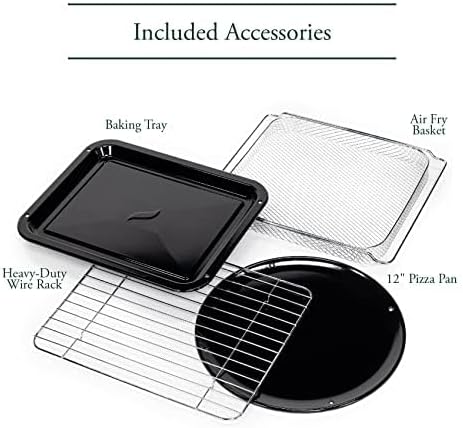
A collection of accessories included with the oven: a heavy-duty wire rack, a baking tray, a 12-inch pizza pan, and an air fry/dehydrate basket.
This video showcases the various accessories included with the Café Couture Oven, such as the heavy-duty wire rack, pizza pan, baking pan, and air fry basket, demonstrating their use with different foods like bagels, pizza, and avocado fries.
4. Konfigurazioa
4.1 Hasierako Prestaketa
- Before first use, wipe the interior walls of the oven with a damp belakia.
- Accessories may be cleaned in the dishwasher, but hand washing with warm, soapy water is recommended for longevity.
4.2 Jartzea
- Place the oven on a level, heat-resistant surface.
- Ensure at least 4 inches of clearance on all sides for proper ventilation.
- Ez jarri edo gorde elementurik labearen gainean, sartzen diren osagarriak izan ezik.
4.3 First Use Operation
- Plug in the oven. The appliance alarm will sound, and the control display will illuminate.
- It is recommended to operate the oven empty on Air Fry mode for 20 minutes at 400°F (205°C) before cooking for the first time. This helps to eliminate any manufacturing odors.
- During this initial operation, the unit may emit visible vapors and a slight odor. This is normal, safe, and not detrimental to the oven.
This video provides initial setup instructions for the Café Couture Oven, including wiping the interior, cleaning accessories, proper placement on a heat-resistant surface, and the recommended first-time operation on Air Fry mode to eliminate manufacturing odors.
5. Funtzionamendu-argibideak
5.1 Selecting a Cooking Mode
- Rotate the 'Cook Mode' knob until your desired cooking mode is shown on the control display.
- When using the oven for the first time, default cooking settings will be displayed. Otherwise, the oven will always store the last used settings for any given cooking mode.
5.2 Adjusting Cooking Mode Settings
- The settings for each cooking mode can be adjusted using the 'Temp/Time/Slices/Shade' knob.
- Rotate the knob clockwise to increase the temperature or time.
- Rotate the knob counter-clockwise to decrease the temperature or time.
- The 'Temp/Time/Slices/Shade' knob also functions as a button. Pushing the button toggles the setting being adjusted (e.g., between temperature and time).
5.3 Starting the Oven
- After selecting your desired cooking mode and adjusting the settings, place the food in the oven.
- Sakatu 'Hasi' botoia sukaldaritza hasteko.
- For Bake, Roast, and Cookies modes, the 'Preheating' indicator will illuminate on the control display, and the oven will begin heating to the set temperature.
- When the oven has reached the set temperature, the oven alarm will sound, and the 'Preheating' indicator will disappear. The 'Press Start' reminder will illuminate. If the 'Start' button is not pressed within 10 minutes, the oven will automatically turn off.
- The preheat mode may be skipped manually by pressing the 'Start' button a second time. The cooking timer will begin counting down immediately.
- All other cooking modes do not require preheating. When starting one of these modes, the cooking timer will begin counting down immediately.
5.4 Cancelling a Cooking Mode
- When the oven has finished cooking, it will shut off automatically, and the oven alarm will sound to indicate that the cooking cycle is complete.
- The cooking cycle can also be ended manually by pressing the 'Cancel' button.
5.5 Turning on the Oven Light
- To turn on the oven light, press the 'Light' button to the left of the control display.
- To turn off the light, press the 'Light' button again.
- The oven light will also automatically turn on whenever the oven door is opened.
5.6 Activating the Convection Fan
- Some cooking modes offer an optional convection feature.
- To manually activate the convection fan for these cooking modes, press the 'Conv.' button to the right of the control display.

The Café Couture Countertop Oven's control panel showing 'ROAST' mode, alongside a comprehensive list of its 14 cooking modes: Air Fry, Crisp Finish, Bake, Broil, Roast, Toast, Bagel, Pizza, Cookies, Proof, Dehydrate, Slow Cook, Reheat, and Keep Warm.
This video demonstrates the CrispFinish feature of the Café Couture Oven, showing how it can be used to brown, caramelize, melt, or crisp dishes like crème brûlée.
This video provides a guide on how to use the Café Couture Oven, covering selection of cooking modes, adjusting settings, starting the oven, and cancelling a cooking cycle. It also shows how to turn the oven light on/off and activate the convection fan.
This video highlights the large capacity of the Café Couture Oven, demonstrating how it can accommodate various dishes like a whole roasted chicken, lasagna, and pizza.
6. Garbiketa eta Mantentze-lanak
6.1 Barnealdea garbitzea
- Deskonektatu beti labea eta utzi guztiz hozten garbitu aurretik.
- Garbitu barruko hormak iragarkiarekinamp sponge and mild detergent. Avoid abrasive cleaners or scouring pads.
- For stubborn stains, a paste of baking soda and water can be applied, left for a few minutes, then wiped clean.
6.2 Garbiketa osagarriak
- All included accessories (wire rack, baking tray, pizza pan, air fry/dehydrate basket, crumb tray) can be washed by hand with warm, soapy water.
- Most accessories are dishwasher safe, but hand washing is recommended to preserve their finish and extend their lifespan.
- Ez jarri apurrak erretilua ontzi-garbigailuan.
6.3 Kanpoaldea garbitzea
- Garbitu kanpoko gainazalak leun batekin, damp oihal.
- Saihestu akabera kaltetu dezaketen produktu kimiko gogorrak edo material urratzaileak erabiltzea.
7. Arazoak
| Arazoa | Kausa posiblea | Irtenbidea |
|---|---|---|
| Labea ez da pizten. | Ez dago konektatuta; itzalita dagotage; zirkuitu-etengailua jauzi egin du. | Ziurtatu labea ondo konektatuta dagoela funtzionatzen duen entxufe batera. Egiaztatu etxeko etengailua. |
| Janaria ez da uniformeki egosten. | Incorrect rack position; overcrowding; uneven food distribution. | Refer to recipe for recommended rack position. Avoid overcrowding the oven. Arrange food in a single layer for best results. |
| Oven emits smoke or strong odor during first use. | Fabrikazioko hondar-olioak. | This is normal. Operate empty on Air Fry mode at 400°F for 20 minutes to burn off residues. Ensure adequate ventilation. |
| Display shows "Press Start" but oven doesn't start. | Preheating cycle complete, awaiting confirmation. | Press the 'Start' button again to begin the cooking timer. |
8. Zehaztapenak
- Marka: Kafetegia
- Ereduaren izena: Café™ Couture™ Oven with Air Fry
- Modelo zenbakia: C9OAAAS4RW3
- Kolorea: Zuri Mattea
- Produktuaren neurriak: 17" L x 18.6" W x 14" H
- Elementuaren pisua: 28 kilo
- Edukiera: 0.8 ku. ft.
- Kontrol mota: Eskutiloa
- Atearen estiloa: Goitibeherako Atea
- Atearen material mota: Beira Tenplatua
- Energia iturria: AC
- Tenperatura tartea: 80 - 450 Fahrenheit gradu
- Apalategi kopurua: 1
- Ezaugarri berezia: CrispFinish™ - Use CrispFinish at the end of any standard cooking mode to melt, caramelize, brown or crisp, and put the perfect finishing touch on any of your signature dishes.
- Konektibitatea: WiFi & Smart Connected, Voice Control (via SmartHQ app, Echo, or Google Home devices)
- UPC: 084691857563

Aldea view of the Café Couture Countertop Oven in Matte White, illustrating its dimensions: 18.6 inches width, 14 inches height, and 17 inches depth. An air fry basket is visible inside.

A hand interacting with the SmartHQ app on a smartphone, demonstrating remote control capabilities for the Café Couture Countertop Oven. The oven's display shows 'AIR FRY' mode.
9. Bermea eta Laguntza
For detailed warranty information, please refer to the warranty card included with your product packaging or visit the official Café Appliances website. For customer support, technical assistance, or to register your product, please visit the Café Appliances support page or contact their customer service line.
You can also connect your Café Smart Appliance by downloading the free SmartHQ app from your Apple or Android smartphone. Open the app, sign in or create an account, and follow the instructions to connect your appliance.
- Lineako laguntza: Bisitatu Café Store on Amazon produktuen informazioa eta baliabideak lortzeko.
- SmartHQ App: Available on Apple App Store and Google Play Store.


