1. Sarrera
Thank you for choosing the Gembird USB-C Gigabit Network Adapter with 3-Port USB 3.1 Hub. This device is designed to expand the connectivity of your USB-C enabled laptop, tablet, or computer, providing both high-speed Gigabit Ethernet and additional USB 3.1 ports. This manual provides essential information for setting up, operating, and maintaining your device.
2. Produktuaren ezaugarriak
- USB-C konexioa: Connects to your host device via a reversible USB-C port.
- Gigabit Ethernet ataka: Provides a stable and fast wired network connection up to 1000 Mbps.
- 3-Port USB 3.1 Hub: Adds three USB 3.1 ports for connecting peripherals such as external hard drives, flash drives, keyboards, and mice.
- Abiadura handiko datuen transferentzia: USB 3.1 ports support data transfer rates up to 5 Gbps.
- Plug and Play: No driver installation required for most modern operating systems.
3. Paketearen edukia
Please ensure the following items are included in your package:
- Gembird USB-C Gigabit Network Adapter with 3-Port USB 3.1 Hub (Model A-CMU3-LAN-01)
4. Produktua amaitu daview
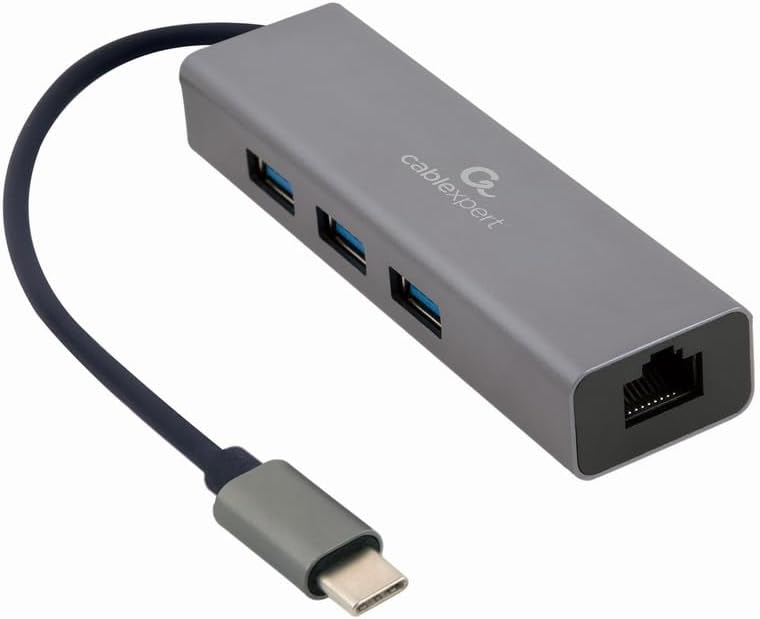
1. irudia: Aurrealdea view of the Gembird USB-C Gigabit Network Adapter, showing the USB-C cable, three USB 3.1 ports, and the RJ45 Gigabit Ethernet port.

2. irudia: Retail packaging for the Gembird USB-C Gigabit Network Adapter, highlighting key features like USB Type-C, USB 3.1 x 3, RJ45, Gigabit, 1000 Mbps, and Plug & Play.
5. Konfigurazioa
Follow these steps to set up your Gembird USB-C Gigabit Network Adapter:
- Konektatu ostalari gailura: Plug the USB-C connector of the adapter into an available USB-C port on your laptop, tablet, or computer.
- Konektatu sarera: Insert an Ethernet cable (RJ45) from your router or modem into the Gigabit Ethernet port on the adapter.
- USB periferikoak konektatu: Plug your USB devices (e.g., flash drives, external hard drives, mouse, keyboard) into the three available USB 3.1 ports on the adapter.
- Gidariaren instalazioa: The adapter is typically plug-and-play. Your operating system (Windows, macOS, Linux, Chrome OS) should automatically detect and install the necessary drivers. If prompted, allow the system to install drivers.
6. Funtzionamendu-argibideak
Once connected, the adapter functions automatically:
- Sarerako sarbidea: Your host device should now have a wired network connection. You can verify this in your operating system's network settings.
- USB Device Access: Connected USB peripherals will be recognized by your host device and function as if directly connected.
7. Arazoak
Arazoak badituzu, jo ezazu honako arazo eta irtenbide ohikoenei:
- Sareko konexiorik ez:
- Ensure the Ethernet cable is securely connected to both the adapter and your router/modem.
- Check your router/modem for proper operation.
- Egiaztatu sareko ezarpenak zure ostalari gailuan.
- Try connecting the adapter to a different USB-C port on your host device.
- Ez dira ezagutzen USB gailuak:
- Ensure USB devices are properly plugged into the adapter's USB 3.1 ports.
- Try connecting the USB device directly to your host computer to confirm it is functional.
- Some high-power USB devices may require an external power source if your host device's USB-C port does not provide sufficient power (this adapter does not have a dedicated power input).
- Sarearen abiadura motela:
- Ensure your Ethernet cable is rated for Gigabit speeds (Cat5e or higher).
- Verify your internet service provider's speed and your router's capabilities.
- Ensure your host device's USB-C port supports USB 3.0/3.1 speeds.
8. Zehaztapenak
| Modelo zenbakia | A-CMU3-LAN-01 |
| Hardware interfazea | USB-C (Host), USB 3.1 (Hub), RJ45 (Ethernet) |
| USB portuak guztira | 3 (USB 3.1) |
| Ethernet Portuak | 1 (Gigabit RJ45) |
| Datuen transferentzia-tasa (USB) | Gehienez 5 Gbps (USB 3.1) |
| Data Transfer Rate (Ethernet) | 10/100/1000 Mbps |
| Produktuaren neurriak | 10 x 2 x 2.7 hazbete |
| Elementuaren pisua | 2.46 ontza |
9. Mantentzea
Zure egokitzailearen iraupena eta errendimendu optimoa bermatzeko:
- Garbiketa: Erabili zapi leun eta lehor bat gailuaren kanpoaldea garbitzeko. Saihestu garbitzaile likidoak edo disolbatzaileak.
- Biltegiratzea: Erabiltzen ez duzunean, gorde egokitzailea leku fresko eta lehor batean, eguzki-argitik eta muturreko tenperaturetatik babestuta.
- Manipulazioa: Avoid dropping or subjecting the device to strong impacts. Do not attempt to disassemble the adapter.
10. Bermea eta Laguntza
This Gembird product comes with a bi urteko bermea fabrika akatsen aurkaGorde erosketaren egiaztagiria bermearen erreklamazioetarako.
For technical support or warranty inquiries, please contact your retailer or visit the official Gembird webharremanetarako informazioa lortzeko gunea.


