1. Sarrera
This manual provides detailed instructions for the setup, operation, maintenance, and troubleshooting of your Joso D3 Wireless Mobile Gaming Controller. Please read this manual thoroughly before using the product to ensure proper functionality and to maximize your gaming experience.
2. Paketearen edukia
- 2 x Joso D3 Mobile Game Controllers (1 Black, 1 Gray)
- 2 x USB-C kargatzeko kable
- 2 x Erabiltzailearen eskuliburuak
3. Konfigurazioa
3.1 Kontrolagailua kargatzea
Before initial use, fully charge the controller using the provided USB-C charging cable. Connect the USB-C end to the controller's charging port and the USB-A end to a compatible power source (e.g., computer USB port, wall adapter). The charging time is approximately 2-3 hours.

Image: This image illustrates the working time, charging time, and battery capacity of the Joso D3 controller. It shows a working time of 15-18 hours, a charging time of 2-3 hours, and a 400mAh battery capacity.
3.2 Attaching Your Mobile Device
The Joso D3 controller features a telescopic holder designed to securely fit mobile phones between 5.0 and 6.9 inches in length. Gently extend the controller's sides and place your smartphone into the holder. Ensure the device is centered and stable. Oharra: This controller is not compatible with iPads or other tablets.
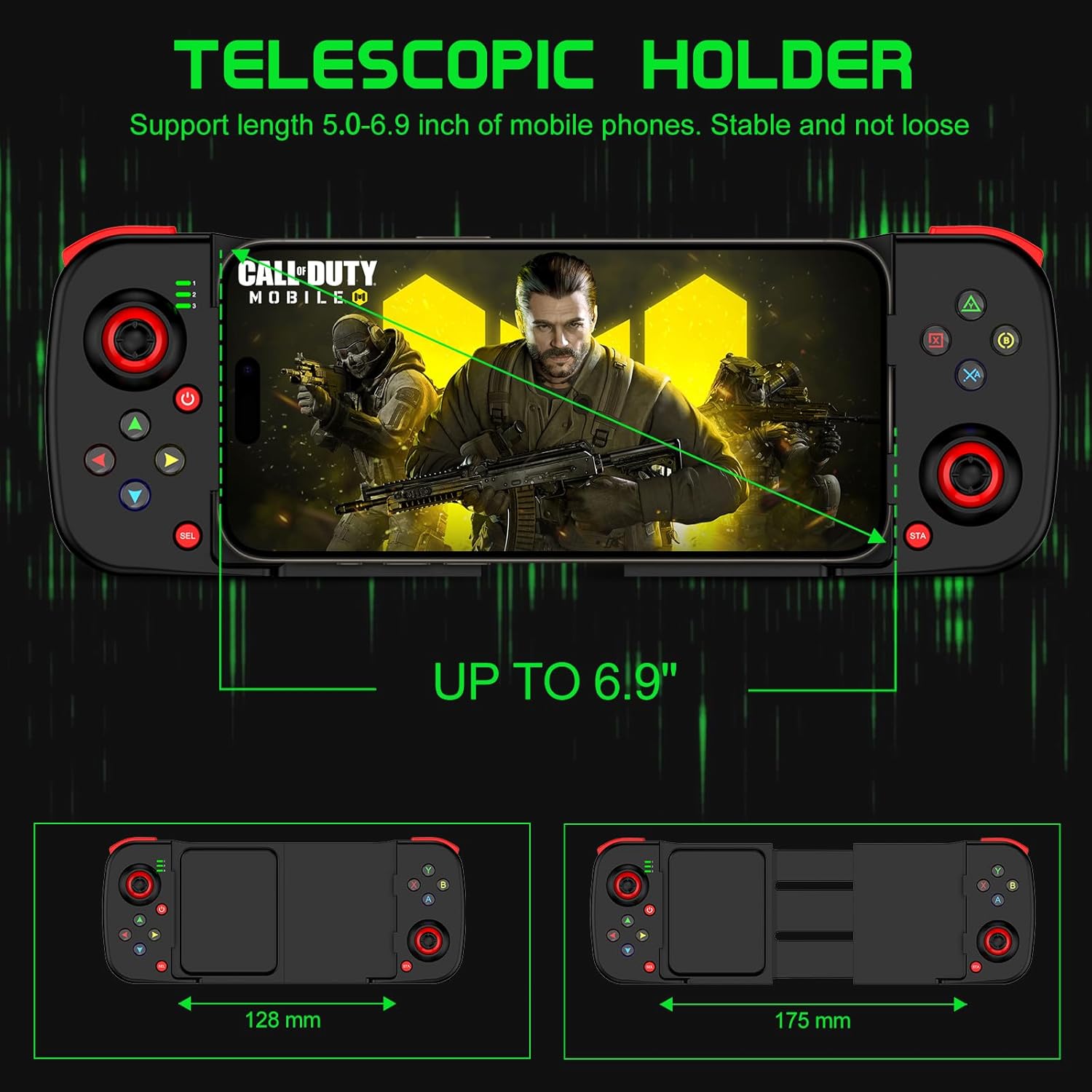
Image: This image demonstrates the telescopic holder of the Joso D3 controller, supporting mobile phones from 5.0 to 6.9 inches. It also shows the controller's dimensions, with a minimum width of 128mm and an extended width of 175mm.
3.3 Bluetooth parekatzea
Follow these steps to pair your Joso D3 controller with your device:
- Ensure the controller is powered off before initiating the Bluetooth pairing connection.
- To boot the controller into the desired mode, hold down one of the following buttons, then press the 'Home' button:
- B + Home: For DUALSHOCK 4 Wireless Controller mode (typically for iOS).
- X + Home: For D3 mode (general Android compatibility).
- RB + Home: For Xbox Wireless Controller mode (for Android or PC).
- On your iPhone, Android device, or PC, navigate to the Bluetooth settings and select the Joso D3 controller from the list of available devices to connect.

Image: This image displays the universal compatibility of the Joso D3 controller with iPhone, Android, and PC. It also provides visual instructions for Bluetooth pairing using specific button combinations (B+Home, X+Home, RB+Home) for different device types.
4. Funtzionamendu-argibideak
4.1 Kontrolagailuaren diseinua
Familiarize yourself with the buttons and joysticks on your Joso D3 controller:
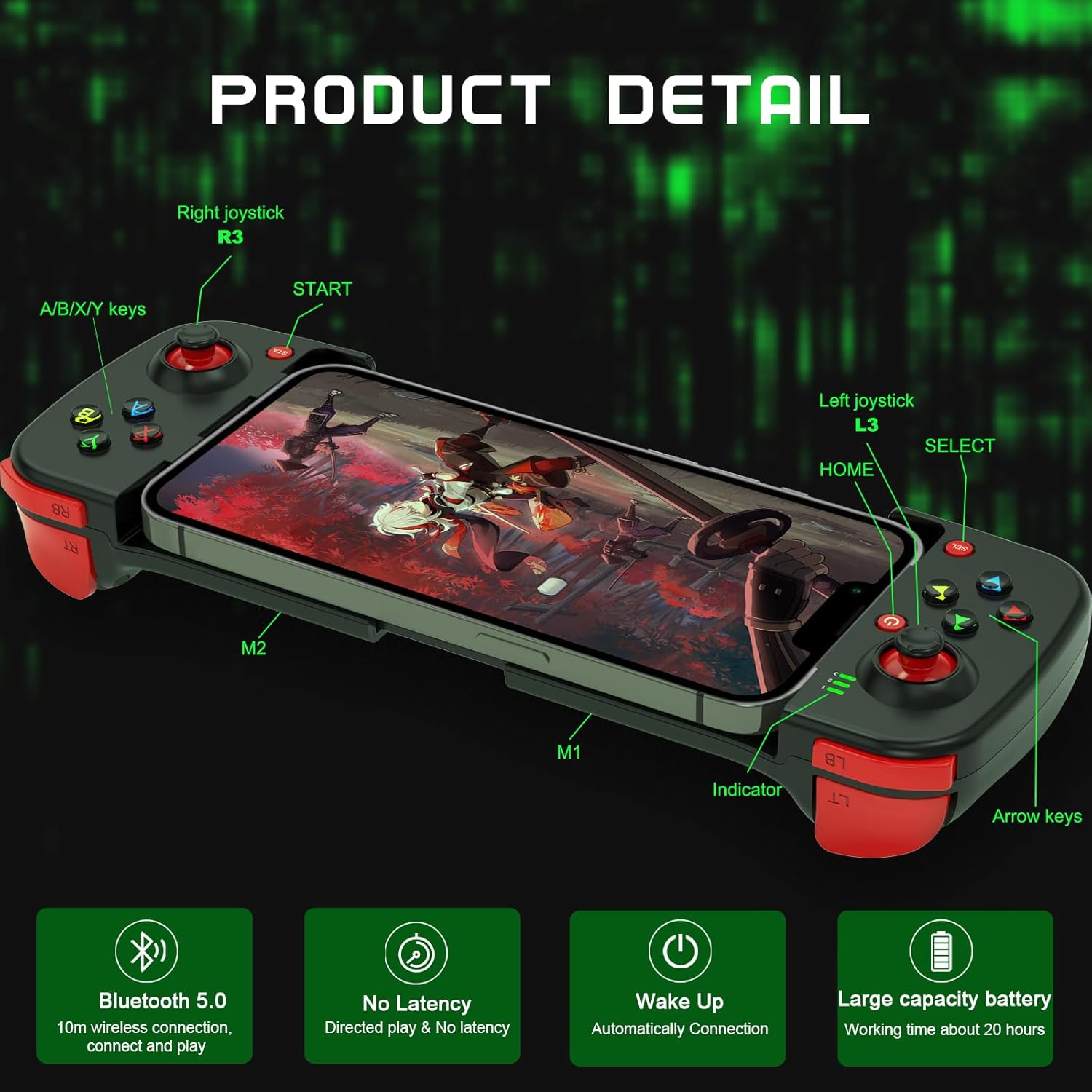
Irudia: Irudi honek xehetasunak eskaintzen ditu view of the Joso D3 controller, labeling key components such as the Right joystick (R3), A/B/X/Y keys, START button, Left joystick (L3), HOME button, SELECT button, Indicator light, Arrow keys, and the M1/M2 back buttons.
- Left Joystick (L3): Mugimendurako eta kamera kontrolatzeko.
- Right Joystick (R3): Kameraren kontrola eta apuntatzea egiteko.
- A/B/X/Y botoiak: Action buttons, functions vary by game.
- Directional Pad (Arrow Keys): Norabide zehatzaren sarrerarako.
- L1/L2 (LB/LT) & R1/R2 (RB/RT) Triggers/Bumpers: Sorbaldako botoiak jokoan hainbat ekintza egiteko.
- START/SELECT (Menu/View) Botoiak: For pausing, accessing menus, or specific game functions.
- HOME botoia: To power on/off and for pairing.
- M1/M2 botoiak: Atzeko botoiak pertsonalizagarriak.
4.2 Advanced Gaming Features
The Joso D3 controller is designed to enhance your mobile gaming with several advanced features:
- Six Fingers Operation: The ergonomic design and button placement allow for simultaneous aiming, shooting, moving, and switching angles, providing a competitive edge.
- 360° High Precision 3D Rocker: Experience highly accurate positioning and smooth movement control in your games.

Image: This image highlights the
Erlazionatutako dokumentuak - D3
 |
Joso D3 Haririk gabeko Joko Kontrolagailuaren Erabiltzaile Eskuliburua Joso D3 haririk gabeko joko-kontrolagailuaren erabiltzailearen eskuliburu osoa, konfigurazioa, iOS eta Androiderako konexio moduak, makroen grabaketa, energiaren egoera eta arazoak konpontzea azaltzen dituena. |
 |
Joso D6/D7 Haririk gabeko Joko Kontrolagailuaren Erabiltzaile Eskuliburua Joso D6 eta D7 haririk gabeko joko-kontrolagailuen erabiltzailearen eskuliburu osoa, paketearen edukia, hardwarearen bateragarritasuna, gailuaren diseinua, iOS, Android eta PCrako konexio-gidak, botoien konbinazioak eta arazoak konpontzea azaltzen dituena. |
 |
Joso D6 kontrolagailuaren arazoak konpontzea eta PS urruneko erreprodukzioaren gida Joso D6 mugikorreko joko-kontrolagailuarekin ohikoak diren arazoak konpontzeko gida osoa, konfigurazioa, botoien funtzionaltasuna eta PS Remote Play erabiltzea barne. Ikasi firmwarea nola eguneratu eta kontrolagailua nola konektatu joko ezin hobeak lortzeko. |
 |
PS Urruneko Jolaserako Bateragarritasunerako Gamepad Eguneratzeko Tutoriala Shooting Plus V3 aplikazioa erabiliz PS Remote Play-rako gamepad-a eguneratzeko urratsez urratseko gida. Ikasi nola konektatu zure kontrolagailua PS4 eta PS5 kontsoletara urruneko jokoetarako. |
 |
Joso AX200 Keyboard and Mouse Adapter User Manual | Setup & Customization Guide User manual for the Joso AX200 Keyboard and Mouse Adapter, detailing hardware requirements, setup for PC and Nintendo Switch, equipment layout, key mapping, and customization options via the Geekvice app. |
 |
JOSO PG-9083S Haririk gabeko Joko Kontrolagailuaren Erabiltzaile Eskuliburua JOSO PG-9083S haririk gabeko joko-kontrolagailuaren erabiltzailearen eskuliburua, paketearen edukia, hardware-eskakizunak, iOS, Android eta PCrako konexio-metodoak, energia-egoera eta arazoak konpontzea zehaztuz. |