1. Produktua amaitu daview
The SLuB Bluetooth 5.3 Ear-hook Headset F6 is designed for clear, hands-free communication and high-quality audio playback. Featuring the latest Bluetooth 5.3 technology, a comfortable ear-hook design, and long battery life, it is suitable for various activities including driving, work, and commuting.
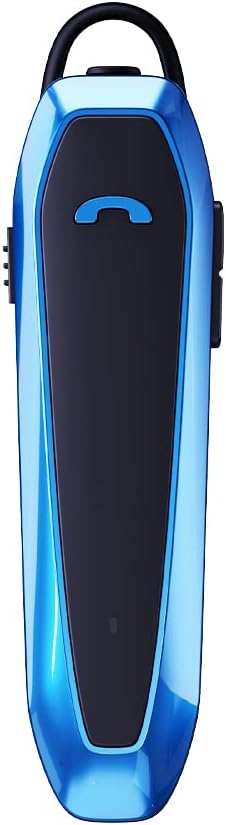
Image 1.1: SLuB Bluetooth 5.3 Ear-hook Headset F6 (Blue)
Ezaugarri nagusiak:
- Advanced Bluetooth 5.3 EDR: Ensures stable connection, minimal interruptions, and clear audio transmission up to 10 meters. Optimized for both iOS and Android devices.
- Eskurik gabeko komunikazioa: Integrated microphone and one-button control for managing calls and music playback effortlessly.
- Universal Fit & Comfort: 180° rotatable ear hook allows use on either ear. Lightweight design (13.2g) for extended comfortable wear.
- Bateriaren iraupen hedatua: Up to 33 hours of talk time and 280 hours of standby time on a single charge.
- Urarekiko erresistentearen diseinua: Drip-proof specifications protect against sweat and splashes, suitable for various environments.
2. Paketearen edukia
Mesedez, egiaztatu elementu guztiak paketean daudela:
- SLuB Bluetooth Ear-hook Headset (F6)
- Earpieces (various sizes)
- C motako karga-kablea
- Erabiltzailearen eskuliburua
3. Gailuaren diseinua eta kontrolak
Familiarize yourself with the physical components and controls of your headset.

Image 3.1: Headset Components and Controls. This diagram illustrates the location of the Type-C charging port, multi-function button, power button, volume up/down buttons, indicator lamp, microphone, and silicone earpiece.
Kontrol-funtzioak:
| Funtzioa | Funtzionamendua |
|---|---|
| Piztu/Itzali | Push the power button up/down. |
| Itzali automatikoa | Device powers off automatically if not connected for 5 minutes. |
| Sarrerako deiari erantzun | Sakatu behin funtzio anitzeko botoia. |
| Amaitu deia | Sakatu funtzio anitzeko botoia behin dei batean zehar. |
| Sarrerako deia baztertu | Eduki sakatuta funtzio anitzeko botoia 2 segundoz. |
| Musika Erreproduzitu/Pausatu | Single press the multi-function button during music playback. |
| Bolumena igo | Sakatu bolumena igotzeko botoia. |
| Bolumena jaitsi | Sakatu Bolumena Jaisteko botoia. |
| Hurrengo Pista | Sakatu eta eutsi bolumena igotzeko botoia 2 segundoz. |
| Aurreko Pista | Sakatu eta eutsi bolumena jaisteko botoia 2 segundoz. |
| Aktibatu ahots-laguntzailea (Siri) | Eduki sakatuta funtzio anitzeko botoia 2 segundoz. |
| Berriz markatu azken zenbakia | Sakatu bi aldiz funtzio anitzeko botoia. |
4. Konfigurazioa eta parekatzea
4.1 Entzungailuak kargatzea
Before first use, fully charge the headset. Use the provided Type-C charging cable.
- Connect the Type-C end of the charging cable to the headset's charging port.
- Konektatu USB-A muturra USB elikatze-iturri bateragarri batera (adibidez, ordenagailua, hormako egokitzailea).
- l adierazleaamp will show charging status (refer to the device for specific light patterns).
- Karga osoak 2.5 ordu behar ditu gutxi gorabehera.

Image 4.1: Charging and Battery Life. The headset offers approximately 280 hours of standby time, 33 hours of talk time, and charges in about 2.5 hours.
4.2 Bluetooth parekatzea
To connect your headset to a device:
- Ziurtatu entzungailuak kargatuta daudela.
- Turn on the headset by pushing the power button. The indicator lamp will flash, indicating it is in pairing mode.
- Zure telefonoan edo Bluetooth gaitutako beste gailu batean, joan Bluetooth ezarpenetara.
- Bilatu available devices. Select "SLuB F6" (or similar name) from the list.
- Once connected, the indicator lamp will change (e.g., solid blue or slow flash), and you may hear a confirmation tone.
- The headset supports connecting to two devices simultaneously.

Image 4.2: Dual Device Connection. The headset can maintain a connection with two devices, such as a work phone and a personal tablet, allowing seamless switching.
4.3 Entzungailuak janztea
The ear hook is designed for comfort and versatility:
- The ear hook can rotate 180 degrees, allowing you to wear the headset on either your left or right ear.
- Adjust the ear hook to find the most comfortable and secure fit.
- The lightweight design ensures comfort even during prolonged use.

Image 4.3: Comfortable Wearing. The ergonomic design and soft silicone earpiece ensure comfortable, long-term wear.
5. Funtzionamendu-argibideak
5.1 Deiak egitea eta jasotzea
Use the multi-function button for call management:
- Erantzuna: Sakatu behin funtzio anitzeko botoia.
- Amaiera: Sakatu funtzio anitzeko botoia behin dei batean zehar.
- Baztertu: Eduki sakatuta funtzio anitzeko botoia 2 segundoz.
- Berriro markatzea: Double press the multi-function button to call the last dialed number.
5.2 Musika erreproduzitzea
Control your music directly from the headset:
- Erreproduzitu/Pausatu: Sakatu behin funtzio anitzeko botoia.
- Bolumena igo: Sakatu bolumena igotzeko botoia.
- Bolumena jaitsi: Sakatu Bolumena Jaisteko botoia.
- Hurrengo ibilbidea: Sakatu eta eutsi bolumena igotzeko botoia 2 segundoz.
- Aurreko pista: Sakatu eta eutsi bolumena jaisteko botoia 2 segundoz.
5.3 Ahots laguntzailea
Activate your device's voice assistant (e.g., Siri) by pressing and holding the multi-function button for 2 seconds.
6. Mantentzea
To ensure the longevity and optimal performance of your SLuB F6 Headset, follow these maintenance guidelines:
- Garbiketa: Garbitu entzungailuak oihal leun eta lehor batekin. Saihestu produktu kimiko gogorrak edo material urratzaileak erabiltzea.
- Uraren erresistentzia: The headset is drip-proof and resistant to sweat and splashes. However, it is not designed for submersion in water. Avoid exposing it to heavy rain or direct water jets.
- Biltegiratzea: Gorde entzungailuak leku fresko eta lehor batean, eguzki-argitik eta muturreko tenperaturetatik babestuta.
- Kargatzen: Use only the provided Type-C charging cable. Do not attempt to charge with damaged cables or chargers.

Image 6.1: Water-Resistant Design. The sealed structure protects the headset from sweat and splashes during activities.
7. Arazoak
Aurikularrekin arazoak badituzu, jo ezazu ohiko irtenbide hauetara:
| Arazoa | Irtenbide posiblea |
|---|---|
| Aurikularrak ez dira pizten. | Ensure the headset is fully charged. Check the charging cable and power source. |
| Ezin da gailuarekin parekatu. | Ensure Bluetooth is enabled on your device. Make sure the headset is in pairing mode (indicator light flashing). Move the headset closer to your device (within 10m). Turn off and on both the headset and your device. |
| Soinurik ez edo soinu kalitate eskasa. | Check the volume levels on both the headset and your connected device. Ensure the headset is properly paired. Try re-pairing the headset. |
| Calls are not clear (noise). | The headset features ENC noise cancellation. Ensure the microphone is not obstructed. Try moving to a quieter environment. |
| Aurikularrak maiz deskonektatzen dira. | Ensure the headset is within the 10-meter Bluetooth range of your device. Avoid obstacles between the headset and your device. Check for interference from other wireless devices. |
8. Zehaztapenak
Detailed technical specifications for the SLuB F6 Headset:

Image 8.1: Product Parameters. This image displays key specifications such as model number, Bluetooth version, weight, dimensions, speaker unit size, charging port type, charging time, charging voltage, talk time, standby time, and noise cancellation type.
| Ezaugarri | Xehetasuna |
|---|---|
| Modelo zenbakia | F6 |
| Haririk gabeko Teknologia | Bluetooth 5.3 EDR |
| Konektibitatea | Haririk gabekoa |
| Aurikular mota | Ear-hook, In-ear |
| Zarata Kontrola | Zarata Aktiboko Ezeztapena (ENC) |
| Pisua | 13.2 g |
| Neurriak | 69 x 18 x 29 mm |
| Bozgorailu Unitatea | φ10 mm |
| Kargatzeko ataka | C motakoa |
| Kargatzeko Denbora | Gutxi gorabehera. 2.5 ordu |
| Kargatzen Voltage | DC 5V |
| Hitzaldi Denbora | Gehienez 33 ordu |
| Egonean Denbora | Gehienez 280 ordu |
| Gailu bateragarriak | iPhone, Android |
| Kolorea | Urdina |
9. Bermea eta Laguntza
9.1 Bezeroarentzako laguntza
For any inquiries or issues regarding your SLuB F6 Headset, please contact our customer support team.
- Initial Defects or Incorrect Product: If you receive a product different from your order or experience initial defects, please contact us via email as soon as possible.
- Nola jarri gurekin harremanetan: Navigate to 'Account Service' → 'Order History' → 'Seller' → 'Ask a question' to reach out to us.
9.2 Bermearen informazioa
Specific warranty details are typically provided with your purchase documentation. Please retain your proof of purchase for warranty claims.


