1. Produktua amaitu daview
The Sharp RP-TT70 is a 12-inch vinyl record player turntable designed to deliver a rich audio experience with modern convenience. It features a classic wooden cabinet and comes with stereo bookshelf speakers. This belt-drive turntable supports multiple playback speeds and offers versatile connectivity options, including dual Bluetooth functionality.

Figure 1.1: Sharp RP-TT70 Turntable and Speakers. The turntable features a stylish wooden finish and a clear dust cover, flanked by two matching stereo bookshelf speakers.
2. Zer dago barne
Mesedez, egiaztatu paketearen edukia elementu guztiak daudela ziurtatzeko:
- Sharp RP-TT70 Turntable Unit
- Apalategiko bozgorailu estereoa (2 unitate)
- Hauts Estalkia
- Elikatze-moldagailua
- Erabiltzailearen eskuliburua (dokumentu hau)
3. Konfiguratzeko argibideak
Follow these steps to set up your Sharp RP-TT70 turntable:
- Lekua: Place the turntable on a stable, level surface away from direct sunlight, heat sources, and excessive dust. Ensure adequate ventilation around the unit.
- Bozgorailuaren konexioa: Connect the included stereo bookshelf speakers to the "SPEAKER OUT" terminals on the rear of the turntable. Ensure correct polarity (positive to positive, negative to negative).
- Potentzia-konexioa: Connect the power adapter to the "POWER IN DC 12V" port on the rear of the turntable, then plug the adapter into a wall outlet.
- Hauts-estalkia: Carefully attach the dust cover to the hinges on the back of the turntable.

Figure 3.1: Rear Panel Connections. This image highlights the AUX-IN Jack, RCL (R&L) Speaker Out, Pitch (+)(-) Speed Calibration, and Power In DC 12V ports, crucial for proper setup.
4. Funtzionamendu-argibideak
4.1 Binilozko disko bat erreproduzitzea
- Piztu: Turn the power knob to activate the turntable.
- Hautatu Abiadura: Adjust the speed selector to match the record's RPM (33 1/3, 45, or 78 RPM). For 45 RPM records, place the included 45 RPM adapter on the spindle.
- Lekuaren erregistroa: Carefully place your vinyl record on the turntable platter.
- Igogailu besoa: Astiro-astiro altxa besoa seinaleztapen palanka erabiliz.
- Estiletearen posizioa: Mugitu besoa diskoaren nahi duzun hasierako ildoaren gainetik.
- Beheko besoa: Jaitsi poliki-poliki besoa seinale palanka erabiliz. Estiletak diskoarekin kontaktua egingo du eta erreprodukzioa hasiko da.
- Bolumenaren doikuntza: Adjust the volume using the volume knob on the turntable.
- Auto-Stop eginbidea: The turntable features an auto-stop function that will automatically stop the platter rotation when the record reaches its end.
4.2 Bluetooth konexioa
The Sharp RP-TT70 supports dual Bluetooth connectivity, allowing you to stream music in two ways:
- Streaming Vinyl to External Bluetooth Device:
- Ziurtatu platoa piztuta dagoela.
- Activate Bluetooth pairing mode on your external Bluetooth speaker or headphones.
- The turntable will automatically search for and connect to nearby Bluetooth devices. The Bluetooth indicator light will illuminate when connected.
- Once connected, audio from your vinyl record will play through the external Bluetooth device.
- Streaming Music from Your Phone to Turntable Speakers:
- Ziurtatu platoa piztuta dagoela.
- On your smartphone or other Bluetooth-enabled device, search for "Sharp RP-TT70" in the Bluetooth settings.
- Select the turntable to pair. The Bluetooth indicator light will illuminate when connected.
- Once connected, audio from your phone will play through the turntable's included stereo speakers.
4.3 Sarrera lagungarria (AUX-IN)
Connect external audio devices such as smartphones, tablets, or MP3 players using a 3.5mm audio cable (not included) to the AUX-IN jack on the rear of the turntable. Switch the input mode to AUX to play audio through the turntable's speakers.
4.4 Aurikularretarako Jack
For private listening, connect headphones to the headphone jack located on the front panel of the turntable.
5. Mantentzea
Proper maintenance ensures the longevity and optimal performance of your turntable:
- Hauts-estalkia: Always keep the dust cover closed when the turntable is not in use to prevent dust accumulation on the platter and stylus.
- Estiletoa garbitzea: Gently clean the stylus regularly using a soft brush designed for turntable styli. Brush from back to front.
- Cleaning the Turntable: Wipe the turntable and speakers with a soft, dry cloth. Do not use abrasive cleaners or solvents.
- Cartridge and Stylus Replacement: The RP-TT70 uses a changeable ceramic cartridge and stylus. If sound quality degrades or the stylus is damaged, replace it with a compatible Sharp replacement part.
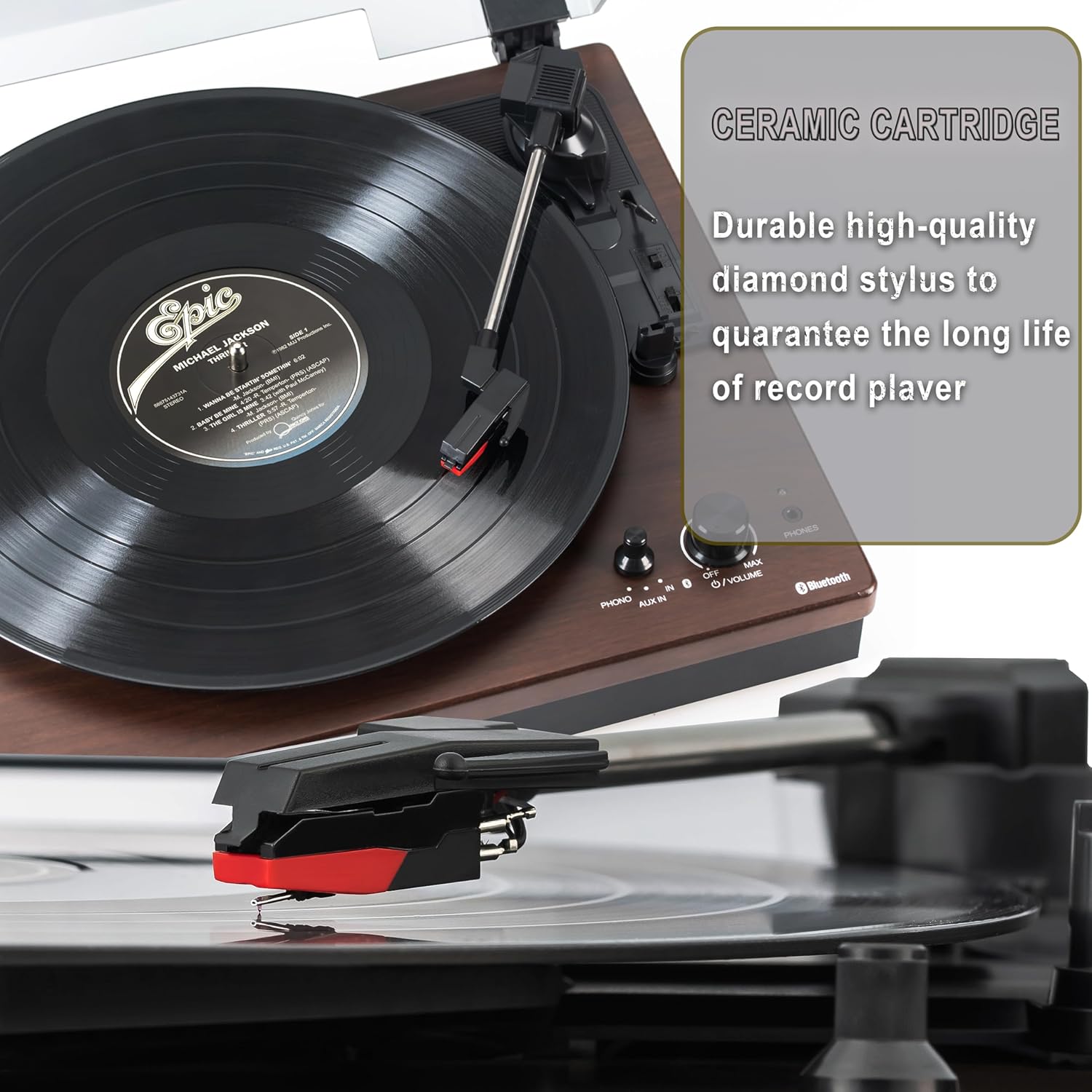
Figure 5.1: Ceramic Cartridge. The turntable is equipped with a durable high-quality diamond stylus designed for extended record playback life.
6. Arazoak
If you encounter issues with your Sharp RP-TT70, refer to the following common problems and solutions:
| Arazoa | Kausa posiblea | Irtenbidea |
|---|---|---|
| Botererik ez | Korronte-egokitzailea ez dago konektatuta edo entxufea ez dago aktibo. | Ensure power adapter is securely plugged into the turntable and a working wall outlet. |
| Bozgorailuetatik ez dago soinurik | Speakers not connected correctly; Volume too low; Incorrect input mode. | Check speaker cable connections and polarity. Increase volume. Ensure turntable is in PHONO or AUX mode as appropriate. |
| Poor Sound Quality / Skipping | Dirty or worn stylus; Dirty record; Turntable not level. | Clean the stylus and record. Ensure the turntable is on a stable, level surface. Consider replacing the stylus if worn. |
| Bluetooth parekatzeari buruzko arazoak | Device too far; Bluetooth not enabled on external device; Interference. | Ensure devices are within range (approx. 30 ft). Confirm Bluetooth is enabled on the external device. Try restarting both devices. |
| Platter Not Spinning | Belt dislodged; Auto-stop engaged prematurely. | Check if the drive belt is properly seated around the platter and motor pulley. If auto-stop is causing issues, ensure the record is placed correctly. |
7. Zehaztapenak
| Ezaugarri | Xehetasuna |
|---|---|
| Modelo zenbakia | RP-TT70 |
| Marka | Zorrotza |
| Produktuaren neurriak | 16.8 x 13.5 x 2.8 hazbete |
| Elementuaren pisua | 18.6 kilo |
| Konektibitate Teknologia | Bluetooth (Bi-directional) |
| Onartutako Abiadurak | 33 1/3, 45, 78 RPM |
| Dakarten osagaiak | Turntable, Stereo Bookshelf Speakers |
| Materiala | Plastikoa, Egurra |
| Kolorea | Black (with wooden finish) |
| Kartutxo mota | Changeable Ceramic Cartridge and Stylus |
| Ezaugarriak | Belt-drive, Auto-return, Pitch control, Dust cover |
8. Bermea eta Laguntza
For warranty information and technical support, please refer to the official Sharp webwebgunera edo jarri harremanetan bezeroarentzako arreta-zerbitzura zuzenean. Gorde erosketa-agiria erosketaren frogagiri gisa berme-erreklamazioetarako.


