1. Sarrera
This manual provides essential information for the safe and efficient operation, maintenance, and troubleshooting of your Cecotec Conga 2299 Ultra Home X-Treme T Robot Vacuum Cleaner. Please read it thoroughly before using the product and retain it for future reference.
2. Segurtasun-argibideak
Always follow basic safety precautions when using electrical appliances to reduce the risk of fire, electric shock, and personal injury. This robot vacuum cleaner is designed for indoor household use only.
- Ziurtatu elikadura hornidura boltage matches the rating label on the charging base.
- Ez erabili robota ingurune hezeetan edo uraren ondoan.
- Mantendu ilea, arropa solteak, behatzak eta gorputzeko atal guztiak irekiguneetatik eta atal mugikorretatik urrun.
- Ez jaso objektu handi edo zorrotzik, likidorik edo sutan/kea eragiten ari diren materialik.
- Zaindu haurrak eta ziurtatu ez dutela tresnarekin jolasten.
- Only use manufacturer-recommended attachments and accessories.
- If the power cord or plug is damaged, do not use the appliance. Contact customer support.
3. Paketearen edukia
Egiaztatu osagai guztiak paketean daudela:
- Cecotec Conga 2299 Ultra Home X-Treme T Robot Vacuum Cleaner
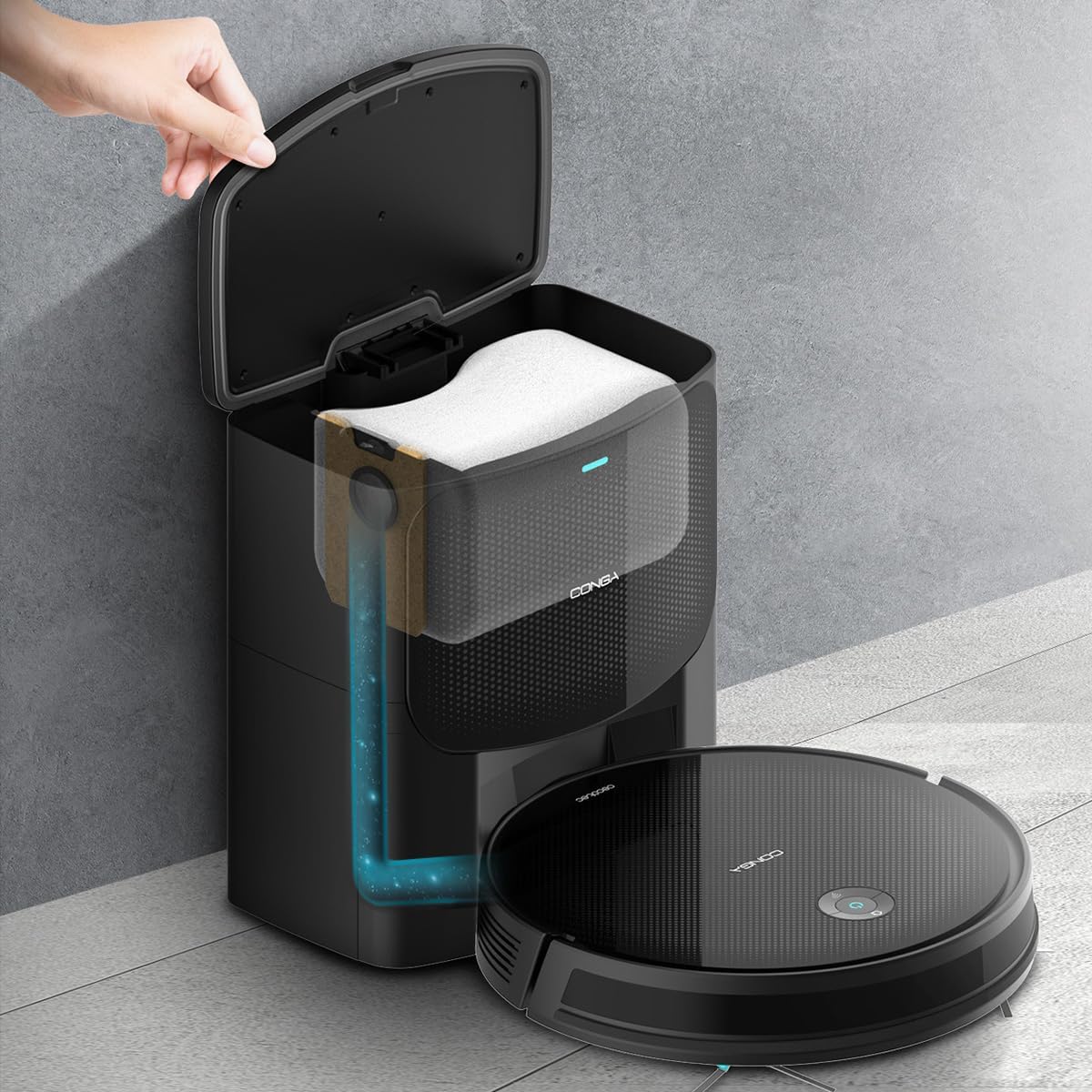
- Auto-emptying Base
- 3L Hygienic Dust Bag (pre-installed or spare)
- Depositu mistoa (ura eta hautsa gordetzeko)
- Multifunction Brush (bristles and rubber silicone)
- 2 alboko eskuilak
- 2 fregona
- Eraginkortasun handiko iragazkia
- Self-cleaning Brush
- Argibide eskuliburua

4. Produktua amaitu daview eta Ezaugarriak
The Cecotec Conga 2299 Ultra Home X-Treme T is a versatile robot vacuum cleaner designed for comprehensive floor cleaning. It integrates multiple cleaning functions and smart navigation for efficient operation.
Ezaugarri nagusiak:
- 4-in-1 garbiketa sistema: Aldi berean erratzatzen, xurgagailua pasatzen, fregona pasatzen eta eskuila pasatzen du.
- Automatic Emptying Base: The robot automatically empties its dustbin into a 3-liter hygienic bag in the base, reducing manual intervention for weeks. Features BagDetect technology to alert if a bag is missing.
- Xurgatze-ahalmen handia: Delivers 2100 Pa suction power with an automatic Turbo mode for effective carpet cleaning.
- Extended Autonomy: Up to 160 minutes of continuous cleaning. Total Surface technology ensures the robot returns to its base to recharge and resumes cleaning from where it left off.
- iTech SmartGyro 4.0 Navigation: Provides ordered and efficient cleaning paths using gyroscopic, proximity, anti-shock, and anti-fall sensors.
- APP Kontrola: Manage cleaning modes, schedule tasks, adjust suction and mopping levels, and review cleaning history via a smartphone application.
- Funtzio anitzeko eskuila: Equipped with a combination of bristles and rubber silicone for effective cleaning on various surfaces.
- Adjustable Mopping: Offers 3 levels of water flow to tackle different types of dirt.
- Alboko eskuila bikoitzak: Enhances sweeping and suction coverage for thorough cleaning.


5. Konfigurazioa
5.1 Desontziratzea eta kokatzea
- Kontu handiz kendu osagai guztiak ontzitik.
- Choose a suitable location for the auto-emptying base. Ensure it is against a wall, on a hard, level surface, with at least 1 meter of clear space in front and 0.5 meters on either side. Avoid direct sunlight or areas with strong Wi-Fi interference.
- Plug the auto-emptying base into a power outlet. Ensure the power cord is neatly arranged to prevent the robot from tangling.
5.2 Hasierako karga
Place the robot vacuum cleaner onto the charging contacts of the auto-emptying base. Ensure the robot is correctly aligned. The indicator light on the robot will show charging status. For first use, fully charge the robot (approximately 4-5 hours).
5.3 Installing Side Brushes and Mop
- Attach the two side brushes by pressing them into their designated slots on the underside of the robot until they click into place.
- If using the mopping function, fill the mixed tank with water (and a small amount of neutral cleaning solution if desired, following manufacturer guidelines). Attach a clean mop cloth to the mixed tank and slide the tank into the robot until it locks.

5.4 Aplikazioaren konexioa
- Download the official Cecotec Conga app from your smartphone's app store.
- Follow the in-app instructions to register an account and add your Conga 2299 Ultra Home X-Treme T robot. This typically involves connecting the robot to your home Wi-Fi network.
6. Funtzionamendua
6.1 Garbiketa-ziklo bat abiaraztea
- Eskuzko hasiera: Sakatu robotaren pizteko botoia behin garbiketa ziklo automatikoa hasteko.
- Aplikazioaren hasiera: Open the Conga app, select your robot, and choose a cleaning mode (Auto, Random, Wash, Spiral, Edges, Manual) to begin.

6.2 Mopping Funtzioa
Ensure the mixed tank is filled with water and the mop cloth is attached before activating the mopping function. You can adjust the water flow level via the app for different floor types and cleaning needs.
6.3 Returning to Charging Base
- The robot will automatically return to its auto-emptying base when its battery is low or when a cleaning cycle is complete.
- You can also send the robot back to the base manually via the app or by pressing the home button on the robot.

7. Mantentzea
Mantentze-lan erregularrak zure robot-xurgagailuaren errendimendu optimoa bermatzen du eta bizitza luzatzen du.
7.1 Auto-Emptying Base Dust Bag
The 3L hygienic dust bag in the auto-emptying base should be replaced when full. The app or an indicator on the base will notify you. The BagDetect technology ensures the system recognizes if a bag is present.


7.2 Cleaning the Mixed Tank and Filter
- After each mopping cycle, empty any remaining water from the mixed tank.
- Rinse the mixed tank and mop cloth with clean water. Allow them to air dry completely before reassembling.
- Tap out the high-efficiency filter to remove dust. Replace the filter every 3-6 months, depending on usage.
7.3 Eskuilak eta sentsoreak garbitzea
- Regularly remove hair and debris from the multifunction brush and side brushes using the provided self-cleaning tool.
- Wipe the charging contacts on both the robot and the base with a dry cloth.
- Clean the anti-drop sensors and proximity sensors on the robot's underside and front bumper with a soft, dry cloth.
8. Arazoak
If you encounter issues with your robot vacuum cleaner, refer to the following common solutions:
| Arazoa | Kausa posiblea | Irtenbidea |
|---|---|---|
| Robota ez da pizten edo kargatzen. | Battery depleted, charging contacts dirty, power adapter not connected. | Ensure the robot is correctly docked. Clean charging contacts. Check power connection to the base. |
| Xurgatze potentzia murriztua. | Dust bag full, filter clogged, brushes tangled. | Replace the dust bag. Clean or replace the HEPA filter. Clean the main and side brushes. |
| Robota maiz trabatuta geratzen da. | Obstacles, tangled cables, dirty sensors. | Clear obstacles from the cleaning path. Tidy up cables. Clean anti-fall and proximity sensors. |
| Cleaning map in app is frozen or incorrect. | Software glitch, temporary sensor error. | Perform a reset on the robot. The reset button is typically located on the side of the robot. Refer to the physical manual for exact location. |
| Robot does not return to base. | Base is obstructed, robot is too far, low battery. | Ensure the base has clear space around it. Manually place the robot near the base. |
Irtenbide hauek saiatu ondoren arazoa konpontzen ez bada, jarri harremanetan Cecotec bezeroarentzako arreta-zerbitzuarekin.
9. Zehaztapenak
| Ezaugarri | Zehaztapena |
|---|---|
| Marka | Cecotec |
| Ereduaren izena | Conga 2299 Ultra Home X-Treme T |
| Modelo zenbakia | 08607 |
| Kolorea | Beltza |
| Produktuaren neurriak (robot) | 32.3L x 32.5W x 7.5H cm |
| Elementuaren pisua | 6.5 kg |
| Xurgatze Potentzia | 2100 Pa |
| Bateria mota | Litio-ioi |
| Autonomia | Gehienez 160 minutu (2 ordu eta 40 minutu) |
| Dust Bag Capacity (Base) | 3 litro |
| Iragazki mota | HEPA |
| Kontrolagailu mota | Aplikazioen kontrola |
| Ezaugarri bereziak | Turbo Mode, Automatic Emptying Base, Mopping Function |
| Azalera gomendioa | Alfonbra, Zoru gogorrak |
| Ordezko piezen erabilgarritasuna | 10 Urte |
10. Bermea eta Laguntza
Your Cecotec Conga 2299 Ultra Home X-Treme T Robot Vacuum Cleaner comes with a standard manufacturer's warranty. Please refer to the warranty card included in your package for specific terms and conditions, including warranty period and coverage details.
Laguntza teknikoa, ordezko piezak edo berme erreklamazioak jasotzeko, jarri harremanetan Cecotec bezeroarentzako arreta-zerbitzu ofizialaren bidez. website or the contact information provided in your product documentation. Ensure you have your model number (08607) and proof of purchase available when contacting support.


