1. Sarrera
This manual provides detailed instructions for the safe and effective use of the IDEAL Electrical 61-327 600V Manual Range Multimeter. This device is designed for measuring AC/DC voltage, resistance, continuity, diodes, and testing batteries. It is a CAT III 600V rated instrument suitable for various electrical testing applications.

1.1. irudia: Aurrealdea view of the IDEAL Electrical 61-327 Multimeter. This image displays the multimeter's main display, rotary dial, function buttons, and input jacks for test leads.
2. Segurtasun informazioa
OHARRA: To avoid electric shock or personal injury, read, understand, and follow all safety information and instructions before using this multimeter. Keep this manual for future reference.
- Always ensure the multimeter is in good working condition before use. Inspect test leads for damage.
- Ez aplikatu bolumen baloratua baino gehiagotage, neurgailuan markatuta dagoen bezala, terminalen artean edo edozein terminalen eta lurraren artean.
- Kontuz ibili voltag30V AC RMS, 42V peak edo 60V DC-tik gorakoak. Bolumen hauektagshock arriskua dakar.
- Deskonektatu beti zirkuituaren potentzia eta deskargatu bolumen handiko karga guztiak.tage kondentsadoreak erresistentzia, jarraitutasuna edo diodoak probatu aurretik.
- Do not operate the meter with the case open or the battery cover removed.
- Irakurketa zehatzak bermatzeko, aldatu bateriak berehala bateria baxuaren adierazlea agertzen denean.
- This multimeter is rated for CAT III 600V. Do not use it in environments exceeding this rating.
3. Produktuaren ezaugarriak
The IDEAL Electrical 61-327 Multimeter offers a range of features designed for electrical professionals:
- UL Certified CAT III 600V: Ensures safety and reliability for AC/DC manual range measurements.
- Neurtzeko gaitasunak: Neurriak AC/DC voltage, resistance, continuity, diodes, and tests batteries.
- Kontaktu gabeko boltage (NCV) Detekzioa: AC vol. detektatzen dutagKontaktu zuzenik gabe, segurtasuna hobetuz.
- Atzeko argiztatutako pantaila: Improves visibility in poorly lit environments.
- Built-in Probe Tip Holders: Allows for convenient and safer measurement by securing one lead.
- Hanging Strap Clip: Compatible with IDEAL hanging straps (sold separately, e.g., UMHS-757) for hands-free operation.
- Rugged Overmolding: Heldulekua hobetzen du eta erorketen aurkako babesa eskaintzen du.
- Eutsi funtzioa: Freezes the displayed reading for easier recording.
- Selectable Auto Power Off: Bateriaren iraupena aurrezten du.
4. Osagaiak eta kontrolak
Familiarize yourself with the main components and controls of your multimeter:

4.1. irudia: Aurrealdea view of the multimeter, highlighting the display, rotary switch, and function buttons. The display shows measurement values and indicators. The rotary switch selects measurement functions. Buttons include HOLD and Backlight.

4.2. irudia: Included test leads and AAA batteries. The red and black test leads are essential for making electrical measurements. The batteries power the device.

4.3. irudia: Atzekoa view of the multimeter, showing the battery compartment cover and safety warnings. This view also illustrates the integrated test lead storage points.
5. Konfigurazioa
5.1 Bateriaren instalazioa
The multimeter requires three (3) 1.5V AAA batteries for operation. To install or replace batteries:
- Ziurtatu multimetroa itzalita dagoela.
- Locate the battery compartment on the back of the meter (refer to Figure 4.3).
- Erabili bihurkin bat bateriaren estalkia lotzen duen torlojua askatzeko.
- Kendu bateriaren estalkia.
- Insert three new 1.5V AAA batteries, observing the correct polarity (+/-) as indicated inside the compartment.
- Jarri bateriaren estalkia eta estutu torlojua ongi.
5.2 Proba-kableak konektatzea
Always connect the black test lead to the "COM" (Common) input jack. Connect the red test lead to the "VΩ" input jack for voltage, resistance, continuity, and diode measurements. Ensure connections are firm.
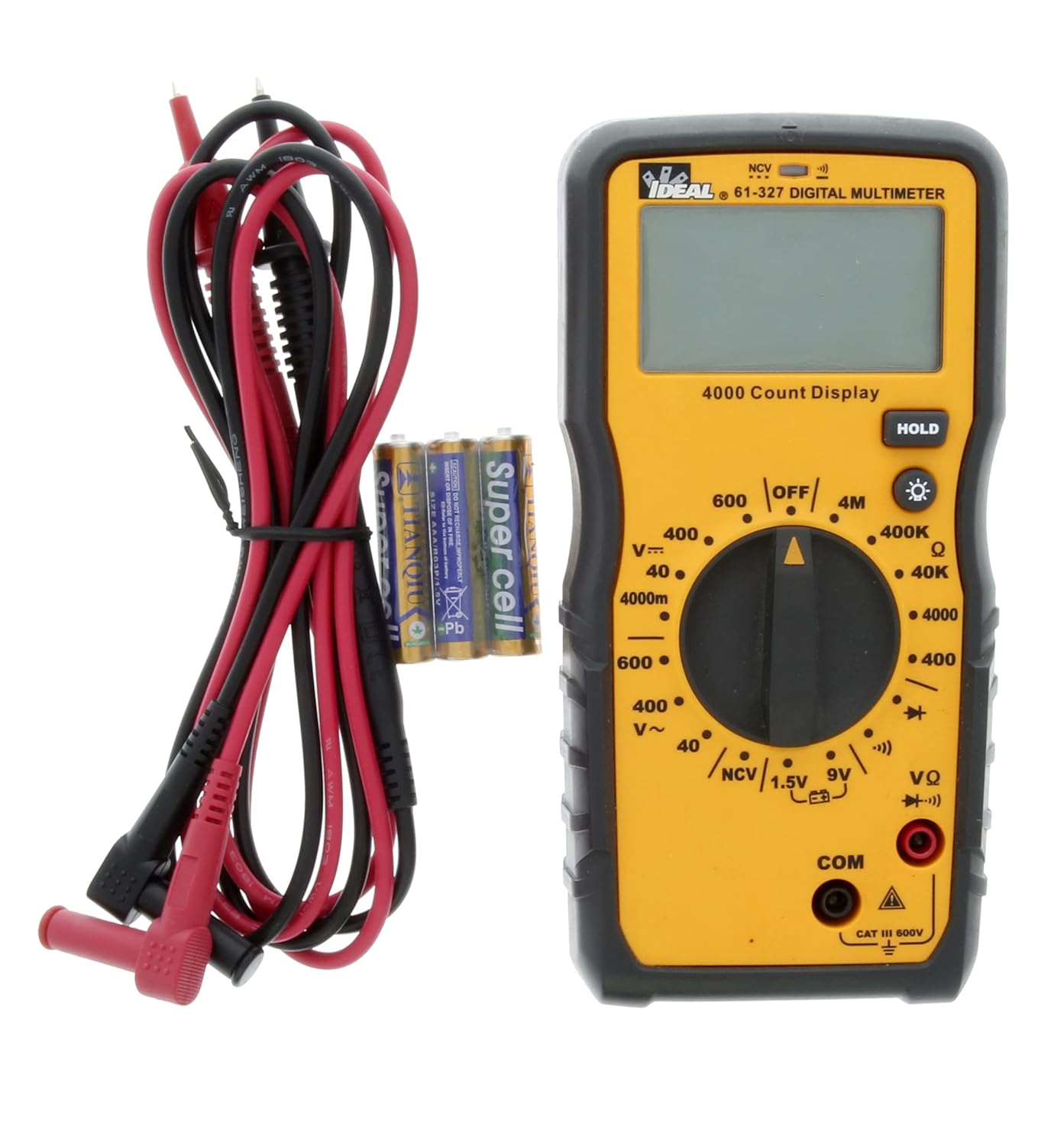
5.1. irudia: The multimeter shown with its test leads and batteries, ready for initial setup. The black lead connects to COM, and the red lead connects to VΩ.
6. Funtzionamendu-argibideak
This section details how to perform various measurements using the 61-327 Multimeter.
6.1 AC/DC Vol. neurtzeatage
- Biratu biraketa-etengailua nahi duzun korronte alternoko bolumenera.tage (V~) edo DC bolumenatage (V=) range. Select a range higher than the expected voltage.
- Connect the black test lead to the "COM" jack and the red test lead to the "VΩ" jack.
- Konektatu proba-zundak paraleloan neurtu nahi duzun zirkuituarekin edo osagaiarekin.
- Irakurri liburukiatagPantailako balioa.
6.2 Erresistentzia neurtzea (Ω)
- OHARRA: Ziurtatu zirkuitua deskonektatuta dagoela eta kondentsadore guztiak deskargatuta daudela erresistentzia neurtu aurretik.
- Turn the rotary switch to the desired Resistance (Ω) range.
- Connect the black test lead to the "COM" jack and the red test lead to the "VΩ" jack.
- Connect the test probes across the component where resistance is to be measured.
- Irakurri erresistentziaren balioa pantailan.
6.3 Jarraitasun proba
- OHARRA: Ziurtatu zirkuitua deskonektatuta dagoela jarraitutasun-proba egin aurretik.
- Turn the rotary switch to the Continuity (•))) position.
- Connect the black test lead to the "COM" jack and the red test lead to the "VΩ" jack.
- Ukitu proba-zundak jarraitutasuna egiaztatu nahi dituzun bi puntuetan.
- Entzun daitekeen tonu batek jarraitutasuna (erresistentzia baxua) adierazten du. Pantailak erresistentziaren balioa erakutsiko du.
6.4 Diodoaren proba
- OHARRA: Ensure the circuit is de-energized before performing a diode test.
- Turn the rotary switch to the Diode (→|) position.
- Connect the black test lead to the "COM" jack and the red test lead to the "VΩ" jack.
- Connect the red test probe to the anode and the black test probe to the cathode of the diode.
- Pantailak aurrerako bolumena erakutsiko dutage tanta. Alderantzikatu zundak; pantailak "OL" (Ireki Begizta) erakutsi beharko luke diodo ona dela adierazteko.
6.5 Battery Test (1.5V / 9V)
- Turn the rotary switch to the 1.5V or 9V battery test position.
- Connect the black test lead to the "COM" jack and the red test lead to the "VΩ" jack.
- Connect the red test probe to the positive terminal of the battery and the black test probe to the negative terminal.
- Irakurri bateria voltage pantailan.
6.6 Harremanik gabeko Voltage (NCV) Sensing
NCV funtzioak AC bolumena detektatzeko aukera ematen du.tage eroaleekin zuzeneko kontakturik gabe.
- Biratu etengailu birakaria NCV posiziora.
- Move the top tip of the multimeter near the conductor or outlet to be tested.
- The meter will emit an audible tone and an illuminated red LED will flash when AC voltage is detected. The display may show "EF" or similar indication.

6.1. irudia: The multimeter being used to perform a Non-Contact Voltage (NCV) test near an electrical outlet. The display shows "EF" indicating voltage detekzioa.
6.7 Using the HOLD Function
Press the "HOLD" button to freeze the current reading on the display. Press it again to release the hold and resume live readings.
6.8 Atzeko argia erabiltzea
Press the backlight button (light bulb icon) to illuminate the display for better visibility in dark conditions. Press it again to turn off the backlight.
7. Mantentzea
7.1 Garbiketa
Garbitu neurgailua iragarkiarekinamp oihal eta detergente leun batekin. Ez erabili urratzailerik edo disolbatzailerik. Ziurtatu neurgailua guztiz lehor dagoela erabili aurretik.
7.2 Bateria ordezkatzea
Refer to Section 5.1 for instructions on battery installation and replacement. Always replace all three AAA batteries at the same time.
7.3 Proba-kableen ikuskapena
Regularly inspect test leads for any signs of damage, such as cuts, cracks, or frayed insulation. Replace damaged leads immediately to prevent electric shock.
8. Arazoak
| Arazoa | Kausa posiblea | Irtenbidea |
|---|---|---|
| Neurgailua ez da pizten. | Bateriak hilda edo gaizki instalatuta. | Check battery polarity; replace batteries (refer to Section 5.1). |
| "OL" (gainkarga) bistaratzen da. | Measurement exceeds selected range or open circuit. | Select a higher range or check for an open circuit in the component/wiring. |
| Irakurketa okerrak. | Low battery, incorrect range selection, or damaged test leads. | Replace batteries, select appropriate range, inspect and replace test leads if damaged. |
| Jarraitutasun tonurik ez. | Open circuit or high resistance. | Verify the circuit is closed; check for breaks in wiring or components. |
9. Zehaztapenak
Key technical specifications for the IDEAL Electrical 61-327 Multimeter:
- Modelo zenbakia: 61-327
- Neurketa mota: Manual Range Digital Multimeter
- Segurtasunaren balorazioa: UL certified CAT III 600V AC/DC
- AC Boltage: 600V arte
- DC bolumenatage: 600V arte
- Erresistentzia: Up to 4MΩ (4000kΩ)
- Jarraipena: Audible tone and resistance display
- Diodo proba: Bai
- Bateria proba: 1.5 V, 9 V
- Kontaktu gabeko boltage (NCV): Bai
- Pantaila: Backlit, 4000 Count
- Energia iturria: 3 x 1.5V AAA bateria
- Itzali automatikoa: Hautagarria
- Eutsi funtzioa: Bai
- Neurriak: 9.09 x 6.18 x 3.35 hazbete inguru
- Pisua: Gutxi gorabehera 1.1 kilo
- Kolorea: Horia
- Fabrikatzailea: Ideal Industries

9.1. irudia: A comparison table of various IDEAL digital multimeters, including the 61-327, detailing their features and specifications. This table provides a quick overview of the 61-327's capabilities relative to other models.
10. Bermea eta Laguntza
For warranty information, technical support, or service inquiries, please contact IDEAL Industries directly. Refer to the official IDEAL website or the product packaging for the most current contact details.
Additional resources, including a downloadable PDF user manual, may be available on the IDEAL Store on Amazon edo fabrikatzailearen ofiziala webgunea.


