Sarrera
Thank you for choosing the Viper ProScore Electronic Scoreboard. This device is designed to enhance your dart game experience by providing automatic scoring for up to 8 players across 40 different games and 655 game options. This manual will guide you through the installation, operation, and maintenance of your new scoreboard.
Produktuaren Ezaugarriak
- Compatible with steel-tip dartboards, bringing electronic dart game features to traditional play.
- Large, backlit LCD screen for clear visibility from the throw line.
- Supports up to 8 players with 40 distinct games and 655 game variations, including customizable handicaps.
- Features an automatic shut-off and sleep mode to conserve battery power.
- Soft-touch keypad for intuitive and easy operation.
- Compact dimensions: 12.7 cm (L) x 3.8 cm (W) x 26 cm (H).
- Battery operated: Requires 3 AA batteries (not included).
Paketearen edukia
Mesedez, ziurtatu elementu guztiak daudela instalazioarekin jarraitu aurretik:
- Viper ProScore Electronic Scoreboard
- Mounting hardware (screws and wall anchors or wood screws)
Konfigurazio Argibideak
1. Bateriaren instalazioa
- Locate the battery compartment on the back of the scoreboard.
- Ireki bateriaren konpartimenduaren estalkia.
- Insert 3 AA batteries (not included), ensuring correct polarity (+/-).
- Itxi bateriaren konpartimenduaren estalkia ondo.
2. Mounting the Scoreboard
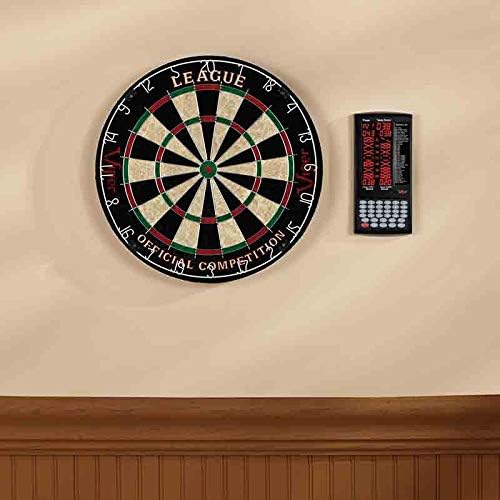
The Viper ProScore Electronic Scoreboard can be mounted on a wall next to your dartboard for optimal viewing.

Irudia: Gertuko planoa view of the black mounting bracket with three screw holes, designed to secure the scoreboard to a wall.
- Choose a suitable location on the wall, typically to the side of your dartboard, at a comfortable viewing altuera.
- Use the provided mounting hardware (screws and anchors or wood screws) to securely attach the scoreboard to the wall. Ensure the scoreboard is level.

Image: The Viper ProScore Electronic Scoreboard is shown mounted on a wall to the right of a traditional dartboard, illustrating a typical installation setup.
Funtzionamendu-argibideak

Image: The Viper ProScore Electronic Scoreboard displaying scores for two players and a list of available games. The keypad with number buttons and function keys is visible at the bottom.
1. Piztu/Itzali
- To turn on the scoreboard, press the Piztu/Desaktibatu botoia.
- To turn off the scoreboard, press and hold the Piztu/Desaktibatu botoia pantaila itzali arte.
- The scoreboard features an automatic shut-off and sleep mode to conserve battery life when not in use.
2. Jokoaren hautaketa
- Piztu ondoren, erabili Up eta Behera buttons to scroll through the list of 40 available games displayed on the screen.
- Once your desired game is highlighted, press the Sartu botoia hautatzeko.
3. Player Setup
- The scoreboard supports up to 8 players. Follow the on-screen prompts to select the number of players for your game.
- Some games allow for custom handicaps. Refer to the specific game rules for details.
4. Puntuazioa
After each player's turn, manually enter the score using the numeric keypad (buttons 1-20, 25, 50). Special buttons are available for common dart scores:
- X2: Multiplies the last entered score by 2 (Double).
- X3: Multiplies the last entered score by 3 (Triple).
- 25: For scoring a single bullseye.
- 50: For scoring a double bullseye.
- andereñoa: To register a missed throw.
- Next Player: Advances to the next player's turn after scores are entered.
5. Correcting Scores
- If an incorrect score is entered, press the Zuzena button to adjust the last entry.
6. Bolumenaren kontrola
- Erabili Bolumena button to adjust the sound level of the scoreboard's voice announcements and effects.
Jokoen zerrenda
The Viper ProScore Electronic Scoreboard includes the following 40 games:
Irudia: Xehetasun zehatza view of the game list section on the scoreboard's display, showing game codes and names.
- G01 Kilkerra
- G02 No Score Cricket
- G03 Eztarria Moztu Kilkerra
- G04 Killer Cricket
- G05 Low Ball Cricket
- G06 Low Pitch Cricket
- G07 English Cricket
- G08 Doubles Only Cricket
- G09 Double only Cricket
- G10 Single only Cricket
- G11 Futbola
- G12 Bowling
- G13 Golfa
- G14 Rally
- G15 301
- G16 401
- G17 501
- G18 601
- G19 701
- G20 301 Liga
- G21 401 Liga
- G22 501 Liga
- G23 601 Liga
- G24 801 Liga
- G25 Round the Clock
- G26 Zenbatu gora
- G27 Shoot-Out
- G28 Shanghai
- G29 Half-It
- G30 Hiltzailea
- G31 Shoot-Out
- G32 9 Lives
- G33 baino gehiago
- G34 Unders
- G35 High Score
- G36 Big-6
- G37 Forty-One
- G38 Bingoa
- G39 Bikoiztu
- G40 21 Points
Mantentzea
- Garbiketa: Wipe the scoreboard surface with a soft, dry cloth. Do not use abrasive cleaners or solvents.
- Bateria ordezkatzea: Replace batteries when the display dims or the scoreboard functions erratically. Always replace all batteries at the same time with new ones of the same type.
- Biltegiratzea: Denbora luzez gordetzen baduzu, kendu bateriak isuriak saihesteko.
Arazoak konpontzea
- Scoreboard does not turn on:
- Egiaztatu bateriak behar bezala sartuta dauden, polaritate egokia errespetatuz.
- Ordeztu bateria zaharrak berriekin.
- Pantaila ilun edo dir-dir egiten du:
- Bateriak agortuta egon daitezke. Ordeztu itzazu.
- Incorrect scores are registered:
- Ensure you are pressing the correct numeric buttons for the score.
- Erabili Zuzena button to rectify recent entries.
- Botoiek ez dute erantzuten:
- Try turning the scoreboard off and on again.
- Ensure the buttons are clean and free from debris.
Zehaztapenak
- Modelo zenbakia: 37-0116
- Neurriak (L x W x H): 12.07 x 12.07 x 25.4 cm (4.75 x 4.75 x 10 hazbete)
- Pisua: 318 gramo (0.7 lb)
- Energia iturria: 3 AA bateria (ez daude barne)
- Materiala: Sisal (Note: This specification seems to refer to a dartboard material, not the scoreboard itself. The scoreboard is typically plastic/electronic components.)
- Kolorea: Beltza
- Player Capacity: Gehienez 8 jokalari
- Jolasak: 40 games, 655 options
Bermea eta Laguntza
For specific warranty information and customer support, please refer to the documentation included with your product or visit the official Viper webgunea. Gorde erosketa-agiria berme-erreklamazioetarako.


