Sarrera
The Edifier CX7 is an active 2.1 home entertainment system designed to deliver high-quality audio for various devices, including televisions, personal computers, and notebooks. This system features Bluetooth V5.0 connectivity, an 8-inch subwoofer, and an infrared remote control for convenient operation. This manual provides essential information for setting up, operating, and maintaining your CX7 system.
Paketearen edukia
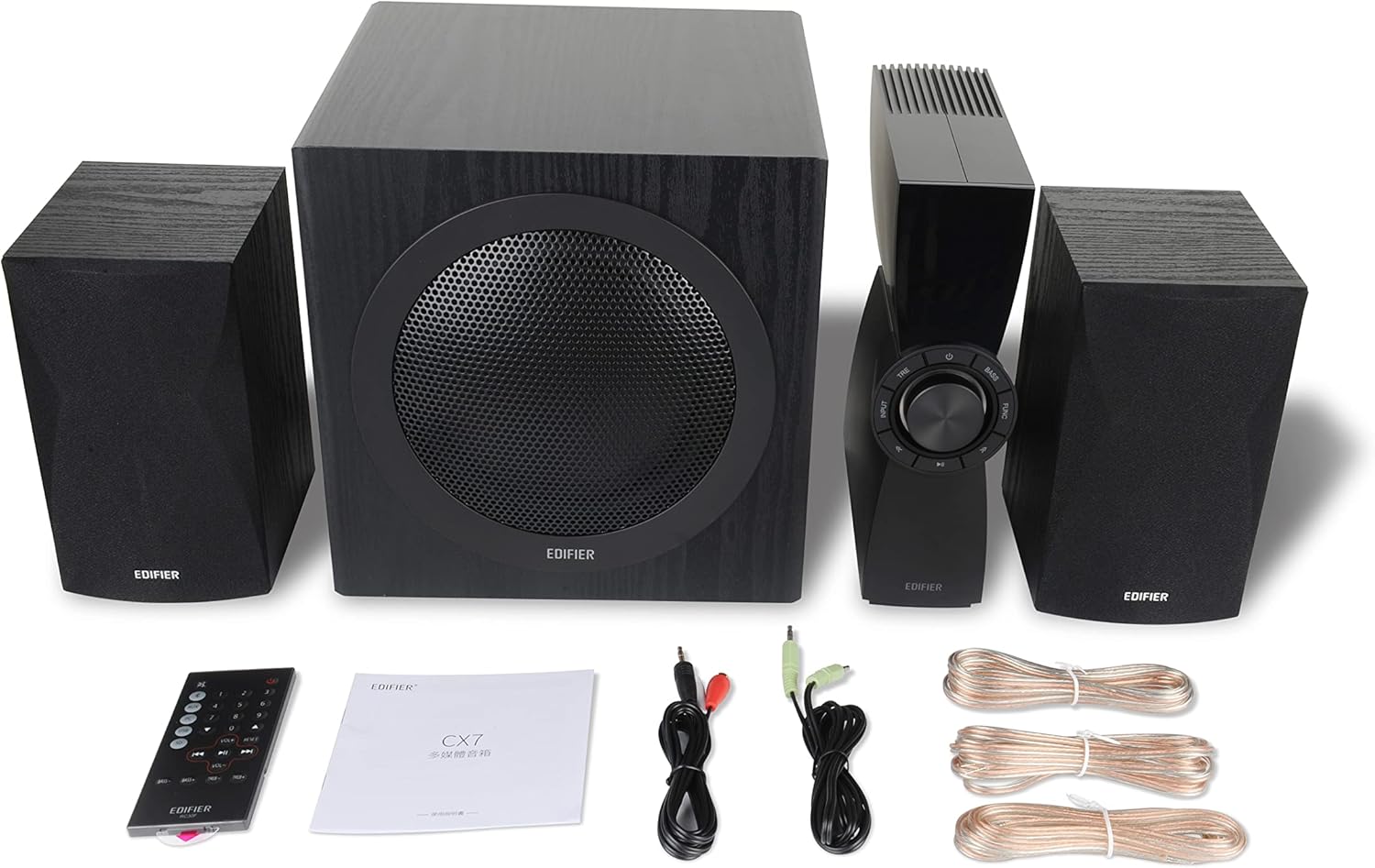
Figure 1: Edifier CX7 System Components
Mesedez, egiaztatu behean zerrendatutako elementu guztiak zure paketean sartuta daudela:
- Subwoofer (1)
- Satelite bozgorailuak (2)
- Control Unit (1)
- Infrared Remote Control (1)
- 3.5mm to RCA Audio Cable (1)
- RCA to RCA Audio Cable (1)
- Speaker Connection Cables (2)
- Erabiltzailearen eskuliburua (1)
Konfigurazio Gida
1. Kokapen
Position the subwoofer on the floor, preferably in a corner or near a wall for optimal bass response. Place the satellite speakers on either side of your listening area, equidistant from the listener, and at ear level if possible. Ensure the control unit is easily accessible.

Figure 2: Recommended System Placement
2. Bozgorailuak konektatzea
Connect the satellite speakers to the speaker output terminals on the rear of the control unit using the provided speaker cables. Ensure correct polarity (red to red, black to black) for each speaker.
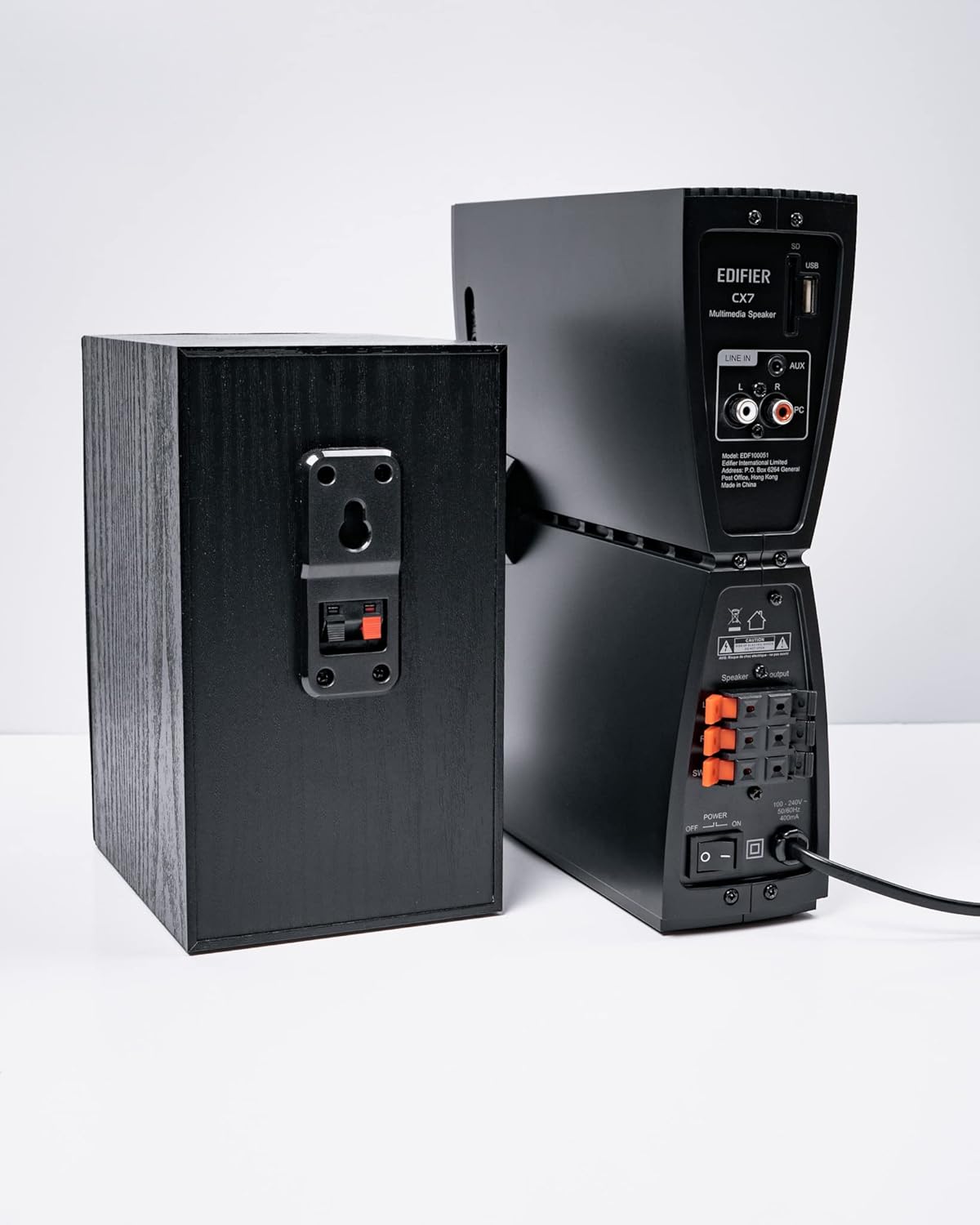
3. Irudia: Bozgorailuaren konexioak
3. Audio iturriak konektatzea
The CX7 system supports multiple audio input options:
- AUX sarrera: Use the 3.5mm to RCA audio cable to connect devices like smartphones, tablets, or computers to the AUX input on the control unit.
- PC sarrera: Use the RCA to RCA audio cable to connect your PC's audio output to the PC input on the control unit.
- Bluetootha: Haririk gabeko konexiorako, jo ezazu Erabilera Argibideen azpian dagoen "Bluetooth parekatzea" atalera.
4. Energia-konexioa
Connect the power cable to the control unit and then plug it into a standard wall outlet. Turn on the power switch located on the rear of the control unit.
Funtzionamendu-argibideak
1. Piztu/Itzali
After connecting the power, press the power button on the control unit or the remote control to turn the system on or off. The display on the control unit will illuminate when powered on.

Figure 4: Control Unit Display
2. Sarrera hautapena
Press the "INPUT" button on the control unit or the remote control to cycle through available audio sources: AUX, PC, and Bluetooth. The selected input will be displayed on the control unit's screen.

Figure 5: Control Knob and Input Buttons
3. Bolumenaren kontrola
Rotate the large knob on the control unit clockwise to increase volume and counter-clockwise to decrease it. Alternatively, use the "VOL+" and "VOL-" buttons on the remote control.
4. Baxu eta Goi Doikuntza
Press the "BASS" or "TRE" (Treble) buttons on the control unit or remote control, then rotate the main knob to adjust the respective levels. The display will show the current bass/treble setting.
5. Bluetooth parekatzea
- Select the Bluetooth input on the CX7 system. The display will show "BT" and flash, indicating it's in pairing mode.
- Zure gailuan (smartphone-an, tabletan, etab.), gaitu Bluetooth-a eta bilatu eskuragarri dauden gailuak.
- Select "EDIFIER CX7" from the list of found devices.
- Once paired, the "BT" indicator on the CX7 display will stop flashing and remain solid.
To disconnect a Bluetooth device, press and hold the "FUNC" button on the control unit or the Bluetooth button on the remote control for a few seconds.
6. Urruneko kontrol funtzioak

Figure 6: Infrared Remote Control
The remote control provides convenient access to all major functions:
- Potentzia: Sistema pizten/izten du.
- Sarrera hautatzea: Cycles through AUX, PC, Bluetooth.
- Bolumena: Master bolumena doitzen du.
- Baxuak/Agudoak: Baxu eta goi mailak doitzen ditu.
- Ezkutatu: Audioa desaktibatu/aktibatzen du.
- Erreprodukzio kontrolak: Play/Pause, Previous/Next track (for Bluetooth mode).
Mantentzea
- Garbiketa: Use a soft, dry cloth to clean the surfaces of the speakers and control unit. Do not use liquid cleaners or abrasive materials.
- Aireztapena: Ensure adequate ventilation around the control unit and subwoofer to prevent overheating. Do not block ventilation openings.
- Ingurumena: Saihestu sistema muturreko tenperaturen, hezetasunaren, hautsaren edo eguzki-argiaren eraginpean jartzea.
- Itzali: If the system will not be used for an extended period, disconnect it from the power outlet.
Arazoak konpontzea
| Arazoa | Kausa posiblea | Irtenbidea |
|---|---|---|
| Soinurik ez |
|
|
| Bluetooth konexioak huts egin du |
|
|
| Soinu distortsionatua |
|
|
Zehaztapenak
| Ezaugarri | Xehetasuna |
|---|---|
| Ereduaren izena | CX7 |
| Hizlari mota | 2.1 Bozgorailu sistema |
| Konektibitate Teknologia | Bluetootha |
| Haririk gabeko Komunikazio Teknologia | Bluetooth V5.0 |
| Bluetooth barrutia | 10 metro |
| Audio irteera modua | Inguratu |
| Bozgorailuaren irteera-potentzia maximoa | 69 Watt |
| Subwoofer Konektibitate Teknologia | Haririk gabekoa |
| Wooferaren diametroa | 8 hazbete |
| Materiala | Polipropilenoa |
| Kolorea | Beltza |
| Produktuaren neurriak | 16.93" L x 17.72" W x 13.39" H |
| Elementuaren pisua | 29 libra (13.2 kilogramo) |
| Energia iturria | Kable elektrikoa |
| Kontrolagailu mota | Urruneko Kontrola |
| Gomendatutako Erabilerak | Telebistetarako, Ordenagailuetarako, Smartphoneetarako edo Tabletetarako |
Bermea eta Laguntza
For warranty information and technical support, please refer to the warranty card included with your product or visit the official Edifier webgunea. Gorde erosketa-agiria erosketaren frogagiri gisa berme-erreklamazioetarako.
Edifier Official Webgunea: www.edifier.com


