1. Sarrera
This manual provides detailed instructions for the setup, operation, and maintenance of your Adler AD 1196B Digital Alarm Clock. Please read this manual thoroughly before using the device to ensure proper function and longevity.
2. Produktua amaitu daview
2.1 Ezaugarri nagusiak
- Digital time display with 12/24 hour format.
- Atzeko argiztatutako pantaila errazago viewing, automatically turns off after 4 seconds.
- Three independent alarm time settings.
- Three alarm activation settings: 5 days (weekday), 6 days (weekday + Saturday), 7 days (every day).
- Displays current time, date, indoor temperature, and humidity.
- Battery-powered for portability and backup during power outages.
2.2 Paketearen edukia
- Adler AD 1196B Digital Alarm Clock Unit
- Erabiltzailearen eskuliburua
Note: 2x AA batteries are required and not included in the package.

1. irudia: Aurrealdea view of the Adler AD 1196B Digital Alarm Clock, displaying 12:00, 26°C, 56% humidity, and the current date.
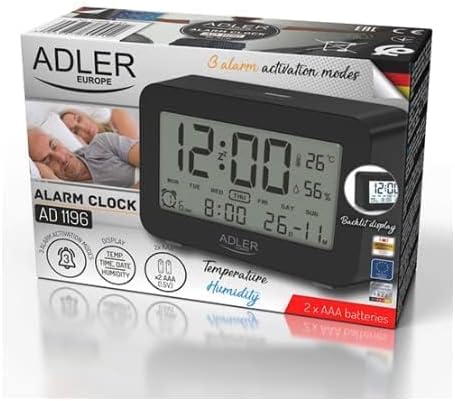
Figure 2: The Adler AD 1196B Digital Alarm Clock shown in its retail packaging, highlighting key features.
3. Konfigurazioa
3.1 Bateriaren instalazioa
- Bilatu bateriaren konpartimentuaren estalkia alarma-erlojuaren atzealdean.
- Irristatu edo altxatu estalkia konpartimentua irekitzeko.
- Insert two (2) AA batteries, ensuring the correct polarity (+ and -) as indicated inside the compartment.
- Jarri bateriaren konpartimenduaren estalkia ongi.
The clock will power on automatically once batteries are inserted. The display will show default settings or begin flashing.
3.2 Hasierako piztea
Upon successful battery installation, the display will illuminate. You may need to press a button (e.g., "MODE" or "SET") to activate the display if it remains blank after battery insertion. The backlight will activate briefly and then turn off.
4. Funtzionamendu-argibideak
Familiarize yourself with the control buttons, typically located on the back or top of the device. Common buttons include: MODE, SET, UP/+, DOWN/-, ALARM.
4.1 Ordua ezartzea
- Eduki sakatuta EZARTU botoia (edo MODUA button, depending on model) until the hour digits begin to flash.
- Erabili GORA/+ or BEHERA/- ordua doitzeko botoiak.
- Sakatu EZARTU (edo MODUA) again to move to the minute setting.
- Erabili GORA/+ or BEHERA/- minutuak doitzeko botoiak.
- Jarraitu sakatzen EZARTU (edo MODUA) to cycle through 12/24 hour format, and then to exit time setting mode.
4.2 Data ezartzea
- Ordu-pantaila normalean, sakatu MODUA button repeatedly until the date display starts flashing or you enter date setting mode.
- The year digits may flash first. Use GORA/+ or BEHERA/- urtea egokitzeko.
- Sakatu MODUA to move to the month setting, then adjust with GORA/+ or BEHERA/-.
- Sakatu MODUA to move to the day setting, then adjust with GORA/+ or BEHERA/-.
- Sakatu MODUA again to confirm and exit date setting.
4.3 Setting Alarms (Alarm 1, Alarm 2, Alarm 3)
The AD 1196B features three independent alarms. The process is similar for each.
- Sakatu ALARMA botoia behin to view Alarm 1. Press again for Alarm 2, and a third time for Alarm 3.
- Bitartean viewing the desired alarm (e.g., AL1), press and hold the EZARTU botoia sakatu alarmaren orduko digituak keinuka hasi arte.
- Erabili GORA/+ or BEHERA/- alarma-ordua ezartzeko.
- Sakatu EZARTU to move to the alarm minute setting.
- Erabili GORA/+ or BEHERA/- to set the alarm minutes.
- Sakatu EZARTU berriro alarmaren ordua berresteko.
- Alarma aktibatzeko/desaktibatzeko, sakatu ALARMA button repeatedly until the alarm icon (e.g., bell symbol) appears or disappears next to the corresponding alarm number (AL1, AL2, AL3).
4.4 Alarm Activation Modes (5, 6, 7 Days)
After setting an alarm time, you can choose its activation frequency:
- While in alarm setting mode (after setting minutes for an alarm), press EZARTU one more time. The display will show a day indicator (e.g., "5 DAY", "6 DAY", "7 DAY").
- Erabili GORA/+ or BEHERA/- to cycle through the options:
- EGUN 5: Alarm sounds Monday to Friday.
- EGUN 6: Alarm sounds Monday to Saturday.
- EGUN 7: Alarm sounds every day of the week.
- Sakatu EZARTU to confirm your selection and exit alarm setting for that specific alarm.
4.5 Atzeko argiztapen funtzioa
The display features a backlight for improved visibility in low light conditions. The backlight automatically activates when a button is pressed and turns off after approximately 4 seconds to conserve battery power.
4.6 Tenperatura eta hezetasunaren bistaratzea
The alarm clock continuously displays the current indoor temperature (in Celsius) and relative humidity percentage. No specific action is required to view these readings; they are shown on the main display.
5. Mantentzea
5.1 Garbiketa
To clean the alarm clock, gently wipe the surface with a soft, dry cloth. Do not use abrasive cleaners, solvents, or chemical sprays, as these may damage the display or casing.
5.2 Bateria ordezkatzea
When the display becomes dim or the clock functions erratically, it is time to replace the batteries. Follow the battery installation steps in Section 3.1. Always replace both batteries with new AA batteries of the same type. Dispose of old batteries responsibly according to local regulations.
6. Arazoak
| Arazoa | Kausa posiblea | Irtenbidea |
|---|---|---|
| Pantaila hutsik edo ilun dago. | Bateriak gutxi daude edo gaizki instalatuta daude. | Ordeztu bateriak AA bateria berriekin, polaritate zuzena ziurtatuz. |
| Alarmak ez du jotzen. | Alarma ez dago aktibatuta edo gaizki konfiguratuta. | Ensure the alarm icon is visible on the display. Verify the alarm time and activation mode (5, 6, or 7 days) are set correctly. |
| Ordua/data okerra da. | Ordua/data ez da ezarri edo berrezarri bateria aldatu ondoren. | Follow instructions in Section 4.1 and 4.2 to set the correct time and date. |
| Tenperatura/hezetasun neurketak zehaztugabeak dirudite. | Clock is placed near a heat source, vent, or in direct sunlight. | Relocate the clock to a stable environment away from extreme temperature or humidity fluctuations. Allow time for readings to stabilize. |
7. Zehaztapenak
- Eredua: AD 1196B
- Energia iturria: 2 x AA pila (ez daude barne)
- Bistaratzeko mota: Atzeko argiztapenarekin LCD digitala
- Funtzioak: Time, Date, Day of Week, Temperature (°C), Humidity (%), 3 Alarms with 3 Activation Modes
- Atzeko argiaren iraupena: 4 segundo gutxi gorabehera
- Materiala: Plastikoa
- Neurriak (W x D x H): 11 cm x 3.81 cm x 5 cm
- Pisua: 1.6 kg
8. Bermea eta Laguntza
For warranty information or technical support, please refer to the warranty card included with your product or contact the manufacturer directly. Keep your purchase receipt as proof of purchase.
Manufacturer: Adler


