1. Sarrera eta Overview
The Calix GigaCenter 844E-1 is a high-performance wireless router and modem designed to provide robust and reliable internet connectivity for home and small office environments. It supports dual-band Wi-Fi (2.4GHz and 5GHz) for optimal wireless performance and includes multiple Ethernet ports for wired connections. This manual provides detailed instructions for setting up, operating, maintaining, and troubleshooting your GigaCenter 844E-1 device.
2. Produktuaren ezaugarriak
- Banda bikoitzeko Wi-Fi: Supports 2.4GHz and 5GHz frequencies for flexible and high-speed wireless connections (802.11ac, 802.11n, 802.11a/g/b compatible).
- High LAN Data Rate: Capable of up to 1000 Mbps for fast wired connections.
- Hainbat portu: Includes Ethernet (RJ-45) ports (4 LAN ports), USB 2.0, and RJ-11 ports for versatile connectivity.
- Integrated Modem: Functions as both a router and a modem, simplifying network setup.
- Diseinu trinkoa: Designed for efficient space utilization.
3. Paketearen edukia
Mesedez, egiaztatu elementu guztiak zure paketean daudela:
- Calix GigaCenter 844E-1 Wireless Router Modem
- AC egokitzailea elikadura hornidura
- (Optional: Ethernet Cable, Phone Cable - may vary by package)
4. Konfigurazio gida
Follow these steps to set up your Calix GigaCenter 844E-1:
- Gailua kokatzea: Place the GigaCenter 844E-1 in a central location in your home, away from obstructions and sources of interference (e.g., microwaves, cordless phones). Ensure adequate ventilation.
- Konektatu energia: Connect the provided AC Adapter Power Supply to the "POWER" port on the back of the GigaCenter 844E-1 and then plug the adapter into a standard electrical outlet. The Power indicator light on the front panel should illuminate.

4.1. irudia: Aurrealdea view of the Calix GigaCenter 844E-1 showing indicator lights and the included power adapter.
- Connect to Internet Source: Connect your internet service provider's (ISP) cable or fiber optic line to the appropriate WAN/Broadband port on the GigaCenter 844E-1. This port is typically labeled "ETH-WAN" or "Broadband". The Broadband indicator light should turn solid green once a connection is established.

4.2. irudia: Aldea view of the GigaCenter 844E-1 highlighting the ETH-WAN, Power, and Phone ports.
- Konektatu kable bidezko gailuak (aukerakoa): Use standard Ethernet cables to connect computers, gaming consoles, or other network devices to the "ETHERNET 1-4" ports on the back of the GigaCenter 844E-1. The corresponding Ethernet indicator light will illuminate when a device is connected and active.

Figure 4.3: Top/back view of the GigaCenter 844E-1 displaying the USB, Reset, Ethernet (LAN), and Phone ports.
- Connect Phone Devices (Optional): If your service includes voice, connect analog phones to the "PHONE 1" or "PHONE 2" ports using RJ-11 cables.
- Hasierako Wi-Fi konexioa:
- Locate the Wi-Fi Network Name (SSID) and Password (WPA Key) on the label usually found on the bottom or back of your GigaCenter 844E-1.
- Bilatu eskuragarri dauden Wi-Fi sareak zure haririk gabeko gailuan (ordenagailu eramangarria, telefono adimenduna, tableta).
- Select your GigaCenter's SSID and enter the WPA Key when prompted.
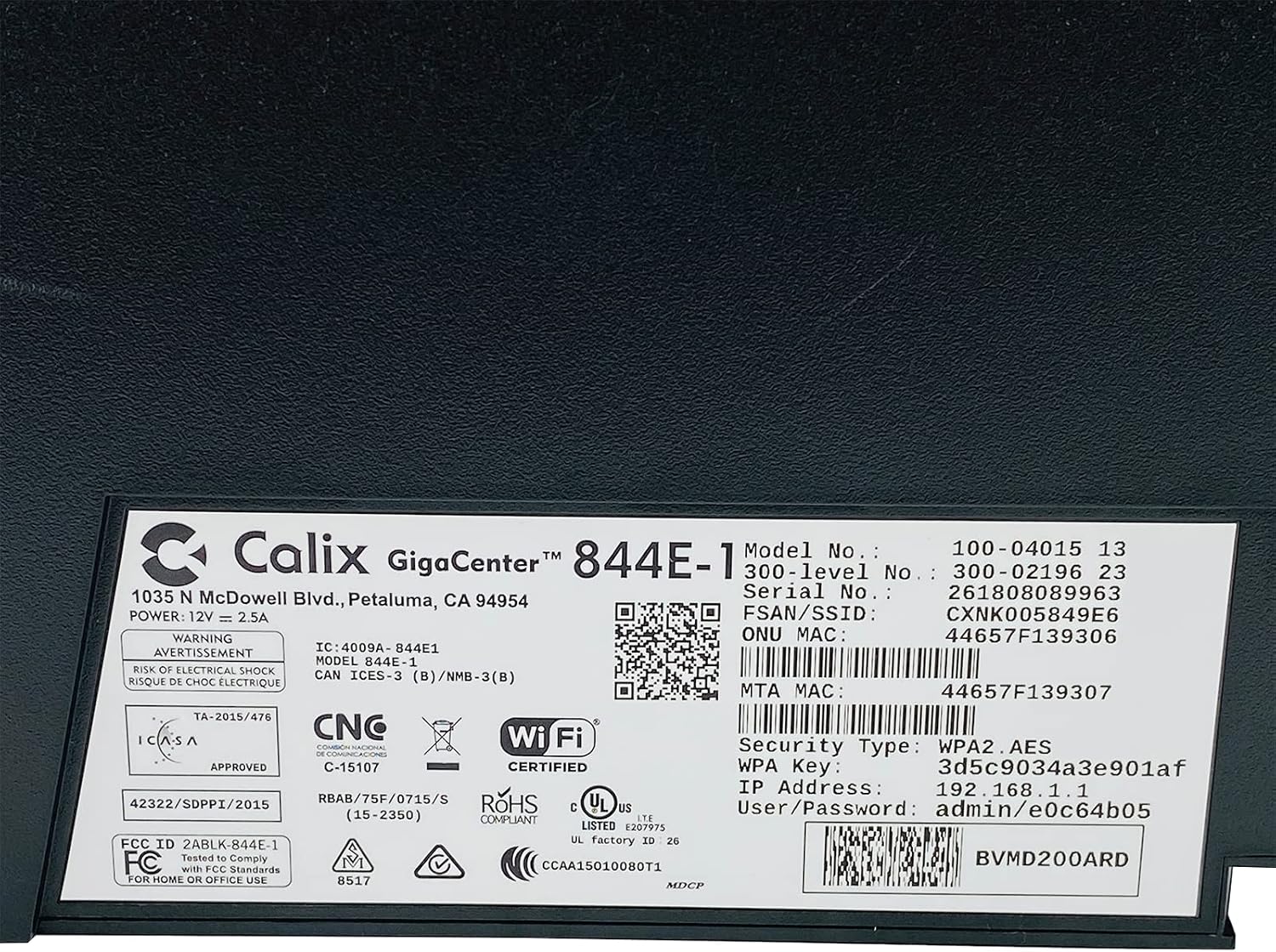
4.4. irudia: Xehetasuna view of the bottom label, providing essential information such as model number, serial number, Wi-Fi SSID, and WPA Key for network access.
- Egiaztatu konexioa: Konektatu ondoren, ireki a web browser and try to access a webgunea (adibidez, www.google.com). If successful, your GigaCenter 844E-1 is set up and ready for use.
5. Funtzionamendu-argibideak
5.1 Adierazle argiak
The front panel of the GigaCenter 844E-1 features several indicator lights that provide status information:
| Argia | Egoera | Deskribapena |
|---|---|---|
| BOTEREA | Berde Solidoa | Gailua piztuta dago. |
| BANDA ZABALA | Berde Solidoa | Interneteko konexioa aktibo dago. |
| ZERBITZUA | Berde Solidoa | Service is active and provisioned. |
| WIFI 2.4 GHz | Solid Green/Flashing | 2.4 GHz Wi-Fi is active/data transfer. |
| WIFI 5 GHz | Solid Green/Flashing | 5 GHz Wi-Fi is active/data transfer. |
| ETHERNET 1-4 | Solid Green/Flashing | Wired connection active/data transfer. |
| PHONE 1-2 | Solid Green/Flashing | Phone service active/in use. |
| USBa | Solid Green/Flashing | USB device connected/data transfer. |
| WPS | Keinuka | WPS parekatzea abian da. |
5.2 Sartzea Web Interfazea
To configure advanced settings, you can access the GigaCenter's web interfazea:
- Ensure your device is connected to the GigaCenter via Wi-Fi or Ethernet.
- Ireki a web browser and enter the IP Address (e.g., 192.168.1.1) found on the product label into the address bar.
- Enter the User/Password (e.g., admin/e0c64b05) from the product label when prompted.
- You can now configure settings such as Wi-Fi name, password, port forwarding, and parental controls.
6. Mantentzea
- Garbiketa: Erabili zapi leun eta lehor bat gailuaren kanpoaldea garbitzeko. Ez erabili garbitzaile likidorik edo aerosolik.
- Aireztapena: Ensure the device's ventilation slots are not blocked to prevent overheating.
- Firmware eguneraketak: Periodically check with your Internet Service Provider (ISP) for available firmware updates to ensure optimal performance and security.
- Berrabiarazten: If you experience connectivity issues, try restarting the device by unplugging the power adapter for 10 seconds and then plugging it back in.
7. Arazoak
Atal honek aurki ditzakezun arazo ohikoenak jorratzen ditu:
7.1 Interneteko konexiorik ez
- Egiaztatu kableak: Ensure all cables (power, internet source, Ethernet) are securely connected.
- Adierazle argiak: Verify that the POWER, BROADBAND, and SERVICE lights are solid green. If not, refer to Section 5.1 or contact your ISP.
- Berrabiarazi gailua: Power cycle the GigaCenter 844E-1 by unplugging it for 10 seconds and plugging it back in.
- ISP Outage: Check with your ISP for any service outagzure eremuan.
7.2 Wi-Fi Not Working or Slow
- Wi-Fi Lights: Ensure the WIFI 2.4 GHz and/or WIFI 5 GHz lights are solid green.
- Pasahitza: Double-check that you are entering the correct Wi-Fi password (WPA Key).
- Seinalearen indarra: Move closer to the GigaCenter 844E-1 to improve signal strength.
- Interferentzia: Murriztu beste gailu elektronikoen interferentziak.
- Kanalen optimizazioa: Sartu web interface to change Wi-Fi channels if experiencing congestion.
7.3 Ezin da sartu Web Interfazea
- IP helbidea: Confirm you are using the correct IP Address (e.g., 192.168.1.1).
- Konexioa: Ensure your device is connected to the GigaCenter's network.
- Kredentzialak: Verify the User/Password from the product label.
- Suebakia/Aurkakoa: Desgaitu aldi baterako zure ordenagailuan sarbidea blokeatzen ari den edozein suebaki edo antibirus software.
7.4 WPS funtzionalitatea
The WPS (Wi-Fi Protected Setup) button allows for easy connection of WPS-compatible devices without manually entering the password. Press the WPS button on the GigaCenter 844E-1 and then activate WPS on your client device within two minutes. The WPS light will flash during the pairing process.
8. Zehaztapenak
| Ezaugarri | Xehetasuna |
|---|---|
| Eredua | GigaCenter 844E-1 (100-04015 13) |
| Marka | Calix |
| Konektibitate Teknologia | Wireless-Wi-Fi 802.11ac, Ethernet (RJ-45) Hub/Switch, 5G |
| Haririk gabeko estandarrak | 802.11ac, 802.11n, 802.11a/g/b |
| Maiztasun Banda Klasea | Banda bikoitza (2.4 GHz, 5 GHz) |
| Maximum LAN Data Rate | 1000 Mbps |
| Portuak | 4 x Ethernet (RJ-45), 1 x USB 2.0, 2 x RJ-11 (Phone) |
| Gailu bateragarriak | Personal Computer, Network Devices |
| Erabilera gomendatua | Hasiera |
| Dakarten osagaiak | Elikatze Hornidura |
| Elementuaren pisua | 3 kilo |
9. Segurtasun informazioa
- Ez jarri gailua uretara edo hezetasunera.
- Ez ireki gailua casing. Konponketa guztiak langile kualifikatuen esku utzi.
- Erabili emandako korronte-egokigailua soilik.
- Mantendu gailua bero-iturrietatik eta eguzki-argitik urrun.
- Ziurtatu aireztapen egokia gehiegi berotzea saihesteko.
10. Bermea eta Laguntza
For warranty information and technical support, please contact your Internet Service Provider (ISP) or the vendor from whom you purchased this device. The Calix GigaCenter 844E-1 is typically provided and supported by your ISP as part of your internet service package.
For general inquiries or to find more information about Calix products, you may visit the official Calix website (if available, search online for "Calix official webgunea").


