1. Sarrera
The MiLESEEY DP20 Bilateral Laser Distance Meter is a professional-grade measuring tool designed for accuracy and efficiency in various applications. This device features patented coaxial optical technology, multiple measurement functions, and a durable design, making it suitable for both professional and DIY use. This manual provides comprehensive instructions for its safe and effective operation.

Figure 1: MiLESEEY DP20 Bilateral Laser Distance Meter
2. Segurtasun informazioa
Mesedez, irakurri eta ulertu segurtasun-argibide guztiak gailua erabili aurretik. Argibide hauek jarraitzen ez badira, laser erradiazioaren eraginpean egon daitezke, deskarga elektrikoak, sua edo lesio larriak gerta daitezke.
2.1 Segurtasun orokorra
- Mantendu gailua haurren eskura.
- Do not attempt to modify or disassemble the device. Repairs should only be performed by authorized personnel.
- Avoid using the device in explosive atmospheres or near flammable materials.
- Protect the device from extreme temperatures, moisture, and strong vibrations.
2.2 Laser segurtasuna
WARNING: This product emits Class 2 laser radiation. Avoid direct eye exposure to the laser beam.
- Ez begiratu zuzenean laser izpiari.
- Ez zuzendu laser izpia pertsonei edo animaliei.
- Ez erabili tresna optikoak (adibidez, prismatikoak, teleskopioak) view laser izpia.
- Ensure the laser is switched off when not in use.
3. Paketearen edukia
Egiaztatu elementu guztiak paketean daudela:
- MiLESEEY DP20 Bilateral Laser Distance Meter x1
- Hard Case x1
- C motako karga-kablea x1
- Erabiltzailearen eskuliburua x1
- Eskuko uhala x1

Figure 2: Contents included in the DP20 package
4. Produktua amaitu daview
The MiLESEEY DP20 is engineered for precision and ease of use. Key features include:
- Bilateral Measurement: Allows measurement between two points from any position along the measurement line, significantly speeding up tasks.
- Patented Coaxial Optical Technology: Ensures both laser beams share a common geometric axis, eliminating measurement inaccuracies.
- Hainbat neurketa-funtzio: Includes single, continuous, area, volume, automatic horizontal/vertical height, and line segment division.
- OLED Display with Big Text Mode: Provides clear readability of measurements, even in challenging lighting conditions.
- Diseinu iraunkorra eta trinkoa: Made from aerospace-grade magnesium-aluminum alloy, offering robustness and a comfortable grip.
- Bateria kargagarria: Integrated 1000mAh lithium battery with USB-C charging for extended use.
4.1 Osagaiak eta pantaila
Familiarize yourself with the device's components and display interface.
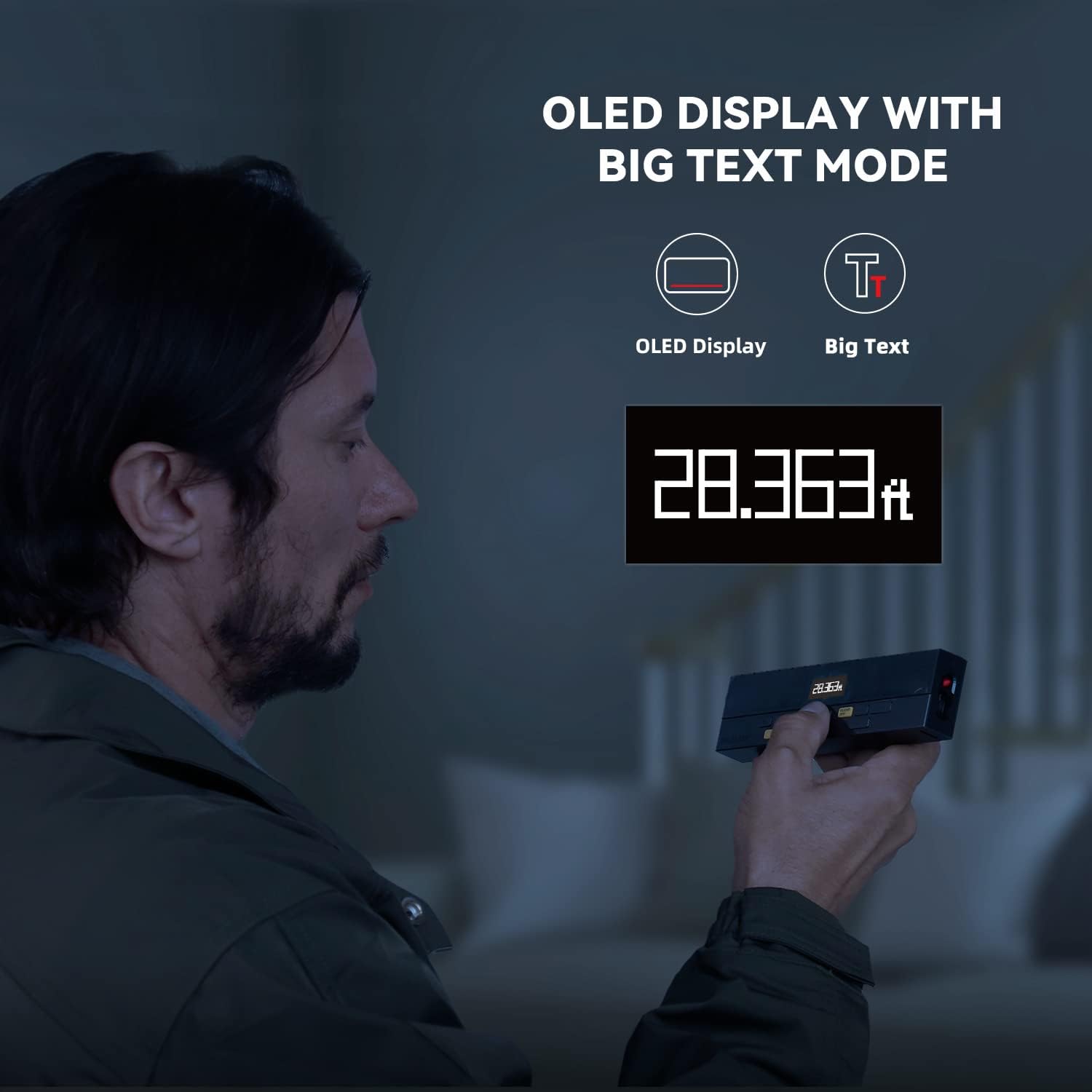
Figure 3: Clear OLED Display with Big Text Mode for enhanced readability.

Figure 4: Illustration of the patented coaxial optical design for precise measurements.
5. Konfigurazioa
5.1 Bateria kargatzea
The DP20 comes with a built-in 1000mAh lithium battery. Before first use, fully charge the device using the provided Type-C charging cable.
- Connect the Type-C cable to the charging port on the device.
- Konektatu kablearen beste muturra USB elikatze-egokitzaile batera (ez dago barne) edo ordenagailuko USB ataka batera.
- The battery indicator on the display will show charging status. A full charge typically takes about 2 hours.

Figure 5: Charging the DP20 via USB-C port.
5.2 Piztu/Itzali
- Pizteko, sakatu NEURRIAK botoia.
- To power off, long-press the GARBITU/DESAKTIBATU button. The device will also automatically power off after a period of inactivity to conserve battery.
6. Funtzionamendu moduak
The DP20 offers a variety of measurement modes to suit different needs. Use the MODUA button to cycle through the available functions.
6.1 Single and Continuous Measurement
For basic distance measurements.
- Sakatu NEURRIAK button once for a single measurement.
- Luze sakatu NEURRIAK button to enter continuous measurement mode, which also displays minimum and maximum distances. Press NEURRIAK berriro gelditzeko.
6.2 Bilateral and One-Way Measurement
The DP20 allows switching between bilateral (two-way) and one-way laser measurement.
- Use the dedicated button (often labeled T/R or similar, refer to device markings) to switch between bilateral and one-way laser modes.
- Bilateral mode measures the distance between two points by positioning the device anywhere along the line.
- One-way mode measures from the device to a single target point.
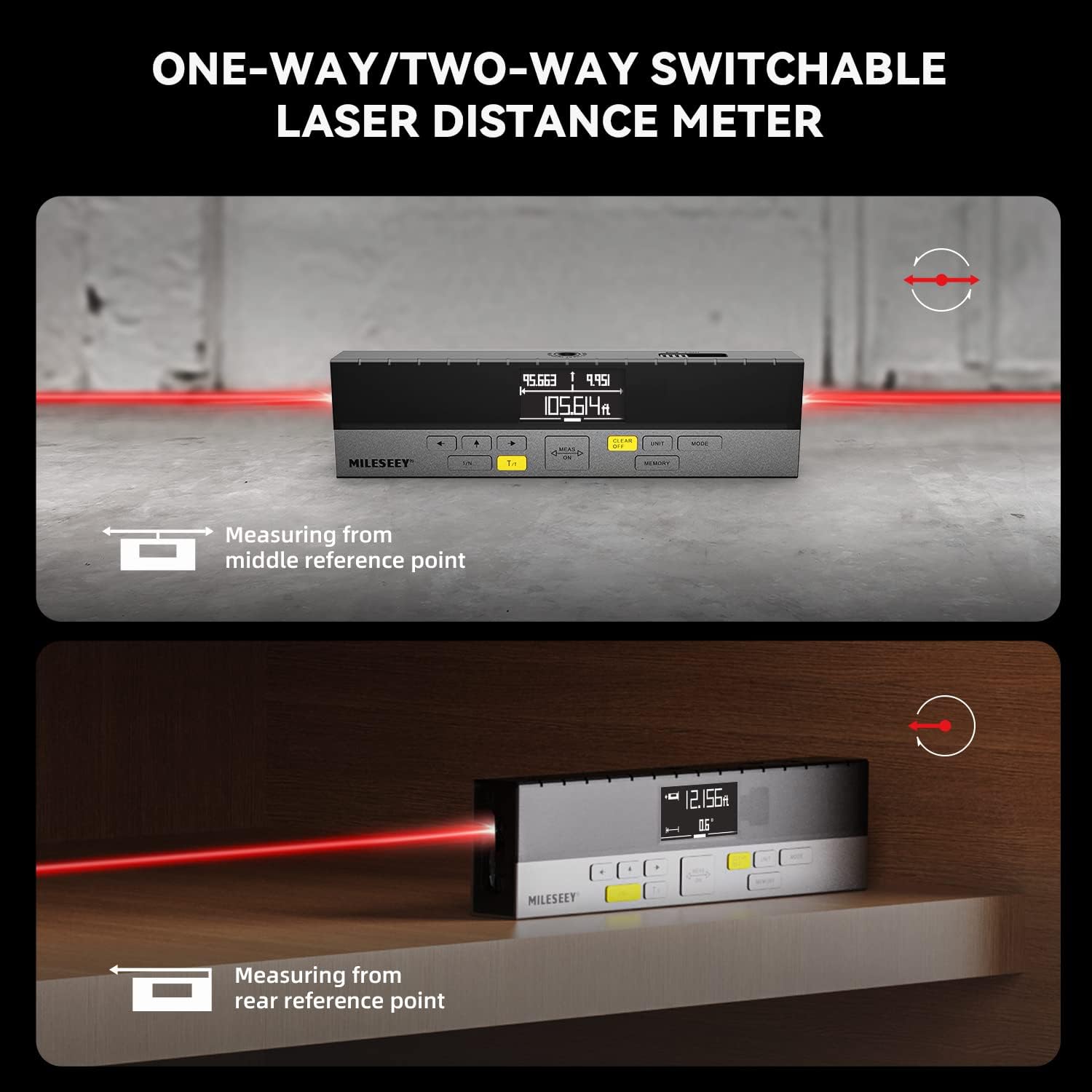
Figure 6: Demonstrating one-way and two-way measurement capabilities.
6.3 Area and Volume Measurement
To calculate area or volume:
- Select the Area or Volume mode using the MODUA botoia.
- Follow the on-screen prompts to take the required number of measurements (e.g., length and width for area; length, width, and height for volume).
- The device will automatically calculate and display the result.
6.4 Pitagorasen neurketa
For indirect measurements of height or distance where direct measurement is not possible.
- Select the Pythagorean mode using the MODUA botoia.
- Follow the on-screen prompts to take the necessary measurements (e.g., hypotenuse and one leg for height).
- The device will calculate and display the unknown dimension.
6.5 Line Segment Division (Staking Out)
This function divides a line segment into equal smaller segments, useful for tasks like installing multiple items at consistent intervals.
- Enter the Line Segment Division mode (often labeled 1/N).
- Set the number of desired segments (N).
- Measure the total length of the line. The device will then guide you to the division points.
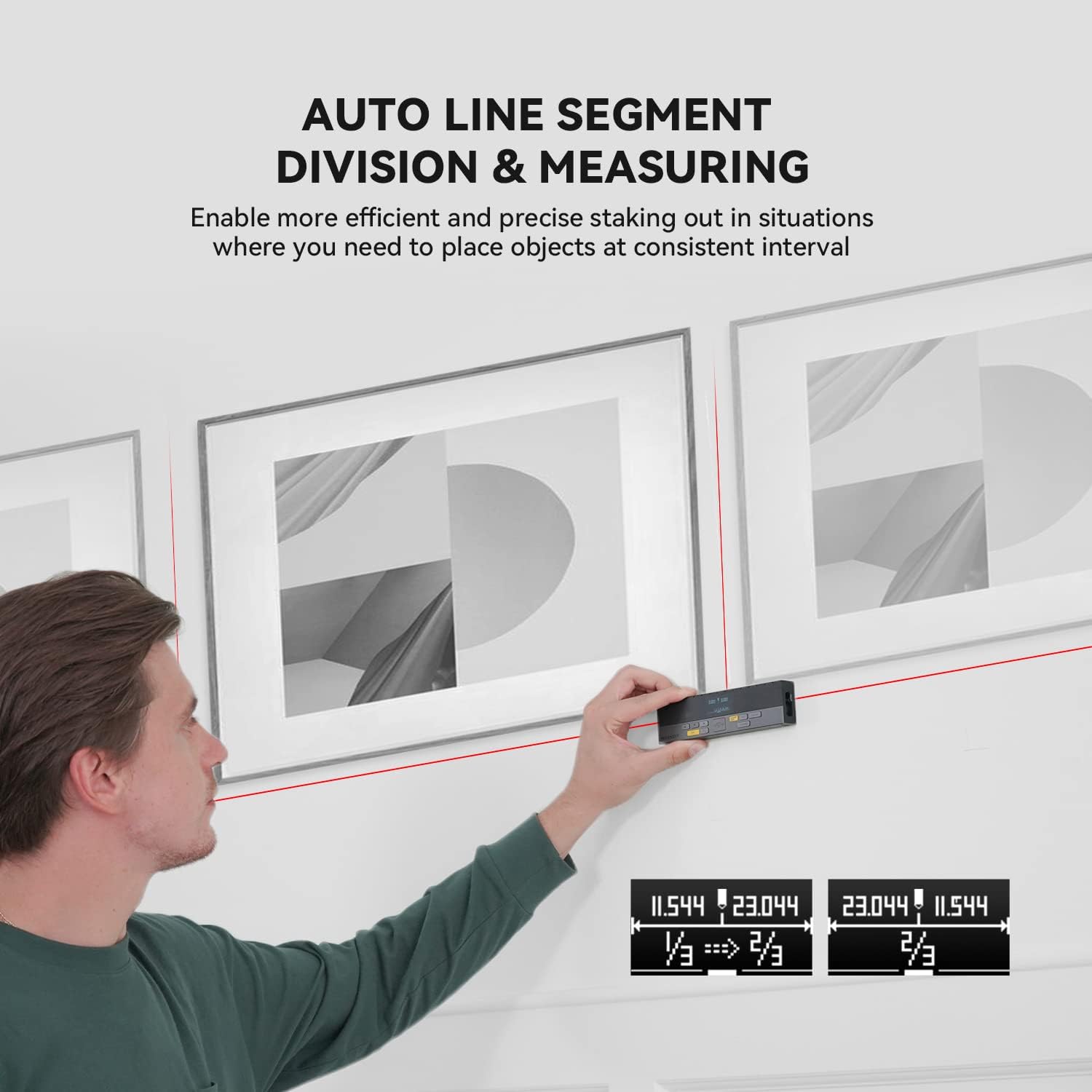
Figure 7: Using the auto line segment division feature for consistent spacing.
6.6 Digital Angle Level
The integrated digital angle level provides real-time angle measurements.
- The device automatically displays the current tilt angle.
- This feature can be used in conjunction with other measurement modes for more complex calculations.

Figure 8: The digital tilt sensor provides accurate angle readings.
7. Ezaugarri aurreratuak
7.1 Bluetooth Connectivity and App Synchronization
The DP20 supports Bluetooth connectivity, allowing it to pair with the
Erlazionatutako dokumentuak - DP20
 |
MILESEEY D5T Professional Laser Distance Meter User Manual User manual for the MILESEEY D5T Professional Laser Distance Meter. This guide details the device's 8 functions, including distance, area, volume, and Pythagorean measurements, along with operation, safety precautions, and specifications for professional use. |
 |
MileSeey S6 laser distantzia-neurgailuaren erabiltzailearen eskuliburua MileSeey S6 laser distantzia-neurgailuaren erabiltzailearen eskuliburu osoa, segurtasun-argibideak, funtzionamendua, neurketa-funtzioak (bakarra, jarraitua, azalera, bolumena, pitagorearra), Bluetooth konexioa, arazoak konpontzea eta zehaztapen teknikoak biltzen dituena. Ikasi S6 nola erabili distantzia-neurketa zehatzak egiteko. |
 |
MILESEEY S6 Laser Neurgailuaren Erabiltzaile Eskuliburua MILESEEY S6 Laser Measure erabiltzailearen eskuliburuak S6 laser distantzia-neurgailua erabiltzeko argibide zehatzak eskaintzen ditu, neurketa eta erabiltzailearen esperientzia hobetzeko 8 funtzio nabarmenduz, besteak beste, distantzia, azalera, bolumen eta Pitagorasen neurketak, arazoak konpontzea eta zehaztapen teknikoak. |
 |
Mileseey DP20 Serieko Laser Distantzia Neurgailuaren Hasiera Azkarreko Gida Mileseey DP20 serieko laser distantzia-neurgailuaren hasierako gida azkarra, produktuaren xehetasunak azaltzen dituena.view, neurketa modu desberdinen zehaztapen teknikoak eta funtzionamendu argibideak. |
 |
MILESEEY S2 Laser Distantzia Neurgailuaren Hasiera Azkarreko Gida MILESEEY S2 laser distantzia-neurgailuaren gida laburra, bere ezaugarriak, funtzionamendua, segurtasun-argibideak, arazoak konpontzea eta zehaztapenak biltzen dituena. Ikasi distantzia, azalera, bolumena eta funtzio pitagorasen erabilera nola lortu. |
 |
Mileseey X5 laser distantzia neurgailuaren erabiltzailearen eskuliburua Mileseey X5 laser distantzia-neurgailuaren erabiltzailearen eskuliburu osoa, ezaugarriak, funtzionamendua, neurketa moduak eta arazoak konpontzea azaltzen dituena. |