1. Sarrera
The ASUS Prime Z790M-Plus microATX motherboard is engineered to support 12th, 13th, and 14th Gen Intel Core processors. It features robust power delivery, comprehensive cooling solutions, and intelligent tuning options, making it suitable for daily users and DIY PC builders. This manual provides essential information for setting up, operating, and maintaining your motherboard.
2. Produktua amaitu daview
Ezaugarri nagusiak
- Intel LGA 1700 Socketa: Compatible with 14th, 12th, and 13th Gen Intel processors.
- Enhanced Power Solution: 10+1 DrMOS, 6-layer PCB, ProCool sockets, alloy chokes, and durable capacitors for stable power delivery.
- Next-gen Connectivity: PCIe 5.0, DDR5, Intel 1 Gb Ethernet, USB 3.2 Gen2x2 Type-C, front panel USB 3.2 Gen 1 Type-C, Thunderbolt (USB4) header support.
- ASUS OptiMem II: Careful routing of traces and vias, plus ground layer optimizations to preserve signal integrity for improved memory overclocking.
- Hozte integrala: Large VRM heatsink, PCH heatsink, hybrid fan headers, and Fan Xpert 4 (with AI Cooling II).
Plaka nagusiaren diseinua
Familiarize yourself with the main components of your ASUS Prime Z790M-Plus motherboard.

1. irudia: Goitik behera view of the ASUS Prime Z790M-Plus motherboard, highlighting the CPU socket, RAM slots, and M.2 heatsinks.

2. irudia: Angeludun view of the ASUS Prime Z790M-Plus motherboard, showcasing the VRM heatsinks and PCIe slots.
3. Konfigurazioa eta instalazioa
3.1 PUZaren instalazioa
Carefully align your Intel LGA 1700 processor with the socket on the motherboard. Ensure the gold triangle on the CPU matches the triangle on the socket. Gently lower the CPU into place, then secure it with the load plate and lever.

Figure 3: Close-up of the LGA 1700 CPU socket, ready for processor installation.
3.2 Memoriaren (RAM) instalazioa
The motherboard supports DDR5 RAM. Open the clips on the DIMM slots, align the memory modules with the notches, and press firmly until the clips snap into place. Refer to your CPU and RAM specifications for optimal dual-channel configuration.
3.3 Storage Installation (M.2 and SATA)
The ASUS Prime Z790M-Plus features three M.2 slots and four SATA 6Gb/s ports. For M.2 SSDs, remove the heatsink, insert the M.2 drive, and secure it with the provided M.2 Q-Latch mechanism or screws. For SATA drives, connect the SATA data and power cables.
3.4 Expansion Cards (PCIe)
Install your graphics card (GPU) and other PCIe expansion cards into the appropriate PCIe 5.0 or PCIe 4.0 slots. Ensure the card is seated firmly and secured with the case screw. The motherboard features a Q-Release button for easy GPU ejection.
3.5 Potentzia-konexioak
Connect the 24-pin ATX power connector and the 8-pin (or 4+4-pin) CPU power connector from your power supply to the motherboard. Ensure all connections are secure.
4. Funtzionamendu-argibideak
4.1 BIOS konfigurazioa
Upon first boot, enter the BIOS/UEFI setup by pressing the DEL or F2 key during startup. Here you can configure boot order, system settings, and monitor hardware status. Regularly check the ASUS support website for BIOS updates to ensure optimal performance and compatibility.
4.2 Gidariaren instalazioa
After installing your operating system, install the necessary drivers for the motherboard components (chipset, LAN, audio, graphics, etc.). These can be found on the included support DVD or downloaded from the official ASUS support website. Ensure you install the latest drivers for stability and performance.
5. Konektibitatea
The ASUS Prime Z790M-Plus offers a wide range of connectivity options:
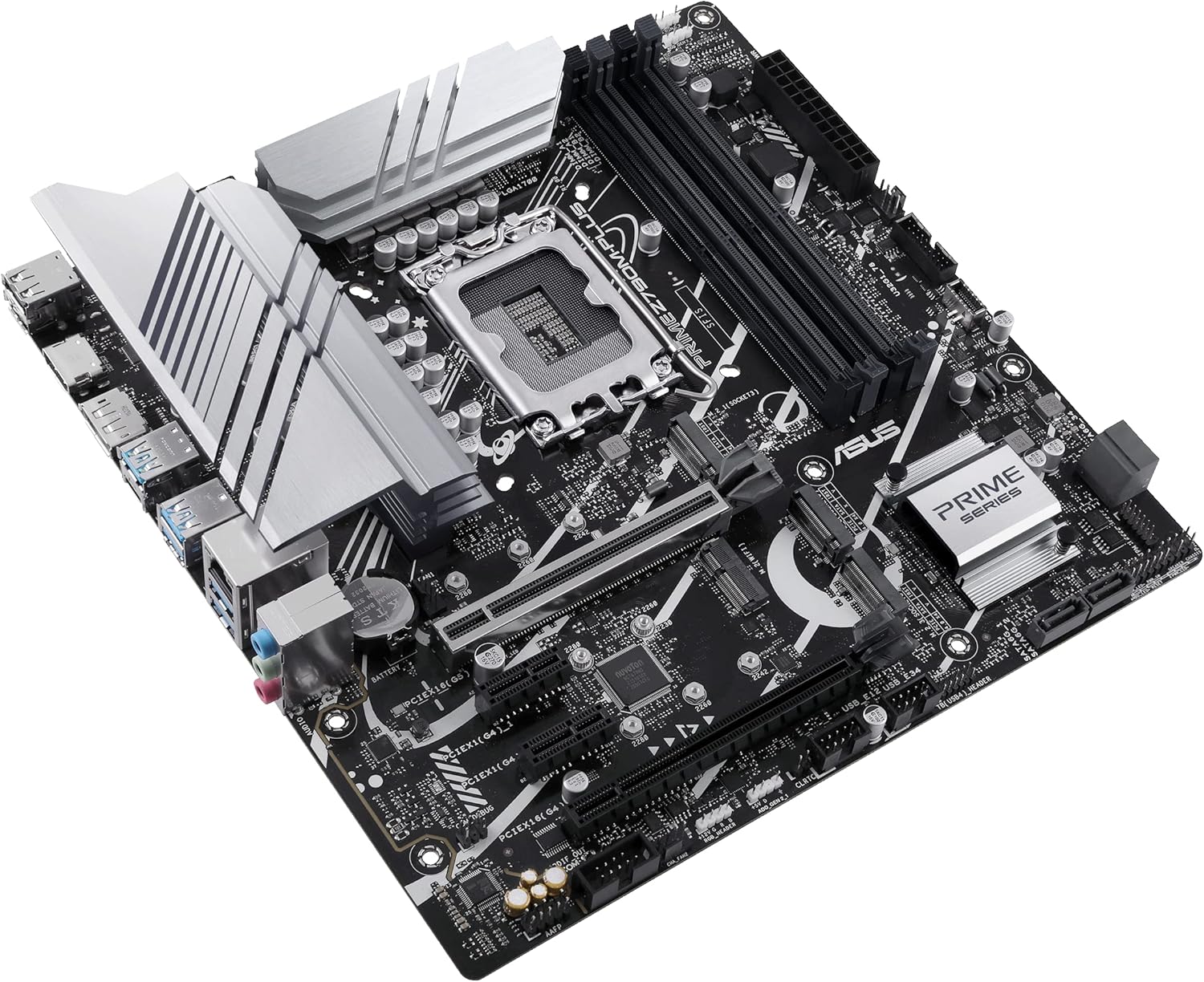
Figure 4: Rear I/O panel of the ASUS Prime Z790M-Plus, showing various USB, display, and audio ports.
- USB atakak: Multiple USB 3.2 Gen 2x2 Type-C, USB 3.2 Gen 2 Type-A, USB 3.2 Gen 1, and USB 2.0 ports.
- Bistaratzeko irteerak: DisplayPort (DP) and HDMI ports for integrated graphics.
- LAN: Intel 1 Gb Ethernet for reliable network connectivity.
- Audioa: Realtek S1220A 7.1 Surround Sound High Definition Audio CODEC with premium audio capacitors.
- Thunderbolt (USB4) Support: Header for Thunderbolt (USB4) expansion cards.
6. Zehaztapenak
| Osagaia | Zehaztapena |
|---|---|
| CPU Socketa | LGA 1700 |
| Prozesadore bateragarriak | Intel 14th, 12th, and 13th Gen Core, Pentium Gold, and Celeron Processors |
| Chipset | Intel Z790 |
| RAM Memoria Teknologia | DDR5 |
| RAM zirrikituak | 4 x DIMM, Max. 128GB |
| PCIe zirrikituak | 1 x PCIe 5.0 x16, 2 x PCIe 4.0 x16 (x4 modua), 1 x PCIe 3.0 x1 |
| M.2 zirrikituak | 3 x M.2 slots (PCIe 4.0 x4 mode) |
| SATA portuak | 4 x SATA 6Gb/s ataka |
| LAN | Intel 1 Gb Ethernet |
| USB atakak (atzealdean) | 1 x USB 3.2 Gen 2x2 Type-C, 3 x USB 3.2 Gen 2 Type-A, 2 x USB 3.2 Gen 1 Type-A, 2 x USB 2.0 |
| Audioa | Realtek S1220A 7.1 Surround Sound High Definition Audio CODEC |
| Forma-faktorea | mikroATX |
| Neurriak | 10.5 x 2.8 x 11 hazbete |
| Elementuaren pisua | 2.82 kilo |
7. Mantentzea
To ensure the longevity and optimal performance of your motherboard, regular maintenance is recommended:
- Hautsa kentzea: Aldian-aldian, garbitu hautsa plaka basetik eta kaxa haizagailuetatik aire konprimatua erabiliz. Ziurtatu sistema itzalita eta deskonektatuta dagoela garbitu aurretik.
- BIOS eguneraketak: Keep your BIOS updated to the latest version available on the ASUS support website. This can improve stability, compatibility, and performance.
- Gidarien eguneraketak: Regularly update all device drivers to their latest versions.
- Kableen kudeaketa: Ensure cables are neatly routed to prevent obstruction of airflow and components.
8. Arazoak
If you encounter issues with your ASUS Prime Z790M-Plus motherboard, consider the following troubleshooting steps:
- Argindarrik ez/Abiorik ez: Double-check all power connections (24-pin ATX, CPU power). Ensure the power supply is switched on. Test with minimal components (CPU, one RAM stick, GPU) to isolate the issue.
- Bistaratzeko arazoak: Verify that your monitor is connected to the correct display output (either motherboard's integrated graphics or dedicated GPU). Ensure the graphics card is properly seated.
- Memory Errors: Reseat RAM modules. Test each RAM stick individually. Ensure RAM is compatible with the motherboard and CPU.
- Gidarien arteko gatazkak: If issues arise after a driver installation, try booting into Safe Mode and uninstalling the problematic driver.
- BIOS Flashback: The motherboard supports BIOS Flashback, allowing you to update the BIOS without a CPU or RAM installed. Refer to the ASUS website for detailed instructions on using this feature.
9. Baliabide osagarriak
Related Video: ASUS Z790 Motherboard Unboxing (ProArt Z790-CREATOR WIFI)
1. bideoa: Kutxa ireki eta amaituview of a related ASUS Z790 series motherboard, the ProArt Z790-CREATOR WIFI. This video provides a general idea of the packaging and components found in ASUS Z790 motherboards, though specific features may vary from the Prime Z790M-Plus model.
10. Bermea eta Laguntza
For warranty information, technical support, and the latest drivers and BIOS updates, please visit the official ASUS support webgunea. Gorde erosketa-agiria erosketaren frogagiri gisa berme-erreklamazioetarako.
ASUS laguntza Webgunea: https://www.asus.com/support/


