1. Sarrera
This manual provides comprehensive instructions for the MotionBlinds Coulisse CM-16-BK 4-Channel Wall Remote Control. This device is designed to operate MotionBlinds window shade motors, allowing for precise control of your blinds. Please read this manual carefully before using the product to ensure proper operation and to maximize its lifespan.
2. Produktua amaitu daview
The MotionBlinds Coulisse CM-16-BK is a versatile 4-channel wall remote control. It allows you to operate and program up to four individual blinds or groups of blinds with the push of a button. Blinds can be moved to any desired position or to a preset favorite position. Its sleek, matte black design integrates seamlessly into modern interiors. The remote can be used either mounted on its wall plate or as a portable hand/table remote.

1. irudia: MotionBlinds CM-16-BK 4-Channel Wall Remote Control. This image illustrates the remote's key features, including its 4-channel capability, matte black finish, and ease of wall attachment, highlighting its function to operate blinds with simple button presses.
Ezaugarri nagusiak:
- 4 independent channels for controlling multiple blinds or groups.
- Ability to move blinds to any desired position or a preset favorite.
- Matte black finish for a contemporary aesthetic.
- Can be used as a wall-mounted or portable remote.
- Designed for cable-free installation and simple setup.
3. Konfigurazioa eta instalazioa
3.1 Paketatzea
Carefully remove the remote control and its wall plate from the packaging. Ensure all components are present and undamaged.
3.2 Bateriaren instalazioa
The CM-16-BK remote requires three CR2430 3.0V batteries. Locate the battery compartment on the back of the remote. Open the compartment, insert the batteries according to the polarity markings, and close the compartment securely.
3.3 Horman muntatzea (aukerakoa)
The remote control can be easily attached to a wall using its dedicated wall plate. The wall plate typically uses screws or adhesive for mounting. Once the wall plate is secured, the remote can be magnetically or mechanically attached to it, allowing for easy removal for portable use.

2. irudia: Dimensions of the CM-16-BK remote and illustration of wall attachment. This image provides the physical dimensions of the remote (approximately 3.39 inches) and indicates that it can be easily attached to a wall.
3.4 Pairing with Window Shade Motors
To control your window shades, the CM-16-BK remote must be paired with compatible MotionBlinds motors. The specific pairing procedure may vary depending on your motor model. Generally, this involves activating a pairing mode on the motor and then pressing a specific button sequence on the remote. Refer to your MotionBlinds motor's instruction manual or the MotionBlinds app for detailed pairing instructions.
Etxe Adimendunaren Konexio Aukerakoa: For advanced control and integration with smart home systems (e.g., Google Home, Amazon Alexa), a MotionBlinds Wi-Fi bridge can be installed. This bridge connects Bluetooth-powered blinds to your smart home ecosystem, enabling voice control and automated routines. The remote control operates independently of the Wi-Fi bridge but can be used in conjunction with a smart home setup.
4. Urruneko agintea funtzionatzea
The CM-16-BK remote features four channels, each capable of controlling an individual blind or a group of blinds. Each channel typically has dedicated buttons for Up, Down, and Stop/Favorite functions.

3. irudia: Gertutik view of the CM-16-BK remote control buttons. This image displays the four distinct channels, each with its own set of control buttons for operating window shades.
Oinarrizko funtzionamendua:
- Hautatu kanala: Press the desired channel button (1, 2, 3, or 4) to select the blind or group you wish to control.
- Mugitu gora: Sakatu Up button to raise the selected blind.
- Mugitu behera: Sakatu Behera button to lower the selected blind.
- Stop/Favorite: Sakatu Gelditu button to halt the blind at its current position. A long press on this button may set or recall a favorite position, depending on the motor's programming.
Programming Favorite Positions:
Refer to your MotionBlinds motor's specific instructions for programming favorite positions. This typically involves moving the blind to the desired position and then performing a specific action on the remote (e.g., a long press of the Stop/Favorite button) to save that position.
5. Mantentzea
5.1 Garbiketa
To clean the remote control, use a soft, dry cloth. Do not use abrasive cleaners, solvents, or wet cloths, as these may damage the surface or internal components.
5.2 Bateria ordezkatzea
When the remote's range decreases or it becomes unresponsive, it may be time to replace the batteries. Open the battery compartment on the back of the remote and replace the three CR2430 3.0V batteries with new ones, ensuring correct polarity. Dispose of old batteries responsibly according to local regulations.
6. Arazoak
6.1 Urruneko agintea ez da erantzuten
- Check the batteries: Ensure they are correctly inserted and not depleted. Replace if necessary.
- Check the range: Ensure you are within the operating range of the blind motor.
- Re-pair the remote: If the remote has lost connection, follow the pairing instructions in your motor's manual to re-establish the connection.
6.2 Inconsistent Operation
- Interference: Ensure there are no strong radio frequency sources nearby that could interfere with the remote's signal.
- Motor issue: If only one blind is affected, the issue might be with the motor itself. Refer to the motor's manual for troubleshooting.
7. Zehaztapenak
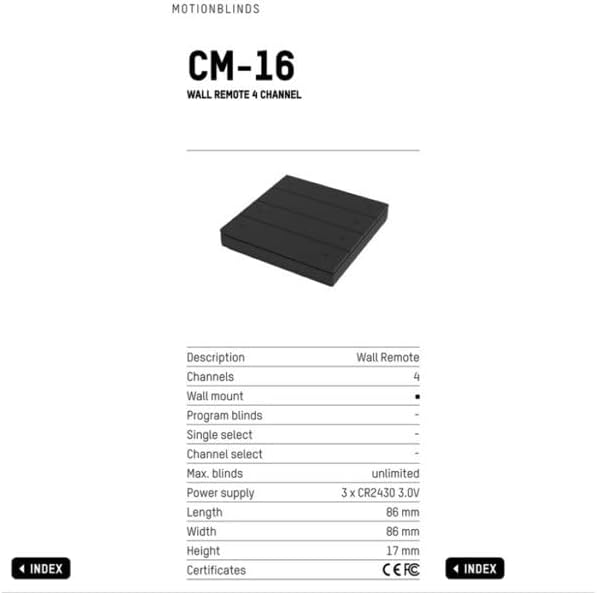
4. irudia: Detailed specifications for the MotionBlinds CM-16-BK Wall Remote. This table provides comprehensive technical data including channels, power supply, dimensions, and certifications.
| Ezaugarri | Xehetasuna |
|---|---|
| Modelo zenbakia | CM-16-BK |
| Deskribapena | Hormako Urrunekoa |
| Kanalak | 4 |
| Kolorea | Beltza |
| Elikatze Hornidura | 3 x CR2430 3.0V |
| Luzera | 86 mm (3.39 hazbete inguru) |
| Zabalera | 86 mm (3.39 hazbete inguru) |
| Altuera | 17 mm (0.67 hazbete inguru) |
| Gehienez Pertsianak | Unlimited (per channel/group) |
| Ziurtagiriak | CE, FC |
| Elementuaren pisua | 4 ontza |
8. Bermea eta Laguntza
8.1 Bermearen informazioa
Specific warranty details for the MotionBlinds Coulisse CM-16-BK remote control are typically provided at the point of purchase or on the manufacturer's official webgunea. Gorde erosketaren egiaztagiria bermearen erreklamazioetarako.
8.2 Bezeroarentzako laguntza
For technical assistance, troubleshooting, or further information regarding your MotionBlinds product, please contact MotionBlinds customer support through their official webwebgunea edo zure erosketarekin emandako harremanetarako informazioa.


