1. Produktua amaitu daview
The Onforu 5-Head 70W Motion Sensor Outdoor Flood Light (Model BDBS70G-5) is a hardwired LED security light designed for outdoor use. It features five adjustable light heads, a built-in motion sensor, and provides 7000 lumens of daylight white illumination. The robust IP65 waterproof design ensures durability in various weather conditions, making it suitable for driveways, garages, gardens, and other outdoor areas.
2. Segurtasun informazioa
- Segurtasun elektrikoa: Installation must be performed by a qualified electrician or a person with sufficient electrical knowledge. Ensure power is turned off at the circuit breaker before installation, wiring, or maintenance.
- Lurreratzea: This fixture must be properly grounded to prevent potential electrical shock.
- liburukiatage: Ziurtatu elikadura hornidura boltage-k aparatuaren eskakizunak betetzen ditu (120 Volt).
- Kanpoko erabilera: Designed for outdoor use. Ensure all connections are sealed and waterproofed according to local electrical codes.
- Beroa: LED lights can generate heat. Do not touch the light heads immediately after operation.
- Begietako babesa: Avoid looking directly into the LED light source when illuminated, as it can cause eye strain or damage.
3. Paketearen edukia
Instalazioa hasi aurretik, egiaztatu osagai guztiak daudela:
- Onforu 5-Head Motion Sensor Flood Light (x1)
- Muntatzeko euskarria (x1)
- Muntatzeko torlojuak eta hormako aingurak
- Hari azkoinak (x3)
- Erabiltzailearen eskuliburua (x1)
- LED Lens (Included as part of the fixture)
4. Konfigurazioa eta instalazioa
This flood light is designed for hardwired installation. Follow these steps carefully:
- Itzali energia: Before starting, ensure the power to the installation area is turned off at the main circuit breaker.
- Prestatu kableatua: Identify the Live (Black), Neutral (White), and Ground (Green/Bare Copper) wires from your electrical box.
- Muntatzeko euskarria: Secure the mounting bracket to the desired surface (wall, soffit, or pillar) using the provided screws and anchors. Ensure it is firmly attached.
- Hari-konexioak: Connect the fixture's wires to your household wiring using the provided wire nuts:
- Black (Fixture) to Black (Household - Live)
- White (Fixture) to White (Household - Neutral)
- Green (Fixture) to Green/Bare Copper (Household - Ground)
- Gailu segurua: Carefully tuck the wires into the junction box and attach the light fixture to the mounting bracket. Ensure a tight seal to prevent water ingress.
- Argi-buruak doitu: Once mounted, adjust the five individual light heads to cover the desired area. Each head can be rotated to direct light as needed.
- Berrezarri boterea: Piztu berriro etengailuan.
Instalazio-altuera gomendatua: 6.5 - 13.1 feet (2 - 4 meters) above the ground for optimal motion detection and lighting coverage.

Figure 4.1: Hardwired Installation Diagram. This image illustrates the wiring connections (Live, Neutral, Ground) and how the fixture attaches to the mounting bracket on a wall.

Figure 4.2: Various Mounting Options. The image displays the flood light installed in three common configurations: under a soffit, on a wall, and on a pillar, demonstrating its versatility.
5. Funtzionamendu-argibideak
The Onforu flood light is designed for automatic operation based on motion detection and ambient light levels.
- Mugimenduaren aktibazioa: The built-in PIR motion sensor detects movement within its sensing range. When motion is detected, the light will automatically turn on for the set duration.
- Argi-buru erregulagarriak: The five light heads can be independently adjusted to direct light precisely where needed, providing broad and customizable illumination.

Figure 5.1: Wide Area Illumination. This image demonstrates the extensive coverage area (up to 1230 sq.ft.) provided by the adjustable 5-head design, illuminating a large backyard at night.

Figure 5.2: Motion Activated Lighting. The image illustrates the motion sensor's functionality, showing a person triggering the light within its 180-degree sensing angle and up to 72.17ft detection distance.
6. Mugimendu-sentsorearen ezarpenak
The motion sensor features adjustable controls for customization:
- Detektatzeko tartea: Adjustable from approximately 19 feet to 72 feet (6 meters to 22 meters).
- Lan egiteko moduak:
- "+" Mode: Light will be triggered both day and night when motion is detected.
- "-" Mode: Light will only be triggered at night when motion is detected.
- Tenporizadorea: Adjustable duration for how long the light stays on after motion detection, typically from 1 to 10 minutes.

Figure 6.1: Motion Sensor Controls. This image shows the three adjustment knobs on the motion sensor for setting detection range, operating mode (day/night), and illumination duration (timer).

Figure 6.2: Flexible Light Panels and Adjustable Motion Sensor. This image highlights the design features, including the ability to adjust the angle of the five light panels and the motion sensor for optimal coverage.
7. Mantentzea
Mantentze-lan erregularrak zure uholde-argiaren errendimendu optimoa eta iraupena bermatzen ditu.
- Garbiketa: Garbitu aldian-aldian argiaren buruak eta mugimendu-sentsorearen lentea oihal leun eta lehor batekin.amp cloth to remove dirt, dust, or debris that may obstruct light output or sensor function. Do not use abrasive cleaners.
- Ikuskapena: Annually inspect the wiring and mounting for any signs of wear, damage, or loosening. Ensure all seals remain intact to maintain IP65 waterproof rating.
- Erabiltzaileak ez du zerbitzurik gabeko piezarik: The LED components are integrated and not user-replaceable. Do not attempt to disassemble the light heads.

Figure 7.1: IP65 Waterproof Design. This image visually confirms the light's resistance to water, snow, heat, and dust, highlighting its suitability for outdoor environments.
8. Arazoak
If you encounter issues with your Onforu flood light, refer to the following common troubleshooting steps:
- Argia ez da pizten:
- Check if the power supply is active at the circuit breaker.
- Egiaztatu kableatu-konexio guztiak ondo eta ondo daudela.
- Ensure the motion sensor is set to the correct working mode (e.g., "+" for day/night, "-" for night only).
- Adjust the ambient light sensor sensitivity if the light is not activating in low light conditions.
- Argia etengabe piztuta mantentzen da:
- Check if the motion sensor is detecting constant movement (e.g., tree branches, pets). Adjust the sensor angle or sensitivity.
- Ensure the timer setting is not set to its maximum duration or a continuous mode if available.
- Light Flashes or Cycles On/Off:
- This could indicate an unstable power supply or a faulty connection. Recheck wiring.
- Ziurtatu mugimendu-sentsorearen lentea garbi eta oztoporik gabe dagoela.
- Motion Sensor Not Detecting:
- Increase the detection range setting on the sensor.
- Ensure the sensor is not obstructed and is facing the desired detection area.
- Verify the installation height is within the recommended range for optimal detection.
If these steps do not resolve the issue, please contact Onforu customer support for further assistance.
9. Zehaztapenak
| Ezaugarri | Zehaztapena |
|---|---|
| Marka | Onforu |
| Ereduaren izena | BDBS70G-5 |
| Energia iturria | Kable elektrikoa |
| Wattage | 70 Watt |
| Distira | 7000 lumen |
| Kolore Tenperatura | 6500 Kelvin (Eguneko Argia) |
| Materiala | Metala, Plastikoa |
| Uraren Erresistentzia Maila | IP65 Iragazgaitza |
| Ezaugarri bereziak | 5 Heads Adjustable, Anti-Rust, Energy Efficient, Motion Sensor, Waterproof |
| Produktuaren neurriak | 16.4"L x 4.7"Z x 5.7"A |
| Elementuaren pisua | 4.51 kilo |
| liburukiatage | 120 Volt |
| Muntatze Mota | Wall Mount, Soffit Mount, Pillar Mount |
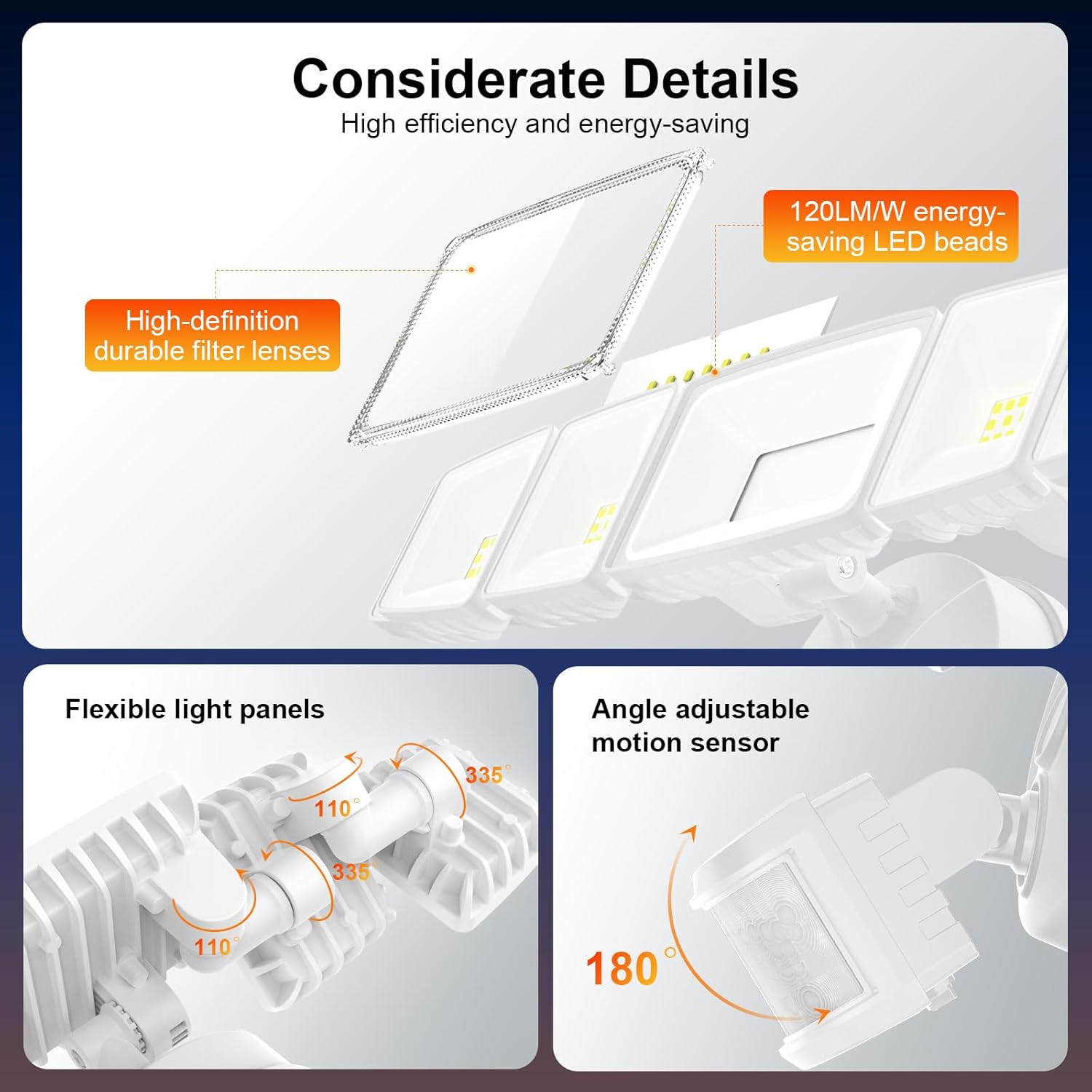
Figure 9.1: Product Dimensions. This image provides a detailed view of the flood light with its key measurements in both millimeters and inches.
10. Bermea eta Laguntza
This Onforu product comes with a limited warranty. For specific warranty details, please refer to the documentation included with your purchase or visit the official Onforu webgunea.
For technical support, troubleshooting assistance, or any questions regarding your product, please contact Onforu customer service. Contact information can typically be found on the product packaging or the official Onforu webgunea.


