Sarrera
Thank you for choosing the Genai True Wireless Earphones. This manual provides detailed instructions on how to set up, operate, maintain, and troubleshoot your new earphones. Please read this manual carefully before use to ensure optimal performance and longevity of your device.
Produktua amaituview
The Genai True Wireless Earphones feature a digital intelligence LED display on the charging case, tap control for easy operation, and Bluetooth 5.0 for stable connectivity. They are designed for comfortable in-ear wear and deliver clear stereo sound.
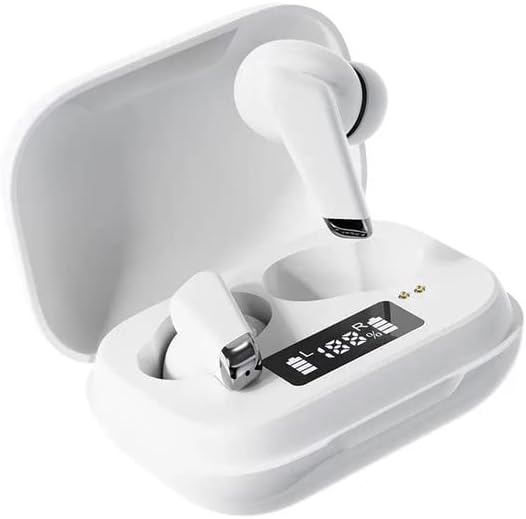
Image: Genai True Wireless Earphones in their charging case, showcasing the digital LED display indicating battery levels.
Ezaugarri nagusiak:
- Wireless Wireless Stereo (TWS): Kablerik gabeko audio esperientzia ezin hobea.
- Sakatu Kontrola: Intuitive touch-sensitive controls for music and calls.
- Digital Intelligence LED Display: Shows real-time battery status of earbuds and charging case.
- Bluetooth 5.0: Haririk gabeko konexio egonkorra eta eraginkorra bermatzen du.
- Diseinu ergonomikoa belarri barrukoan: Comfortable and secure fit.
Konfigurazio Gida
1. Entzungailuak eta zorroa kargatzea
- Hasierako karga: Before first use, fully charge the charging case and earbuds. Place the earbuds into the charging case.
- Konektatu kargagailua: Konektatu kargatzeko kaxa energia-iturri batera USB kable bateragarri bat erabiliz.
- LED pantaila monitorearen pantaila: The digital LED display on the case will show the charging status and battery percentage. Ensure both earbuds and the case are fully charged before proceeding.

Image: The charging case with its digital LED display, indicating the charge level of both the case and the individual earbuds.
2. Zure gailuarekin parekatzea
- Piztu: Open the charging case. The earbuds will automatically power on and enter pairing mode. You may hear an audible prompt.
- Aktibatu Bluetootha: Zure telefonoan edo Bluetooth gaitutako beste gailu batean, joan Bluetooth ezarpenetara eta gaitu Bluetooth.
- Hautatu gailua: Look for "Genai Earphones" (or similar name) in the list of available devices and select it to connect.
- Berrespena: Once successfully paired, you will hear a confirmation sound, and the earbuds will be ready for use.

Image: A visual representation of the Bluetooth 5.0 chipset, highlighting the stable wireless connection technology.
Funtzionamendu-argibideak
The Genai True Wireless Earphones feature intuitive tap controls. The specific functions may vary slightly, but common controls are listed below:
Piztu/Itzali
- Piztu: Open the charging case, or long-press the touch area on both earbuds for a few seconds.
- Itzali: Place the earbuds back into the charging case and close the lid, or long-press the touch area on both earbuds for several seconds until they power off.
Musika erreproduzitzea
- Erreproduzitu/Pausatu: Sakatu bakar batean entzungailu batean.
- Hurrengo ibilbidea: Sakatu birritan eskuineko entzungailuan.
- Aurreko pista: Sakatu bi aldiz ezkerreko entzungailuan.
Deien Kudeaketa
- Deia erantzun/amaitu: Sakatu behin entzungailuetako edozeinetan sarrerako dei batean edo dei aktibo batean zehar.
- Deia baztertu: Sakatu luze entzungailuetako bat sarrerako dei batean zehar.
Ahots Laguntzailea
- Aktibatu Ahots Laguntzailea: Sakatu hiru aldiz entzungailuetako edozeinetan (funtzionalitatea alda daiteke gailuaren arabera).

Image: An illustration showing an earbud comfortably and ergonomically fitted within the ear canal.
Mantentzea
Garbiketa
- Erabili zapi leun, lehor eta lihorik gabeko bat entzungailuak eta kargatzeko zorroa garbitzeko.
- Ez erabili garbitzaile urratzailerik, disolbatzailerik edo aerosol-sprayrik.
- Gently clean the ear tips and speaker mesh to remove any earwax or debris.
Biltegiratzea
- Gorde entzungailuak kargatzeko zorroan erabiltzen ez dituzunean, babesteko eta kargatuta mantentzeko.
- Avoid storing in extreme temperatures, direct sunlight, or high humidity.
Arazoak konpontzea
- Entzungailuak ez dira elkarren artean edo gailuarekin parekatzen:
- Ziurtatu bi entzungailuak kargatuta daudela.
- Jarri bi entzungailuak kargatzeko zorroan berriro, itxi tapa, itxaron segundo batzuk eta ireki berriro tapa.
- On your device, forget/delete the "Genai Earphones" from the Bluetooth list and try pairing again.
- Soinurik ez edo bolumen baxua:
- Egiaztatu zure gailuaren eta entzungailuen bolumen-maila.
- Ziurtatu entzungailuak behar bezala konektatuta daudela gailura.
- Garbitu entzungailuen bozgorailuen sareko hondakin guztiak.
- Kargatzeko arazoak:
- Ziurtatu kargatzeko kablea ondo konektatuta dagoela bai kaxara bai elikatze-iturrira.
- Egiaztatu energia-iturria aktibo dagoela.
- Garbitu entzungailuen eta zorroaren kargatzeko kontaktuak.
Zehaztapenak
| Ezaugarri | Xehetasuna |
|---|---|
| Eredua | B0BX5G53VT |
| Konektibitate Teknologia | Haririk gabekoa (Bluetooth 5.0) |
| Aurikular mota | Erdi irekia |
| Gidari kopurua | 2 |
| Kargatzeko metodoa | Kargatzeko kaxa |
| Entzungailuen alfonbrak | Silikona |
| Gidariaren diametroa | 10 mm |
| Distortsio harmoniko osoa | %0.02 |
| Inpedantzia sorta | 32 Ω arte |
| Materiala | Silikona |
| Belarrien Kokatzea | Belarrian |
| Forma-faktorea | Egiazko Haririk gabekoa |
Bermea eta Laguntza
The Genai True Wireless Earphones come with a 12 hilabeteko bermea from the date of purchase, covering manufacturing defects. For any quality problems or support inquiries, please contact the seller directly through your purchase platform.
We are committed to ensuring 100% customer satisfaction. If you encounter any issues, please do not hesitate to reach out for assistance, including full refunds or replacements as applicable.


