1. Sarrera
This manual provides detailed instructions for the assembly, operation, and maintenance of your BONTEC FITW-2 Mobile TV Stand. Please read this manual thoroughly before installation and use to ensure safe and correct operation. Retain this manual for future reference.
The BONTEC FITW-2 is a versatile mobile TV stand designed to accommodate most 30-70 inch plasma, LCD, and LED screens weighing up to 40 kg. It features adjustable height, swivel functionality, two tempered glass shelves for media devices, and lockable wheels for easy mobility.

1.1. irudia: Amaituview of the BONTEC FITW-2 Mobile TV Stand.
2. Segurtasun informazioa
OHARRA: Failure to read and follow all instructions may result in personal injury or property damage. The manufacturer is not responsible for damage or injury caused by incorrect assembly or use.
- Ziurtatu osagai guztiak daudela eta kalterik gabe muntatu aurretik. Ez erabili kaltetutako piezak.
- Do not exceed the maximum weight capacity of 40 kg (88 lbs) for the TV and 60 kg (bottom shelf) / 10 kg (top shelf) for the shelves.
- This TV stand is designed for screens between 30 and 70 inches. Verify your TV's VESA pattern is compatible (75x75mm to 600x400mm).
- Muntatu euskarria gainazal leun eta garbi batean marradurak saihesteko.
- Always use two people for lifting and mounting the TV to the stand.
- Ensure all screws are securely tightened before moving or using the stand. Do not overtighten.
- Lock the wheels when the stand is in a stationary position to prevent accidental movement.
- Keep children and pets away from the stand during assembly and operation.
- If your TV's height is less than 640 x 425 mm, the mounting arms may protrude beyond the back of the TV. Consider this during installation.
3. Paketearen edukia
Please verify that all parts are included and undamaged. If any parts are missing or damaged, contact BONTEC customer support.
- Laguntza-zutabe nagusia
- Base Plate (with pre-installed wheels)
- Upper Tempered Glass Shelf
- Lower Tempered Glass Shelf
- Telebista muntatzeko euskarria
- TV Mounting Arms (2 pieces)
- Set of Wheels (4 pieces, 2 lockable)
- Hardware Kit (screws, washers, spacers, Allen keys, wrench)
- Kableak kudeatzeko klipak
4. Muntaketa eta konfigurazio argibideak
Follow these steps carefully for proper assembly. It is recommended to have a second person assist with the assembly, especially when mounting the TV.
4.1. urratsa: Gurpilak oinarrira lotu
Attach the four wheels to the base plate. Ensure the two lockable wheels are positioned at the front for easy access. Tighten securely with the provided wrench.
Step 4.2: Assemble Main Column and Shelves
Secure the main support column to the base plate. Then, attach the upper and lower tempered glass shelves to the main column using the provided hardware. The shelves can be adjusted to different heights during this step or later. Ensure the triangular steel brackets provide stable support for the glass shelves.
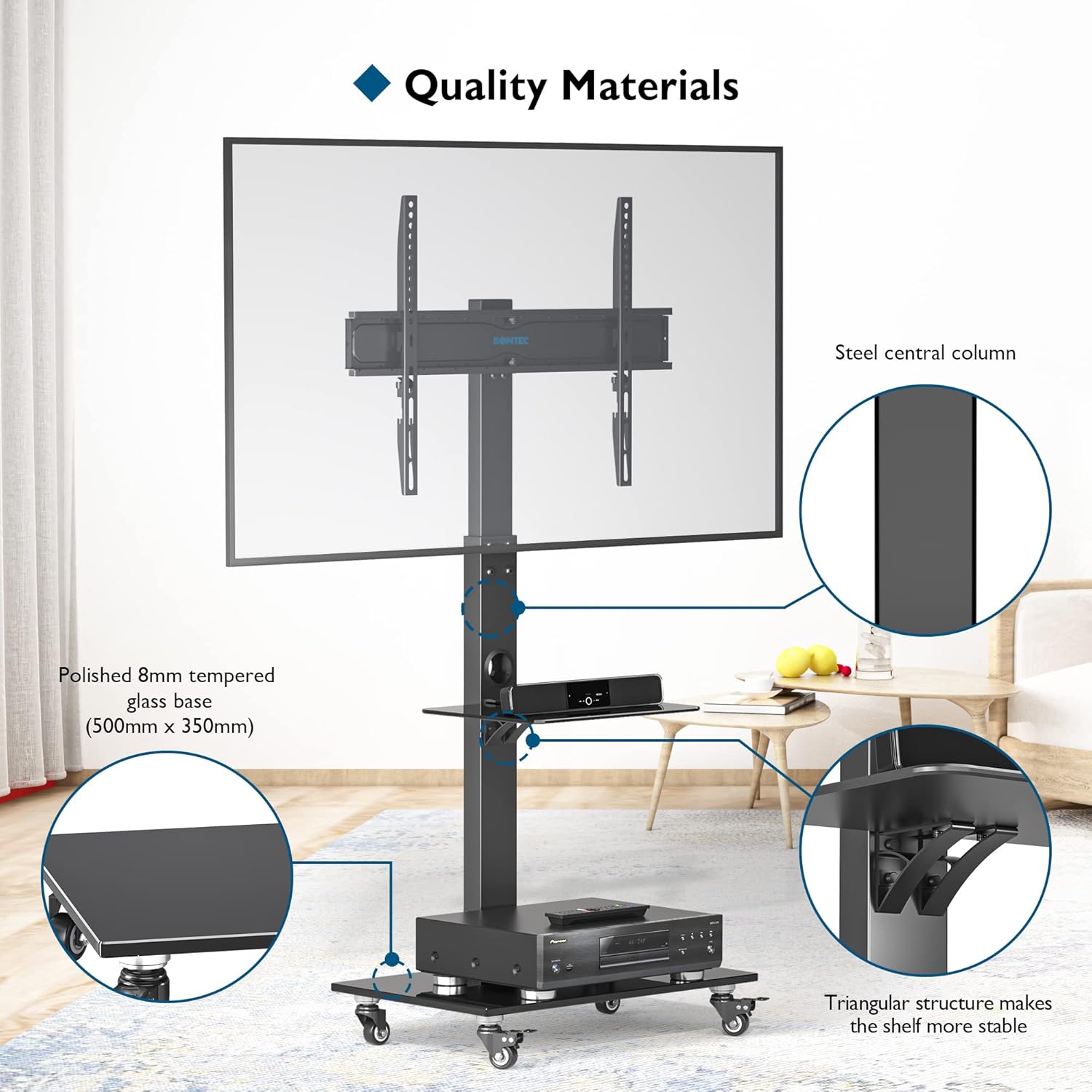
Image 4.2: Illustration of the main column, base, and shelf support structure.
Step 4.3: Attach TV Mounting Bracket to Column
Attach the TV mounting bracket to the main support column. This bracket allows for height adjustment and swivel. Secure it firmly using the designated bolts.
4.4. urratsa: Lotu muntatzeko besoak telebistara
Identify the VESA mounting holes on the back of your TV. Select the appropriate screws, washers, and spacers from the hardware kit that fit your TV. Attach the two TV mounting arms to the back of your TV. Ensure they are level and securely fastened.
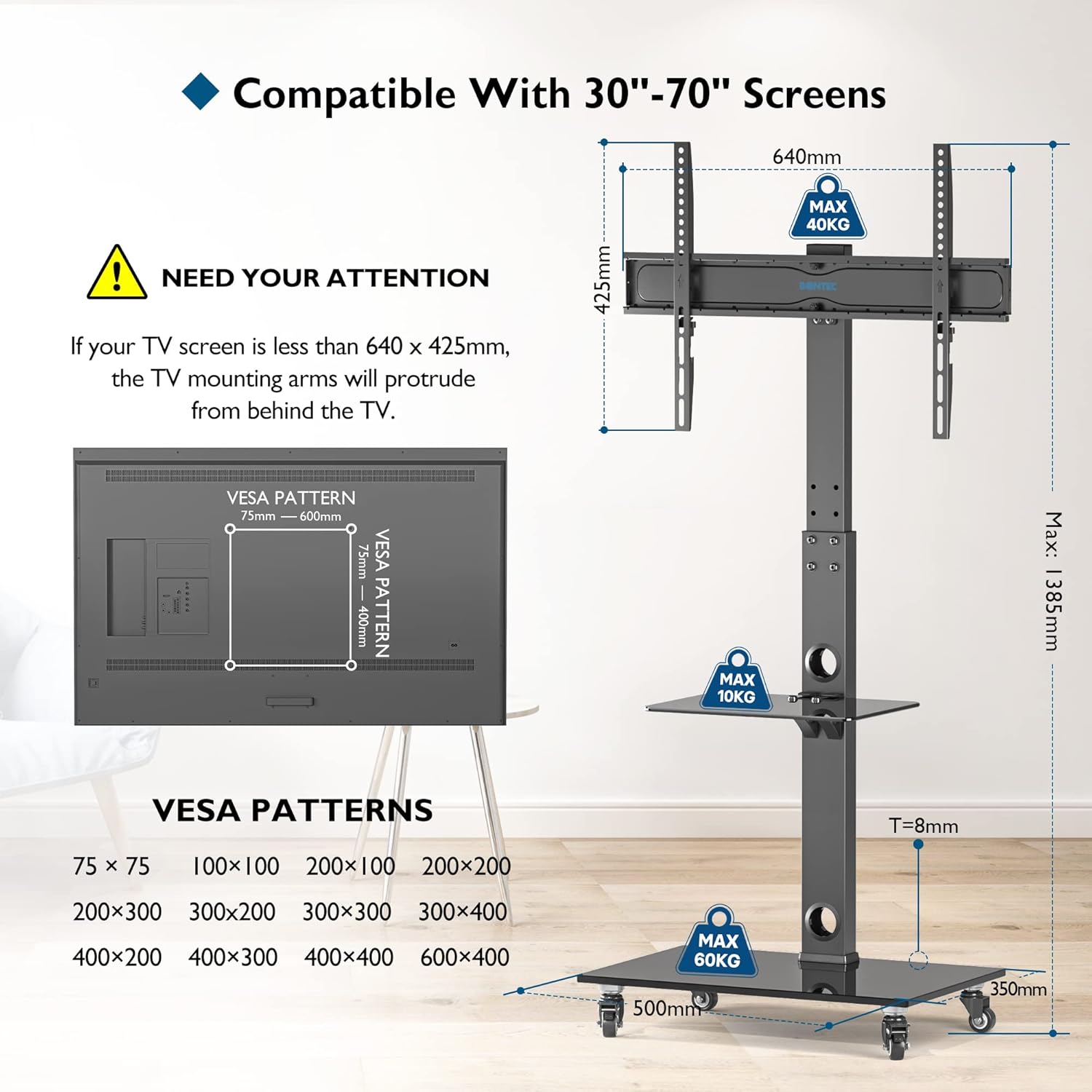
Image 4.4: VESA compatibility and dimensions. Note the warning regarding TV size and mounting arm protrusion.
4.5. urratsa: Telebista euskarrira muntatu
With assistance, carefully lift your TV and hook the mounting arms onto the TV mounting bracket on the stand. Ensure the TV is securely seated. Use the safety screws or locking mechanism to prevent the TV from accidentally disengaging from the bracket.
5. Funtzionamendu-argibideak
5.1: Height Adjustment
The TV mount offers 6 levels of height adjustment, up to a maximum height of 1310mm. The mounting arms can be adjusted in 2 steps, each by 50mm. The central column also features 3 levels of height adjustment, each by 40mm. To adjust the height, loosen the securing bolts, reposition the TV or shelves to the desired height, and then securely tighten all bolts.

Image 5.1: Height adjustment options for optimal viewing.
5.2: Swivel Function
The TV mounting bracket allows for a swivel of up to ±37 degrees. Gently push the TV to the desired angle. Ensure the stand remains stable during adjustment.
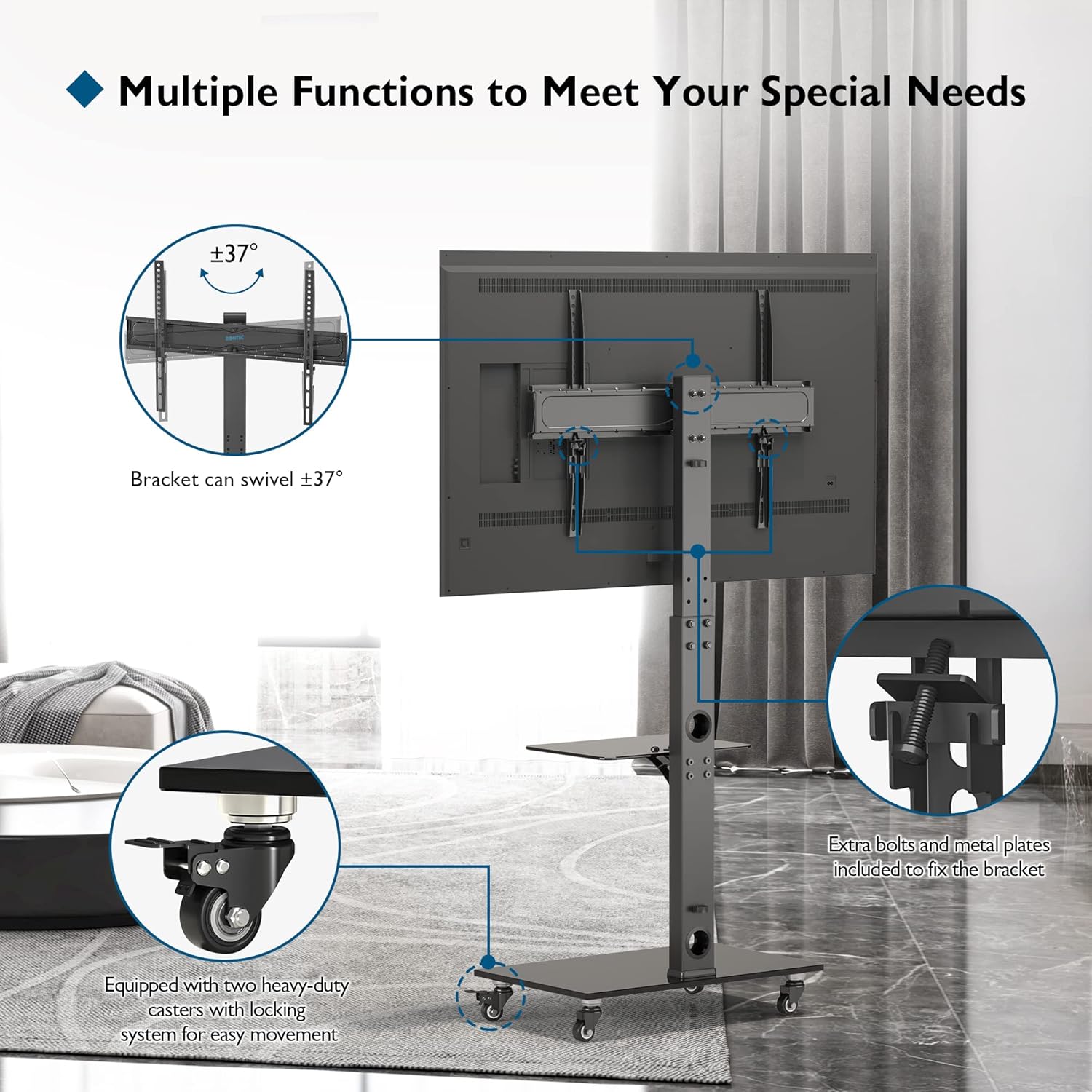
Image 5.2: Swivel capability and wheel locking mechanism.
5.3: Mobility and Locking Wheels
The stand is equipped with four 360° rotating wheels for easy movement. Two of these wheels are lockable. To move the stand, unlock the wheels. To secure the stand in a stationary position, press down on the locking levers on the two lockable wheels until they click into place. The rubber wheels are designed to prevent floor scratches.
5.4: Cable Management
Utilize the integrated cable management clips and holes in the central column to route and organize your TV and device cables. This helps maintain a tidy appearance and prevents cable entanglement.

Image 5.4: Cable management system for an organized setup.
6. Mantentzea
- Garbiketa: Erabili biguna, damp cloth to clean the stand. Avoid abrasive cleaners or solvents that may damage the finish or tempered glass.
- Aldizkako egiaztapenak: Regularly check all screws and bolts to ensure they remain tight. Re-tighten if necessary, but do not overtighten.
- Beira zaintzea: Handle tempered glass shelves with care. Avoid placing heavy or sharp objects on them that could cause scratches or cracks.
7. Arazoak
- Euskarriak ezegonkorra da:
- Ziurtatu torloju eta torloju guztiak ondo estututa daudela.
- Verify the TV weight and size are within the specified limits.
- Ziurtatu euskarria gainazal lau eta mailakatu batean dagoela.
- Telebista ez dago maila berean:
- Check that the TV mounting arms are attached evenly to the back of the TV.
- Adjust the leveling screws (if applicable) on the TV mounting bracket.
- Wheels not rolling smoothly or locking:
- Check for debris caught in the wheels.
- Ensure the locking mechanism is fully disengaged when moving the stand.
- Ensure the locking mechanism is fully engaged when stationary.
- Mounting arms protrude from behind TV:
- This can occur if your TV's height is less than 640 x 425 mm, as indicated in the compatibility diagram. This is a design characteristic for smaller TVs within the supported range and does not affect functionality or safety if installed correctly.
8. Zehaztapenak
| Eredua | FITW-2 |
| Marka | BONTEC |
| Pantailaren tamainaren bateragarritasuna | 30 - 70 hazbete |
| Maximum TV Weight Capacity | 40 kg (88 lb) |
| VESA bateragarritasuna | 75x75, 100x100, 200x100, 200x200, 200x300, 300x300, 300x400, 400x200, 400x300, 400x400, 600x400 mm |
| Upper Shelf Dimensions | 550 x 350 mm |
| Goiko Apalaren Karga-ahalmena | 10 kg |
| Lower Shelf Dimensions | 380 x 250 mm |
| Apal txikiagoko karga-ahalmena | 60 kg |
| Altuera doitzea | 6 levels (up to 1310mm total height); Mounting arm: 2 steps (50mm each); Board: 3 steps (40mm each) |
| Angelu birakaria | ±37° |
| Materiala | Beira tenplatua, altzairua |
| Kolorea | Beltza |
| Product Dimensions (Parcel) | 68 x 40.4 x 8.8 cm |
| Product Weight (Parcel) | 12.24 kg |
9. Bermea eta Laguntza
BONTEC products are manufactured with quality and care. For warranty information or technical support, please refer to the warranty card included with your product or visit the official BONTEC website. If you encounter any issues or have questions regarding your TV stand, please contact BONTEC customer service for assistance.
Informazio gehiago eta harremanetarako datuak aurki ditzakezu hemen: BONTEC Store Page.


