1. Sarrera eta Overview
This manual provides detailed instructions for the installation, operation, and maintenance of your Yansoo 3-Channel Dash Cam. Please read this manual thoroughly before using the device to ensure proper functionality and safety.
Produktuaren Ezaugarriak:
- 3 kanaleko grabaketa: Simultaneously captures video from the front (170° wide-angle), rear (165°), and inside (140°) of your vehicle.
- Bereizmen handiko bideoa: Supports 1080P Front video + AHD-720P Rear video + AHD-720P Inside video.
- Gaueko ikuspegi hobetua: Features 4 unique infrared LED fill lights, F1.8 aperture, and WDR technology for optimal performance in low light.
- Larrialdiko blokeoa (G-sentsorea): Automatically detects sudden shocks or collisions and locks the current video footage gainidazketa saihesteko.
- Loop grabaketa: Continuously records and automatically overwrites the oldest unlocked video files memoria txartela beteta dagoenean.
- Aparkaleku monitorea: Activates recording when motion or shocking is detected while parked (requires separate hardwire kit for 24/7 monitoring).
- Adjustable Interior Camera: The interior lens can be rotated 60° for flexible positioning.
Paketearen edukia:
- Yansoo 3-Channel Dash Cam Unit
- Atzeko kamera kablearekin
- Suction Cup Mendia
- Autoko kargagailua (C motakoa)
- USB datu-kablea
- Erabiltzailearen eskuliburua
- Mounting Hardware for Rear Camera
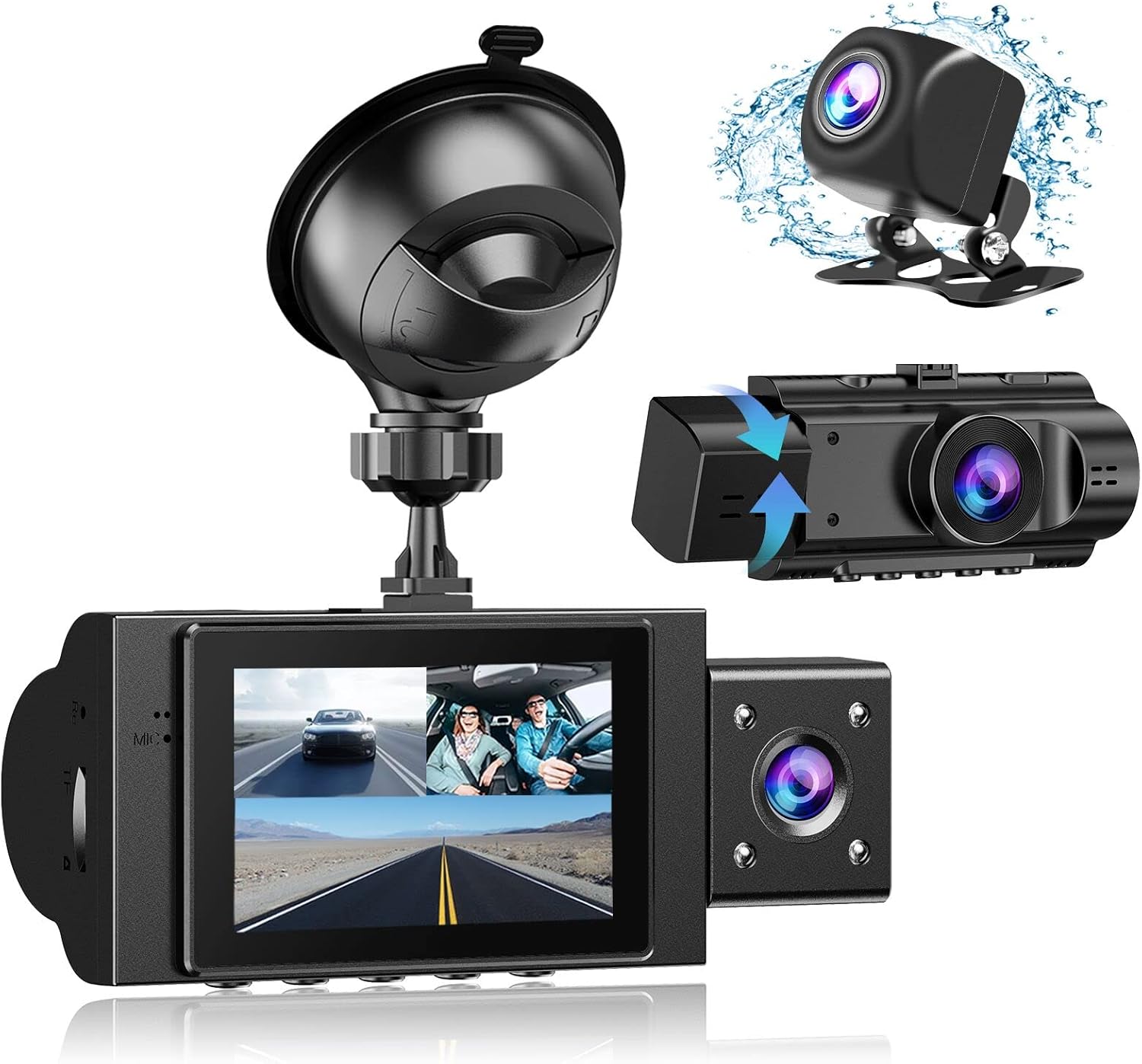
Image: The Yansoo 3-Channel Dash Cam unit with its suction cup mount and the separate rear camera, illustrating the complete package.
2. Konfigurazioa
2.1 Memoria txartela sartzea
The dash cam supports Micro Memory cards up to 64GB (Class 10 or above recommended, not included). Please format the card in the camera menu before first use.
- Locate the memory card slot on the side of the dash cam.
- Insert the Micro Memory card into the slot until it clicks into place.
- Txartela kentzeko, astiro-astiro bultzatu atera arte.

Image: A four-panel illustration showing the steps to insert a Micro SD card into the dash cam's slot.
2.2 Kamera muntatzea
Mount the main dash cam unit to your windshield using the provided suction cup mount. Choose a location that does not obstruct your view gidatzen ari zaren bitartean.
- Garbitu ondo haizetakoan aukeratutako eremua.
- Lotu bentosa-euskarria aginte-kameraren unitateari.
- Sakatu bentosa sendo haizetakoaren kontra eta biratu palanka finkatzeko.
- Egokitu kameraren angelua argi ikusteko view aurretik dagoen errepidearena.

Image: The Yansoo 3-Channel Dash Cam mounted on a car's windshield, showing its position relative to the driver's view.
2.3 Atzeko kamera instalatzea
The rear camera provides a view of the vehicle's rear. It can be installed inside the rear window or externally above the license plate.
- Konektatu atzeko kameraren kablea aginte-kameraren unitate nagusira.
- Route the cable neatly along the vehicle's interior trim to the rear.
- Mount the rear camera in the desired location, ensuring a clear view.

Image: A diagram illustrating the recommended cable routing path for the dash cam and rear camera within a car's interior.
2.4 Energia-konexioa
Connect the dash cam to your vehicle's cigarette lighter socket using the provided car charger. The camera will automatically power on and begin recording when the vehicle starts.

Image: The Yansoo 3-Channel Dash Cam connected to a power source, indicating its readiness for operation.
3. Funtzionamendu-argibideak
3.1 Oinarrizko funtzionamendua
- Piztu/Itzali: The camera powers on/off automatically with your vehicle's ignition. You can also manually power on/off by pressing and holding the power button.
- Grabaketa hasi/gelditu: Recording starts automatically when the camera powers on. Press the "OK" button to manually stop or start recording.
- Aldatu pantaila Views: Press the "Up" button to cycle through different display modes (Front, Inside, Rear, Picture-in-Picture combinations).
Video: Demonstration of the Yansoo X88 Dash Cam's recording capabilities, showcasing its ability to capture clear video footage.
Video: Footage from the Yansoo X88 Dash Cam demonstrating its clear day and night recording capabilities.
Video: A demonstration of the Yansoo X88 Dash Cam's 1080P Full HD recording quality.
3.2 Menuen ezarpenak
To access the menu settings, stop recording (if active) by pressing the "OK" button, then press the "M" button twice.
- Ebazpena: Adjust video resolution for front, inside, and rear cameras.
- Loop grabaketa: Set the duration of video segments (e.g., 1, 3, 5 minutes).
- G-sentsorearen sentsibilitatea: Adjust the sensitivity of the emergency lock feature.
- Aparkaleku monitorea: Enable or disable the parking monitoring function.
- Data/Ordua: Ezarri data eta ordu egokia denbora zehatza lortzekoamps grabazioetan.
- Hizkuntza: Select your preferred language for the menu.
Video: A step-by-step guide on how to set the date and time on the Yansoo Dash Cam.
4. Mantentzea
- Ohiko formatua: Format the memory card regularly (e.g., once a month) to prevent data corruption and ensure optimal recording performance.
- Lenteen garbiketa: Keep the camera lenses clean using a soft, lint-free cloth. Avoid abrasive materials that could scratch the lens.
- Firmware eguneraketak: Check the official Yansoo webwebgunea, errendimendua hobetzeko eta funtzio berriak gehitzeko firmware eguneratze eskuragarri daudenak ikusteko.
- Tenperatura kontuak: Saihestu kamera denbora luzez tenperatura altuetan jartzea.
5. Arazoak
| Arazoa | Kausa posiblea | Irtenbidea |
|---|---|---|
| Kamera ez da pizten. | No power from cigarette lighter; loose connection. | Check car charger connection; ensure vehicle ignition is on. |
| Grabaketa ustekabean gelditu da. | Memory card full or corrupted; G-Sensor triggered. | Format memory card; adjust G-Sensor sensitivity. |
| Bideoa footage lausoa da. | Protective film on lens; dirty lens. | Remove protective film; clean lenses with a soft cloth. |
| Data/ordua okerra da. | Date/Time not set or battery low. | Set Date/Time in menu; ensure continuous power supply. |
| Camera freezes or malfunctions. | Softwarearen akatsa. | Use a needle to press the "RE" (Reset) button. |
6. Zehaztapenak
| Ezaugarri | Xehetasuna |
|---|---|
| Produktuaren neurriak | 4.13 x 1.57 x 1.77 hazbete |
| Elementuaren pisua | 1.23 kilo |
| Bideo Harrapaketa Ebazpena | 1080p (Front), 720p (Inside & Rear) |
| Eremua View | 170° (Front), 140° (Inside), 165° (Rear) |
| Konektibitate Teknologia | USBa |
| Ezaugarri Berezia | G-Sensor, Loop Recording, Parking Monitor, Night Vision |
| Muntatze Mota | Xurgapen Mendia |
| Fabrikatzailea | Yansoo |
7. Bermea eta Laguntza
Yansoo offers comprehensive after-sales support for your dash cam.
- Bermea: 1-YEAR warranty from the date of purchase.
- Zerbitzu Teknikoa: 7*24 hours technical service is available.
- Harremanetarako: For any questions or issues, please contact our customer service team via Amazon or the after-sales email provided in the original product packaging.
- Erabiltzailearen eskuliburua (PDF): Erabiltzailearen eskuliburuaren bertsio digitala deskargatzeko eskuragarri dago hemen.


