1. Sarrera
This manual provides detailed instructions for the Loutoc Voice Remote Control, Model 1385a. This remote is designed as a replacement and upgrade for specific Samsung Smart TVs from 2021 and 2022, offering voice control and quick access to popular streaming services. It features a fast response time of 0.5 seconds and durable silicone buttons tested for over 15,000 clicks. Please read this manual carefully to ensure proper use and optimal performance.

Image 1: Loutoc Voice Remote Control, front view.
2. Bateragarritasuna
The Loutoc Voice Remote Control (Model 1385a) is specifically compatible with 2021/2022 Samsung Neo QLED / Crystal UHD 4K Smart TVs that have Alexa Built-in. It is designed to replace or function similarly to the following Samsung TV remote models with voice function:
- TM2180A (BN68-11642A, BN68-11929A, BN68-11929B, BN68-11929D)
- TM2180E (BN68-11645A, BN68-11645G)
- TM2280E (BN68-13842D, BN68-13842H, BN68-13842J)
- BN68-11645D
Oharra: This remote control may not be fully compatible with Samsung TVs from other years or models that do not support voice control or the listed remote models.

Image 2: The remote is compatible with 2021/2022 Samsung Neo QLED and Crystal UHD 4K Smart TVs with Alexa Built-in.

Image 3: Visual representation of compatible Samsung TV remote models.
3. Konfigurazioa
3.1. Bateriaren instalazioa
The Loutoc Voice Remote Control requires bi AAA bateria funtzionamendurako. Bateriak instalatzeko:
- Kokatu bateriaren konpartimentuaren estalkia urrutiko agintearen atzealdean.
- Slide the cover downwards or press the latch (if present) to open it.
- Sartu bi AAA pila, ziurtatuz terminal positiboa (+) eta negatiboa (-) konpartimentuaren barruko markekin behar bezala lerrokatuta daudela.
- Itxi bateriaren konpartimenduaren estalkia ondo.
3.2. Parekatzeko jarraibideak
For full functionality, including voice control and advanced features, the remote control must be paired with your Samsung Smart TV. If the remote does not automatically pair upon battery installation, follow these steps:
- Ziurtatu zure Samsung Smart TV piztuta dagoela.
- Point the Loutoc remote control directly at the front of your TV.
- Eduki sakatuta aldi berean "Itzuli" botoia (gezi kurbatua) eta "Play/Pause" button (triangle and two vertical lines) for at least 3 to 5 seconds.
- Release the buttons when a pairing message appears on your TV screen, indicating that the pairing process has begun or is complete.
- The TV screen should display a confirmation message once pairing is successful.
If pairing fails, ensure the batteries are correctly inserted and try again. Maintain a clear line of sight to the TV during the pairing process.
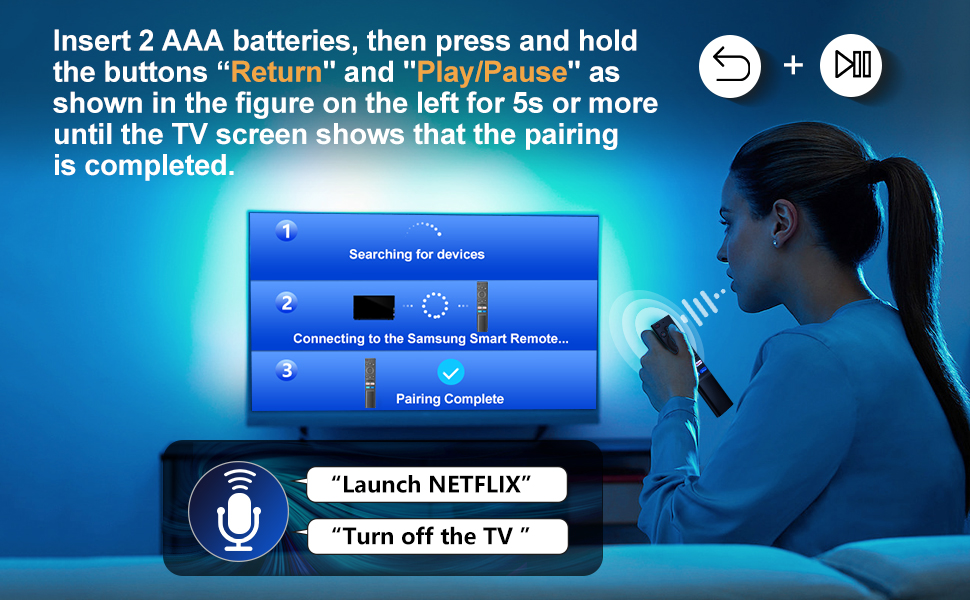
Image 4: Visual guide for pairing the remote control with your Samsung Smart TV by holding the Return and Play/Pause buttons.
4. Funtzionamendu-argibideak
The Loutoc Voice Remote Control offers intuitive navigation and quick access to various TV functions and streaming services.
4.1. Botoien funtzioakview
Refer to the diagram below for a detailed overview of each button's function:

Image 5: Labeled diagram of the Loutoc Voice Remote Control buttons and their functions.
| Botoia/Ezaugarri | Deskribapena |
|---|---|
| Boterea | Sakatu telebista pizteko edo itzaltzeko. |
| Mikrofonoa / LED | Used as MIC when using voice recognition with the remote control. The LED indicates remote activity. |
| Ahots Laguntzailea | Press and hold this button to speak commands to the voice assistant (e.g., Alexa). Supported languages and features may vary by geographical region. |
| Color / Number button (123) | Press once to display the virtual numeric pad and color buttons. Use these to access additional options or enter numbers/text. Press and hold for 1 second or more to access the TTX menu. |
| Anitza View | Press this button directly to enter the Multi View function. Press and hold for 1 second or more to access the Shortcuts menu screen. |
| Directional buttons (Up, Down, Left, Right) | Moves the focus and changes values on the TV's menu. |
| Hautatu | Selects or runs a focused item. When pressed while watching a broadcast program, detailed program information appears. |
| Itzuli | Returns to the previous menu. When pressed for 1 second or more, the running function is terminated. When pressed while watching a program, the previous channel appears. |
| Smart Hub (Home) | Hasierako pantailara itzultzen da. |
| Erreproduzitu/Pausatu | Controls media playback. Use to pause/play content. When pressed, the playback controls appear. Using these controls, you can control the media content that is playing. To use Game Bar, press and hold the button in Game Mode. Game Bar may not be supported depending on the model or geographical area. |
| Bolumena (+/-) | Moves the button up or down to adjust the volume. To mute the sound, press the button. When pressed for 1 second or more, the Accessibility Shortcuts menu appears. |
| Kanala (Gora/Behera) | Moves the button up or down to change the channel. To see the Guide screen, press the button. When pressed for 1 second or more, the Channel List screen appears. |
| Launch App buttons (NFLX, Rakuten TV, Prime Video, Dis) | Press each button to launch its respective application directly. |
4.2. Voice Control Function
The remote features a dedicated voice control button, allowing you to interact with your Samsung Smart TV using voice commands. This function is particularly useful for searching content, changing settings, or controlling smart home devices connected to your TV's voice assistant.
- Eduki sakatuta Ahots Laguntzailea botoia (mikrofonoaren ikonoa).
- Speak your command clearly into the microphone located on the remote.
- Askatu botoia hitz egiten amaitutakoan.
Examples of commands include: "Launch Netflix", "Turn off the TV", "Bilatu action movies".

Image 6: The remote control highlighting the voice function button.

Image 7: A user demonstrating the voice control feature to launch applications or control the TV.
4.3. Quick Access Shortcut Buttons
The remote includes four dedicated shortcut buttons for instant access to popular streaming applications:
- NFLX: Launches Netflix.
- Rakuten telebista: Launches Rakuten TV.
- Prime Video: Launches Amazon Prime Video.
- Dis: Launches Disney+.

Image 8: Close-up of the dedicated shortcut buttons for streaming services.
5. Mantentzea
To ensure the longevity and proper functioning of your Loutoc Voice Remote Control, follow these maintenance guidelines:
- Garbiketa: Erabili zapi leun eta lehor bat urrutiko agintea garbitzeko. Zikinkeria egoskorra bada, garbitu pixka bat.ampGarbitu oihalak urarekin edo garbitzaile leun eta ez-urratzaile batekin. Saihestu produktu kimiko gogorrak edo material urratzaileak erabiltzea.
- Bateria ordezkatzea: Replace batteries when the remote's response becomes sluggish or it stops functioning. Always replace both batteries at the same time with new ones of the same type (AAA).
- Biltegiratzea: Gorde urrutiko agintea leku fresko eta lehor batean, eguzki-argitik, muturreko tenperaturetatik eta hezetasun handitik babestuta.
- Saihestu tantoak: Babestu urrutiko agintea kolpe fisikoetatik, erorketek barneko osagaiak kaltetu baititzakete.
6. Arazoak
If you encounter issues with your Loutoc Voice Remote Control, refer to the following common problems and solutions:
- Urrunekoek ez dute erantzuten:
- Egiaztatu bateriak behar bezala sartuta dauden eta nahikoa karga duten. Beharrezkoa bada, ordezkatu itzazu.
- Ziurtatu urrutiko agintearen eta telebistaren artean oztoporik ez dagoela.
- Re-pair the remote control with your TV by following the "Pairing Instructions" in Section 3.2.
- Ahots-kontrola ez dabil:
- Ensure the remote is properly paired via Bluetooth/RF (not just infrared).
- Make sure you are pressing and holding the Voice Assistant button while speaking.
- Speak clearly and close to the microphone on the remote.
- Check your TV's settings to ensure the voice assistant feature is enabled and configured correctly.
- Delayed response or intermittent functionality:
- This can sometimes occur if the remote is not fully paired or if there's interference. Try re-pairing the remote.
- Ensure you are within the effective operating range (up to 8 meters / 26 feet).
- Ordeztu bateriak baxuak badira.
- Specific shortcut buttons not working:
- Ensure your TV has the corresponding application installed and updated.
- Verify that the remote is correctly paired.
Konponbide hauek saiatu ondoren arazoa konpontzen ez bada, jarri harremanetan bezeroarentzako arreta-zerbitzuarekin.
7. Zehaztapenak
| Ezaugarri | Xehetasuna |
|---|---|
| Marka | Loutoc |
| Modelo zenbakia | 1385a |
| Energia iturria | 2 x AAA bateria (ez daude barne) |
| Konektibitate Teknologia | Bluetooth/RF (for pairing and voice control), Infrared (for basic functions) |
| Gehienezko irismena | Gehienez 8 metro (26 oin) |
| Kontrolagailu mota | Ahots-kontrola, botoien kontrola |
| Botoi kopurua | Approx. 20 (including directional pad) |
| Ezaugarri bereziak | Ergonomic design, No programming required (after pairing), Lightweight, Universal (for compatible Samsung models) |
| Kolorea | Beltza |
| Neurriak (L x W x H) | Gutxi gorabehera 19.7 x 4.8 x 1.5 cm (7.76 x 1.89 x 0.59 hazbete) |
| Pisua | Gutxi gorabehera 40 gramo (1.41 ontza) |
| Jatorrizko Herrialdea | Txina |

Image 9: Dimensions of the Loutoc Voice Remote Control.
8. Bermea eta Laguntza
Loutoc is committed to providing quality products and customer satisfaction. If you have any questions regarding your Loutoc Voice Remote Control or encounter any issues, please do not hesitate to contact our customer support team.
- Bezeroarentzako arreta: For inquiries about your order or product, please contact us directly. We aim to respond within 12 hours on business days.
- Bermea: Specific warranty details may vary. Please refer to your purchase documentation or contact customer support for more information.
