Produktua amaituview
The WOLFBOX i05 Dash Cam is a high-performance front and rear dash camera system designed to provide comprehensive road coverage and enhanced driving safety. It captures crystal-clear panoramic footage with its front 4K and rear 1080p cameras, offering wide viewing angles to minimize blind spots. Equipped with advanced features such as GPS, Wi-Fi, WDR, HDR, Night Vision, and Loop Recording, the i05 ensures reliable performance in various driving conditions.
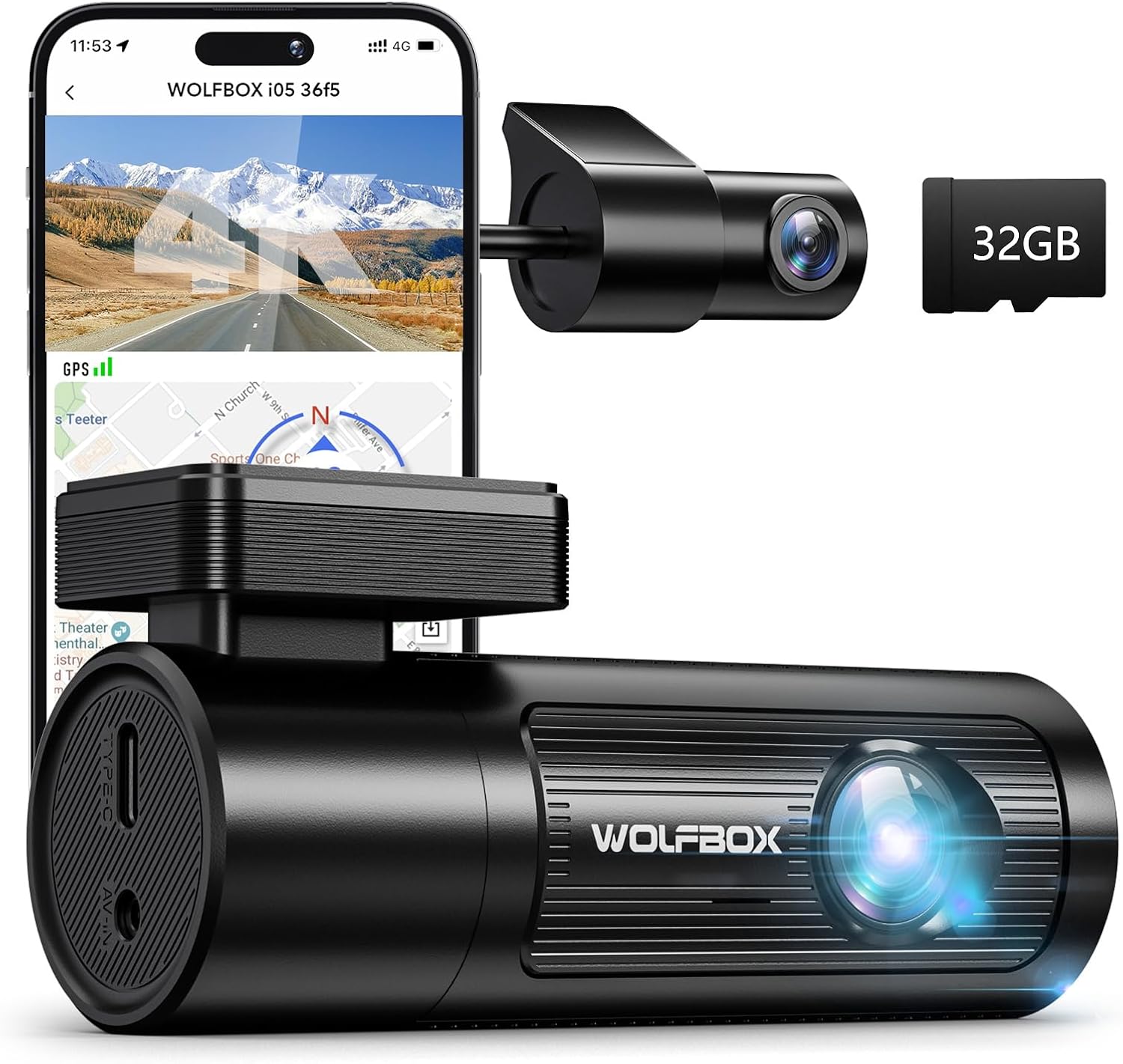
Figure 1: WOLFBOX i05 4K Dash Cam with included 32GB SD card and rear camera.
Kutxan dagoena
Upon unboxing your WOLFBOX i05 Dash Cam, please verify that all the following components are included:
- i05 Dash Cam * 1
- 1080P Rear Camera * 1
- 11.5ft Power Supply Cable with Car Charger * 1
- 3M eranskailua * 2
- Erabiltzailearen eskuliburua
Konfigurazioa eta Instalazioa
The WOLFBOX i05 Dash Cam is designed for straightforward installation. Follow these steps for optimal setup:
1. Dash Cam-aren muntaketa
- Garbitu kamera muntatuko den haizetakoaren eremua. Ziurtatu hautsik eta koiperik gabe dagoela.
- Attach one of the 3M stickers to the dash cam mount.
- Carefully position the dash cam on the windshield, ensuring it does not obstruct your view. Use the built-in level (if available on your model) for precise alignment.
- Press firmly to secure the adhesive mount to the windshield.

Figure 2: The i05 dash cam features a center point scale for quick measurement and layout, and can be installed with an electrostatic sticker to prevent residual marks.
2. Connecting the Rear Camera
- Attach the 1080P rear camera to the rear window.
- Konektatu atzeko kameraren kablea aginte-kameraren unitate nagusira.
- Route the rear camera cable neatly along the vehicle's interior trim.
Figure 3: The rear camera attaches to the rear window with a simple one-wire connection.
3. Dash Cam-ari energia ematea
- Connect the 11.5ft power supply cable to the dash cam.
- Konektatu autoko kargagailuaren muturra zure ibilgailuaren 12V-ko entxufean (zigarro-pizgailuaren entxufean).
- Route the power cable along the edge of the windshield and dashboard to keep it tidy and out of the way.
4. Hardwire Kit Installation (Optional)
For continuous power and parking monitoring features, a hardwire kit (sold separately, ASIN: B09X1L1GMX) is recommended. The installation process involves connecting three wires to your vehicle's fuse box.
Video 1: WOLFBOX Hardwire Kit Installation Guide. This video demonstrates the process of installing the hardwire kit for continuous power supply to the dash cam.
Hardwire Kit Connection Steps:
- Kokatu fusibleen kutxa: The fuse box location varies by vehicle. For BMWs, it's typically in the trunk. Consult your vehicle's manual for the exact location.
- Route the Hardwire Kit Cable:
- Reserve a section of wire near the dash cam.
- Use a crowbar tool to hide the remaining wire along the gap of the front windshield.
- Continue routing the cable through the A-pillar.
- Hide the cable along the gap between the car body and the ceiling on the passenger side.
- Route the cable between the rear seat and the ceiling.
- Remove the door rubber strips, plastic housing, and interior trunk trim to thread the hardwire kit to the trunk.
- Connect the Wires to the Fuse Box: The hardwire kit includes three wires: red, yellow, and black.
- Red Wire (ACC): Connect to an ACC (Accessory) terminal in the fuse box. This terminal receives power only when the car's ignition is on. Examples of ACC terminals include DOME, RADIO, TAIL, EFI, TEL, ECU-IG, ECU-B.
- Yellow Wire (B+): Connect to a B+ (Battery Positive) terminal. This terminal provides constant power, even when the car is off. Examples of B+ terminals include POWER, CB DOOR.
- Kable beltza (lurra): Connect to a metal part of the car's chassis for grounding.
Note: Some car models have a delayed power-off feature for the ACC terminal. Wait until power is completely cut off before testing. Refer to your fuse box diagram for specific current information for each terminal.
Funtzionamendu-argibideak
1. Piztu/Itzali
- The dash cam will automatically power on and begin recording when connected to a power source and the vehicle's ignition is turned on.
- It will automatically power off when the vehicle's ignition is turned off (unless hardwired for parking monitoring).
2. Bideo Grabaketa
The i05 dash cam records simultaneously from both front and rear cameras, providing comprehensive coverage.
- Aurrealdeko kamera: Records in 4K UHD (2160p) with a 170° wide-angle field of view.
- Atzeko kamera: Records in 1080p with a 150° wide-angle field of view.
- Loop grabaketa: The camera continuously records, overwriting the oldest unlocked footage memoria txartela beteta dagoenean.

Figure 4: The WOLFBOX i05 offers dual-channel recording with a 4K front camera (170° FOV) and a 1080P rear camera (150° FOV).
3. Night Vision and Image Enhancement
Advanced WDR (Wide Dynamic Range) and HDR (High Dynamic Range) technologies, combined with a large F1.5 aperture, ensure clear video capture in low-light conditions and challenging lighting environments.

Figure 5: Superior night vision capabilities with WDR and HDR technology for clear recordings in various lighting conditions.
4. Built-in WiFi and GPS
The dash cam features built-in Wi-Fi and GPS for convenient access to recordings and tracking capabilities.
- Wi-Fi konexioa: Use the dedicated WOLFBOX software (available for iOS and Android) to connect to the dash cam via Wi-Fi. This allows you to view bizi footage, retrieve recorded videos, and adjust settings directly from your smartphone.
- GPS jarraipena: The GPS feature records your driving route, speed, and other relevant data, which can be reviewed later via the app.

Figure 6: Conveniently download and review recordings on the WOLFBOX App, which also displays GPS route and speed tracking.
5. Aparkalekuen jarraipena
When connected to a hardwire kit (ASIN: B09X1L1GMX), the i05 dash cam offers two parking monitoring modes:
- Collision Sense Mode (G-sensor): Erregistroak footage automatically when an impact is detected while parked.
- Time-Lapse modua: Continuously records at 1 frame per second (1FPS) for extended coverage, allowing hours of surveillance video to be played back in minutes.

Figure 7: The dash cam supports two parking modes for 24-hour surveillance: Time Lapse Mode for continuous recording and G-sensor Mode for impact-triggered recording.
Mantentzea
- Memoria Txartelaren Formatua: It is recommended to format the included 32GB SD card periodically (e.g., once a month) to maintain optimal performance and prevent data corruption. If using a larger capacity card, the frequency may be reduced.
- Lenteen garbiketa: Regularly clean the front and rear camera lenses with a soft, lint-free cloth to ensure clear video quality.
- Firmware eguneraketak: Begiratu WOLFBOX ofizialari webwebgunea edo aplikazioa firmware eguneratze eskuragarri dauden ikusteko, zure dash kamerak azken funtzioak eta akatsen konponketak dituela ziurtatzeko.
Arazoak konpontzea
If you encounter any issues with your WOLFBOX i05 Dash Cam, please refer to the following common solutions:
- Kamera ez pizten:
- Ziurtatu elikadura-kablea ondo konektatuta dagoela bai autoaren kamerara bai ibilgailuaren entxufearekin.
- Check the vehicle's 12V power outlet for power.
- If hardwired, verify all fuse box connections are correct and fuses are intact.
- Video Quality Issues (Blurry/Unclear):
- Garbitu kameraren lenteak.
- Ziurtatu babes-filma lenteetatik kendu dela.
- Egiaztatu auto-kamera ondo muntatuta dagoen eta bibraziorik egiten ez duen.
- App Connectivity Issues (Wi-Fi/GPS):
- Ensure Wi-Fi is enabled on your smartphone and you are connected to the dash cam's Wi-Fi network.
- Berrabiarazi autoko kamera eta telefonoa.
- Update the WOLFBOX app to the latest version.
- If GPS data is inaccurate, ensure the dash cam has a clear view zeruko.
- Memoria-txarteleko erroreak:
- Format the SD card using the dash cam's settings or the WOLFBOX app.
- Try a different high-speed (Class 10 or U3 recommended) SD card.
For further assistance, please contact WOLFBOX customer service.
Zehaztapenak
| Ezaugarri | Xehetasuna |
|---|---|
| Produktuaren neurriak | 2.76 x 5.12 x 4.33 hazbete |
| Elementuaren pisua | 1.13 ontza |
| Ereduaren izena | i05 |
| Kolorea | Beltza |
| Bideo Harrapaketa Ebazpena | Front: 2160p (4K), Rear: 1080p |
| ren eremua View (FOV) | Aurrealdea: 170°, Atzealdea: 150° |
| Konektibitate Teknologia | Wi-Fi |
| GPSa | Built-in GPS for route and speed tracking |
| Ezaugarri bereziak | 4K+1080P Dual Dash Cams, Built-In WiFi & GPS, Compact Design, Free APP Control, Dual Parking Monitor (G Sensor Trigger Record & Time-lapse), Night Vision, Loop Recording, G-sensor, WDR, HDR, Super Capacitor |
| Muntatze Mota | Itsasgarri Mendia |
| Dakarten osagaiak | i05 Dash Cam, 1080P Rear Camera, 11.5ft Power Supply Cable with Car Charger, 3M Stickers (2), User Manual |

Figure 8: The compact size of the WOLFBOX i05 dash cam, similar to a lipstick, making it small and convenient.
Bermea eta Laguntza
WOLFBOX stands behind the quality of its products. Your i05 Dash Cam comes with:
- 1-Year Unconditional Warranty: Covers manufacturing defects and ensures product reliability.
- Lifelong Technical Support: Assistance is available for any usage problems or technical queries you may have throughout the product's lifespan.
For customer service and technical support, please reach out to:
Posta elektronikoa: service_us@wolfbox.com
Telefonoa: +1 888 296 8399


