1. Sarrera
Thank you for choosing the HIKMICRO HEIMDAL H4D Digital Night Vision Monocular. This device is designed for observation in low light and complete darkness, featuring a high-resolution sensor and AMOLED display for clear imaging.
Ezaugarri nagusiak:
- 1.39" AMOLED display with 454 x 454 resolution
- High-resolution 2560 x 1440 sensor
- Integrated 850 nm infrared illuminator with smart IR function
- Day/Night/Auto/Defog modes
- Irudi Elektronikoaren Egonkortasuna (EIS)
- Detection range up to 200 meters
- Replaceable and rechargeable battery with over 4 hours of use
- Compact and portable design, waterproof and dustproof (IP67)
- Integrated 32 GB EMMC for storing recorded videos and photos
- Wireless connection via HIKMICRO Sight app, local album function
Paketearen edukia:
- HIKMICRO HEIMDAL H4D Digital Night Vision Monocular
- Bateria
- Hautsezko zapia
- Babes-poltsa
- Eskumuturreko uhala
- USB-C kablea
- Gida Azkarra
2. Produktua amaitu daview
Familiarize yourself with the components and controls of your HIKMICRO HEIMDAL H4D monocular.
Gailuaren diseinua
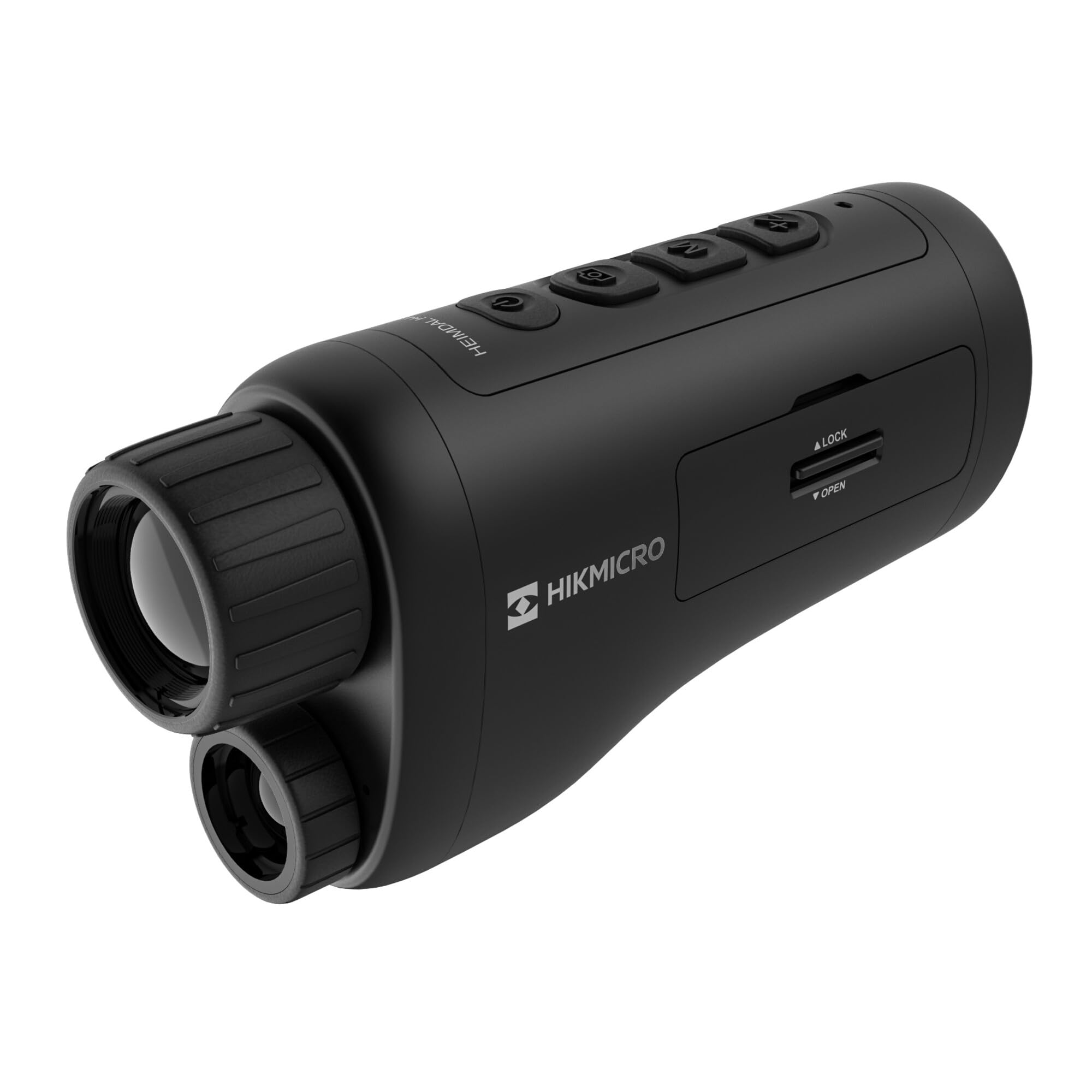
Angelu bat. view of the HIKMICRO HEIMDAL H4D monocular, showing its compact, ergonomic design and the main lens.
Kontrolak eta botoiak

Goiena view of the monocular showing the power button, photo/video record button, mode button, and zoom/IR adjustment buttons.
Lenses and Focus

Aurrealdea view displaying the objective lens and the integrated infrared illuminator.
Bateriaren konpartimendua

Aldea view showing the battery compartment with 'LOCK' and 'OPEN' indicators.
3. Konfigurazioa
Bateriaren instalazioa
- Bilatu bateriaren konpartimentua gailuaren alboan.
- Slide the lock mechanism to the 'OPEN' position.
- Sartu bateria kargagarria, polaritate zuzena ziurtatuz.
- Close the compartment and slide the lock mechanism to the 'LOCK' position.
Bateria kargatzen
Connect the device to a power source using the provided USB-C cable. The charging indicator will show the charging status.
Hasierako piztea
Press and hold the power button (usually marked with Ⓘ) until the HIKMICRO logo appears on the display.
4. Funtzionamendu-argibideak
Piztu/Itzali
- Piztu: Eduki sakatuta pizteko botoia 3 segundo gutxi gorabehera.
- Itzali: Press and hold the power button for approximately 3 seconds until the device shuts down.
Fokuaren doikuntza
Rotate the focus ring on the objective lens to achieve a clear image of your target.
Modu hautaketa
Press the 'M' (Mode) button to cycle through observation modes: Day, Night, Auto, and Defog.
Zoom and IR Adjustment
Use the '+' and '-' buttons to adjust the digital zoom level. These buttons also control the intensity of the infrared illuminator in night mode.
Photo and Video Recording
- Atera argazkia: Press the photo/video button (usually marked with 📷) once to capture an image.
- Grabatu bideoa: Press and hold the photo/video button to start recording. Press again to stop.
Connecting to HIKMICRO Sight App
Download the HIKMICRO Sight app from your device's app store. Follow the in-app instructions to connect your monocular for live view, remote control, and media management.
5. Mantentzea
Garbiketa
- Use the provided dust cloth or a soft, lint-free cloth to clean the lenses.
- For stubborn dirt, use a lens cleaning solution specifically designed for optics.
- Garbitu gailuaren gorputza oihal leun etaamp oihal. Ez erabili garbitzaile edo disolbatzaile urratzailerik.
Biltegiratzea
- Store the monocular in its protective bag in a cool, dry place when not in use.
- Kendu bateria gailua denbora luzez erabiliko ez bada.
Bateria zaintzea
- Charge the battery regularly, even if not in frequent use, to maintain its lifespan.
- Saihestu tenperatura altuegiak kargatzen eta gordetzen ari den bitartean.
6. Arazoak
Ohiko arazoak eta irtenbideak
| Arazoa | Kausa posiblea | Irtenbidea |
|---|---|---|
| Gailua ez da pizten. | Bateria agortuta dago edo gaizki instalatuta dago. | Kargatu bateria. Ziurtatu bateria polaritate zuzenarekin sartuta dagoela. |
| Irudia lausoa da. | Focus is not adjusted. | Rotate the focus ring on the objective lens until the image is clear. |
| Poor image quality in darkness. | IR illuminator is off or set to low intensity. | Activate the IR illuminator or increase its intensity using the '+' button. Ensure you are in Night mode. |
| Cannot connect to HIKMICRO Sight app. | Bluetooth/Wi-Fi is off on device or phone, or app is not updated. | Ensure Bluetooth/Wi-Fi is enabled on both devices. Restart the app and monocular. Check for app updates. |
| Gailua blokeatu egiten da edo ez du erantzuten. | Softwarearen aldi baterako akatsa. | Perform a soft reset by holding the power button until the device restarts. If issue persists, contact support. |
7. Zehaztapenak
| Ezaugarri | Xehetasuna |
|---|---|
| Sentsore ebazpena | 2560 x 1440 |
| Bistaratzeko mota | AMOLED |
| Bistaratzeko ebazpena | 454 x 454 |
| Bistaratzeko tamaina | 1.39 hazbete (3.5 cm) |
| Infragorria Illuminator | Integrated 850 nm |
| Detekzio-eremua | Gehienez 200 metro |
| Biltegiratzea | 32 GB EMMC (internal) |
| Bateriaren iraupena | More than 4 hours (replaceable, rechargeable) |
| Iragazgaitzaren balorazioa | IP67 |
| Neurriak | 153 mm x 50 mm x 80 mm (6.02" x 1.97" x 3.15") |
| Pisua | 375 gramo (0.83 libera) |
| Materiala | Plastikoa |
| Gailu bateragarriak | Rifle, Compound Bow |
| Muntatze Mota | Picatinny mendia |
| Sport Use | Camping, Mendi ibilaldia |
| Kolorea | Zuria |
8. Bermea eta Laguntza
HIKMICRO products are covered by a limited warranty. For detailed warranty information, please refer to the official HIKMICRO webgunera edo jarri harremanetan tokiko saltzailearekin.
For technical support, troubleshooting assistance, or service inquiries, please visit the official HIKMICRO support page or contact their customer service department.
Ofiziala Webgunea: www.hikmicrotech.com


