1. Sarrera
This manual provides detailed instructions for the ANCEL PB100 Car Circuit Tester and the ANCEL AD410 PRO OBD2 Scanner. These devices are designed to assist in diagnosing vehicle electrical systems and engine performance issues. The ANCEL AD410 PRO combines OBD2 diagnostic capabilities with comprehensive battery testing functions, while the ANCEL PB100 is a versatile tool for circuit testing.

Figure 1: ANCEL PB100 Car Circuit Tester and ANCEL AD410 PRO OBD2 Scanner Combo Kit
2. Zer dago barne
The ANCEL PB100 Car Circuit Tester with ANCEL AD410 PRO OBD2 Scanner combo includes the following items:
- 1x ANCEL PB100 Automobilgintzako Potentzia Zirkuituen Zunda Probatzailea
- 1x ANCEL AD410 PRO Vehicle Code Reader
- 1x OBD2 connection cable for AD410 PRO
- 1x Battery clamp cable for AD410 PRO
- 1x User's Manual for AD410 PRO
- 1x User's Manual for PB100
3. Konfigurazioa
3.1 Connecting for OBD2 Diagnostics (ANCEL AD410 PRO)
- Locate your vehicle's 16-pin Data Link Connector (DLC). This is usually found under the dashboard on the driver's side.
- Connect the ANCEL AD410 PRO's OBD2 cable to the vehicle's DLC.
- Turn the vehicle's ignition to the 'ON' position (engine can be off or running). The AD410 PRO will power on automatically.
3.2 Connecting for Battery Testing (ANCEL AD410 PRO)
- Disconnect the OBD2 cable from the AD410 PRO.
- Connect the provided battery clamp cable to the AD410 PRO's main unit.
- Erantsi cl gorriaamp to the positive (+) terminal of the 6V or 12V vehicle battery.
- Erantsi cl beltzaamp to the negative (-) terminal of the 6V or 12V vehicle battery. The AD410 PRO will power on.

Figure 2: ANCEL AD410 PRO showing battery testing connections and menu options.
3.3 Connecting the Circuit Tester (ANCEL PB100)
The ANCEL PB100 is designed for 12V and 24V vehicle electrical systems. Connect the red clamp ibilgailuaren bateriaren terminal positiboari (+) eta kli beltzariamp to the negative (-) terminal. The device will power on.
4. Funtzionamendu-argibideak
4.1 ANCEL AD410 PRO OBD2 Scanner Functions
Once connected via the OBD2 port, navigate the menu using the directional buttons and 'ENTER' key.
4.1.1 Diagnostiko-arazoen kodeak (DTC) irakurtzea eta ezabatzea
- From the main menu, select 'OBDII'.
- Choose 'Read Codes' to view uneko, izapidetzen ari diren eta behin betiko DTCak.
- To clear codes, select 'Erase Codes'. Confirm the action when prompted. This will turn off the Check Engine Light (MIL).

Figure 3: ANCEL AD410 PRO displaying various OBD2 diagnostic functions, including reading and clearing codes.
4.1.2 I/M Readiness Monitor Status
This function checks the readiness of the emission-related monitoring systems. It's useful for pre-smog checks.
- From the main menu, select 'I/M'.
- The scanner will display the status of various monitors (e.g., MIS, FUEL, CCM, CAT, EVAP, O2S).
- A green checkmark indicates the monitor is complete, a yellow 'X' indicates not complete, and a gray dash indicates not applicable.
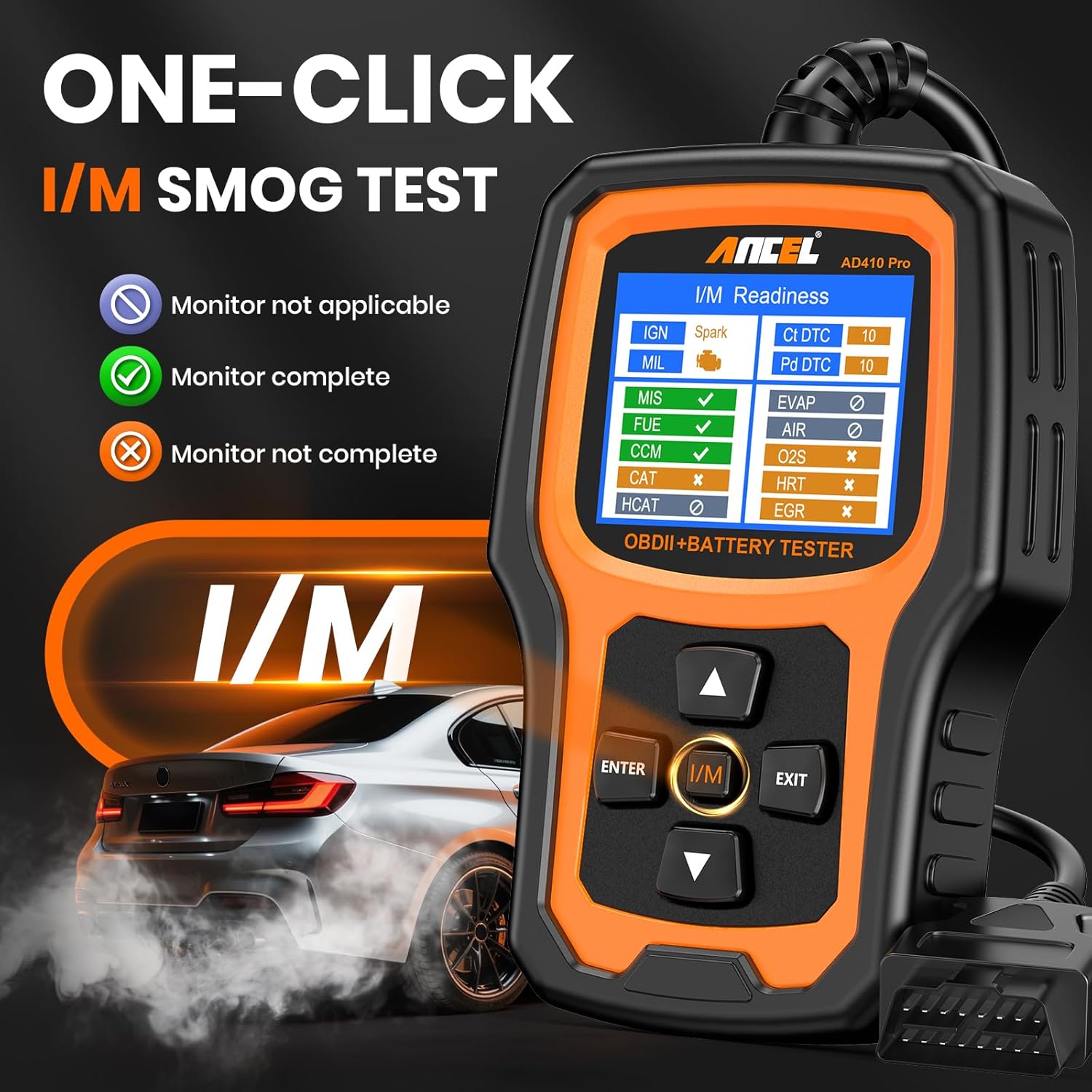
Figure 4: ANCEL AD410 PRO showing I/M Readiness status with color-coded indicators.
4.1.3 Datu-jario zuzena
View real-time data from the vehicle's sensors, which can be displayed as text or graphs.
- From the 'OBDII' menu, select 'Data Stream'.
- Choose 'View All Items' for a comprehensive list, or 'Select Items' to choose specific parameters.
- Hautatu 'View Graphic Items' to see selected data in graphical format.
4.1.4 DTC bilaketa
This feature allows you to input a DTC code and receive a description of the code and possible causes.
- Menu nagusian, hautatu 'DTC bilaketa'.
- Enter the 5-character DTC code using the directional buttons.
- Press 'ENTER' to view the code description and troubleshooting tips.

Figure 5: ANCEL AD410 PRO displaying a DTC code description and possible causes.
4.1.5 Ibilgailuen informazioa
Retrieve the vehicle's VIN (Vehicle Identification Number), CID (Calibration ID), and CVN (Calibration Verification Number).
4.2 ANCEL AD410 PRO Battery Tester Functions
Once connected to the battery via clamps, navigate the menu using the directional buttons and 'ENTER' key.
4.2.1 Bateria proba
Proba honek bateriaren osasun orokorra eta karga-maila ebaluatzen ditu.
- From the main menu, select 'BAT'.
- Aukeratu 'Bateriaren proba'.
- Input battery details: type (e.g., Regular Flooded, AGM Flat Plate, GEL, EFB) and CCA (Cold Cranking Amps) rating. This information is usually found on the battery label.
- The scanner will display battery health (%), charge (V and %), internal resistance, and a recommendation (e.g., Good-Recharge, Replace).
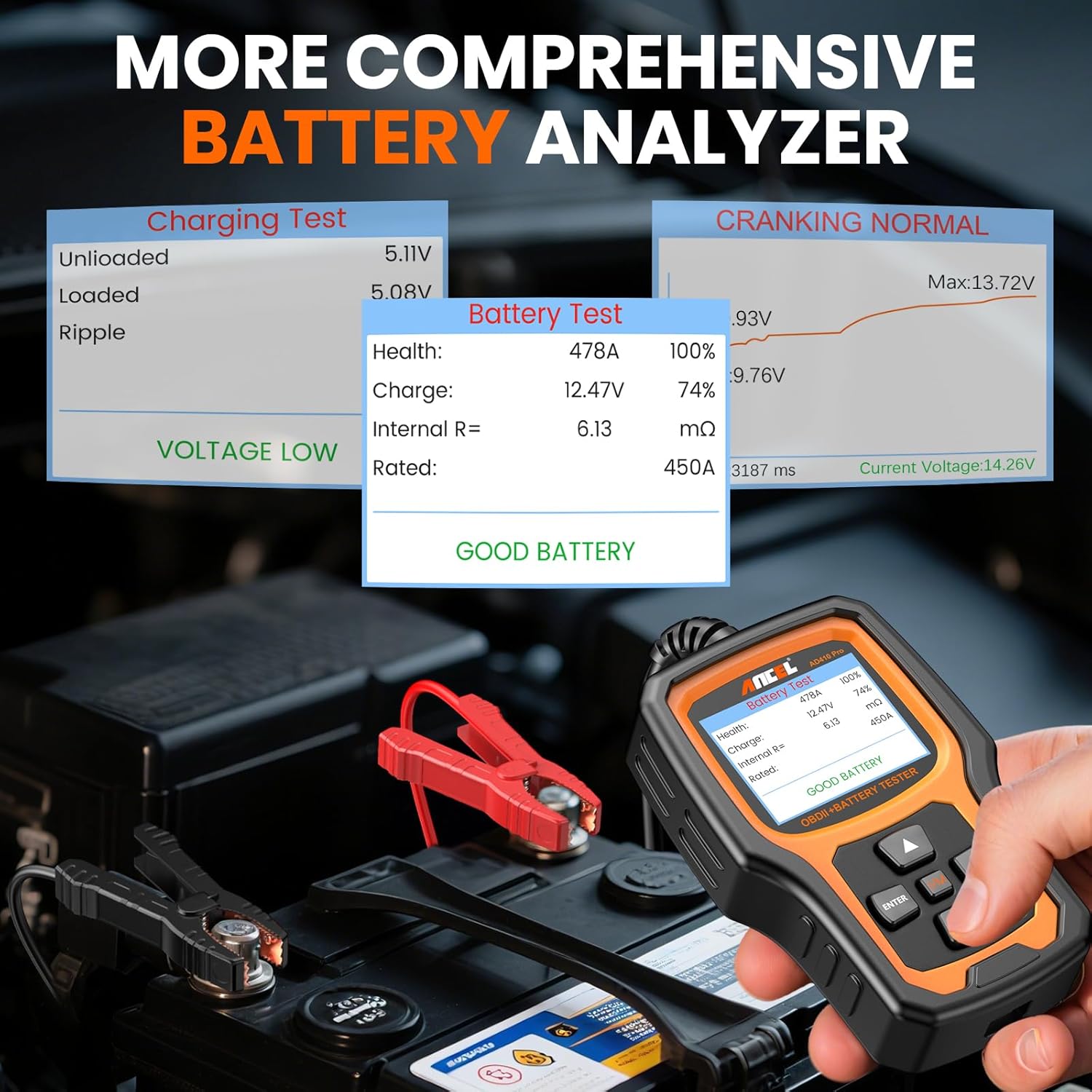
Figure 6: ANCEL AD410 PRO displaying detailed battery test results including health, charge, and internal resistance.
4.2.2 Biradera proba
This test evaluates the battery's ability to start the engine.
- From the 'BAT' menu, select 'Cranking Test'.
- Follow the on-screen prompts, which typically involve turning off the ignition and then starting the engine.
- The scanner will analyze the cranking voltage and provide a result.
4.2.3 Karga-sistemaren proba
Proba honek ibilgailuaren kargatzeko sistema egiaztatzen du, alternadorea barne.
- From the 'BAT' menu, select 'Charging Test'.
- Follow the on-screen prompts, which may include turning on/off headlights and air conditioning, and maintaining specific RPMs.
- The scanner will display unloaded voltage, loaded voltage, eta uhinen bolumenatage, indicating if the charging system is normal or faulty.
4.3 ANCEL PB100 Car Circuit Tester Functions
The ANCEL PB100 is a versatile tool for quickly testing vehicle electrical circuits. It can perform functions such as power injection, ground testing, polarity checking, continuity testing, and component activation. Refer to the dedicated PB100 user manual for detailed operating instructions for each function.
5. Mantentzea
- Keep the devices clean and dry. Use a soft, clean cloth to wipe the exterior.
- Store the devices in their protective cases when not in use to prevent damage.
- Ensure cables and clamps are free from damage before each use.
- Software updates for the ANCEL AD410 PRO may be available periodically. Visit the ANCEL official website to download the latest software and update your device via a computer.
6. Arazoak
- Gailua ez da pizten: Ensure proper connection to the vehicle's DLC or battery terminals. Check vehicle battery voltage.
-
Erlazionatutako dokumentuak - PB100, AD410 PRO

ANCEL AD410 Erabilera, Eguneratze eta Iritzi Arazoak Konpontzeko Gida
ANCEL AD410 automobilgintzako diagnostiko eskanerrarekin gertatzen diren arazo ohikoenak zehazten dituen gida osoa, erabilera, softwarearen eguneraketak eta feedback datuen kudeaketa jorratzen dituena, irtenbideekin eta arazoak konpontzeko urratsekin.
ANCEL PB100 Ibilgailuen Zirkuitu Zundaren Erabiltzaile Eskuliburua
ANCEL PB100 Automobilgintzako Zirkuituetako Zunda Probatzailearen erabiltzailearen eskuliburu osoa. Ikasi 12V/24V autoentzako diagnostiko elektrikorako tresna honen segurtasunari, zehaztapenei, tresnaren deskribapenari, funtzionamendu-argibideei, proba-prozedurei eta bermeari buruzko informazioa.
ANCEL AD410 Pro Erabiltzailearen Eskuliburua - Gida Osoa
ANCEL AD410 Pro OBD2 eskaner eta bateria probatzailearen erabiltzailearen eskuliburu zehatza. Ikasi bere ezaugarriei, zehaztapenei eta ibilgailuen diagnostiko eta bateria probak egiteko nola erabili.
ANCEL AD410 Pro+ OBDII eta bateria probatzailearen erabiltzailearen gida
ANCEL AD410 Pro+ 2-in-1 OBD2 eskaner eta bateria probatzailearen gida osoa, OBDII funtzioak, bateria probak eta menu nabigazioa biltzen dituena.
ANCEL PB100 Ibilgailuen Zirkuitu Zundaren Erabiltzaile Eskuliburua eta Diagnostiko Gida
ANCEL PB100 ibilgailuen zirkuitu-zundaren erabiltzailearen eskuliburu eta gida osoa, non bere ezaugarriak, zehaztapenak, segurtasun-neurriak eta ibilgailuen sistema elektrikoen diagnostikorako funtzionamendu-argibideak zehaztuta dauden.
Ancel AD410 OBD2 eskaneatze tresnaren erabiltzailearen eskuliburua
Ancel AD410 OBD2 eskaneatze tresna eta kode irakurgailuaren erabiltzailearen eskuliburu osoa. Ikasi ibilgailuen arazoak diagnostikatzen, arazo kodeak irakurtzen eta garbitzen, view datuak zuzenean, eta I/M presttasun egoera ulertu.