Sarrera
This manual provides comprehensive instructions for the installation, operation, and maintenance of your Natec Cabassu G2 Midi Tower PC Case. Please read this manual thoroughly before beginning installation to ensure proper setup and optimal performance.
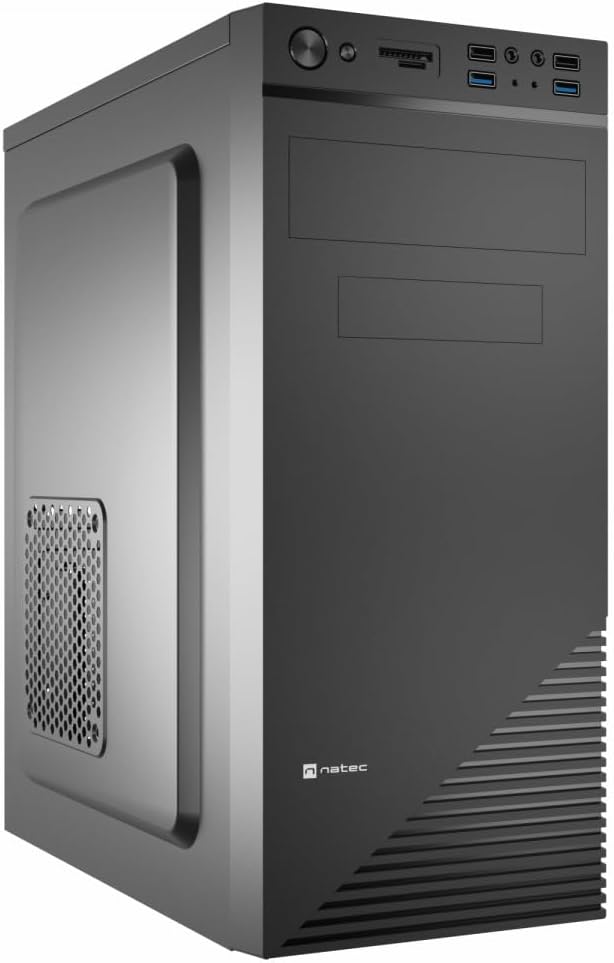
Figure 1: Natec Cabassu G2 Midi Tower PC Case. This image shows the front and left side of the black PC case, highlighting its sleek design and front panel layout.
Segurtasun Informazioa
- Deskonektatu beti korronte-iturria hormako entxufetik edozein osagai instalatu edo kendu aurretik.
- Handle components with care to prevent damage from static electricity.
- Mantendu zorroa uretatik, hezetasunetik eta muturreko tenperaturetatik urrun.
- Ziurtatu aireztapen egokia gehiegi berotzea saihesteko.
- Do not attempt to open the power supply unit.
Paketearen edukia
Egiaztatu elementu guztiak paketean daudela:
- Natec Cabassu G2 Midi Tower PC Case
- Osagarrien kita (torlojuak, euskarriak, kable-bridak)
- Erabiltzailearen eskuliburua (dokumentu hau)
Setup and Component Installation
1. Kasua prestatzea
- Jarri zorroa gainazal lau eta egonkor batean.
- Remove the side panels by unscrewing the thumbscrews at the rear and sliding the panels backward.

2. Irudia: Barrualdea view of the Natec Cabassu G2 case with the side panel removed, illustrating the internal layout for component installation.
2. Plaka amaren instalazioa
- Instalatu S/I babeskia kaxaren atzeko irekiduran.
- Align the motherboard with the pre-installed standoffs. The Cabassu G2 supports Mini ITX, Micro ATX, and ATX motherboards.
- Lotu plaka nagusia emandako torlojuekin.
3. Elikatze-horniduraren instalazioa
- The power supply mounts at the bottom of the case.
- Slide the power supply into its designated bay from the rear of the case.
- Secure it with screws from the rear.
4. Biltegiratze unitatearen instalazioa
- 2.5" Drives (SSDs/HDDs): The case features 3 x 2.5" drive bays. Mount drives using the provided screws in the designated locations.
- 3.5" Drives (HDDs): The case also supports 3.5" drives.
5. Hedapen-txartelaren instalazioa
- Remove the necessary expansion slot covers from the rear of the case (7 expansion slots available).
- Sartu zure grafiko-txartela edo beste hedapen-txartelak plaka basearen PCIe zirrikituetan.
- Txartelak torlojuekin finkatu.

3. Irudia: Atzealdea view of the Natec Cabassu G2 case, detailing the I/O shield cutout, power supply opening, and seven expansion slots.
6. Kableen kudeaketa
Route cables behind the motherboard tray where possible to improve airflow and aesthetics. Use the included cable ties to secure bundles.
7. Aurreko paneleko kableak konektatzea
Connect the front panel cables (USB 2.0, USB 3.0, audio, power switch, reset switch, HDD LED, power LED) to the corresponding headers on your motherboard. Refer to your motherboard manual for exact pin assignments.

Figure 4: Close-up of the Natec Cabassu G2 front panel, showing 2x USB 2.0 ports, 2x USB 3.0 ports, audio jacks, and power/reset buttons.
Funtzionamendu-argibideak
Piztu/Itzaltzea
- Piztu: Sakatu aurreko panelean dagoen pizteko botoia.
- Itzali: Initiate shutdown through your operating system. For a forced shutdown, press and hold the power button for several seconds.
- Berrezarri: Press the reset button on the front panel to restart the system.
Using Front Panel Ports
The front panel provides convenient access to:
- 2 x USB 2.0 ataka
- 2 x USB 3.0 ataka
- Audio input (microphone) and output (headphone) jacks
Connect compatible devices to these ports as needed.
Mantentzea
Garbiketa
- Garbitu aldizka kaxaren kanpoaldea zapi leun eta lehor batekinamp oihal. Saihestu garbitzaile urratzaileak.
- Use compressed air to remove dust from fan filters and internal components. Ensure the system is powered off and unplugged before cleaning.
Hauts-iragazkiak
The case may include removable dust filters. Periodically remove and clean these filters to maintain optimal airflow and cooling performance.
Arazoak konpontzea
| Arazoa | Kausa posiblea | Irtenbidea |
|---|---|---|
| Sistema ez da pizten. | Power cables not connected properly. Faulty power supply. | Check all power connections (motherboard, CPU, GPU, power supply to wall). Ensure power supply switch is ON. |
| Aurreko paneleko USB atakak ez dira funtzionatzen. | Front panel USB cables not connected to motherboard. | Verify that the USB 2.0 and USB 3.0 headers are correctly connected to the motherboard. |
| Excessive fan noise. | Dust accumulation. Loose fan. | Clean dust from fans and filters. Ensure all fans are securely mounted. |
Zehaztapenak
| Ezaugarri | Xehetasuna |
|---|---|
| Ereduaren izena | Cabassu G2 |
| Elementuaren eredu-zenbakia | S5624687 |
| Kasu mota | Midi Dorrea |
| Neurriak (LxWxH) | 19.69 x 19.69 x 11.02 hazbete (50 x 50 x 28 cm) |
| Pisua | 7.04 libra (3.19 kg) |
| Materiala | Acrylonitrile Butadiene Styrene (ABS), Alloy Steel |
| Plaka amaren bateragarritasuna | Mini ITX, Mikro ATX, ATX |
| 2.5 hazbeteko unitate-baiek | 3 |
| Zabaltzeko Slots | 7 |
| Aurreko I / O Portuak | 2 x USB 2.0, 2 x USB 3.0, Audio In/Out |
| Zaleen laguntza | 120mm (rear, pre-installed if applicable) |
| Hozteko metodoa | Airea |
| Elikatze iturriaren muntaketa | Beheko mendia |
Bermearen informazioa
Natec products are covered by a manufacturer's warranty. Specific warranty terms and conditions may vary by region and retailer. Please refer to the warranty card included with your product or visit the official Natec website for detailed information regarding warranty coverage and claims.
Laguntza
For technical assistance, troubleshooting, or further inquiries, please visit the official Natec support webwebgunean edo jarri harremanetan bezeroarentzako arreta-zerbitzuarekin. Harremanetarako informazioa normalean produktuaren ontzian edo marka ofizialean aurki daiteke. webgunea.
Webgunea: www.natec-zone.com (Adibampesteka, benetako esteka alda daiteke)


