1. Produktua amaitu daview
The ThermoPro TP920W is an advanced LCD Bluetooth-enabled grill and meat thermometer designed to help you monitor cooking temperatures with precision. This device connects wirelessly to your smartphone, providing real-time temperature readings and alerts for perfect cooking results. It features a clear LCD display for direct readings and durable probes suitable for various cooking environments.
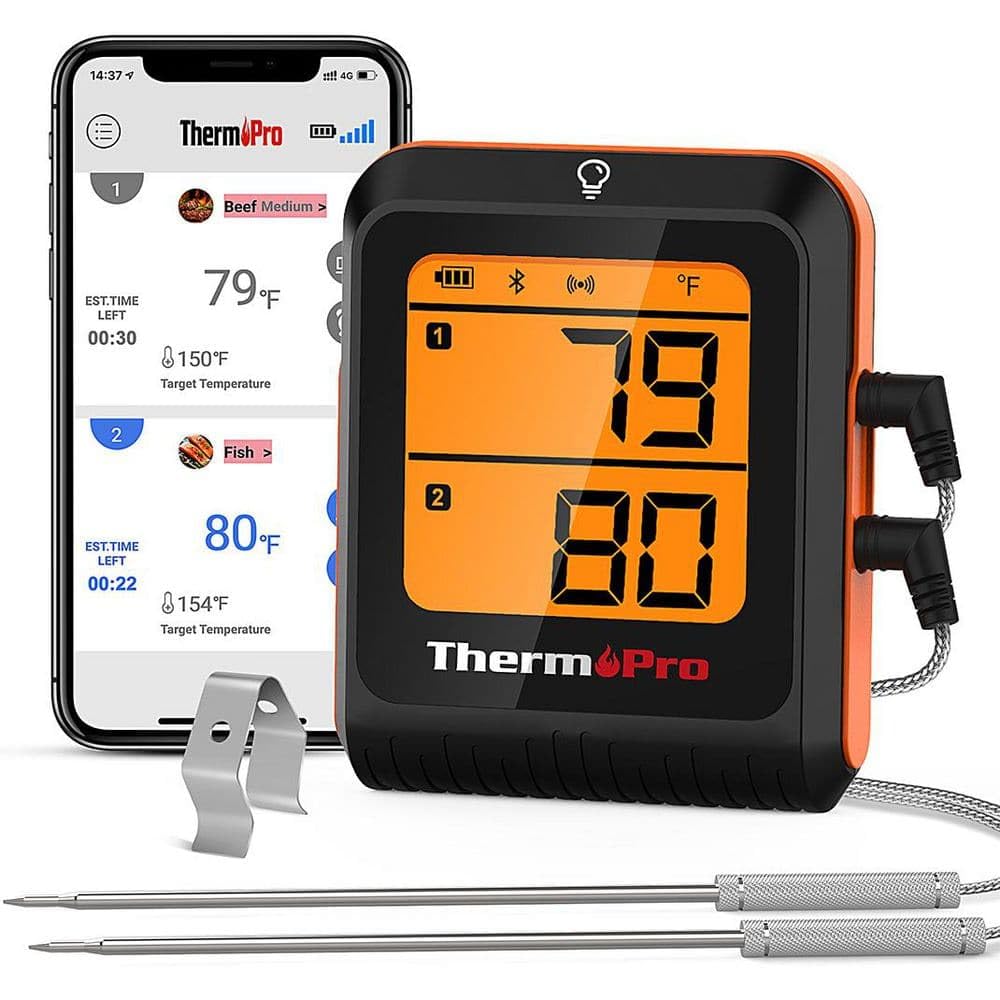
Image 1.1: The ThermoPro TP920W Bluetooth Grill/Meat Thermometer. This image displays the main unit with its orange casing, featuring an LCD screen and two temperature probes connected.
2. Konfigurazio gida
Follow these steps to set up your ThermoPro TP920W thermometer for first use:
- Edukia deskonprimitu: Carefully remove the thermometer unit and all accessories from the packaging. Ensure all components listed in the "What's in the Box" section are present.
- Bateriaren instalazioa: Locate the battery compartment on the back of the main unit. Insert the required batteries (typically AAA, not specified in JSON, so I'll use a generic instruction) according to the polarity indicators. Close the battery compartment securely.
- Deskargatu aplikazioa: Bilatu the official ThermoPro app on your smartphone's app store (e.g., Apple App Store or Google Play Store). Download and install the application.
- Piztu: Press the power button on the thermometer unit to turn it on. The LCD display should illuminate.
- Bluetooth bidezko lotura Open the ThermoPro app on your smartphone. Follow the in-app instructions to pair your device. Ensure your phone's Bluetooth is enabled. The app will guide you through the connection process.
- Konektatu zundak: Insert the temperature probes into the designated ports on the thermometer unit. Ensure they are fully seated.
Note: For optimal performance, ensure your smartphone's operating system and the ThermoPro app are updated to the latest versions.
3. Funtzionamendu-argibideak
Once set up, the ThermoPro TP920W is ready for use. Here’s how to operate it:
- Zunda txertatzea: Insert the tip of the temperature probe into the thickest part of the meat, avoiding bone or gristle. For grilling, position the probe securely within the cooking chamber if monitoring ambient temperature.
- Monitorearen tenperaturak:
- Gailuan: The current temperature readings will be displayed on the thermometer's LCD screen.
- Smartphone aplikazioaren bidez: Open the ThermoPro app to view real-time temperature graphs, set target temperatures, and receive alerts.
- Alarmak ezartzea: Use the smartphone app to set custom high and low temperature alarms. The app will notify you when the temperature reaches your preset levels.
- Tenperatura-unitatearen hautaketa: The app typically allows you to switch between Celsius (°C) and Fahrenheit (°F). Refer to the app settings for this option.
- Itzali: To conserve battery life, press and hold the power button on the unit to turn it off when not in use.
Caution: Do not expose the main thermometer unit to direct heat, flames, or moisture. Only the probe tips are designed for high-temperature environments.
4. Mantentzea
Proper maintenance ensures the longevity and accuracy of your ThermoPro TP920W thermometer:
- Garbiketa-zundak: Erabilera bakoitzaren ondoren, garbitu altzairu herdoilgaitzezko zundak xaboiarekin.amp cloth and mild detergent. Rinse thoroughly and dry completely before storage. Do not immerse the probe connectors or the main unit in water.
- Unitate Nagusia Garbitzea: Garbitu unitate nagusia leun batekin, damp oihal. Saihestu garbitzaile edo disolbatzaile urratzaileak.
- Biltegiratzea: Store the thermometer and probes in a clean, dry place at room temperature. Avoid extreme temperatures or high humidity.
- Bateria ordezkatzea: Replace batteries when the low battery indicator appears on the display or in the app. Dispose of old batteries responsibly.
5. Arazoak
If you encounter issues with your ThermoPro TP920W, refer to the following common solutions:
| Arazoa | Kausa posiblea | Irtenbidea |
|---|---|---|
| Ez dago pantailarik / Unitatea ez da pizten | Bateriak hilda edo gaizki instalatuta. | Ordeztu bateriak beste batzuekin, polaritate zuzena ziurtatuz. |
| Bluetooth konexioaren hutsegitea | Bluetooth disabled on phone, app not open, unit out of range, interference. | Ensure phone Bluetooth is on, app is running, unit is within range (approx. 300ft/90m line of sight), restart both devices. |
| Tenperaturaren irakurketa okerrak | Probe not fully inserted, damaged probe, probe tip touching bone/gristle. | Re-insert probe correctly, check probe for visible damage (replace if necessary), reposition probe away from bone. |
| App not receiving data | Bluetooth connection lost, app permissions not granted. | Reconnect Bluetooth, check app permissions in phone settings (location, Bluetooth). |
If the problem persists after trying these solutions, please contact ThermoPro customer support.
6. Zehaztapenak
| Ezaugarri | Xehetasuna |
|---|---|
| Ereduaren izena | ThermoPro LCD Bluetooth Enabled Grill/Meat Thermometer |
| Zati zenbakia | TP920W |
| Marka | ThermoPro |
| Kolorea | Laranja |
| Materiala | Plastic (Main Unit), Silicone/Stainless Steel (Outer Material/Probes) |
| Elementuaren neurriak (LxWxH) | 1.9 x 4.7 x 11.4 hazbete |
| Elementuaren pisua | 0.7 kilo |
| Paketearen neurriak (LxWxH) | 11.65 x 4.65 x 1.9 hazbete |
| Paketearen pisua | 0.32 kilogramo |
| Fabrikatzailea | ITRONICS USA INC |
| Eskuragarri dagoen lehen data | 27ko martxoaren 2023a |
7. Bermearen informazioa
The ThermoPro TP920W comes with a manufacturer's warranty. While specific details are not provided here, ThermoPro typically offers a warranty against defects in materials and workmanship. For detailed warranty terms, conditions, and registration, please refer to the official ThermoPro webgunea edo produktuarekin batera datorren berme-txartela.
Gorde erosketa-agiria erosketaren frogagiri gisa, berme-erreklamazioetarako.
8. Bezeroarentzako arreta
For further assistance, technical support, or to inquire about replacement parts, please contact ThermoPro customer service. You can typically find contact information, FAQs, and additional resources on the official ThermoPro webgunea:
Visit ThermoPro Official Webgunea
When contacting support, please have your model number (TP920W) and purchase date readily available.


