1. Sarrera
This manual provides essential information for the safe operation and maintenance of your DEERC DE28 RC Helicopter. Please read this manual thoroughly before operating the helicopter to ensure proper function and to prevent damage or injury. The DEERC DE28 is designed for indoor use and features a durable metal airframe, altitude hold, one-key take-off/landing, and multiple speed modes for various skill levels.

Image: The DEERC DE28 RC Helicopter, its remote control, and two interchangeable body shells (red and blue/white).
2. Segurtasun Jarraibideak
OHARRA: Argibide hauek ez jarraitzeak lesioak edo produktua kaltetu dezake.
- Barruko erabilera soilik: This helicopter is designed for indoor flight. Do not operate outdoors, as wind can cause loss of control.
- Adinaren gomendioa: Recommended for users aged 14 years and up. Adult supervision is advised for younger users.
- Clear Flight Path: Ensure the flight area is clear of obstacles, people, and pets. Maintain a safe distance from walls, furniture, and other objects.
- Bateriaren segurtasuna:
- Use only the provided charger and batteries.
- Ez kargatu gehiegi edo zirkuitulaburtu bateriak.
- Ez jarri bateriak muturreko tenperaturara edo eguzki-argitara.
- If batteries swell or leak, discontinue use immediately and dispose of them properly.
- Errotore-palak: Keep fingers, hair, and loose clothing away from rotating blades. Do not touch the helicopter while the blades are spinning.
- Gainbegiratzea: Always supervise children when they are operating the helicopter.
- Eraginak saihestea: While durable, repeated hard impacts can damage the helicopter. Avoid crashing.
3. Package Contents and Component Identification
Verify that all items listed below are included in your package. If any items are missing or damaged, please contact DEERC customer support.
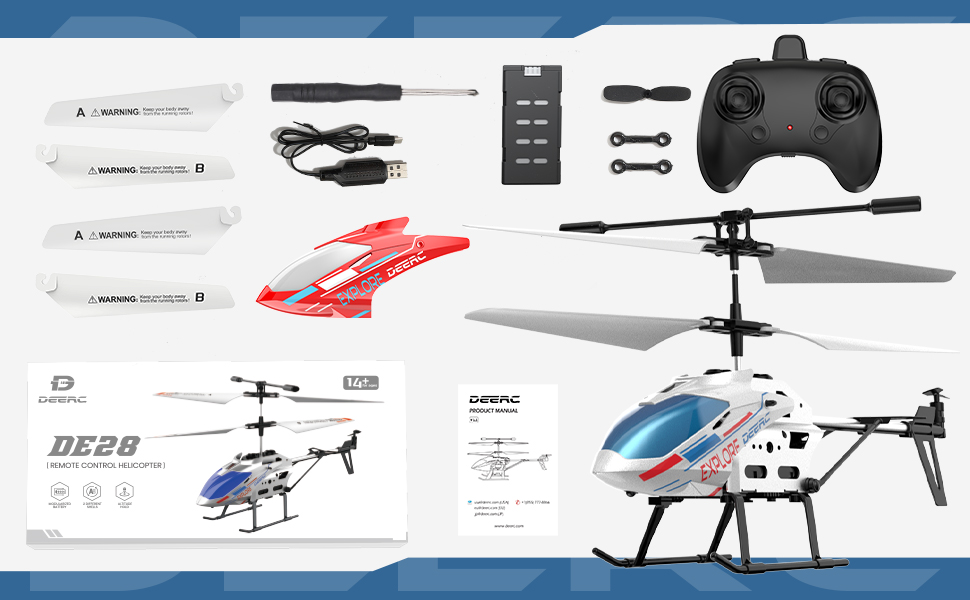
Irudia: Gainetikview of the DEERC DE28 RC Helicopter package contents.
Paketearen edukia:
- DEERC DE28 RC Helicopter (1)
- 2.4GHz Remote Control (1)
- Rechargeable Helicopter Batteries (2)
- USB kargatzeko kablea (1)
- Spare Main Rotor Blades (A & B) (2 sets)
- Spare Tail Rotor Blade (1)
- Bihurkinak (1)
- Extra Helicopter Shell (1)
- Erabiltzailearen eskuliburua (1)
Osagaien identifikazioa:

Image: The DEERC DE28 helicopter showcasing its full aluminum alloy body and key features like fast acceleration, altitude hold, one-key takeoff/land, LED light, 2.4GHz, 3 speed modes, gyroscope system, and 2 shells.
- Errotoreko pala nagusiak: Provide lift and thrust.
- Tail Rotor Blade: Biraketa kontrolatzen du (ardatz bertikalaren inguruko biraketa).
- LED argia: Front-mounted light for visibility and aesthetics.
- Lurreratze-irristaketak: Provide stable landing and protect the helicopter.
- Bateriaren konpartimendua: Located on the underside of the helicopter.
- Switch potentziala: On/Off switch for the helicopter.
- Kargatzeko ataka: USB kargatzeko kablea konektatzeko.
- Urruneko kontrola:
- Left Stick: Throttle (up/down) and Yaw (left/right).
- Right Stick: Forward/Backward, Left/Right Sideways flight.
- One-Key Take-off/Landing Button.
- Speed Mode Button.
- Power Indicator LED.
- Pizteko etengailua.

Image: The DEERC DE28 helicopter with its two interchangeable shells, blue/white and red.
4. Konfigurazio gida
4.1 Charging the Helicopter Battery
- Konektatu USB kargatzeko kablea helikopteroaren kargatzeko atakara.
- Plug the other end of the USB cable into a USB power adapter (e.g., computer USB port, phone charger, power bank).
- USB kablearen kargatzeko adierazlearen argia piztuko da kargatzen ari den bitartean eta itzali egingo da guztiz kargatzen denean.
- A full charge typically takes approximately 60-90 minutes. Do not leave charging unattended.
- Deskonektatu kablea kargatzen amaitutakoan.

Image: The helicopter's battery compartment, illustrating the battery and its approximate 12-minute flight time per charge.
4.2 Urrutiko agintearen bateriak instalatzea
- Ireki urrutiko agintearen atzealdean dagoen bateriaren konpartimendua.
- Insert 3 x AAA batteries (not included) into the compartment, ensuring correct polarity (+/-).
- Itxi bateriaren konpartimenduaren estalkia ondo.
4.3 Helikopteroa eta urrutiko agintea parekatzea
- Ziurtatu helikopteroa eta urrutiko agintea guztiz kargatuta daudela / bateria berriak dituztela.
- Jarri helikopteroa gainazal lau eta berdindu batean.
- Turn on the helicopter's power switch. The helicopter's LED lights will flash.
- Turn on the remote control's power switch. The remote control's indicator light will flash.
- Push the left throttle stick (left joystick) all the way up, then pull it all the way down.
- Both the helicopter's and remote control's indicator lights will become solid, indicating successful pairing.
- Parekatzeak huts egiten badu, itzali bi gailuak eta errepikatu urratsak.

Image: The 2.4GHz remote control in use, demonstrating its connection to the helicopter.
5. Funtzionamendua
5.1 Oinarrizko hegaldi-kontrolak
- Abiarazte giltza bakarrekoa: After pairing, press the One-Key Take-off/Landing button. The helicopter will automatically ascend and hover at a stable altitude.
- Azeleragailua (Ezkerreko palanka gora/behera): Controls the helicopter's altitude. Push up to ascend, pull down to descend.
- Biratu (Ezkerreko makila ezker/eskuin): Controls the helicopter's rotation. Push left to rotate counter-clockwise, right to rotate clockwise.
- Forward/Backward (Right Stick Up/Down): Controls the helicopter's forward and backward movement.
- Left/Right Sideways (Right Stick Left/Right): Controls the helicopter's sideways movement (strafe).
- Altuera eustea: The helicopter will automatically maintain its current altitude when the throttle stick is released, allowing for easier control.
- Gako bakarreko lurreratzea: During flight, press the One-Key Take-off/Landing button again. The helicopter will slowly descend and land automatically.

Image: The helicopter demonstrating its One-Key Take-off and Altitude Hold features.
5.2 Abiadura moduak
The DEERC DE28 features 3 speed modes to accommodate different skill levels. Press the Speed Mode button on the remote control to cycle through the modes:
- Abiadura baxua: Ideal for beginners and indoor flight in confined spaces. Provides stable and gentle control.
- Abiadura ertaina: A balanced mode for intermediate users, offering more responsiveness.
- Abiadura Handia: For experienced pilots seeking maximum agility and faster flight.

Image: The helicopter demonstrating its three speed levels, suitable for both adults and children.
5.3 LED argiaren kontrola
The helicopter is equipped with bright LED lights for enhanced visibility, especially in low-light conditions. The LED lights typically turn on automatically when the helicopter is powered on. Refer to the remote control diagram for any dedicated light control buttons, if available.

Image: The helicopter's front LED light illuminated.
6. Mantentzea
6.1 Garbiketa
- Always turn off the helicopter and remote control before cleaning.
- Wipe the helicopter with a soft, dry cloth. Do not use water or chemical cleaners, as they may damage the electronics.
- Remove any dust or debris from the rotor blades and motors.
6.2 Palak ordezkatzea
If a rotor blade becomes damaged, it can be replaced using the spare blades provided and the included screwdriver.
- Identify the damaged blade (A or B).
- Carefully unscrew the small screw holding the blade in place.
- Remove the damaged blade.
- Align the new blade (ensure it's the correct A or B type) and secure it with the screw. Do not overtighten.

Image: The durable and flexible design of the helicopter blades.
6.3 Biltegiratzea
- Store the helicopter and remote control in a cool, dry place away from direct sunlight and moisture.
- If storing for an extended period, remove batteries from the remote control to prevent leakage.
7. Arazoak
| Arazoa | Kausa posiblea | Irtenbidea |
|---|---|---|
| Helikopteroak ez du urrutiko aginteari erantzuten. | Not paired; Low battery (helicopter or remote); Remote control off. | Ensure both are on and paired. Charge helicopter battery. Replace remote control batteries. |
| Helikopteroa ezin da aireratu edo ahulki hegan egiten du. | Low helicopter battery; Damaged blades; Obstruction. | Charge helicopter battery fully. Replace damaged blades. Clear any obstructions. |
| Helicopter drifts or spins uncontrollably. | Not calibrated on a flat surface; Damaged tail rotor; Strong airflow. | Ensure helicopter is placed on a flat surface for pairing. Check and replace tail rotor if damaged. Fly in a calm environment. |
| LED argiak ez dute funtzionatzen. | Helicopter off; Malfunction. | Ensure helicopter is powered on. If still not working, contact support. |
8. Zehaztapenak
| Ezaugarri | Xehetasuna |
|---|---|
| Modelo zenbakia | CADE4-DE28 |
| Neurriak (L x W x H) | 19.99 x 4.5 x 12.5 cm (7.87 x 1.77 x 4.92 hazbete) |
| Pisua | 290 g |
| Kontrol Maiztasuna | 2.4 GHz |
| Kanalak | 3.5 CH |
| Hegaldi Denbora | Bateria bakoitzeko 12 minutu inguru |
| Kargatzeko Denbora | Gutxi gorabehera. 60-90 minutu |
| Gomendatutako Adina | 14 urtetik gora |
| Ezaugarriak | Altitude Hold, One-Key Take-off/Landing, 3 Speed Modes, LED Light, Gyroscope System |

Image: Dimensions of the DEERC DE28 RC Helicopter.
9. Bermea eta Laguntza
DEERC products are manufactured to high quality standards. For information regarding warranty coverage, returns, or technical support, please refer to the official DEERC webgunera edo jarri harremanetan zuzenean bezeroarentzako arreta-zerbitzuarekin.
DEERC Official Webgunea: www.deerc.com
Please have your model number (DE28) and purchase details ready when contacting support.


