1. Sarrera
The SteelSeries GameDAC Gen 2 is a high-resolution audio amplifier designed to enhance your gaming audio experience on PC, PlayStation 5, and PlayStation 4. Featuring an ESS Sabre Quad-DAC, AI Noise Cancellation, and 360° Spatial Audio, this device delivers detailed and immersive sound. This manual provides instructions for setup, operation, maintenance, and troubleshooting to ensure optimal performance.
2. Produktua amaitu daview
Familiarize yourself with the components and features of your GameDAC Gen 2.
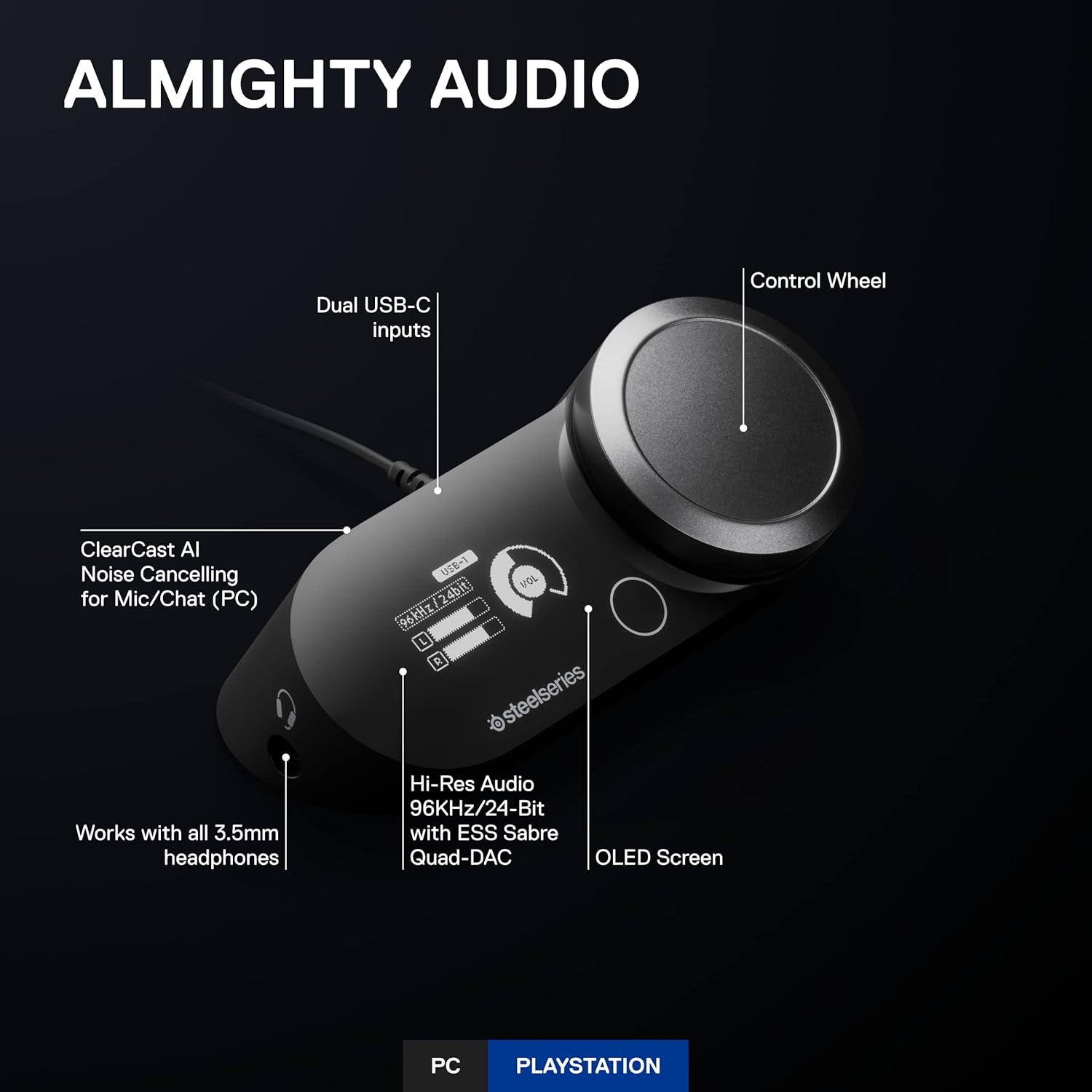
Image 2.1: GameDAC Gen 2 Front View with Labeled Components. Irudi honek goitik behera erakusten du view of the GameDAC Gen 2, highlighting its key features: Dual USB-C inputs, Control Wheel, OLED Screen, Hi-Res Audio with ESS Sabre Quad-DAC, ClearCast AI Noise Cancellation for Mic/Chat (PC), and the 3.5mm headphone jack.

Image 2.2: GameDAC Gen 2 Rear View Portuekin. This image shows the rear panel of the GameDAC Gen 2, indicating the USB 1, USB 2, Line Out, and Line In ports for various connections.
Ezaugarri nagusiak:
- ESS Sabre Quad-DAC: Delivers 78% purer signal compared to GameDAC Gen 1, supporting 96KHz/24-Bit resolution for detailed audio.
- OLED pantaila: Provides intuitive control and display of settings.
- Kontrol gurpila: For adjusting volume and navigating menus.
- Dual USB-C Inputs: Allows connection to two systems simultaneously.
- ClearCast AI Noise Cancellation (PC): Utilizes AI algorithms to remove background noise from microphone input and incoming chat.
- 360° Spatial Audio: Immersive surround sound for enhanced gaming awareness.
- Entzungailuen bateragarritasuna: Works with any headset wired via a 3.5mm cable, including the Arctis Nova Pro (sold separately).
3. Konfiguratzeko argibideak
3.1 PCra konektatzea
- Connect one end of the provided USB-C to USB-A cable to the USB 1 or USB 2 port on the back of the GameDAC Gen 2.
- Connect the other end of the cable to an available USB port on your PC.
- Connect your headset to the 3.5mm headphone jack on the front of the GameDAC Gen 2.
- Download and install the SteelSeries GG software from the official SteelSeries website. This software is required for full functionality, including AI Noise Cancellation and advanced audio customization.
- Ensure the GameDAC Gen 2 is selected as the default audio output and input device in your PC's sound settings.
3.2 Connecting to PlayStation (PS5/PS4)
- Connect one end of the provided USB-C to USB-A cable to the USB 1 or USB 2 port on the back of the GameDAC Gen 2.
- Connect the other end of the cable to an available USB port on your PlayStation console.
- Connect your headset to the 3.5mm headphone jack on the front of the GameDAC Gen 2.
- On your PlayStation, navigate to Settings > Sound > Audio Output and select "GameDAC Gen 2" as the output device. For microphone input, select "GameDAC Gen 2" under Input Device.
3.3 Multi-System Connect
The GameDAC Gen 2 allows you to connect two systems simultaneously and switch between them with ease.
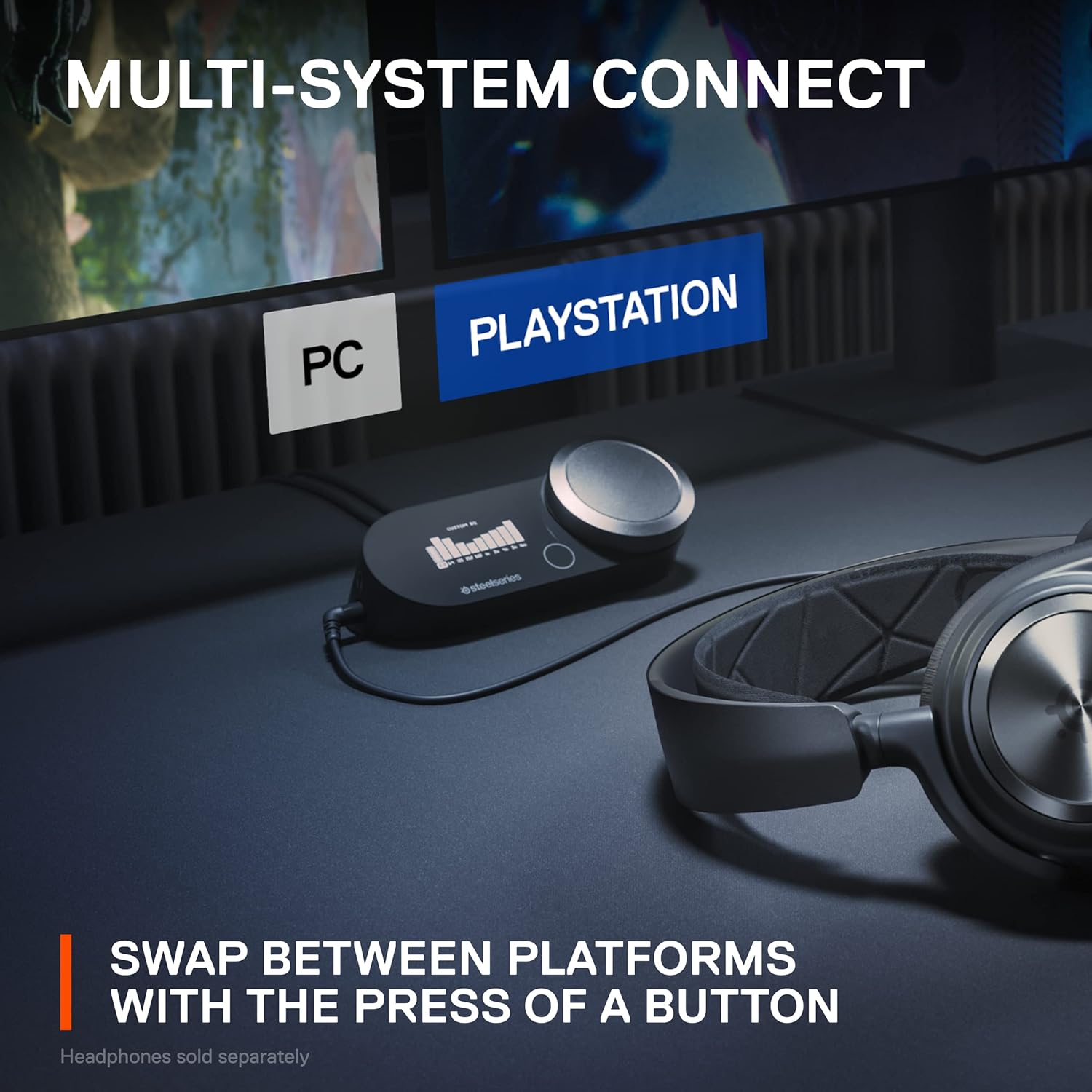
Image 3.1: Multi-System Connection Example. This image illustrates the GameDAC Gen 2 connected to both a PC and a PlayStation console, demonstrating the ability to switch between platforms. Headphones are shown connected to the GameDAC.
- Connect your primary system (e.g., PC) to USB 1 and your secondary system (e.g., PlayStation) to USB 2.
- Use the OLED screen and control wheel on the GameDAC Gen 2 to select the desired input (USB 1 or USB 2) to switch between systems.
4. Funtzionamendu-argibideak
4.1 Basic Audio Control
The large control wheel on the GameDAC Gen 2 primarily adjusts the master volume. Pressing the wheel often accesses menu options on the OLED screen.
4.2 AI Noise Cancellation (PC Only)
For PC users, the ClearCast AI feature significantly reduces background noise from your microphone and cleans up incoming chat audio. This feature is managed through the SteelSeries GG software.
- Open the SteelSeries GG software on your PC.
- Navigate to the Sonar section.
- Adjust the AI Noise Cancellation settings for both your microphone and incoming audio as desired.
4.3 360° Spatial Audio
Experience immersive soundscapes with 360° Spatial Audio, allowing you to pinpoint in-game sounds with greater accuracy.

Image 4.1: 360° Spatial Audio Experience. This image depicts a gamer wearing headphones, surrounded by glowing orange rings, visually representing the immersive 360° spatial audio experience.
The GameDAC Gen 2 is fully compatible with Tempest 3D Audio for PS5 and Microsoft Spatial Sound for PC and Xbox. Ensure these features are enabled in your console or PC's sound settings for the best experience.
4.4 EQ parametrikoa
Pertsonalizatu zure audio profesionalafile with the built-in Parametric EQ to suit your preferences or specific game types.

Image 4.2: Parametric EQ Display. This image shows the OLED screen of the GameDAC Gen 2 displaying a custom equalizer profile, allowing users to fine-tune audio frequencies.
Access EQ settings via the OLED screen menu. You can select from preset profiles or create your own custom settings.
5. Mantentzea
To ensure the longevity and optimal performance of your GameDAC Gen 2, follow these simple maintenance guidelines:
- Garbiketa: Use a soft, dry cloth to wipe down the exterior of the device. Avoid using abrasive cleaners, solvents, or harsh chemicals.
- Biltegiratzea: Store the GameDAC Gen 2 in a cool, dry place away from direct sunlight and extreme temperatures when not in use.
- Kableen kudeaketa: Avoid sharp bends or excessive pulling on cables to prevent damage to connectors and wires.
6. Arazoak
If you encounter issues with your GameDAC Gen 2, refer to the following troubleshooting steps:
6.1 Soinurik ez
- Egiaztatu konexioak: Ensure all USB and 3.5mm headset cables are securely connected to both the GameDAC Gen 2 and your system.
- Bolumen maila: Verify that the volume on the GameDAC Gen 2 and your system is not muted or set too low.
- Sistemaren audio ezarpenak: Confirm that "GameDAC Gen 2" is selected as the default audio output device in your PC's or PlayStation's sound settings.
- Softwarea/Firmwarea: Ensure SteelSeries GG software is installed (for PC) and that the GameDAC Gen 2 firmware is up to date.
6.2 Mikrofonoak ez du funtzionatzen
- Egiaztatu entzungailuen konexioa: Ensure your headset's microphone is properly connected and not muted.
- System Input Settings: Verify that "GameDAC Gen 2" is selected as the default audio input device in your PC's or PlayStation's sound settings.
- Software Settings (PC): Check microphone settings within SteelSeries GG Sonar to ensure it's enabled and not muted.
6.3 Hissing Noise or Static
- Lurreko begizta: If using a USB microphone or other peripherals, a ground loop isolator may be necessary to eliminate electrical interference.
- Kableen interferentziak: Ensure USB cables are not running parallel to power cables or other sources of electromagnetic interference.
- Irabazien ezarpenak: bada amplifier gain is set very high without audio playing, a slight hiss might be perceptible. Adjust gain levels as needed.
6.4 Unable to Switch Between Systems
- Egiaztatu konexioak: Ensure both systems are properly connected to the USB 1 and USB 2 ports.
- OLED Menu: Use the control wheel to navigate the OLED menu and explicitly select the desired input source.
7. Zehaztapenak
- Eredua: GameDAC 2. belaunaldia
- ASIN: B0C3PGTYVR
- Fabrikatzailea: SteelSeries
- Produktuaren neurriak: 1.69 x 4.53 x 3.25 hazbete
- Elementuaren pisua: 9.5 ontza
- Audio bereizmena: Up to 96KHz/24-Bit
- DAC mota: ESS Sabre Quad-DAC
- Konektibitatea: Dual USB-C inputs, 3.5mm headphone jack, Line Out, Line In
- Bateragarritasuna: ordenagailua, PlayStation 5, PlayStation 4
8. Bermea eta Laguntza
For detailed warranty information and technical support, please visit the official SteelSeries webgunea:
You can find FAQs, driver downloads, firmware updates, and contact information for customer service on their support page.


