1. Segurtasun-argibide garrantzitsuak
Please read and understand all safety instructions before using the appliance. Failure to follow these instructions may result in electric shock, fire, or serious personal injury.
- Always ensure the appliance is unplugged from the power outlet before cleaning, performing maintenance, or when not in use.
- Ez sartu aparatua uretan edo beste likido batean.
- Etxetresna elektriko hau etxeko erabilerarako bakarrik dago pentsatuta. Ez erabili kanpoan.
- Ez zuzendu lurruna pertsonengana, animaliengana edo etxetresna elektrikoengana.
- Use only distilled or demineralized water in the water tank to prevent mineral buildup and prolong the life of the appliance.
- Do not use the steam cleaner on leather, waxed furniture, synthetic fabrics, unsealed or untreated wooden floors, or any materials sensitive to steam. Test on an inconspicuous area first.
- Mantendu haurrak eta maskotak gailutik urrun funtzionatzen ari diren bitartean.
- Utzi beti aparatua guztiz hozten gorde aurretik.
- Ziurtatu kablea ez dagoela kaltetuta. Kaltetuta badago, fabrikatzaileak, bere zerbitzu-agenteak edo antzeko kualifikazioko pertsonek ordezkatu behar dute arriskuak saihesteko.
- The appliance is IPX4 certified, meaning it is protected against splashing water from any direction. However, do not submerge it.
2. Produktua amaitu daview
The Dirt Devil DD7004 is a versatile 2-in-1 steam cleaner designed for effective and hygienic cleaning of various hard surfaces and for refreshing carpets. It can be used as a traditional steam mop or converted into a handheld steam cleaner for targeted cleaning.

Image: The Dirt Devil DD7004 steam cleaner in its upright steam mop configuration.
2.1. Osagaiak eta osagarriak
The DD7004 comes with several attachments to enhance its cleaning capabilities:
- Unitate nagusia: The core steam generator, convertible between mop and handheld.
- Floor Brush/Mop Head: For cleaning hard floors.
- Fregona-zapia: Attaches to the floor brush for cleaning surfaces.
- Carpet Glider: Used over the mop head for refreshing carpets.
- Small Curved Nozzle: Leku estu eta txokoetara iristeko.
- Spot Jet Nozzle: Provides concentrated steam for stubborn dirt.
- Eskuila pita: For scrubbing tough stains on various surfaces.
- Neurketa Kopa: For accurate water filling.

Image: The mop head with an attached cleaning pad.

Image: The small curved nozzle attachment for targeted cleaning.

Image: The brush nozzle attachment for scrubbing.

Image: The spot jet nozzle attachment for concentrated steam.

Image: The measuring cup for filling the water tank.
3. Konfigurazioa eta Muntaketa
3.1. Lurrun-fregona muntatzea
- Attach the handle to the main body of the steam cleaner until it clicks securely into place.
- Slide the mop head onto the bottom of the main unit.
- Secure a clean mop pad onto the mop head. Ensure it is properly aligned and attached.
3.2. Ur depositua betetzea
- Ziurtatu gailua korronte-hartunetik deskonektatuta dagoela.
- Locate the water tank cap on the main unit.
- Ireki ur deposituaren tapa.
- Using the provided measuring cup, fill the water tank with up to 330 ml of distilled or demineralized water. Avoid using tap water to prevent mineral buildup.
- Itxi ur deposituaren tapa ondo.
4. Funtzionamendu-argibideak
4.1. Preparing for Cleaning
- Before using the steam mop, sweep or vacuum the floor to remove any loose dirt or debris that could scratch surfaces or hinder cleaning.
- For hard floors, ensure the mop pad is securely attached. For refreshing carpets, place the carpet glider over the mop head.
4.2. Powering On and Heating
- Plug the power cord into a suitable electrical outlet (220-240V AC, 50/60Hz). The power indicator light will illuminate.
- Wait approximately 30 seconds for the appliance to heat up. The indicator light will stop flashing when the steam cleaner is ready for use.
4.3. Lurrun-fregona gisa erabiltzea
- Once heated, press the steam button to activate steam. You can adjust the steam quantity using the variable steam control.
- Move the steam mop slowly and steadily across the floor surface. The flexible handle allows easy access under furniture.
- For heavily soiled areas, hold the mop over the spot for a few seconds to allow the steam to penetrate and loosen dirt.
- The appliance provides approximately 15 minutes of continuous steam with a full water tank.
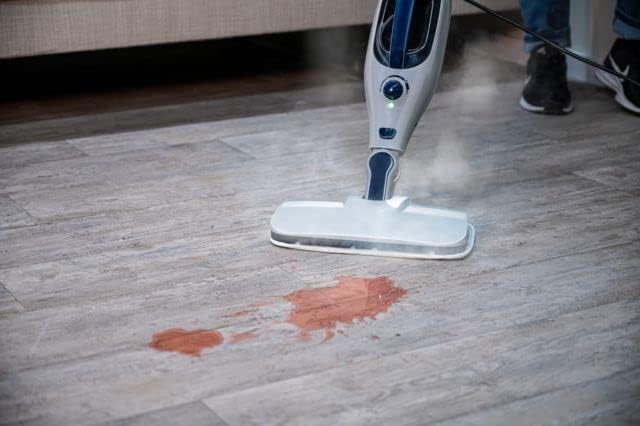
Image: The steam mop effectively cleaning a liquid spill on a hard floor.

Image: The steam mop's flexible handle allows it to reach under furniture for thorough cleaning.
4.4. Using as a Handheld Steam Cleaner
- To convert to handheld mode, ensure the appliance is unplugged and cooled. Detach the handle and mop head from the main unit.
- Select the appropriate attachment (curved nozzle, spot jet nozzle, or brush nozzle) for your cleaning task and securely attach it to the handheld unit.
- Plug in the appliance and wait for it to heat up (approx. 30 seconds).
- Direct the steam at the surface to be cleaned. The handheld unit is ideal for mirrors, sinks, grout, car rims, and refreshing upholstery or garments.

Image: The main unit detached for handheld steam cleaning.

Image: The handheld steam cleaner with a brush attachment cleaning a car rim.
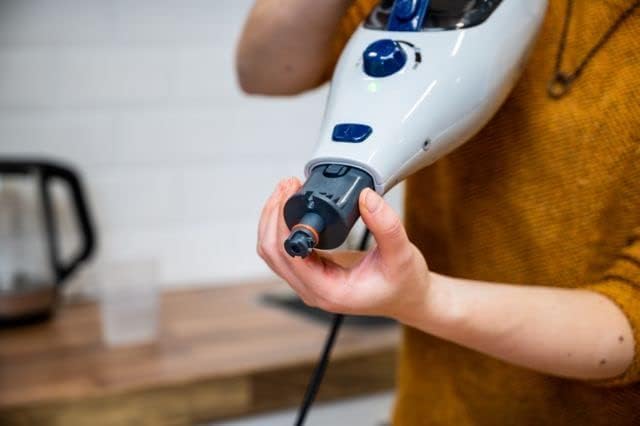
Image: A user attaching a nozzle to the handheld steam cleaner.

Irudia: Beste bat view of attaching a nozzle to the handheld steam cleaner.
5. Mantentzea eta Zainketa
5.1. Cleaning the Mop Pads
Mop pads should be cleaned after each use. They can typically be machine washed with mild detergent. Do not use bleach or fabric softeners, as these can damage the fibers and reduce cleaning effectiveness. Air dry or tumble dry on low heat.
5.2. Emptying and Cleaning the Water Tank
After each use, unplug the appliance and allow it to cool completely. Empty any remaining water from the tank. The water tank is not removable, so carefully tilt the unit to drain. Wipe the exterior of the appliance with a damp oihal. Ez erabili garbitzaile urratzaileak.
5.3. Descaling (Hard Water Filter)
The appliance includes a hard water filter. Over time, mineral deposits can accumulate, especially if tap water is used. While distilled water is recommended, if you notice reduced steam output or mineral residue, descaling may be necessary. Refer to the manufacturer's website or contact support for specific descaling instructions for your model.
5.4. Biltegiratzea
Store the steam cleaner in a cool, dry place. Ensure the water tank is empty and the appliance is completely cool before storing. Wrap the power cord neatly to prevent damage.
6. Arazoak
If you encounter issues with your Dirt Devil DD7004, please consult the following common troubleshooting steps:
| Arazoa | Kausa posiblea | Irtenbidea |
|---|---|---|
| Lurrunik ez edo lurrun-irteera txikia. |
|
|
| Ura unitatetik isurtzen. |
|
|
| Gailua ez da pizten. |
|
|
Urrats hauek probatu ondoren arazoa konpontzen ez bada, jarri harremanetan bezeroarentzako arreta-zerbitzuarekin.
7. Zehaztapenak
| Ezaugarri | Xehetasuna |
|---|---|
| Eredua | DD7004 / SM-518_01 |
| Boterea | 1300 W |
| Sarrera boltage | 220-240 VAC, 50/60 Hz |
| Konektore mota | C mota (CEE 7/17) |
| Ur deposituaren edukiera | 330 ml |
| Runtime (full tank) | Gutxi gorabehera. 15 minutu |
| Aurreberotze Denbora | Gutxi gorabehera. 30 segundo |
| Kablearen luzera | 5 metro |
| Gehienezko irismena | 5.5 metro |
| Removable Handheld Unit | Bai |
| Ur depositua desmuntagarria | Ez |
| Ur gogorraren iragazkia | Bai |
| Variable Steam Adjustment | Bai |
| IP ziurtagiria | IPX4 (Protected against splashing water) |
| Pisua | 3.2 kilogramo |
| Neurriak (L x W x H) | 7 x 15 x 10 cm |
| Dakarten osagaiak | Floor brush, spot jet nozzle, curved nozzle, brush nozzle, carpet glider, measuring cup, mop pad. |
8. Bermea eta Laguntza
8.1. Bermearen informazioa
This product comes with a manufacturer's warranty. Please refer to the warranty card included with your purchase for specific terms and conditions. Spare parts availability is indicated for 1 year from the date of purchase.
8.2. Bezeroarentzako arreta
For technical assistance, warranty claims, or to order replacement parts, please contact Dirt Devil customer support. Contact information can typically be found on the product packaging, the official Dirt Devil webgunea edo zure erosketa-agiria.
When contacting support, please have your model number (DD7004) and purchase date available.


