1. Segurtasun-argibideak
Please read all safety instructions carefully before operating the HANMATEK HM605T Programmable DC Power Supply. Failure to follow these instructions may result in electric shock, fire, or damage to the device.
- Lurreratzea: Ziurtatu elikatze-iturria behar bezala lurrera konektatuta dagoela deskarga elektrikoak saihesteko.
- Energia iturria: Connect the device only to the specified input voltage (110V).
- Aireztapena: Do not block the ventilation openings. Ensure adequate airflow around the unit to prevent overheating. The automatic temperature control cooling fan activates when the operating temperature exceeds 45°C.
- Ingurumena: Avoid operating the power supply in wet, damp, or dusty environments. Keep away from flammable materials.
- Konexioak: Always ensure all connections are secure before turning on the output. Verify positive and negative poles.
- Barne osagaiak: Ez ireki c-a.asing or attempt to repair the unit yourself. Refer servicing to qualified personnel.
- Babes-ezaugarriak: The device is equipped with Overvoltage Protection (OVP), Overcurrent Protection (OCP), Overpower Protection (OPP), Overheat Protection (OTP), and Short-Circuit Protection. Understand how these features operate.
2. Produktua amaitu daview
The HANMATEK HM605T is a high-precision programmable DC power supply designed for various electronic applications. It features a 4-digit display for voltage, current, power, and time, along with advanced protection mechanisms and PC software control.
Ezaugarri nagusiak:
- Irteera programagarria: Supports Modbus programming instruction set and programmable sequence output via USB interface.
- Zehaztasun handiko pantaila: 4-digit display for output current, voltage, power, and time. Voltage resolution: 10mV; Current resolution: 1mA.
- Babes integrala: Includes Overvoltage Protection (OVP), Overcurrent Protection (OCP), Overpower Protection (OPP), Overheat Protection (OTP), and Short-Circuit Protection.
- Funtzio anitzekoa: Features a front 5V 1.5A dual USB charging interface, one-key output ON/OFF switch, 6 groups of quick parameter storage (M1-M6), and automatic switching between voltage stabilization and current stabilization modes.
- Erabiltzaileak: One-key keyboard lock prevents accidental operation.
Osagaien identifikazioa:
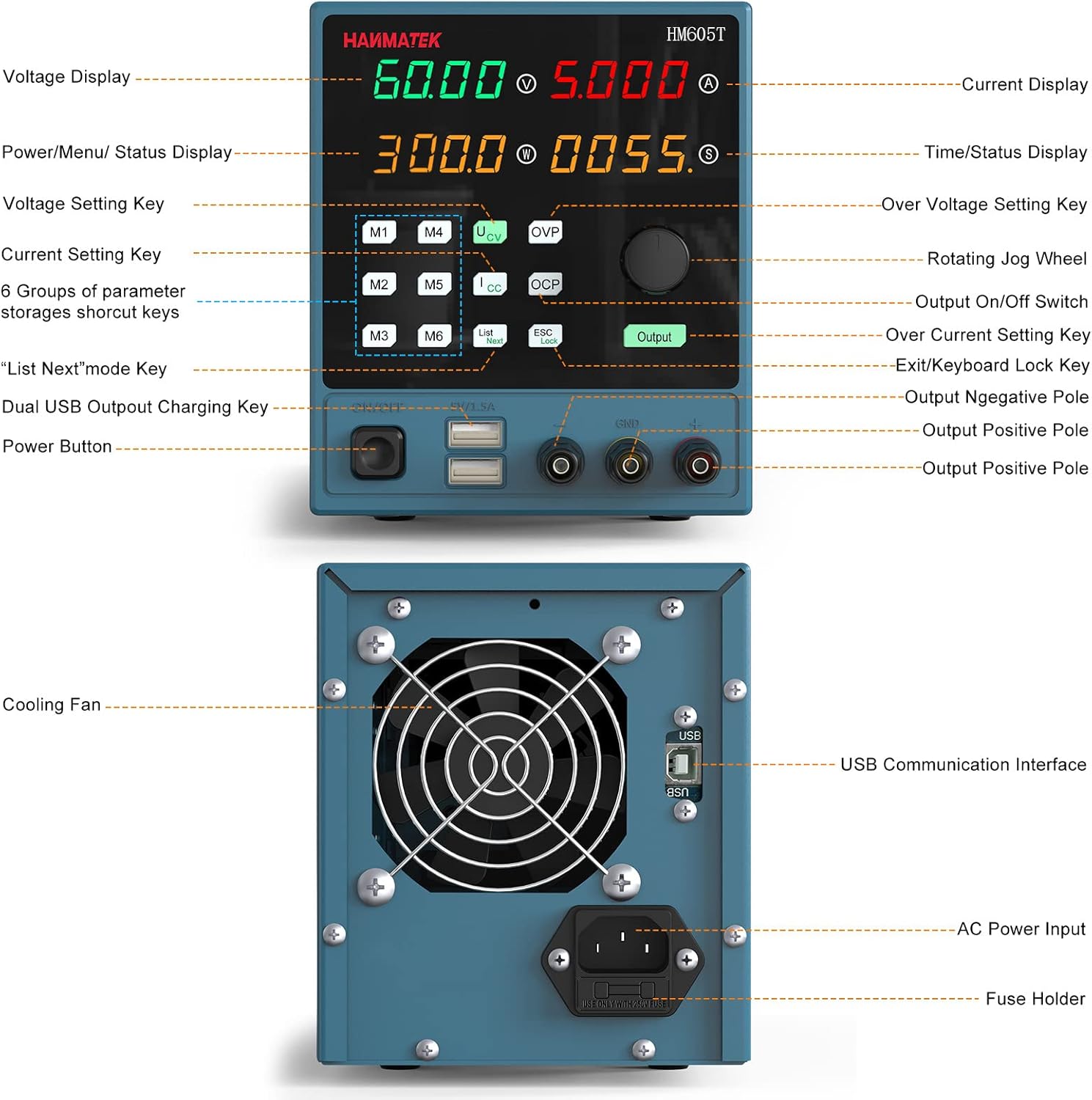
Figure 2.1: Front and Rear Panel Layout. This image illustrates the various controls and ports on the front and back of the HM605T power supply, including the display, control buttons, output terminals, USB ports, cooling fan, and AC power input.

Figure 2.2: Multiple Protection Features. An internal view highlighting the robust circuitry designed for overvoltage, overcurrent, overpower, overtemperature, and short-circuit protection.
3. Konfigurazioa
Follow these steps for initial setup of your HANMATEK HM605T power supply:
- Despaketatzea: Carefully remove all components from the packaging. Verify that all items listed in the 'Packing' section (1 * Programmable DC power supply; 1 * CD; 1 * Power cord; 1 * Clip cord; 1 * USB cable; 1 * Manual) are present.
- Potentzia-konexioa: Connect the provided power cord to the AC power input on the rear panel of the power supply and then to a suitable 110V AC outlet.
- Hasierako piztea: Turn on the main power switch located on the rear panel. The display on the front panel should illuminate.
- Irteerako terminalak: Familiarize yourself with the output terminals (positive, negative, and ground) on the front panel. Ensure correct polarity when connecting your load.
4. Funtzionamendu-argibideak
This section details the operation of the HM605T power supply, including setting parameters and using its various functions.
4.1 Oinarrizko funtzionamendua
- Turning On/Off Output: Sakatu Irteera button on the front panel to enable or disable the power output.
- Ezarpena Voltage:
- Sakatu V botoia liburukia hautatzekotage setting mode.
- Rotate the large rotary knob to adjust the voltage value. The 4-digit display allows for precise adjustments.
- Setting Current:
- Sakatu I button to select the current setting mode.
- Rotate the large rotary knob to adjust the current limit.
- Bistaratzeko moduak: Sakatu Bistaratzea button to switch between numerical and waveform display modes, allowing for real-time monitoring of output parameters.
4.2 Funtzio aurreratuak
- Memory Function (M1-M6): The power supply allows for storing and recalling up to 6 sets of frequently used voltage and current parameters. Press the Memoria button to access the memory presets. Use the rotary knob to navigate and select a preset, then press the knob to load it.
- Teklatuaren blokeoa: Ezarpenetan ustekabeko aldaketak saihesteko, sakatu ESC/Lock button to lock the keyboard. Press it again to unlock.
- PC Software Control: The HM605T features a standard USB interface on the rear panel for connection to a computer. Install the provided PC software (from the included CD or manufacturer's website) to utilize Modbus programming instruction set and programmable sequence output. This allows for remote control and data logging.
- Front USB Charging Ports: The dual 5V 1.5A USB ports on the front panel can be used for charging compatible devices or powering low-current electronics.
4.3 Bideo didaktikoa
Video 4.1: HANMATEK DC Power Supply Overview. This video provides a general demonstration of a HANMATEK adjustable DC power supply, showcasing its features and basic operation, including voltage and current adjustment, and output control.
5. Mantentzea
Mantentze egokiak zure energia-horniduraren iraupena eta funtzionamendu fidagarria bermatzen ditu.
- Garbiketa: Regularly clean the exterior of the unit with a soft, dry cloth. Do not use abrasive cleaners or solvents.
- Aireztapena: Keep the cooling fan and vents free from dust and obstructions. The fan operates automatically to maintain optimal temperature.
- Biltegiratzea: Denbora luzez erabiltzen ez baduzu, gorde elikatze-iturria leku fresko eta lehor batean, eguzki-argitik eta muturreko tenperaturetatik babestuta.
6. Arazoak
This section addresses common issues you might encounter with the HM605T power supply.
- Potentziarik gabe:
- Check if the power cord is securely connected to both the unit and the AC outlet.
- Ensure the main power switch on the rear panel is in the 'ON' position.
- Verify the fuse in the AC input socket. Replace if blown (refer to specifications for correct fuse type).
- Irteerarik ez:
- Sakatu Irteera botoia sakatu irteera gaituta dagoela ziurtatzeko.
- Check for active protection (OVP, OCP, OPP). If any protection is triggered, the output will be disabled. Address the cause of the protection event (e.g., reduce voltage/current settings, check load).
- Ensure the load is correctly connected to the output terminals with proper polarity.
- Irakurketa okerrak:
- Verify that the measurement leads are properly connected and not damaged.
- Ensure the device is operating within its specified temperature range.
- PC Software Connection Issues:
- Ensure the USB cable is securely connected to both the power supply and the computer.
- Verify that the correct drivers and software are installed on your PC. Refer to the included CD or manufacturer's webazken bertsioen gunea.
7. Zehaztapenak
| Zehaztapena | Balioa |
|---|---|
| Marka | HANMATEK |
| Eredua | HM605T |
| Sarrera boltage | 110V |
| Irteera boltage | 0V-60V |
| Irteera Korrontea | 0A-5A |
| Irteera Wattage | 300W |
| liburukiatage Ebazpena | 10 mV |
| Egungo Ebazpena | 1 mA |
| Bistaratzea | 4-Digit (Voltage, Current, Power, Time) |
| Front USB Output | liburukiatage: 5V; Current: ≤1.5A |
| Babes-eginbideak | OVP, OCP, OPP, OTP, Short Circuit |
| Hozteko metodoa | Automatic Temperature Control Fan |
| Elementuaren eredu-zenbakia | HM605T |
| Paketearen neurriak | 36 x 21.3 x 17.4 cm; 2.58 kg |
8. Bermea eta Laguntza
For warranty information and technical support, please refer to the documentation included with your product or contact HANMATEK customer service. The product package includes a manual and a CD with software and drivers. Ensure you keep your purchase receipt for warranty claims.