1. Sarrera
The MOBI CONNECT Smart DualScan Bluetooth Thermometer (Model 700026) is designed for accurate and versatile temperature measurement. It offers multiple reading methods including ear, forehead, room, and object temperature. This device features a backlit screen, LED fever indicators, and memory recall for up to 20 previous readings. It supports both Fahrenheit and Celsius modes and can connect via Bluetooth to the MOBI Smart App for enhanced tracking and management capabilities.

Image: The MOBI CONNECT Smart DualScan Bluetooth Thermometer, its packaging, and a smartphone displaying the companion app.
2. Paketearen edukia
Egiaztatu elementu guztiak paketean daudela:
- 1 x MOBI CONNECT Smart DualScan Bluetooth Thermometer
- 1 x Protective Cap (for forehead mode)
- 1 x Biltegiratzeko poltsa
- 1 x Erabiltzailearen eskuliburua
- 1 x Hasierako gida azkarra
- 2 x AAA bateria

Irudia: Xehetasun handikoa view of the thermometer with its components labeled for easy identification.
3. Konfigurazioa
3.1. Bateriaren instalazioa
- Open the battery compartment cover located on the back of the thermometer.
- Sartu bi AAA pila, polaritate zuzena ziurtatuz (+/-).
- Itxi bateriaren konpartimenduaren estalkia ondo.
3.2. Piztu/Itzaltzea
- Pizteko, sakatu SCAN/Power button. The device will perform a self-test and display the last reading.
- Termometroa automatikoki itzaliko da 30 segundo inguru inaktibo egon ondoren, bateriaren iraupena aurrezteko.
3.3. Switching Temperature Units (Fahrenheit/Celsius)
With the device powered on, press and hold the MODUA button for 3 seconds to switch between Fahrenheit (°F) and Celsius (°C).
4. Funtzionamendu moduak
4.1. Forehead Measurement
- Ensure the protective cap is on the probe.
- Sakatu SCAN/Power termometroa pizteko botoia.
- Position the thermometer approximately 0.5 to 1 inch (1-2.5 cm) from the center of the forehead.
- Eduki sakatuta ESKANETATU button. A beep will sound, and the temperature will be displayed on the LCD screen.

Image: Demonstrating forehead temperature measurement.
4.2. Ear Measurement
- Gently remove the protective cap from the probe.
- Sakatu SCAN/Power termometroa pizteko botoia.
- Carefully insert the probe into the ear canal. For children under 1 year, gently pull the ear straight back. For children over 1 year and adults, gently pull the ear up and back.
- Eduki sakatuta ESKANETATU button. A beep will sound, and the temperature will be displayed on the LCD screen.

Image: Removing the protective cap for ear measurement.

Image: Demonstrating ear temperature measurement.
4.3. Room and Object Temperature Measurement
The thermometer can also measure ambient room temperature and the temperature of objects (e.g., liquids, surfaces). To switch to these modes, press the MODUA button repeatedly until the desired icon (room or object) appears on the display. Then, point the thermometer at the object or area and press ESKANETATU.
4.4. Sukarraren adierazlea
The LCD display changes color to indicate temperature status:
- Atzeko argi berdea: Indicates a normal body temperature.
- Atzeko argi gorria: Indicates a high body temperature (fever warning).
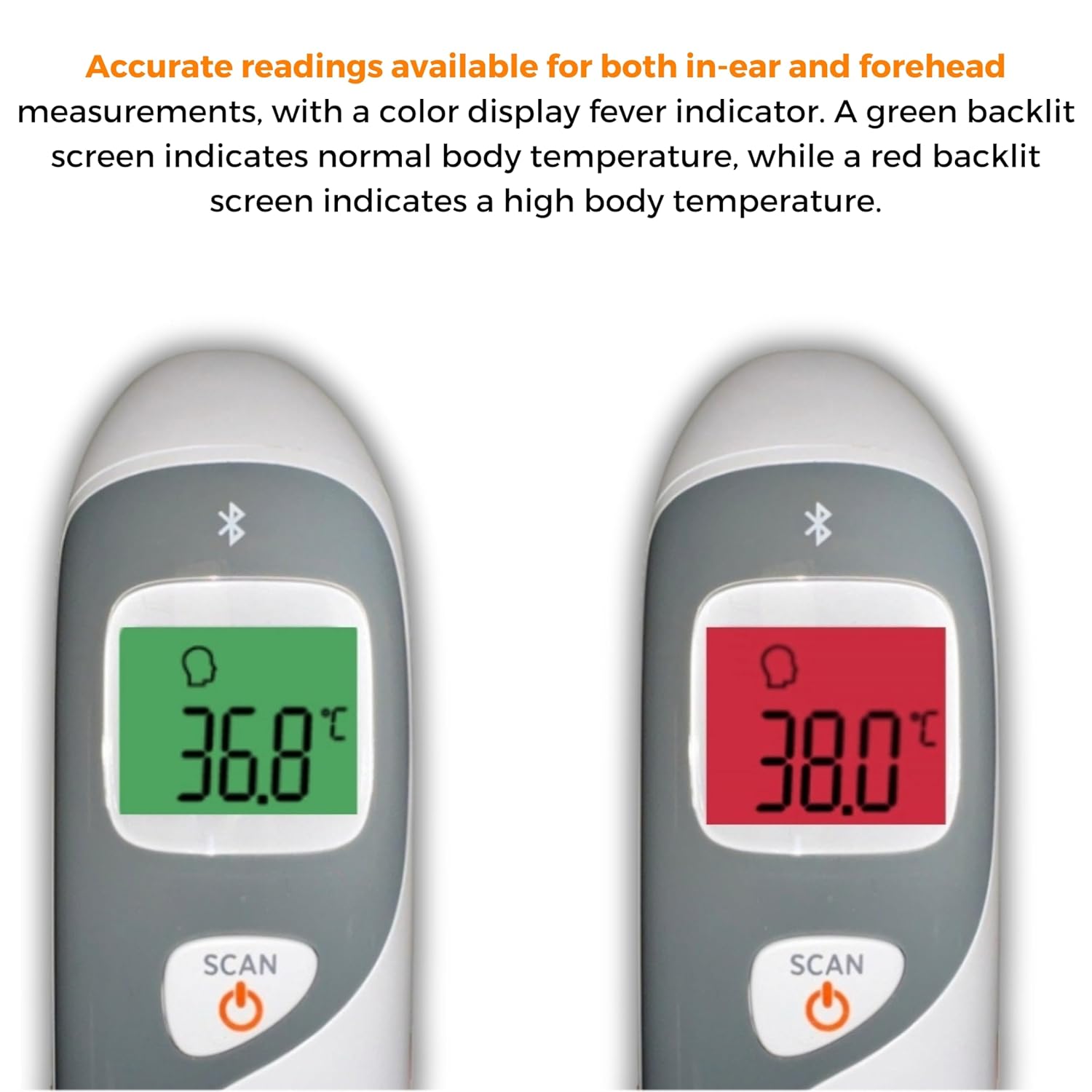
Image: The thermometer's color-changing LCD display indicating normal (green) and high (red) temperatures.
4.5. Memory Recall
The thermometer stores the last 20 temperature readings. To access these readings, press the MEM/MUTE button while the device is on. Each press will cycle through the stored readings.
5. Bluetooth Connectivity and MOBI Smart App
The MOBI CONNECT Smart DualScan Thermometer can be used independently or paired with your smartphone via Bluetooth for enhanced tracking and features through the MOBI Smart App.
5.1. Aplikazioaren deskarga eta parekatzea
- Download the "MOBI Smart" app from your device's app store (available on iOS and Android).
- Ziurtatu Bluetootha gaituta dagoela zure telefonoan.
- Open the MOBI Smart App and follow the on-screen instructions to pair your thermometer.
5.2. Aplikazioaren Ezaugarriak
- Jarraipen automatikoa: Automatically records temperature readings from the thermometer.
- Erabiltzaile anitz Profiles: Sortu eta kudeatu profesionalakfiles for each family member to track their health data independently.
- Datuen erregistroa: Add comments to each reading for context.
- Reporting & Graphs: View powerful reports and graphs for daily, weekly, monthly, or yearly temperature trends.
- Esportazio aukerak: Export data for sharing with healthcare professionals.
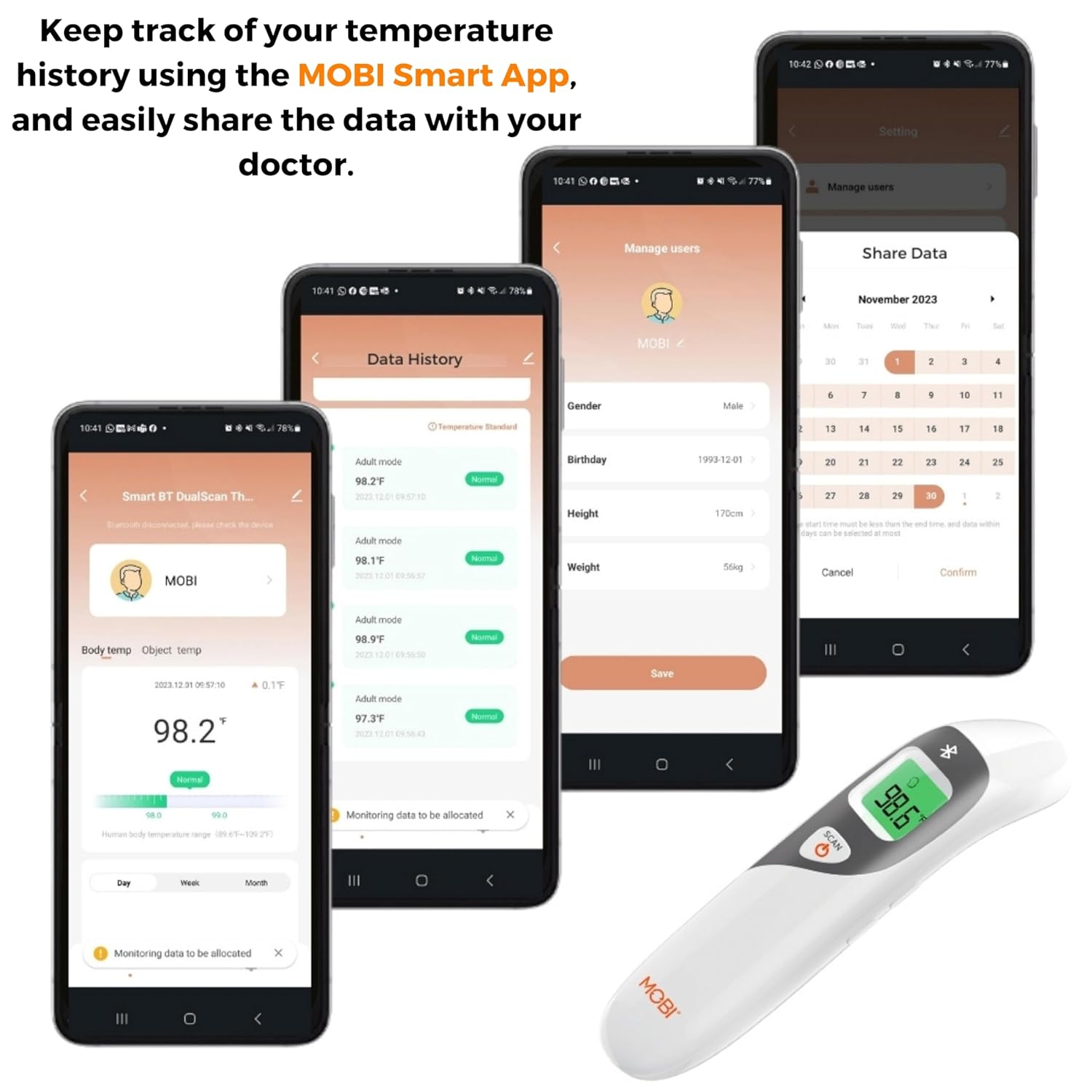
Image: Screenshots of the MOBI Smart App interface, showing data tracking and user management.
5.3. Produktuaren bideo ofiziala
Bideoa: Ofizial bat amaitu daview of the MOBI Smart DualScan Bluetooth Ear & Forehead Thermometer, demonstrating its features and usage.
6. Mantentzea
6.1. Garbiketa
To clean the thermometer, wipe it with a soft, damp cloth. Do not immerse the device in water or use abrasive cleaners. Ensure the probe is clean before each use, especially for ear measurements.
6.2. Biltegiratzea
Store the thermometer in its protective pouch in a cool, dry place, away from direct sunlight and extreme temperatures. Remove batteries if the device will not be used for an extended period.
7. Arazoak
- "Lo" or "Hi" Reading: Indicates a temperature outside the measurable range. Ensure proper placement and try again.
- Irakurketa okerrak:
- Check for proper probe placement (ear or forehead).
- Ziurtatu zunda garbi dagoela.
- Verify the correct mode (Adult/Child/Object) is selected if applicable.
- Allow the thermometer to acclimate to room temperature for 30 minutes if it has been in a significantly different environment.
- Bluetooth konexio-arazoak:
- Ziurtatu Bluetootha gaituta dagoela zure telefonoan.
- Restart the thermometer and the MOBI Smart App.
- Ensure the thermometer is within range of your smartphone.
- Ez dago pantailarik: Egiaztatu bateriaren instalazioa eta ordeztu bateriak behar izanez gero.
8. Zehaztapenak
| Modelo zenbakia | 700026 |
| Energia iturria | Pilaz elikatzen da (2 x AAA) |
| Bistaratzeko mota | LCD atzeko argiarekin |
| Konektibitatea | Bluetootha |
| Neurketa moduak | Ear, Forehead, Room, Object |
| Tenperatura Unitateak | Fahrenheit (°F) / Celsius (°C) |
| Memoria gogoratzea | Azken 20 irakurketak |
| Produktuen zainketa | Garbitu |
| Materiala | Plastikoa |
| Fabrikatzailea | Mobi Technologies Inc. |
9. Bermea eta Laguntza
For warranty information or technical support, please contact Mobi Technologies Inc. directly. Refer to the product packaging or the official MOBI webwebgunea, harremanetarako datu eguneratuenak lortzeko.


