1. Sarrera
The Behringer Four LFO is a versatile 4-channel Low Frequency Oscillator Eurorack module designed for modular synthesis systems. It provides a wide range of modulation possibilities with user-assignable waveforms and various operational modes, making it an essential tool for creating dynamic and evolving soundscapes.
Ezaugarri nagusiak hauek dira:
- 14HP 4-channel LFO Module with 4 Creative Modes
- User-assignable Waveforms
- Reset/Sync Modes
- Zoom modua
- CV (Kontrol Voltage) capabilities
2. Segurtasun-argibide garrantzitsuak
Always follow basic safety precautions when using electrical products to reduce the risk of fire, electric shock, and injury to persons.
- Irakurri argibide hauek.
- Jarrai argibide hauek.
- Kontuan izan abisu guztiei.
- Jarraitu argibide guztiak.
- Ez erabili aparatu hau uraren ondoan.
- Garbitu zapi lehorrekin bakarrik.
- Ez blokeatu aireztapen-zulorik. Instalatu fabrikatzailearen argibideen arabera.
- Ez instalatu bero-iturri inongo ondoan, esate baterako, erradiadoreak, bero-erregistroak, sukaldeak edo beste aparatu batzuk (barne ampberoa sortzen duten argitzaileak).
- Ez zapaldu polarizatutako edo lurreko entxufearen segurtasun-helburua. Entxufe polarizatu batek bi pala ditu, bata bestea baino zabalagoa dutenak. Lurreratze motako entxufe batek bi pala eta lurreko hirugarren ahoa ditu. Pala zabala edo hirugarren ahoa zure segurtasunerako eskaintzen dira. Emandako entxufea zure entxufean sartzen ez bada, kontsultatu elektrizista bati zaharkitutako entxufea ordezkatzeko.
- Babestu korronte-kablea entxufeetan, erosotasun-harguneetan eta aparatutik irteten den puntuan ibiltzetik edo atzamarra ez dadin.
- Erabili soilik fabrikatzaileak zehaztutako eranskinak/osagarriak.
- Erabili fabrikatzaileak zehaztutako edo aparatuarekin saltzen den saskiarekin, euskarria, tripodea, euskarria edo mahaiarekin soilik. Orga bat erabiltzen denean, kontuz ibili saskia/aparatuaren konbinazioa mugitzean, iraultzeagatik zauririk ez izateko.
- Deskonektatu aparatu hau tximista-ekaitzetan edo denbora luzez erabiltzen ez duzunean.
- Jarri zerbitzu-zerbitzu guztiak zerbitzu-pertsonal kualifikatuari. Zerbitzua behar da aparatua edozein modutan hondatu denean, hala nola, elikatze-kablea edo entxufea hondatuta dagoenean, likidoa isuri denean edo objektuak aparatura erori direnean, aparatua euria edo hezetasuna jasan duenean, ez du normalean funtzionatzen. , edo erori egin da.
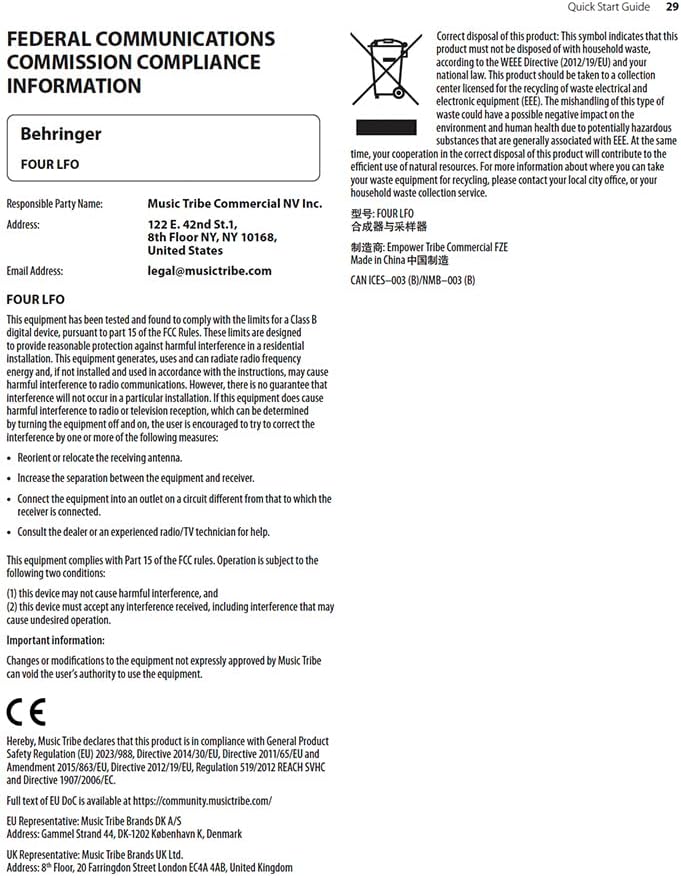
2.1 FCC Compliance Information
Ekipo hau probatu da eta B Klaseko gailu digital baten mugak betetzen dituela ikusi da, FCC Arauetako 15. zatiaren arabera. Muga hauek etxebizitza-instalazio batean interferentzia kaltegarrien aurka arrazoizko babesa emateko diseinatuta daude. Ekipo honek irrati-maiztasuneko energia sortzen, erabiltzen eta igor dezake eta, argibideen arabera instalatu eta erabiltzen ez bada, interferentzia kaltegarriak sor ditzake irrati-komunikazioetan. Dena den, ez dago bermatzen instalazio jakin batean interferentziarik gertatuko ez denik.

Figure 2.1: FCC Compliance and WEEE Directive Information. This image details the Federal Communications Commission compliance statement and the WEEE (Waste Electrical and Electronic Equipment) directive symbol, indicating proper disposal of the product.
Ekipo honek irrati- edo telebista-harreran interferentzia kaltegarriak eragiten baditu, eta hori ekipoa itzali eta piztuz jakin daiteke, erabiltzaileari gomendatzen zaio interferentziak zuzentzen saiatzea, neurri hauetako bat edo gehiago erabiliz:
- Berbideratu edo lekuz aldatu antena hartzailea.
- Handitu ekipoaren eta hargailuaren arteko bereizketa.
- Konektatu ekipoa hargailua konektatuta dagoen zirkuitu desberdineko entxufe batera.
- Kontsultatu banatzaileari edo irrati/telebistako teknikari esperientziadun bati laguntza lortzeko.
Ekipo honek FCC arauen 15. zatia betetzen du. Funtzionamendua honako bi baldintza hauen menpe dago:
- Baliteke gailu honek ez du interferentzia kaltegarririk eragin, eta
- Gailu honek jasotako edozein interferentzia onartu behar du, nahi ez den funtzionamendua eragin dezakeen interferentziak barne.
Informazio garrantzitsua: Changes or modifications to the equipment not expressly approved by Music Tribe can void the user's authority to use the equipment.
3. Konfigurazioa eta instalazioa
The Behringer Four LFO is a Eurorack module and requires a compatible Eurorack case with a power supply. Ensure your Eurorack case provides sufficient power for the module.
3.1 Instalazio fisikoa
- Itzali: Before installing, ensure your Eurorack case's power supply is completely turned off.
- Konektatu zinta-kablea: Connect the included ribbon cable to the module's power header. Ensure the red stripe on the ribbon cable aligns with the -12V pin on both the module and your Eurorack power bus board. Incorrect connection can damage the module.
- Muntaketa modulua: Carefully align the module with the rail nuts in your Eurorack case. Use the provided screws to secure the module firmly to the rails. Do not overtighten.
- Piztu: Once securely mounted and connected, you can power on your Eurorack case.
3.2 Konektibitatea
The Four LFO module features various jacks for integration into your modular system:
- RESET/SYNC Jacks: These inputs allow external signals to reset or synchronize the LFOs.
- SINE Jacks: Output for the sine waveform of each LFO.
- ASSIGN Jacks: Assignable outputs for various waveforms or modes, depending on the module's settings.
- SQUARE Jacks: Output for the square waveform of each LFO.

Figure 3.1: Front panel of the Behringer Four LFO module, showing all controls and jacks.
4. Funtzionamendua
The Four LFO module offers four independent LFO channels, each with dedicated controls and outputs. Understanding the different modes and controls is key to unlocking its full potential.
4.1 Kontrolakview
4.1. irudia: hurbileko planoa view of the Behringer Four LFO's control section, highlighting the sliders and switches.
- Hz Slider: Controls the frequency of the LFOs. The range can be adjusted from very slow (0.01 Hz) to audio rates (100 Hz).
- Φ (Phase) Slider: Adjusts the phase relationship between the LFOs, particularly relevant in certain modes.
- DIV (Divide) Slider: Sets the division factor for LFO frequencies in divide modes.
- MODU etengailua: Selects the operational mode of the LFOs.
- DOAKO botoia: Toggles between free-running and synchronized operation.
- ASSIGN Switch: Configures the function of the ASSIGN outputs.
4.2 Eragiketa moduak
The MODE switch allows you to select between four distinct operational modes, each offering unique modulation capabilities:
- FREQ (Frequency) Mode: In this mode, each of the four LFOs operates independently, and their frequencies are controlled by the Hz slider. This is ideal for general-purpose modulation where individual control over each LFO's speed is desired.
- QUAD Mode: This mode links the four LFOs, allowing for complex polyrhythmic or synchronized modulation. The exact behavior depends on the phase and divide settings.
- FRQ-PH-DIV (Frequency-Phase-Divide) Mode: This mode offers advanced control where the frequency, phase, and division of the LFOs are interconnected, enabling intricate rhythmic and evolving patterns.
- PHASE Mode: Focuses on phase relationships between the LFOs. The Φ slider becomes central to shaping the modulation.
- DIVIDE Mode: In this mode, the frequencies of LFOs 2, 3, and 4 are divisions of the frequency of LFO 1, as set by the DIV slider. This is excellent for creating harmonically related or synchronized LFO patterns.
4.3 Sinkronizazioa eta berrezarri
The Four LFO module can be synchronized to external clock signals or reset manually:
- RESET/SYNC Inputs: Patch a gate or trigger signal into these jacks to reset or synchronize the corresponding LFO. This is crucial for keeping LFOs in time with sequencers or drum machines.
- DOAKO botoia: Pressing the FREE button toggles between free-running LFO operation and synchronized operation. When synchronized, the LFOs will restart or sync to an incoming signal.
5. Mantentzea
Proper care and maintenance will ensure the longevity and optimal performance of your Behringer Four LFO module.
- Garbiketa: Use a soft, dry cloth to clean the module's surface. Do not use abrasive cleaners, solvents, or waxes, as these can damage the finish and controls.
- Ingurumena: Keep the module in a dry environment, away from direct sunlight, extreme temperatures, and excessive dust.
- Konexioak: Periodically check all patch cable connections for secure fit. Avoid excessive force when inserting or removing cables.
- Biltegiratzea: If storing the module for an extended period, ensure it is disconnected from power and stored in a protective case or anti-static bag.
6. Arazoak
If you encounter issues with your Behringer Four LFO module, refer to the following common problems and solutions:
| Arazoa | Kausa posiblea | Irtenbidea |
|---|---|---|
| No LFO output | Module not powered; incorrect power cable connection; output jack not connected. | Ensure Eurorack case is powered on. Verify ribbon cable orientation (red stripe to -12V). Connect a patch cable from a SINE, ASSIGN, or SQUARE output to an audio or CV input. |
| LFOs not synchronizing | Incorrect RESET/SYNC input; FREE button engaged (free-running mode). | Ensure a proper gate or trigger signal is patched to the RESET/SYNC input. Press the FREE button to disengage free-running mode and enable synchronization. |
| Unexpected LFO behavior | Incorrect MODE selection; conflicting CV input. | Check the MODE switch setting and ensure it matches your desired operation. Disconnect any CV inputs to isolate the issue. |
| Module not recognized by software (if applicable) | USB connection issue; driver not installed. | Ensure USB cable is securely connected. Install necessary drivers if required by your operating system or software (e.g., VCV Rack). |
If the problem persists after attempting these solutions, please contact Behringer customer support or refer to the official Behringer weblaguntza gehiago jasotzeko gunea.
7. Zehaztapenak
| Ezaugarri | Xehetasuna |
|---|---|
| Ereduaren izena | LAU LFO |
| Marka | Behringer |
| Elementuaren pisua | 9.6 ontza (272 gramo inguru) |
| Produktuaren neurriak | 6.95 x 4.1 x 3.05 hazbete (gutxi gorabehera 17.65 x 10.41 x 7.75 cm) |
| Energia iturria | Korronte zuzeneko elikatze-iturria (Eurorack estandarra) |
| Konektore mota | USB Type B (for potential future firmware updates or specific software integration) |
| Onartutako softwarea | VCV Rack or Modular (implies compatibility with virtual modular environments) |
| Kolorea | Beltza |
| Fabrikatzailea | Behringer |
| ASIN | B0C5TQQFSP |
| UPC | 787790557753 |
8. Bermea eta Laguntza
Bermeari buruzko informazio zehatza eta laguntza teknikoa lortzeko, bisitatu Behringer-en webgune ofiziala. website or contact Music Tribe Commercial NV Inc., the manufacturer's representative.
- Ofiziala Webgunea: music.tribe.com
- Posta elektronikoko laguntza: legal@musictribe.com
- Fabrikatzailea: Music Tribe Commercial NV Inc.
- Helbidea: 122 E 42nd St.1, 8th Floor, NY NY 10168, United States
Gorde erosketaren egiaztagiria bermearen erreklamazioetarako.


