1. Produktua amaitu daview
The Poly Voyager 4320 UC is a wireless stereo headset designed for professionals requiring seamless connectivity and productivity in various work environments. It features a noise-canceling boom microphone with Acoustic Fence technology, ensuring clear audio transmission by blocking background noise. The headset connects to PC/Mac via a BT700 USB-C Bluetooth adapter (with an included USB-C to USB-A adapter) and to mobile devices via Bluetooth 5.2. It offers up to 24 hours of talk time and includes a desktop charging stand for convenient power management. This model is Microsoft Teams certified and integrates with other communication platforms like Zoom.

Image 1.1: The Poly Voyager 4320 UC Wireless Headset shown on its included desktop charging stand. The headset features over-the-head stereo design with a flexible boom microphone.
2. Ezaugarri nagusiak
- Audioaren kalitate garbia: Features a noise-canceling dual microphone with Acoustic Fence technology to minimize background noise, ensuring your voice is heard clearly.
- Konektibitate malgua: Connects wirelessly to computers (PC/Mac) via the included BT700 USB-C Bluetooth adapter (with USB-C to USB-A adapter) and to mobile phones via Bluetooth 5.2.
- Extended Mobility: Offers a wireless range of up to 164 feet (50 meters) from your computer, allowing freedom of movement during calls.
- Bateriaren iraupen luzea: Provides up to 24 hours of talk time on a single charge. Can also be used as a wired headset via audio-over-USB mode.
- Diseinu erosoa: Equipped with an adjustable padded headband and memory foam ear cushions for comfortable extended wear.
- Dedicated Microsoft Teams Button: Instant access to the Microsoft Teams app for seamless collaboration. Also compatible with Zoom and other platforms.
- Desktop Charging Stand: Simplifies charging and provides a convenient storage solution.
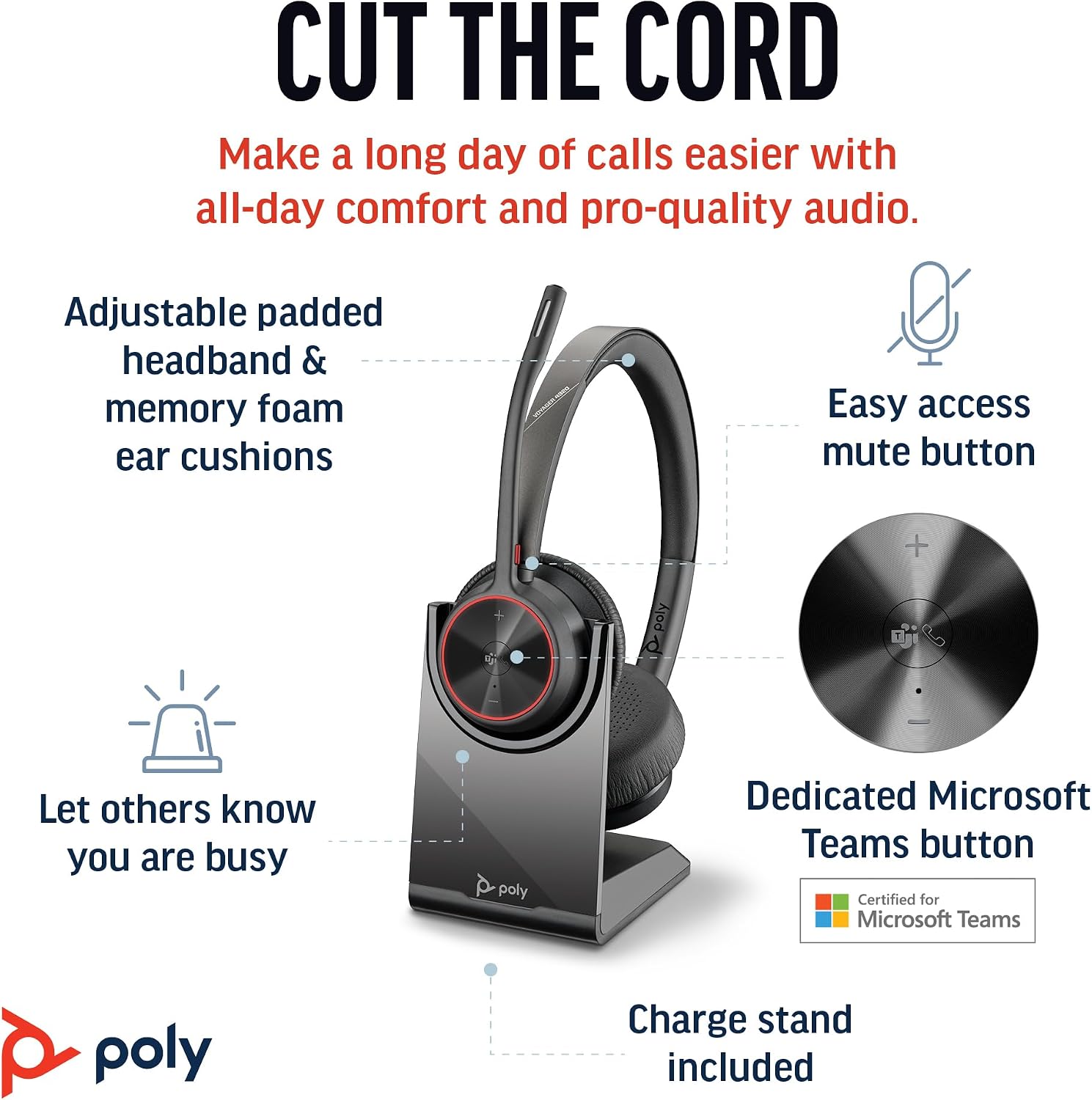
Image 2.1: The Poly Voyager 4320 UC Headset highlighting its adjustable padded headband, memory foam ear cushions, easy access mute button, dedicated Microsoft Teams button, and included charge stand.

Image 2.2: Illustration demonstrating the noise-canceling dual microphone with Acoustic Fence technology, which filters out background noise for clear communication.
3. Konfigurazio gida
3.1 Paketearen edukia
Egiaztatu elementu guztiak zure paketean daudela:
- Poly Voyager 4320 UC Haririk gabeko Aurikularrak
- Mahaigaineko kargatzeko euskarria
- BT700 USB-C Bluetooth egokitzailea
- USB-C USB-Arako egokitzailea
- USB kargatzeko kablea
- Travel Pouch (may be included with some versions)
3.2 Entzungailuak kargatzea
Before first use, fully charge your headset. The headset can be charged using the included desktop charging stand or directly via the USB charging cable.
- Kargatzeko euskarria erabiltzea: Connect the USB charging cable to the charging stand and then to a powered USB port (e.g., computer, wall adapter). Place the headset onto the charging stand. The headset's LED indicator will show charging status.
- Direct USB Charging: Connect the USB charging cable directly to the headset's USB-C port and then to a powered USB port.
A full charge takes approximately 1.5 hours. The headset provides up to 24 hours of talk time and 47 hours of listening time.
3.3 Gailuetara konektatzea
The Voyager 4320 UC headset offers multiple connection options:
3.3.1 Connecting to PC/Mac (via USB Adapter)
- Insert the BT700 USB-C Bluetooth adapter into an available USB-C port on your computer. If your computer only has USB-A ports, use the included USB-C to USB-A adapter.
- Egokitzailearen LEDa urdinez keinuka hasiko da, entzungailuak bilatzen ari dela adieraziz.
- Power on your headset. The headset and adapter are pre-paired and should connect automatically. The adapter's LED will turn solid blue when connected.
- Hautatu Poly Voyager 4320 UC audio sarrera eta irteera gailu gisa zure ordenagailuaren soinu ezarpenetan eta komunikazio aplikazioetan (adibidez, Microsoft Teams, Zoom).
3.3.2 Connecting to Mobile Phone (via Bluetooth)
- With the headset powered on, press and hold the Bluetooth pairing button on the headset until the headset's LED flashes red and blue, indicating pairing mode.
- Zure telefono mugikorrean, joan Bluetooth ezarpenetara eta gaitu Bluetooth.
- Select "Poly Voyager 4320 UC" from the list of available devices.
- Once paired, the headset's LED will stop flashing and remain solid blue.

Image 3.1: Diagram illustrating the multiple connection options for the Poly Voyager 4320 UC headset, including connection to a PC/Mac via the USB-C BT700 Bluetooth adapter (with USB-A adapter option) and direct Bluetooth connection to a mobile device.
4. Funtzionamendu-argibideak
4.1 Entzungailuak janztea
The headset can be worn with the microphone boom on either the right or left side. Rotate the boom up and over to align with the desired side. For optimal microphone performance, position the boom approximately two finger-widths from the corner of your mouth.
4.2 Entzungailuen kontrolak
- Bolumena igo/behera (+/-): Adjusts listening volume.
- Deitzeko botoia: Sakatu deia erantzuteko edo amaitzeko.
- Mututu botoia: Located on the microphone boom. Press to mute/unmute your microphone. A dynamic mute alert will notify you if you speak while muted.
- Microsoft Teams botoia: Dedicated button for instant access to the Microsoft Teams application.
- Pizteko botoia: Slide to power on/off.
4.3 LED adierazleak
The headset and USB adapter feature LED indicators to provide status information:
- Entzungailuen LEDa:
- Solid Blue: Connected/In call
- Flashing Red/Blue: Pairing mode
- Gorri trinkoa: Isilduta
- Anbarra solidoa: Kargatzen
- Flashing Red: Low battery
- USB Adapter LED (BT700):
- Solid Blue: Connected/In call
- Flashing Blue: Searching for headset
- Gorri trinkoa: Isilduta
5. Mantentzea
5.1 Garbiketa
To maintain the headset's performance and hygiene:
- Garbitu belarrietako kuxinak eta buruko zinta oihal leun batekinamp oihal. Saihestu produktu kimiko gogorrak edo material urratzaileak erabiltzea.
- Do not immerse the headset in water or any liquids.
- Keep the charging contacts on the headset and stand clean and free of debris.
5.2 Biltegiratzea
When not in use, store the headset on its charging stand or in the included travel pouch to protect it from dust and damage. Avoid storing in extreme temperatures.
6. Arazoak
6.1 Audiorik ez edo audio kalitate eskasa
- Egiaztatu konexioa: Ensure the headset is properly connected to your device (solid blue LED on headset and adapter).
- Bolumen mailak: Verify that headset, computer, and application volume levels are not muted or set too low.
- Gailu lehenetsia: Confirm that the Poly Voyager 4320 UC is selected as the default playback and recording device in your computer's sound settings and communication software.
- Tartea: Ensure you are within the wireless range (up to 50 meters) of your connected device.
- Interferentzia: Urrundu interferentziak sor ditzaketen beste haririk gabeko gailuetatik.
6.2 Mikrofonoak ez du funtzionatzen
- Egiaztatu mutua: Ensure the microphone is not muted (headset LED should not be solid red).
- Mikrofonoaren posizioa: Adjust the microphone boom to be two finger-widths from your mouth.
- Gailu lehenetsia: Confirm the headset is selected as the default recording device in your computer's sound settings and communication software.
- Software ezarpenak: Egiaztatu mikrofonoaren pribatutasun ezarpenak zure sistema eragilean.
6.3 Headset Not Pairing/Connecting
- Potentzia-zikloa: Itzali entzungailua eta piztu berriro.
- Parekatu berriro: Follow the pairing instructions in Section 3.3 to re-pair the headset with your device or USB adapter.
- Adapter Reset: If using the USB adapter, try unplugging and re-inserting it.
- Clear Device List: On your mobile device, forget the headset from the Bluetooth device list and attempt to pair again.
7. Zehaztapenak
| Ezaugarri | Zehaztapena |
|---|---|
| Ereduaren izena | Voyager 4320 Teams Version with Charge Stand, USB-C BT700 with USB-C to USB-A Adapter |
| Konektibitate Teknologia | Haririk gabekoa (Bluetooth 5.2) |
| Wireless Range | Gehienez 50 metro (164 oin) |
| Hitzaldi Denbora | Gehienez 24 ordu |
| Entzuteko Denbora | Gehienez 47 ordu |
| Kargatzeko Denbora | Gutxi gorabehera. 1.5 ordu karga osoa lortzeko |
| Mikrofonoa | Noise-canceling dual mic with Acoustic Fence technology |
| Gailu bateragarriak | Cellphones, Desktops, Laptops, Tablets |
| Kontrol mota | Multimediaren kontrola, ukimena |
| Elementuaren pisua | 162 gramo (5.7 ontza) |
| Produktuaren neurriak | 3.94 x 0.79 x 1.06 hazbete |
| Bateria mota | 1 litio ioizko bateria (barne) |
| UPC | 017229196667, 196548548736 |
8. Bermea eta Laguntza
Bermeari buruzko informazioa eta laguntza teknikoa lortzeko, jo ezazu Poly ofizialera. webwebgunera edo jarri harremanetan bezeroarentzako arreta-zerbitzura. Gorde erosketaren frogagiria berme-erreklamazioetarako.


