Sarrera
Thank you for choosing the Epson EB-L210SF projector. This manual provides essential information for the safe and efficient use of your projector. Please read it thoroughly before operating the device and keep it for future reference.
The Epson EB-L210SF is a 3LCD Full-HD projector designed for clear and vibrant image projection. It features a laser light source for long-lasting performance.
Segurtasun informazio garrantzitsua
- Laser segurtasuna: Do not look directly into the projector lens when the laser light source is active. Avoid direct eye exposure to the laser beam.
- Aireztapena: Ensure adequate ventilation around the projector. Do not block ventilation openings. Overheating can cause damage.
- Energia iturria: Use only the power supply specified for this projector.
- Manipulazioa: Kontuz ibili proiektorea. Saihestu erortzea edo kolpe bortitzak jasotzea.
- Garbiketa: Deskonektatu kablea garbitu aurretik. Erabili zapi leun eta lehor bat. Ez erabili garbitzaile likido edo aerosolik.
Konfigurazioa
1. Desontziratzea eta kokatzea
Carefully remove the projector and all accessories from the packaging. Place the projector on a stable, level surface. Ensure there is sufficient space around the projector for proper ventilation.

1. irudia: Aurrealdea eta alboa view of the Epson EB-L210SF projector, showing the lens and ventilation grilles.
2. Potentzia konektatzea
- Konektatu emandako elikatze-kablea proiektorearen korronte alternoko sarrerara.
- Entxufatu korronte-kablearen beste muturra lurreko hartune elektriko batean.
3. Sarrera iturriak konektatzea
The projector supports various input sources. Connect your device (computer, Blu-ray player, etc.) to the appropriate port on the projector's rear panel.

Figure 2: Rear panel of the projector, displaying various input and output ports including HDMI, Computer (VGA), Video, USB, and Audio connections.
- HDMI: Connect an HDMI cable from your device to one of the HDMI ports (HDMI 1 or HDMI 2).
- Ordenagailua (VGA): Connect a VGA cable from your computer to the Computer 1 or Computer 2 port. For audio, connect a separate audio cable to Audio 1 or Audio 2.
- Bideoa: Connect composite video and audio cables to the Video and Audio (R/L) ports.
- USBa: Use the USB-A port for connecting USB storage devices or the USB-B port for display over USB.
- LAN: Konektatu Ethernet kable bat sarearen kontrola eta monitorizazioa egiteko.
4. Hasierako piztea eta irudiaren doikuntza
- Press the power button on the projector or remote control to turn on the device. The power indicator will illuminate.
- Egokitu foku eraztuna lentearen inguruan irudia zorrotz eta garbi egon arte.
- Erabili zoom palanka (if available) to adjust the image size.
- Irudia trapezoidala bada, erabili klabearen zuzenketa feature (manual or automatic) to square the image. Refer to the Operating section for details on menu navigation.
Proiektorearen funtzionamendua
1. Kontrol panela baino gehiagoview
The control panel on top of the projector allows access to various functions and settings.
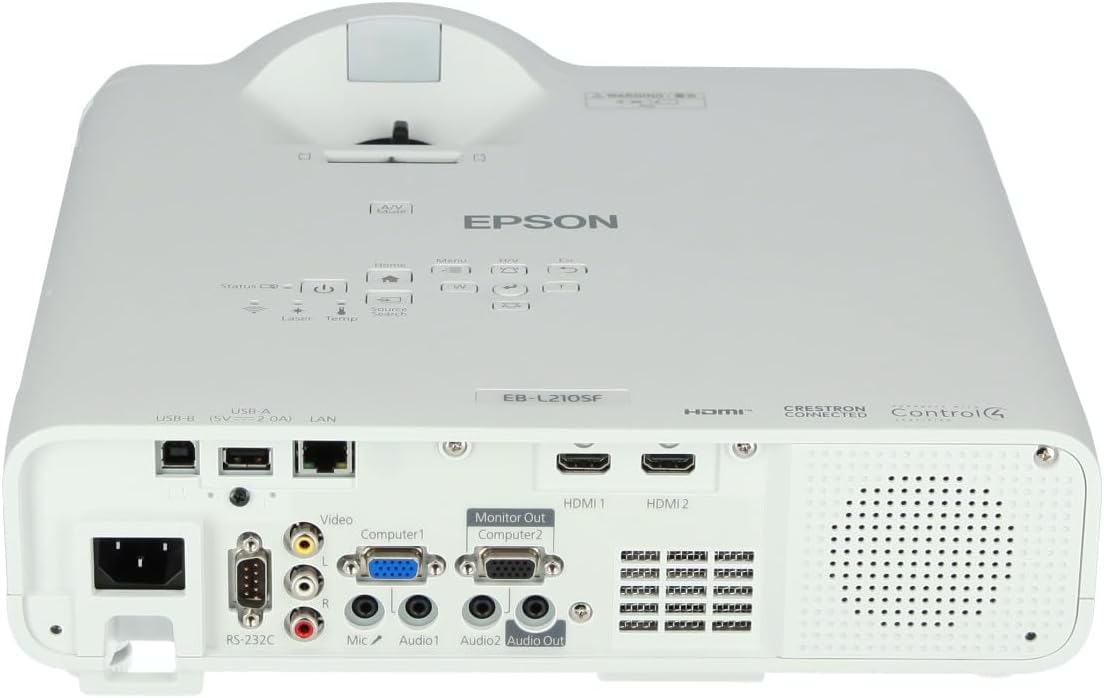
3. irudia: Goikoa view of the projector, highlighting the control panel with buttons for power, menu, source selection, and navigation.
- Pizteko botoia: Proiektorea pizten edo itzaltzen du.
- Iturburuaren bilaketa: Eskuragarri dauden sarrera-iturrien artean ziklatzen du.
- Menuko botoia: Pantailan bistaratze (OSD) menua irekitzen du.
- Navigation Buttons (Arrow keys): Menu aukeren artean nabigatzeko erabiltzen da.
- Sartu botoia: Menuko hautaketak berresten ditu.
- Ihes botoia: Uneko menutik irteten da edo aurreko pantailara itzultzen da.
- Hasierako botoia: Accesses the home screen or quick settings.
- A/V mutu: Aldi baterako audioa isilarazten du eta pantaila itzaltzen du.
2. Sarrera iturri bat hautatzea
Sakatu Iturriaren bilaketa button on the control panel or remote control to cycle through the connected input sources (e.g., HDMI 1, HDMI 2, Computer 1, Video). The projector will automatically detect and display the active source.
3. Adjusting Image and Audio Settings
Sakatu Menua button to access the projector's on-screen display (OSD) menu. Use the navigation buttons to browse categories such as:
- Irudia: Doitu distira, kontrastea, kolorea, tonua, zorroztasuna eta kolore-tenperatura.
- Seinalea: Configure input signal settings, aspect ratio, and overscan.
- Ezarpenak: General projector settings like language, display options, and power management.
- Audioa: Adjust volume, mute, and audio input selection.
Hautatu aukera bat eta sakatu Sartu to modify its value. Press Esc menutik irteteko.
Mantentzea
1. Proiektorea garbitzea
- Kanpoaldea: Wipe the projector's exterior with a soft, dry, lint-free cloth. For stubborn dirt, dampBusti oihal pixka bat urarekin, eta gero lehortu.
- Lentea: Gently wipe the lens with a lens cleaning cloth or lens paper. Avoid using abrasive materials or excessive force.
- Aire-iragazkia: Regularly check and clean the air filter to prevent dust buildup, which can affect performance and cause overheating. Refer to the projector's on-screen menu for filter maintenance reminders.
2. Laser argi iturria
The Epson EB-L210SF uses a laser light source, which offers a long operational life and does not require lamp replacement. No user maintenance is typically required for the laser light source itself.
Arazoak konpontzea
Proiektorearekin arazoak badituzu, jo ezazu honako arazo eta irtenbide ohikoenei:
| Arazoa | Balizko Kausa / Irtenbidea |
|---|---|
| Ez da irudirik proiektatuta |
|
| Irudia lausoa edo fokutik kanpo dago |
|
| Irudia distortsionatuta dago (trapezoidala) |
|
| Soinurik ez |
|
| Projector is not wireless | The Epson EB-L210SF is not inherently a wireless projector. Wireless functionality typically requires an optional external wireless adapter, which is sold separately. Please consult Epson's official website or your retailer for compatible wireless adapters. |
| Overheating warning (Temp indicator) |
|
Zehaztapenak
| Ezaugarri | Xehetasuna |
|---|---|
| Modelo zenbakia | V11HA75080 |
| Bistaratzeko ebazpena | 1920 x 1080 (HD osoa) |
| Konektibitate Teknologia | HDMI, VGA, USB, LAN |
| Produktuaren neurriak | 11.81 x 11.81 x 11.81 hazbete |
| Elementuaren pisua | 10.14 kilo |
| Argi iturria | Laserra |
| Fabrikatzailea | Epson |
| Gomendatutako Erabilerak | Jarraipena |
| Ezaugarri Berezia | Arinak |
| Beharrezko bateriak | 1 AAAA (for remote control, not included with projector unit) |
| Eskuragarri dagoen lehen data | 14ko azaroaren 2023a |
Bermea eta Laguntza
Bermeari buruzko informazio zehatza lortzeko, kontsultatu zure produktuarekin batera datorren berme-txartela edo bisitatu Epson-en webgune ofiziala. webgunea. Bermearen baldintzak eta zehaztapenak eskualdearen arabera alda daitezke.
Laguntza teknikoa lortzeko, produktua erregistratzeko edo azken kontrolatzaileak eta softwarea deskargatzeko, bisitatu Epsonen laguntza ofiziala. website or contact Epson customer service in your region. Contact information can typically be found on the Epson webgunea.


