Sarrera
The Walrus Audio SLOER Stereo Ambient Reverb is an advanced effects pedal designed to create immersive, lush, and modulated soundscapes. Building upon the popular Slö series, the SLOER introduces additional reverb algorithms, stereo width control, new modulation wave shapes, and sample rate control, offering expanded sonic possibilities for guitarists and musicians.
This manual provides detailed instructions for setting up, operating, and maintaining your SLOER pedal, ensuring you get the most out of its extensive features.
Segurtasun Informazioa
- Use only a regulated 9V DC, center-negative power supply. Incorrect power supply may damage the unit and void the warranty.
- Do not expose the pedal to excessive moisture, rain, or extreme temperatures.
- Avoid dropping the pedal or subjecting it to severe impacts.
- Do not attempt to open the enclosure or modify the internal circuitry. Refer all servicing to qualified personnel.
- Mantendu haurren eskura.
Paketearen edukia
- Walrus Audio SLOER Stereo Ambient Reverb Pedal
- Argibide eskuliburua
- Walrus Audio Product Information Card
Produktua amaituview
The SLOER pedal features a robust die-cast enclosure with clearly labeled controls and input/output jacks. Familiarize yourself with the layout before connecting the pedal.

1. irudia: Goikoa view of the Walrus Audio SLOER pedal, showcasing its controls and distinctive blue finish.
Kontrolak eta Jacks
- Desintegrazio botoia: Controls the length of the reverb trail. Turn clockwise for longer, more expansive decays.
- Iragazki-Knob: Adjusts the tone of the reverb. Turn clockwise for brighter reverb, counter-clockwise for darker tones.
- Sakonerako botoia: Controls the intensity or amount of modulation applied to the reverb trail.
- Nahasteko botoia: Blends the wet (effected) signal with the dry (unaffected) signal. Fully counter-clockwise is dry, fully clockwise is wet.
- Width Toggle Switch: Selects the stereo width of the reverb. Options include Zabala, Ertaina, eta Estua.
- Stretch Slider: s-a kontrolatzen duample rate of the reverb, affecting its texture and fidelity.
- Mode Rotary Dial: Selects one of five distinct reverb algorithms:
- Dream (~): Latching pad reverb.
- Light (^): High octave shimmer reverb.
- Rain (ˇ): Delay tap diffusion reverb.
- Dark (π): Lower octave reverb.
- Rise (πˇ): Ambient swell reverb.
- Saihestu oin etengailua: Efektua aktibatzen edo saihesten du.
- Sustain Footswitch: Momentarily or latches the reverb trail, depending on the mode. Also used for preset selection.
- In Stereo (R) / In Mono (L) Jacks: Input jacks for connecting your instrument or other pedals. Use both for stereo input, or In Mono (L) for mono input.
- Out Stereo (R) / Out Mono (L) Jacks: Output jacks for connecting to an amplifier or other effects. Use both for stereo output, or Out Mono (L) for mono output.
- 9V DC potentzia sarrera: Connect a standard 9V DC, center-negative power supply.
Konfigurazioa
Follow these steps to connect your SLOER pedal to your audio setup:
- Potentzia-konexioa: Connect a standard 9V DC, center-negative power supply (not included) to the 9V DC input jack on the rear of the pedal. Ensure the power supply meets the specified requirements to prevent damage.
- Sarrerako konexioa:
- Izan ere Sarrera mono: Connect your instrument or the output of a preceding pedal to the In Mono (L) jack.
- Izan ere Sarrera estereoa: Connect the stereo output of a preceding device to both the In Stereo (R) eta In Mono (L) kakak.
- Irteerako konexioa:
- Izan ere Irteera monofonikoa: Konektatu Out Mono (L) jack zure amplifier or the input of the next pedal in your chain.
- Izan ere Irteera estereoa: Konektatu biak Out Stereo (R) eta Out Mono (L) jacks to two separate amplifiers or stereo input devices.
- Hasierako ezarpenak: Before powering on, set all knobs to their middle position (12 o'clock) and the Width toggle to 'Medium' for a balanced starting point.
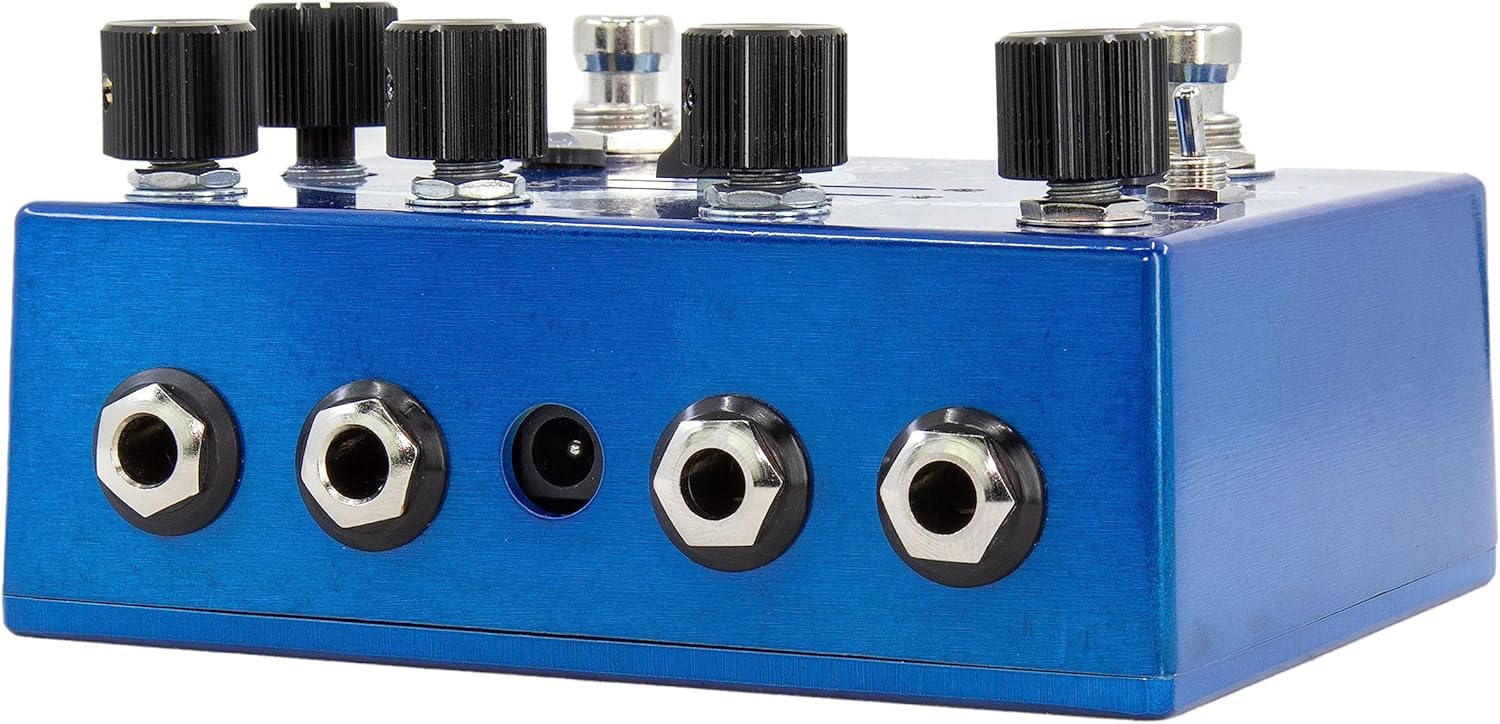
2. Irudia: Atzealdea view of the SLOER pedal, illustrating the input, output, and power connections.
Operating the SLOER
The SLOER offers a wide range of ambient reverb textures through its intuitive controls. Experiment with each setting to discover its full potential.
Erreberb moduak
The Modua rotary dial selects the core reverb algorithm:
- Dream (~): A lush, ethereal reverb that can be latched into an infinite pad by holding the Sustain footswitch. Ideal for ambient textures and drones.
- Light (^): Adds a shimmering high octave to the reverb trail, creating bright, angelic soundscapes.
- Rain (ˇ): Features a unique delay tap diffusion, creating a scattered, evolving reverb that can sound like raindrops or granular textures.
- Dark (π): Introduces a lower octave to the reverb, resulting in deep, brooding, and atmospheric sounds.
- Rise (πˇ): An ambient swell reverb that builds in volume over time, perfect for creating dramatic intros or transitions.
Modulation Wave Shapes (Secondary Function)
Each reverb mode has a secondary function accessible by holding down the Saihesbidea footswitch and turning the Modua rotary dial. This allows you to select one of five different wave shapes for the modulation on the reverb trail:
- Uhin Sinusoitsua: Smooth, gentle modulation.
- Triangle Wave: Even, symmetrical modulation.
- Sawtooth Wave: Asymmetrical, ramp-up or ramp-down modulation.
- Square Wave: Abrupt, on/off modulation.
- Random Wave: Unpredictable, evolving modulation.
The Sakonera knob controls the intensity of this modulation.
Aurrez ezarriak
The SLOER features three onboard preset slots to save and recall your favorite settings:
- Aurrez aurreko ezarpena gordetzea: To save your current settings, simultaneously press and hold both the Saihesbidea eta Eutsi footswitches until the LED flashes, indicating the preset has been saved to the current slot.
- Aurrezarpen bat berreskuratzea: To scroll through the three presets, simultaneously press and release both the Saihesbidea eta Eutsi footswitches. The LED will change color to indicate the active preset (e.g., Green for Preset 1, Blue for Preset 2, Red for Preset 3).

3. irudia: Xehetasuna view of the SLOER's top panel controls, including knobs, toggle switch, slider, and rotary dial.
Mantentzea
To ensure the longevity and optimal performance of your SLOER pedal, follow these maintenance guidelines:
- Garbiketa: Use a soft, dry cloth to wipe down the pedal's enclosure. Avoid abrasive cleaners or solvents, which can damage the finish and labels.
- Biltegiratzea: When not in use for extended periods, store the pedal in a cool, dry place away from direct sunlight and extreme temperatures.
- Konexioak: Aldian-aldian egiaztatu kable-konexio guztiak higadura edo haustura dagoen. Ziurtatu entxufeak hautsik eta hondakinik gabe daudela.
Arazoak konpontzea
If you encounter issues with your SLOER pedal, consult the table below for common problems and solutions:
| Arazoa | Kausa posiblea | Irtenbidea |
|---|---|---|
| Ez dago soinurik pedala sakatuta dagoenean. | Incorrect power supply, faulty cables, incorrect input/output connections. | Verify power supply (9V DC, center-negative). Check all cables for damage. Ensure instrument is connected to 'In Mono (L)' or 'In Stereo (R)' and amplifier to 'Out Mono (L)' or 'Out Stereo (R)'. |
| Effect is too subtle or too dominant. | Mix knob setting. | Egokitu Nahastu knob to achieve the desired blend of wet and dry signals. |
| Reverb trail is too short or too long. | Decay knob setting. | Egokitu Gainbehera knob to control the reverb length. |
| Modulation is not present or too intense. | Depth knob setting, incorrect wave shape. | Egokitu Sakonera knob. Ensure a modulation wave shape is selected (secondary function of Mode dial). |
| Pedal does not respond to footswitches. | Energia arazoa, barne akatsa. | Check power supply. If problem persists, contact Walrus Audio support. |
Zehaztapenak
| Ezaugarri | Xehetasuna |
|---|---|
| Modelo zenbakia | 900-1082BE |
| Neurriak (L x W x H) | 3.86 x 4.72 x 2.32 hazbete |
| Elementuaren pisua | 13.7 ontza (389 gramo) |
| Potentzia-eskakizuna | 9V DC, 300mA minimum, center-negative (power supply not included) |
| Seinalearen formatua | Analogikoa |
| Hardware interfazea | 1/4 hazbeteko audioa |
| Kolorea | Urdina |
| Reverb Algorithms | Dream, Light, Rain, Dark, Rise |
| Modulation Wave Shapes | Sine, Triangle, Sawtooth, Square, Random |
| Aurrez ezarriak | 3 onboard preset slots |
Bermearen informazioa
Walrus Audio pedals come with a limited lifetime warranty covering defects in materials and workmanship. This warranty applies to the original owner and is non-transferable. It does not cover damage caused by misuse, accidents, unauthorized modifications, or improper power supply. For detailed warranty terms and conditions, please visit the official Walrus Audio webgunea.
Laguntza
For technical assistance, troubleshooting beyond this manual, or warranty claims, please contact Walrus Audio customer support. You can find contact information and additional resources on the official Walrus Audio webgunea:
Please have your pedal's model number (900-1082BE) and purchase information ready when contacting support.


