Sarrera
This manual provides comprehensive instructions for the Silvergear XL Smartwatch. It covers setup, operation, maintenance, and troubleshooting to ensure you get the most out of your device. The Silvergear XL Smartwatch features a large 2.41-inch IPS display, integrated cameras, 4G connectivity, and extensive fitness tracking capabilities.
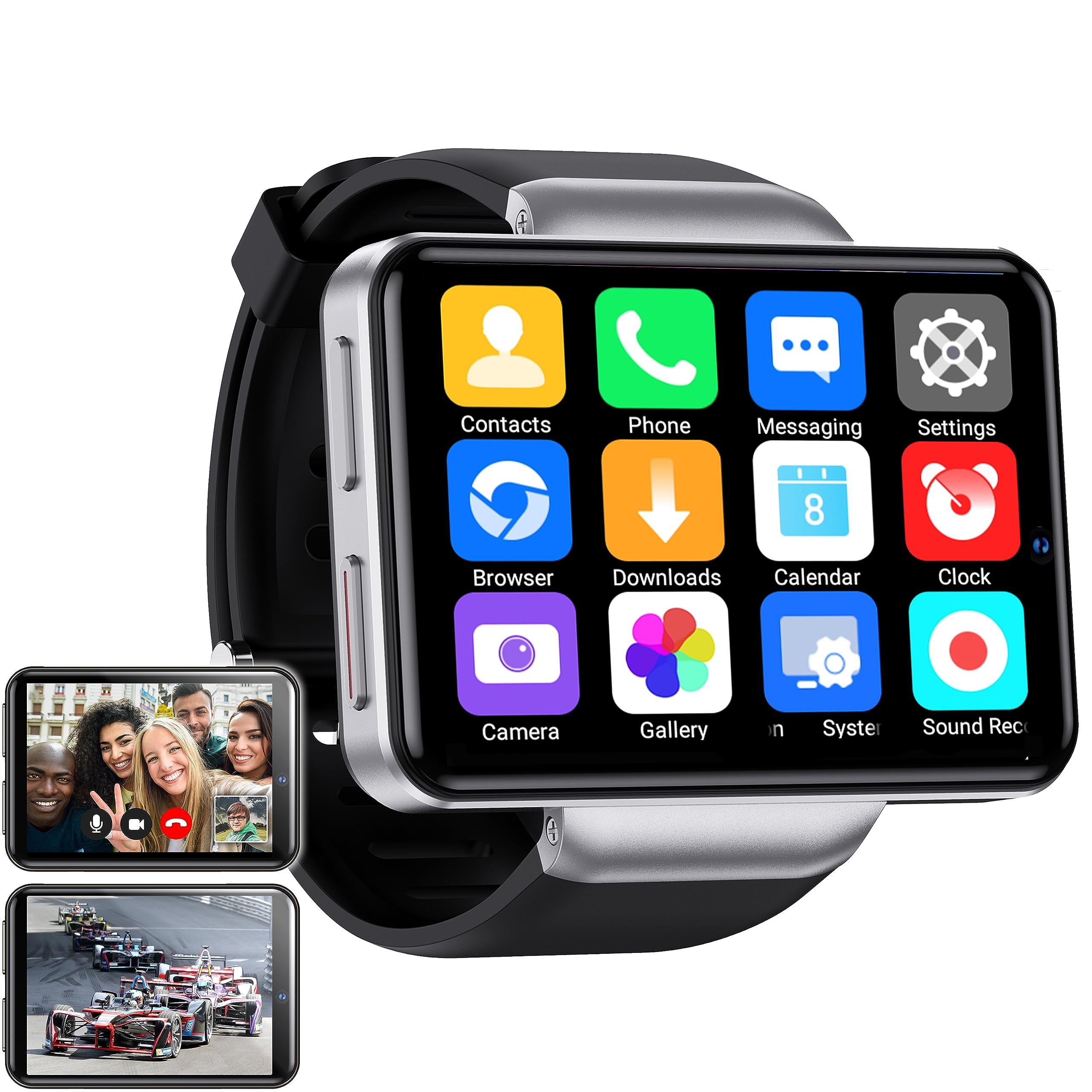
Figure 1: Silvergear XL Smartwatch overview.

Figure 2: The Silvergear XL Smartwatch offers a perfect balance of style, functionality, and advanced technology, including a 2.41-inch IPS display, live video streaming, app downloads, fitness tracking, and communication features.
1. Konfigurazioa
1.1 Kutxa irekitzea eta paketearen edukia
Carefully unpack your Silvergear XL Smartwatch and verify all contents.

Figure 3: Package contents including the Smartwatch XL, charging base, screen protector, and two screwdrivers. Dimensions are also shown: 4.5 cm height, 6.5 cm width, 1.5 cm thickness for the watch body, and strap lengths of 8.5 cm and 12 cm. The watch weighs 120 grams.
- Silvergear XL Smartwatch
- Kargatzeko oinarria
- Pantaila babeslea
- 2x Screwdrivers (for SIM card tray)
- Erabiltzailearen eskuliburua (dokumentu hau)
1.2 Erloju adimenduna kargatzea
Before first use, fully charge the smartwatch.
- Connect the charging base to a USB power adapter (not included) or a computer's USB port.
- Place the smartwatch onto the charging base, ensuring the charging pins align.
- Erlojuaren pantailak kargatze-egoera adieraziko du. Itxaron 2-3 ordu inguru karga osoa lortzeko.
1.3 SIM txartelaren instalazioa
To enable 4G connectivity, calls, and internet access, install a Nano SIM card.

Figure 4: Illustration of how to insert a Nano SIM card into the smartwatch. The image also shows the watch's ability to download apps from the Play Store.
- Aurkitu SIM txartelaren erretilua erloju adimendunaren alboan.
- Erabili emandako bihurkina SIM txartelaren erretilua irekitzeko.
- Carefully insert a Nano SIM card into the tray, ensuring correct orientation.
- Close the SIM card tray securely with the screwdriver.
1.4 Hasierako piztea eta konfigurazioa
Press and hold the power button until the Silvergear logo appears. Follow the on-screen prompts to complete the initial setup, including language selection, time zone, and network connection.
2. Erloju adimendunaren funtzionamendua
2.1 Oinarrizko nabigazioa
- Ukipen-pantaila: Irristatu ezkerrera, eskuinera, gora edo behera menuetan eta pantailetan nabigatzeko. Sakatu elementuak hautatzeko.
- Pizteko botoia: Press to wake/sleep the screen. Press and hold to power on/off or restart.
- Back Button (if applicable): Some watches have a dedicated back button or gesture. Refer to on-screen prompts.
2.2 Komunikazio Ezaugarriak
With a Nano SIM card installed, you can make and receive calls and messages directly from your smartwatch.
- Deiak: Tap the "Phone" icon to access the dialer or contacts.
- Mezularitza: Tap the "Messaging" icon to send and receive text messages.
- Aplikazioak: Download communication apps from the Play Store for additional functionality.
2.3ko kameraren funtzionaltasuna
The smartwatch is equipped with both front and side cameras for capturing photos and videos.

Figure 5: The smartwatch features a 5MP front camera and a 2MP side camera, allowing you to capture photos and videos directly from your wrist.
- Sarbide Kamera: Tap the "Camera" icon on the home screen or app drawer.
- Kamera aldatu: Use the on-screen icon to switch between the 5MP front camera and the 2MP side camera.
- Harrapatzea: Sakatu obturadorearen botoia argazki bat ateratzeko edo bideo grabaketa hasteko/gelditzeko.
2.4 Multimedia Entertainment
Enjoy videos, TV programs, series, and music directly on your smartwatch's extra-large screen.

Figure 6: The extra-large screen allows you to enjoy multimedia content such as sport competitions, TV programmes, series, videos, and music.
- Video/TV: Use pre-installed apps or download streaming services from the Play Store.
- Musika: Play music stored on the device or stream from compatible apps.
2.5 Osasun eta Fitness Jarraipena
Monitor your physical activity and health metrics with the integrated sensors.

Figure 7: The smartwatch offers pedometer and fitness tracking for various activities including running, hiking, cycling, basketball, football, jumping rope, and badminton.
- pedometer: Eguneroko urratsak, distantzia eta erretako kaloriak kontrolatzen ditu.
- Bihotz-taupadak: Provides accurate heart rate readings.
- Entrenamendu moduak: Select from 9 pre-defined exercise types (e.g., running, walking, cycling, swimming) to track your performance.
- Loaren jarraipena: Monitors your sleep patterns (if supported by the device's software).
2.6 App Downloads
Expand your smartwatch's functionality by downloading applications from the Play Store.
- Ensure your smartwatch is connected to Wi-Fi or has an active 4G data connection.
- Tap the "Play Store" icon and browse or search for desired applications.
- Follow on-screen instructions to download and install apps.
3. Mantentzea
3.1 Garbiketa
Zure erloju adimendunaren itxura eta funtzionaltasuna mantentzeko:
- Garbitu pantaila eta gorputza zapi leun eta lihorik gabeko batekin.
- Marka egoskorretarako, apur bat dampGarbitu oihalak urarekin. Saihestu produktu kimiko gogorrak edo material urratzaileak.
- Kargatu aurretik, ziurtatu kargatzeko kontaktuak garbi eta lehor daudela.
3.2 Urarekiko eta hautsarekiko erresistentzia
The Silvergear XL Smartwatch is rated IP67 for water and dust resistance.

Figure 8: The smartwatch is IP67 water- and dustproof, designed to withstand various weather conditions. This includes IP67 splashproof and IP67 dustproof ratings.
- IP67 balorazioa: This means the device is protected from dust ingress and can withstand immersion in water up to 1 meter for up to 30 minutes.
- It is suitable for splashes, rain, and incidental exposure to water.
- Avoid prolonged immersion, hot water, or high-pressure water jets.
- Ensure the SIM card tray is properly sealed to maintain water resistance.
3.3 Software eguneraketak
Aldian-aldian egiaztatu softwarearen eguneraketak errendimendu optimoa eta funtzio berrietarako sarbidea bermatzeko.
- Connect your smartwatch to Wi-Fi.
- Navigate to "Settings" > "About Watch" > "Software Update" (or similar path).
- Follow on-screen instructions to download and install any available updates.
4. Arazoak
| Arazoa | Kausa posiblea | Irtenbidea |
|---|---|---|
| Smartwatch does not power on. | Bateria gutxi; gailua izoztuta. | Kargatu gailua gutxienez 30 minutuz. Berrabiaraztea behartzeko, sakatu eta eutsi pizteko botoia 10-15 segundoz. |
| Ezin dira deiak egin/jaso. | No SIM card; SIM card not properly inserted; no network signal; incorrect network settings. | Ensure SIM card is correctly installed and activated. Check network signal strength. Verify network settings in the smartwatch. |
| Pantailak ez du erantzuten. | Software akatsa; pantaila babeslearen interferentzia. | Restart the smartwatch. Remove and reapply the screen protector if it's causing issues. |
| Fitness tracking data is inaccurate. | Improper fit; sensor obstruction; software calibration needed. | Ensure the watch is worn snugly on your wrist. Clean the sensor area. Check for software updates. |
| Ezin da wifira konektatu. | Pasahitz okerra; eremutik kanpo; bideratzailearen arazoa. | Verify Wi-Fi password. Move closer to the Wi-Fi router. Restart the router. |
If you encounter issues not listed here, or if the suggested solutions do not resolve the problem, please refer to the support section.
5. Zehaztapenak
Below are the technical specifications for the Silvergear XL Smartwatch (Model: 8711568088660).

Figure 9: Key technical specifications of the Silvergear XL Smartwatch, including Android 7.1.1 OS, MT6739 Quad-Core CPU (1.5 GHz), 2.41-inch full screen, 640x480 resolution, and 4G & WiFi connectivity.
| Ezaugarri | Xehetasuna |
|---|---|
| Marka | Silvergear |
| Modelo zenbakia | 8711568088660 |
| Sistema eragilea | Android (version 7.1.1 from image) |
| Pantailaren tamaina | 2.41 hazbete |
| Bistaratzeko mota | LCD (IPS from description) |
| Ebazpena | 640x480 (from image) |
| Prozesadorea | MT6739 Quad-Core CPU, 1.5 GHz (from image) |
| Konektibitatea | 4G, Wi-Fi |
| Aurrealdeko kamera | 5 megapixelekoa |
| Alboko kamera | 2 megapixelekoa |
| Memoria Biltegiratzeko Ahalmena | 500 MB |
| Uraren eta hautsaren erresistentzia | IP67 |
| GPSa | GPSrik ez |
| Gailu bateragarriak | Smartphone |
6. Bermearen informazioa
The Silvergear XL Smartwatch comes with a manufacturer's warranty.
- Fabrikatzailearen bermea: 2 urte.
- Berme honek ohiko erabileran materialen eta eskulanen akatsak estaltzen ditu.
- Ez ditu estaltzen erabilera okerrak, istripuek, baimenik gabeko aldaketek edo ohiko higadurak eragindako kalteak.
- Mesedez, gorde zure erosketa-froga berme-erreklamazioetarako.
7. Laguntza
For further assistance, technical support, or warranty claims, please contact Silvergear customer service.
- Refer to the Silvergear official webharremanetarako datuak lortzeko gunea.
- Have your product model number (8711568088660) and proof of purchase ready when contacting support.


