Sarrera
This manual provides instructions for the Truma Aventa Remote Control, designed for use with Truma Aventa Eco and Truma Aventa Comfort rooftop air conditioning units. This remote allows for convenient control of various air conditioning functions from a distance.
Konfigurazioa
1. Bateriaren instalazioa
The Truma Aventa Remote Control requires two AAA batteries for operation. Follow these steps to install them:
- Kokatu bateriaren konpartimentuaren estalkia urrutiko agintearen atzealdean.
- Irristatu edo askatu estalkia konpartimentua irekitzeko.
- Sartu bi AAA pila, konpartimentuaren barruan adierazten den polaritate zuzena (+/-) ziurtatuz.
- Jarri bateriaren konpartimenduaren estalkia ongi.
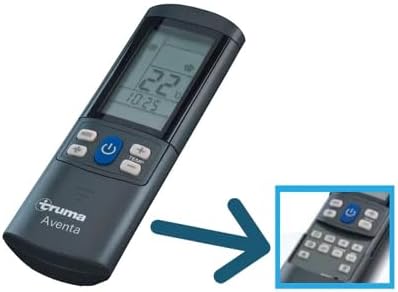
Image: The Truma Aventa Remote Control, showing its ergonomic design and display. This is the device for which batteries are installed.
2. Pairing with the Air Conditioning Unit
To establish communication between the remote control and your Truma Aventa air conditioning unit, follow the pairing procedure outlined in your air conditioning unit's manual. Typically, this involves a synchronization process that may utilize multiple channel options. Ensure the remote has fresh batteries before attempting to pair.
Urruneko agintea funtzionatzea
The Truma Aventa Remote Control features an easy-to-read LCD display and two button panels. The most frequently used functions are readily visible, while advanced functions are concealed under a sliding cover.
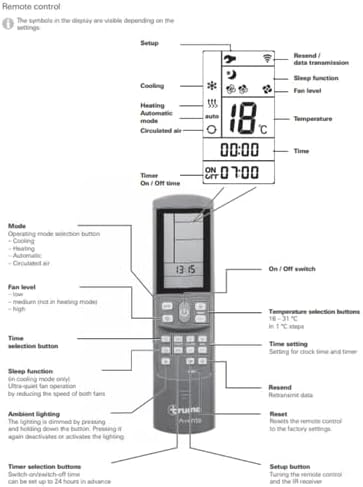
Image: A detailed diagram of the Truma Aventa Remote Control, illustrating the display symbols and the function of each button. Key elements include the On/Off switch, mode selection, temperature controls, fan level, timer, sleep function, and ambient lighting controls.
Oinarrizko Funtzioak
- Piztu / itzali etengailua: Press the power button to turn the air conditioning unit on or off.
- Modu aukeraketa: Use the mode button to cycle through available operating modes:
- Hoztea: Reduces the interior temperature.
- Berogailua: Increases the interior temperature (if supported by your Aventa unit).
- Modu automatikoa: The unit automatically selects cooling or heating based on the set temperature and ambient conditions.
- Circulated Air: Operates the fan without cooling or heating.
- Fan Level: Adjust the fan speed (low, medium, high) using the dedicated fan button. Note that 'medium' may not be available in heating mode.
- Tenperatura hautatzea: Use the temperature up/down buttons to set your desired temperature between 16 – 31 °C in 1 °C steps.
Funtzio aurreratuak
These functions are typically accessed by sliding open the lower panel of the remote control.
- Lo egiteko funtzioa: Activates ultra-quiet fan operation by reducing the speed of both fans, ideal for nighttime use (in cooling mode only).
- Tenporizadorea: Set an On/Off time for the air conditioning unit. This can be configured up to 24 hours in advance.
- Resend / Data Transmission: This button allows for re-transmission of data to the air conditioning unit, useful if a command was not received.
- Berrezarri: Resets the remote control to its factory settings.
- Giro-argiztapena: The lighting can be dimmed by pressing and holding the button. Pressing it again deactivates or activates the lighting.

Image: A person comfortably using the Truma Aventa Remote Control to adjust settings for their rooftop air conditioning unit inside a vehicle, demonstrating typical usage.
Mantentzea
Bateria ordezkatzea
When the remote control display becomes dim or unresponsive, it is time to replace the AAA batteries. Follow the battery installation steps outlined in the Setup section.
Garbiketa
To clean the remote control, use a soft, dry cloth. Do not use liquid cleaners, aerosols, or solvents, as these can damage the device. Keep the remote control dry and away from extreme temperatures.
Arazoak konpontzea
- Urruneko kontrolak ez du erantzuten:
- Egiaztatu bateriak behar bezala instalatuta dauden eta nahikoa karga duten. Beharrezkoa bada, ordezkatu itzazu.
- Ensure there are no obstructions between the remote control and the air conditioning unit's infrared receiver.
- Try resetting the remote control to factory settings (refer to Advanced Functions).
- No Connection with Air Conditioning Unit:
- Re-attempt the pairing procedure as described in your air conditioning unit's manual.
- Verify that the air conditioning unit itself is powered on and functioning correctly via its manual controls.
- Ensure the remote control is within the operational range of the air conditioning unit.
- Infrared Signal Issues:
- Confirm that the remote's infrared emitter (usually at the top) is clean and unobstructed.
- Point the remote directly at the air conditioning unit's receiver.
If problems persist after following these steps, please contact Truma customer support or your authorized dealer.
Zehaztapenak
| Produktuaren neurriak | 9 x 2 x 5 hazbete |
| Elementuaren pisua | 8 ontza |
| Modelo zenbakia | Aventa Remote |
| Gailu bateragarriak | Truma Aventa Eco, Truma Aventa Comfort rooftop air conditioners |
| Onartutako gailuen gehienezko kopurua | 1 |
| Kolorea | Beltza |
| Ezaugarri Berezia | Ergonomia |
| Beharrezko bateriak | 2 x AAA (ez dago barne) |
Bermea eta laguntza
Bermearen informazioa
For detailed warranty information regarding your Truma Aventa Remote Control, please refer to the documentation provided with your purchase or contact Truma North America directly. Warranty terms and conditions may vary.
Bezeroarentzako Arreta
If you require further assistance, have questions about your remote control, or need to report a defect, please contact Truma North America. You can typically find their contact information on their official webgunearen edo zure produktuaren ontziaren bidez.


