1. Produktua amaitu daview
The SOVMIKU Wireless Security Camera System provides comprehensive surveillance for indoor and outdoor environments. This system includes a 10-inch NVR monitor with a built-in 1TB HDD, two 3-megapixel wireless cameras, and features such as two-way audio, AI motion detection, and IP66 waterproof rating.

1 Irudia: Gainetikview of the SOVMIKU Wireless Security Camera System, including the NVR monitor, two cameras, and 1TB hard drive.
Ezaugarri nagusiak:
- 10-inch NVR Monitor: Integrated display for live viewerreproduzitzea eta erreproduzitzea.
- 1TB HDD Built-in: Ematen du ample storage for continuous recording with overwrite function.
- 3-Megapixel Cameras: Delivers clear 1536P video resolution.
- Bi norabideko audioa: Komunikatzeko mikrofono eta bozgorailu integratuak.
- AI mugimenduaren detekzioa: Advanced detection to minimize false alarms and optimize recording.
- IP66 Iragazgaitza: Cameras are designed for reliable outdoor use in various weather conditions.
- Urruneko monitorizazioa: Access live and recorded footage via smartphone, tablet, or PC application.
- H.265 bideo-konpresioa: Efficient storage utilization, reducing capacity requirements by approximately 50% compared to H.264.
2. Paketearen edukia
Egiaztatu behean zerrendatutako elementu guztiak zure paketean sartuta daudela:

Figure 2: Illustration of the items included in the SOVMIKU security camera system package.
- NVR Main Unit (with 1TB HDD built-in)
- 3-Megapixel IP66 Waterproof Cameras (Quantity: 2)
- Power Adapters for Cameras
- NVRrako korronte egokitzailea
- USB sagua
- LAN kablea
- HDMI kablea
- Mounting Screws and Anti-theft Stickers
- User Manual (Japanese, but this document serves as the English equivalent)
3. Konfigurazio gida
3.1 Hasierako konfigurazioa
The system is designed for simple setup. Cameras are pre-paired with the NVR. Simply power on the devices to begin surveillance.
- Konektatu NVRra: Connect the NVR power adapter to the NVR and plug it into a power outlet.
- Konektatu kamerak: Connect each camera's power adapter to the camera and plug it into a power outlet.
- Monitorearen pantaila: The NVR's integrated 10-inch monitor will display the camera feeds automatically.
- Saguaren konexioa: Connect the included USB mouse to the NVR for navigation and configuration.

Figure 3: Diagram illustrating the simple power-on setup for the NVR and cameras, showing automatic wireless connection.
3.2 Kameraren instalazioa
The cameras are IP66 waterproof, suitable for both indoor and outdoor installation. Ensure a stable power source is available at the installation location.
- Muntaketa: Erabili emandako torlojuak kamerak horman edo sabaian ondo finkatzeko.
- Angeluaren doikuntza: The camera features 180° horizontal and 360° vertical adjustment for optimal viewing angles. Secure the angle after adjustment.
- Waterproofing Connections: For outdoor installations, ensure all cable connections are properly sealed and protected from moisture.
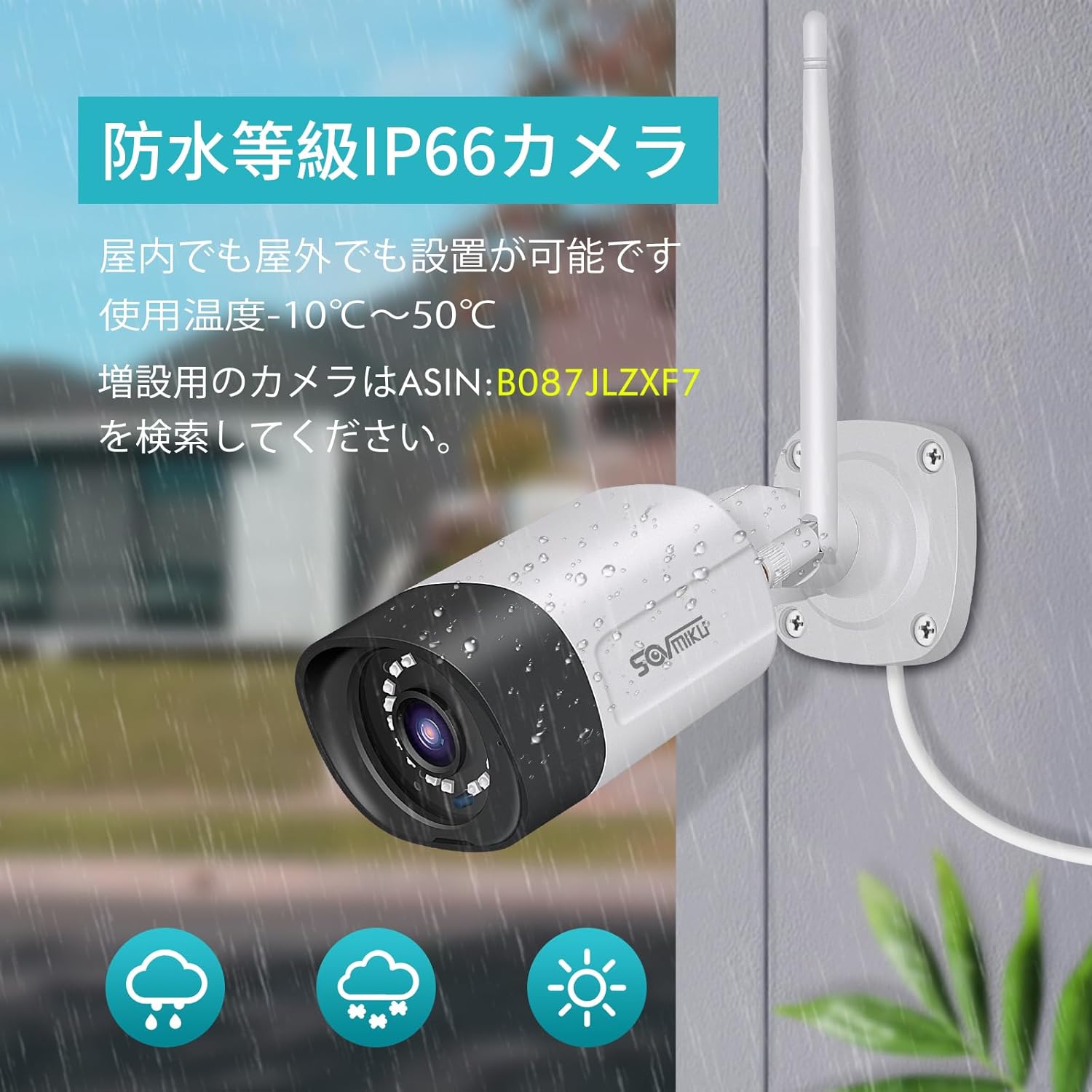
Figure 4: A SOVMIKU camera installed outdoors, demonstrating its IP66 waterproof rating against rain and snow.

Figure 5: Detailed diagram showing the camera components (wireless antenna, LED, lens, microphone, sensor light, speaker, adjustable bracket) and NVR ports (power, USB, HDMI, Ethernet, reset, TF card slot).
4. Funtzionamendu-argibideak
4.1 Viewing Live Feed and Playback
- On NVR Monitor: The 10-inch NVR monitor displays live feeds from connected cameras. Use the USB mouse to navigate the NVR interface for playback, system settings, and other functions.
- Remote Monitoring (EseeCloud App):
- Connect the NVR to your internet router using the provided LAN cable.
- Download the "EseeCloud" app on your smartphone or tablet (available for iOS).
- Jarraitu aplikazioko argibideei zure NVR gailua gehitzeko.
- Konektatu ondoren, egin dezakezu view live feeds, access recorded footage, and receive notifications from anywhere.
- Ordenagailuaren softwarea: For PC monitoring, download the "EseeCloud" software.
4.2 Grabaketa moduak
The system supports various recording modes to suit your needs:
- Grabaketa jarraitua: Records 24/7. The 1TB HDD with H.265 compression allows for extended recording periods (e.g., over 2 months for 2 cameras). Older data is automatically overwritten when the HDD is full.
- Programatutako grabazioa: Ezarri grabazioetarako ordu zehatzak.
- Mugimendua detektatzeko grabazioa: Records only when motion is detected, saving storage space and making event review more efficient.

Figure 6: Visual representation of continuous, scheduled, and motion detection recording modes, along with notification options via app or email.
4.3 Bi norabideko audioa
Each camera is equipped with a built-in microphone and speaker, enabling two-way communication.
- Initiating Communication: Use the EseeCloud app on your mobile device to speak through the camera's speaker and listen through its microphone.
- Soinu garbia: The omnidirectional microphone and optimized algorithms ensure clear sound quality.

Figure 7: Demonstration of the two-way audio function, showing a user communicating with someone at their door via the camera and smartphone app.
4.4 AI Motion Detection and Notifications
The system utilizes AI human detection to accurately identify human movement, reducing false alarms from pets or environmental factors.
- Event Notification: When motion is detected, the system can send instant notifications to your mobile app or email.
- Efficient Search: Recorded events triggered by motion detection can be quickly searched and reviewed.

Figure 8: Illustration of H.265 video compression efficiency (1TB H.265 equals 2TB H.264) and AI human detection identifying a person in a scene.

Figure 9: A visual comparison demonstrating the superior clarity and detail of 5-megapixel resolution compared to 1.3-megapixel resolution, highlighting the system's high-definition capabilities.
5. Mantentzea
Mantentze-lan erregularrak zure segurtasun-sistemaren errendimendu optimoa eta iraupena bermatzen ditu.
- Kameraren lenteen garbiketa: Garbitu kameraren lenteak aldian-aldian zapi leun eta lehor batekinamp zapi bat hautsa, zikinkeria edo ur orbanak kentzeko, estaldura izan dezaketenak viewSaihestu garbitzaile urratzaileak.
- Egiaztatu konexioak: Ziurtatu sareko eta energia-kable guztiak ondo konektatuta daudela eta kalterik gabe daudela.
- Firmware eguneraketak: Check the EseeCloud app or SOVMIKU website for any available firmware updates for the NVR and cameras to ensure the latest features and security patches.
- HDDaren Osasuna: While the 1TB HDD is built-in, it's good practice to periodically check its status through the NVR settings to ensure it's functioning correctly.
6. Arazoak
If you encounter issues with your SOVMIKU security camera system, refer to the following common troubleshooting steps:
- Ez dago irudirik monitorearen gainean:
- Ensure the NVR and cameras are powered on and their power adapters are securely connected.
- Check if the NVR's internal monitor is functioning. If using an external monitor, ensure the HDMI cable is connected correctly.
- Kamerak ez dira NVRra konektatzen:
- Verify that cameras are within range of the NVR's wireless signal. Walls and obstacles can reduce signal strength.
- Restart both the NVR and the cameras.
- If adding new cameras or re-pairing, refer to the NVR's on-screen menu for camera pairing instructions.
- Ez dago aplikazioaren bidezko urruneko sarbiderik:
- Ensure the NVR is connected to your internet router via the LAN cable.
- Egiaztatu Interneteko konexioa.
- Verify that the NVR is correctly added to the EseeCloud app and has an active network status.
- Irudiaren kalitate eskasa:
- Garbitu kameraren lentea.
- Ziurtatu kameraren eremuan oztoporik ez dagoela view.
- Check the camera's resolution settings in the NVR interface.
- Bi norabideko audio-arazoak:
- Ensure the microphone and speaker settings are enabled in the NVR or app.
- Check for any physical obstructions blocking the microphone or speaker on the camera.
- Verify network stability for clear audio transmission.
7. Zehaztapenak
| Ezaugarri | Xehetasuna |
|---|---|
| Marka | SOVMIKU |
| Modelo zenbakia | SFWK-10V-2HB312-1T |
| Bideo Harrapaketa Ebazpena | 1536p (3 Megapixel) |
| Ezaugarri Berezia | Iragazgaitza (IP66) |
| Kanal kopurua | 8 (Supports up to 8 cameras) |
| Memoria Biltegiratzeko Ahalmena | 1 TB HDD (Built-in) |
| Energia iturria | Kable elektrikoa |
| Sistema eragilea (aplikazioa) | iOS (and Android compatible via EseeCloud app) |
| Gailu bateragarriak | Smartphone, Tableta, PC |
| Beste kameraren ezaugarri batzuk | Front-facing, Night color (low light technology) |
| Grabaketa modua | Continuous, Scheduled, Motion Detection |
| Hardware interfazea | 802.11 ac/b/g/n (Wireless), Ethernet, HDMI, USB |
| Lente mota | Wide Angle (3.6 mm) |
| Produktuaren neurriak (NVR) | 29 x 17 x 24 cm |
| Elementuaren pisua | 2.88 kg |
| UPC | 616612550644 |
8. Bermea eta Laguntza
SOVMIKU provides comprehensive support for its products.
- 1 Urteko Kalitate Bermea: Produktuak 12 hilabeteko bermea du erosketa-datatik aurrera.
- Laguntza teknikoa: Professional technical support is available to assist with setup, operation, and troubleshooting.
- Harremanetarako informazioa: For any questions or issues, please contact SOVMIKU customer support via email or phone. (Specific contact details are usually provided in the physical manual or on the product's official webgunea.)
- PSE ziurtagiria: Our products have passed PSE certification in accordance with Japanese electrical safety standards, ensuring safe usage.


