1. Sarrera
This manual provides detailed instructions for the installation, configuration, and operation of the Grandstream GWN7003 11-Port Wired Gigabit VPN Router. The GWN7003 is designed to establish robust wired, wireless, and VPN networks for various environments, offering advanced features for network management and security.
2. Produktua amaitu daview
2.1 Ezaugarri nagusiak
- 1x GbE RJ45 port with IEEE 802.3af/at PoE Input.
- 2x GbE RJ45 ports with 48V Passive PoE output or IEEE802.3af.
- Multiple Gigabit RJ45 ports and Gigabit SFP ports for flexible connectivity.
- Integrated VPN support for secure remote access to corporate networks.
- Built-in firewall for enhanced network security.
- Multi-WAN capabilities for load balancing and failover.
2.2 Aurreko panelaren diseinua
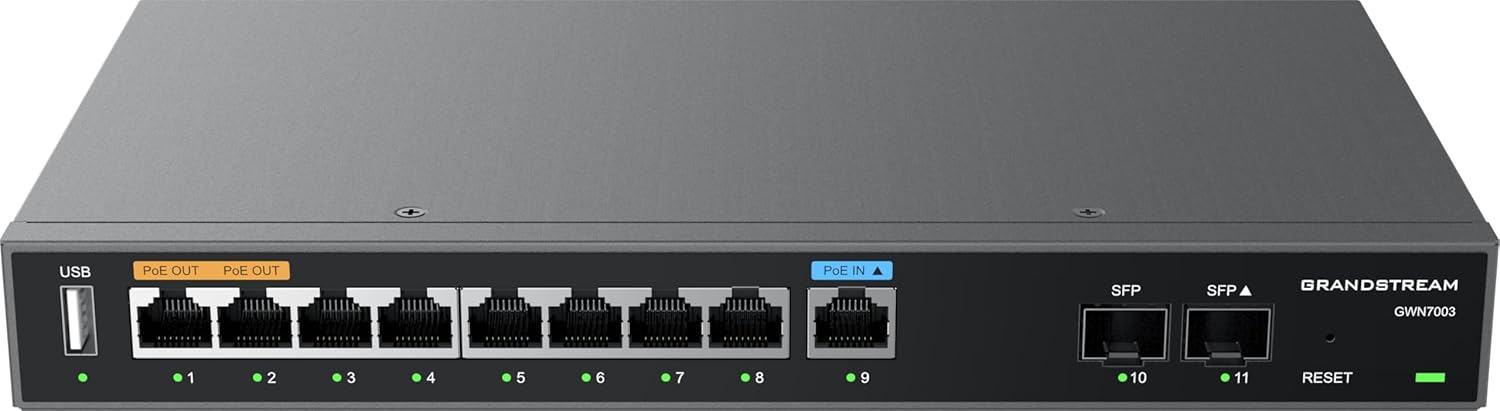
1. irudia: Aurrealdea view of the Grandstream GWN7003 router, showing the USB port, PoE OUT ports, PoE IN port, standard Ethernet ports, SFP ports, and reset button.
- USB ataka: For future use or external storage.
- PoE OUT Ports (Orange): Provide Power over Ethernet to compatible devices.
- PoE IN Port (Blue): Receives Power over Ethernet to power the router itself.
- Ethernet portuak (1-9): Standard Gigabit Ethernet ports for network connections.
- SFP Ports (10-11): Gigabit SFP ports for fiber optic connections.
- Berrezarri botoia: Gailua fabrikako balioetara berrezartzeko erabiltzen da.
- LED adierazleak: Indicate port status (link/activity) and device power.
2.3 Goia View

2. irudia: Goiena view of the Grandstream GWN7003 router, showcasing its compact and durable metal casing.
3. Konfigurazio gida
3.1 Paketearen edukia
Aurrera jarraitu aurretik, ziurtatu elementu guztiak daudela:
- Grandstream GWN7003 Router
- Power Adapter (if not using PoE IN)
- Ethernet kablea
- Instalazio azkarraren gida
3.2 Instalazio fisikoa
- Potentzia-konexioa: Connect the provided power adapter to the router's power input port, or connect an 802.3af/at compliant PoE source to the PoE IN port (blue).
- WAN konexioa: Connect your internet service provider's modem or main network cable to one of the WAN-configured Gigabit Ethernet ports. The GWN7003 supports multiple WAN ports for redundancy or load balancing.
- LAN konexioa: Connect your local network devices (computers, switches, access points) to the available LAN Gigabit Ethernet ports. Use the PoE OUT ports (orange) for devices requiring Power over Ethernet.
- SFP Connections (Optional): If using fiber optic connections, insert compatible SFP modules into the SFP ports and connect fiber cables.
3.3 Hasierako sarbidea Web Interfazea
- Ziurtatu zure ordenagailua bideratzailearen LAN ataka batera konektatuta dagoela.
- Ireki a web nabigatzailea (adibidez, Chrome, Firefox).
- Enter the default IP address of the router in the address bar. The default IP address is typically
192.168.1.1. Refer to the Quick Installation Guide for the exact default IP. - Sartu erabiltzaile-izen eta pasahitza lehenetsiak (normalean
adminfor both, or as specified in the guide). - Follow the on-screen wizard for initial configuration, including changing the default password for security.
4. Funtzionamendu-argibideak
4.1 Sarearen konfigurazioa
The web interface allows for comprehensive network configuration:
- WAN ezarpenak: Configure internet connection type (DHCP, Static IP, PPPoE).
- LAN ezarpenak: Manage IP address range, DHCP server, and VLANs.
- Multi-WAN: Set up load balancing or failover policies for multiple internet connections.
4.2 VPN konfigurazioa
The GWN7003 supports various VPN protocols for secure remote access:
- Navigate to the VPN section in the web interfazea.
- Configure VPN server or client settings based on your network requirements (e.g., OpenVPN, IPsec).
- Ensure proper firewall rules are in place to allow VPN traffic.
4.3 PoE Output Management
The router's PoE OUT ports can power compatible devices:
- Connect PoE-powered devices (e.g., IP cameras, VoIP phones, Wi-Fi access points) to the orange PoE OUT ports.
- Monitor PoE status and power consumption through the web interfazea.
5. Mantentzea
5.1 Firmware eguneraketak
Regularly update the router's firmware to ensure optimal performance, security, and access to new features:
- Bisitatu Grandstream-era website for the latest firmware for the GWN7003.
- Deskargatu firmwarea file zure ordenagailura.
- Sartu bideratzailearen web interface and navigate to the System Maintenance or Firmware Upgrade section.
- Kargatu deskargatutako firmwarea file and follow the on-screen instructions. Do not power off the device during the update process.
5.2 Fabrika berrezarri
To restore the router to its factory default settings:
- With the router powered on, press and hold the Reset button (located on the front panel) for approximately 10 seconds.
- Release the button when the LED indicators flash. The router will reboot with factory default settings.
- Alternatively, a factory reset option is available within the web interface under System Maintenance.
6. Arazoak
6.1 Interneteko konexiorik ez
- Verify that the WAN cable is securely connected to the correct port and that your modem is operational.
- Check WAN settings in the web interface to ensure they match your ISP's requirements.
- Restart both the modem and the router.
6.2 Ezin da sartu Web Interfazea
- Ensure your computer is connected to a LAN port and has obtained an IP address from the router (or has a static IP in the same subnet).
- Verify the router's IP address. Try
192.168.1.1. - Garbitu zure arakatzailearen cachea edo saiatu beste arakatzaile bat erabiltzen.
- If all else fails, perform a factory reset (see Section 5.2).
6.3 PoE Devices Not Powering On
- Ensure the device connected to the PoE OUT port is PoE-compatible.
- Egiaztatu kablearen konexioa.
- Verify PoE settings in the router's web interfazea.
7. Zehaztapenak
| Ezaugarri | Xehetasuna |
|---|---|
| Eredua | GWN7003 |
| Produktuaren neurriak | 10.24 x 11.81 x 2.17 hazbete |
| Elementuaren pisua | 3.12 kilo |
| Konektibitate Teknologia | Wired (Gigabit Ethernet, SFP) |
| PoE Sarrera | 1x GbE RJ45 port with IEEE 802.3af/at |
| PoE irteera | 2x GbE RJ45 ports with 48V Passive PoE or IEEE802.3af |
| Ezaugarri Berezia | QoS, VPN Support, Multi-WAN |
| Sistema eragilea | Grandstream GWN OS |
| Fabrikatzailea | Grandstream |
8. Segurtasun informazioa
Mesedez, irakurri eta jarraitu segurtasun-jarraibide hauek gailuari kalterik edo lesiorik ez izateko:
- Ez jarri gailua uretara edo hezetasunera.
- Ez jarri gailua bero-iturrietatik gertu edo eguzki-argia zuzenean.
- Erabili fabrikatzaileak emandako korronte-egokitzailea soilik.
- Ziurtatu aireztapen egokia gailuaren inguruan.
- Ez saiatu gailua zeuk irekitzen edo konpontzen. Mantendu konponketa guztiak langile kualifikatuen esku.
9. Bermea eta Laguntza
The Grandstream GWN7003 router comes with a manufacturer's warranty. For detailed warranty information, technical support, or service inquiries, please visit the official Grandstream website or contact their customer support. Keep your purchase receipt for warranty validation.