1. Sarrera
The Raymarine Axiom 2 Pro 12 RVM is a powerful all-in-one navigation system designed for marine environments. It integrates chartplotter, sonar, radar, autopilot, and video functionalities. This device features a fast 6-core processor and the intuitive LightHouse operating system, providing a seamless user experience. The HybridTouch™ interface combines touchscreen control with a physical keypad for versatile operation. Built-in RealVision MAX CHIRP and dual-channel 1kW CHIRP sonar enhance fish-finding capabilities with improved range, resolution, and target identification.
This manual provides essential information for the proper setup, operation, and maintenance of your Axiom 2 Pro 12 RVM unit. Please read it thoroughly before using the device.
2. Segurtasun informazioa
OHARRA: This product can expose you to chemicals including Lead, which is known to the State of California to cause cancer, birth defects or other reproductive harm. For more information go to www.P65Warnings.ca.gov.
Always operate your vessel safely. Use this device as a navigational aid only. Do not rely solely on this device for navigation. Ensure all connections are secure and waterproof. Disconnect power before performing any maintenance or installation procedures. Consult a qualified marine electronics technician for complex installations.
3. Zer dago kutxan?
Upon unpacking your Raymarine Axiom 2 Pro 12 RVM, verify that all the following components are present:
- Bistaratzeko unitatea
- User Configurable Keypad
- Eguzki-estalkia
- Junta
- Trunnion knobs (x 2)
- Trunnion bracket (Axiom 2 Pro 9 and 12 Only)
- Optional grounding connection (Screw (M3x5), Spring washer (M3), Crimp terminal (M3))
- DeviceNet to SeaTalkng adaptor cable 1m (3.28 ft)
- RayNet (Female) to RayNet (Female) network cable 2 m (6.56 ft)
- Mounting fixings
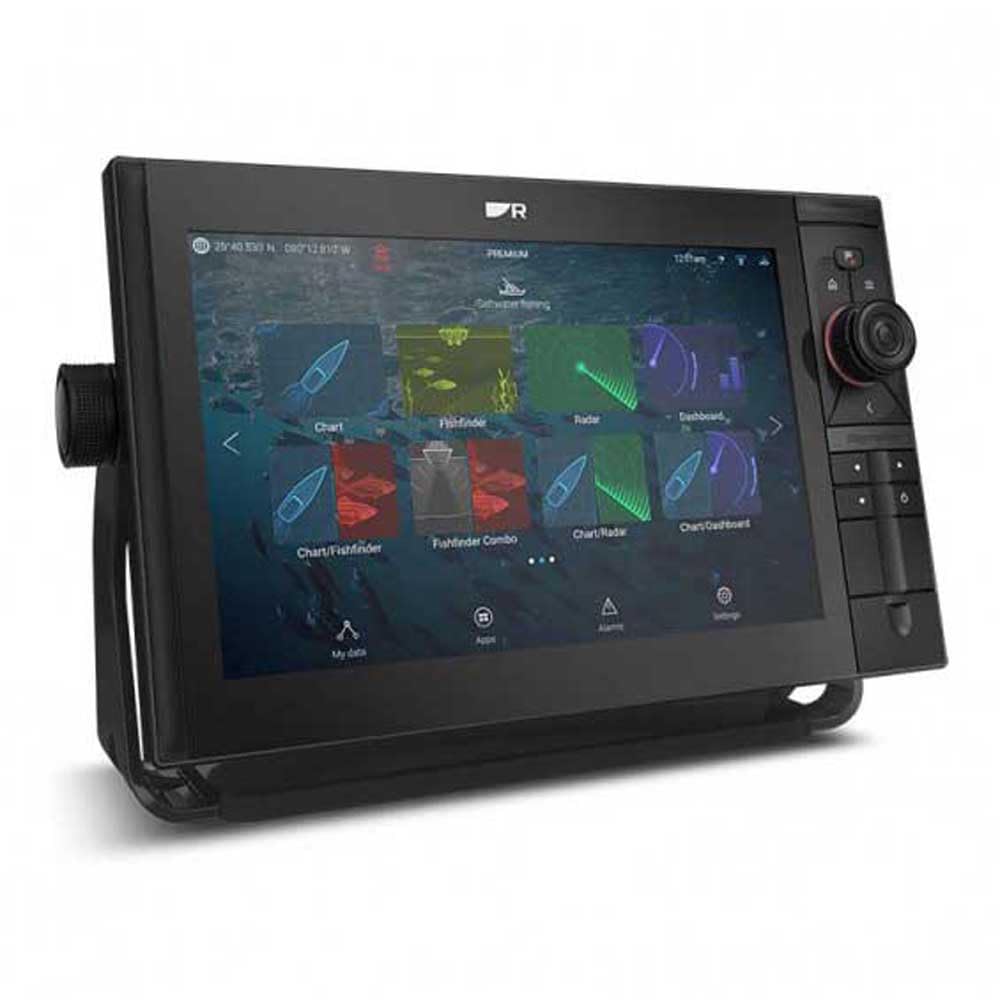
Image: The Raymarine Axiom 2 Pro 12 RVM display unit shown with its various included cables, mounting hardware, and suncover. This image illustrates the complete package contents.
4. Konfigurazioa eta instalazioa
The Axiom 2 Pro 12 RVM offers flexible installation options, including Dashboard Mount and Panel Mount. Detailed instructions for each mounting type are provided in the separate installation guide. Ensure the mounting location is secure, provides adequate ventilation, and is protected from direct exposure to extreme elements where possible.
4.1 Energia-konexioa
Connect the power cable to a suitable 12V DC power source on your vessel. Ensure the connection is fused correctly and waterproofed to prevent corrosion and electrical issues.
4.2 Sare-konexioak
The unit supports various network connections:
- RayNet: Use the provided RayNet cable to connect to other Raymarine devices such as radar, external sonar modules, or additional Axiom displays.
- SeaTalkng/NMEA 2000: Use the DeviceNet to SeaTalkng adaptor cable to integrate with your vessel's NMEA 2000 network for data sharing with compatible devices.
- Wi-Fi: The unit features Wi-Fi connectivity for software updates, mobile app integration, and streaming services.
4.3 Transducer Connection (If applicable)
Although this specific model is sold without a transducer, if you are connecting a compatible RealVision MAX or 1kW CHIRP transducer, ensure it is properly installed and connected to the RVM port on the display unit. Refer to your transducer's installation guide for specific instructions.
5. Funtzionamendu-argibideak
The Axiom 2 Pro 12 RVM operates on the LightHouse operating system, offering a user-friendly interface.
5.1 Piztu/Itzaltzea
Press and hold the Power button (usually located on the front or side bezel) for approximately 3 seconds to power the unit on or off. A short press will bring up the power menu for quick actions.
5.2 HybridTouch™ Control
The unit combines a responsive touchscreen with physical buttons and an interchangeable autopilot keypad or user-programmable soft keys. You can navigate menus, zoom, and control functions using either the touchscreen or the physical controls, depending on your preference and sea conditions.
5.3 Pantailaren distira
The Axiom 2 Pro features smart backlighting and an ambient light sensor that automatically adjusts display brightness for optimal visibility in various lighting conditions (day and evening). Manual adjustment options are available through the system settings.
5.4 Sonar Functions (RealVision MAX)
With built-in RealVision MAX CHIRP, the unit provides advanced fish-finding capabilities:
- DownVision: Provides a photo-like view of the underwater world directly below your boat.
- SideVision: Offers a wide, side-to-side view of the bottom structure and fish targets.
- 3D Sonarra: Creates a three-dimensional representation of the underwater environment, allowing for detailed exploration.
Access sonar views from the main menu. Adjust gain, range, and frequency settings as needed for optimal performance.
5.5 Kartografia-plotteraren nabigazioa
The Axiom 2 Pro supports Navionics/C-Map cartography. Use the chart application to plan routes, mark waypoints, and navigate. The fast 6-core processor ensures smooth chart redraws and quick response times.
5.6 Sistemaren Hedapena
You can create a comprehensive marine system by networking multiple Axiom displays and connecting to radar, autopilot, and other compatible devices. The unit also supports streaming apps and offers HDMI and audio output for remote displays and marine entertainment systems.
6. Mantentzea
6.1 Pantaila garbitzea
The HydroTough™ nano-coating repels water for reliable touchscreen control and superior sunlight visibility. To clean the display, gently wipe it with a clean, damp, soft cloth. For stubborn marks, use a mild glass cleaner applied to the cloth (not directly to the screen). Avoid abrasive cleaners or solvents.
6.2 Software eguneraketak
Periodically check for software updates via Wi-Fi or by downloading from the Raymarine website to a microSD card. Keeping your software updated ensures optimal performance and access to new features.
6.3 Konexio-egiaztapenak
Regularly inspect all power and network connections for signs of corrosion or damage. Ensure all cables are securely fastened and waterproofed.
7. Arazoak
Atal honek aurki ditzakezun arazo ohikoenei irtenbideak eskaintzen ditu.
7.1 Unit Does Not Power On
- Check the power cable connection to the unit and the vessel's power source.
- Verify the vessel's battery voltage and ensure the fuse for the unit is not blown.
- Ensure the power button is pressed and held for the required duration (approx. 3 seconds).
7.2 Sonar irudirik ez
- Confirm that a compatible transducer is correctly connected to the RVM port.
- Check transducer cable for damage.
- Ensure sonar is enabled in the system settings.
- Verify that the vessel is in water deep enough for sonar operation.
7.3 GPS Position Not Acquired
- Ziurtatu unitateak argia duela view zeruko.
- Check for any obstructions that might block the GPS signal.
- Verify GPS settings in the system menu.
7.4 Ukipen-pantailak ez du erantzuten
- Clean the screen to remove any water, salt, or debris.
- If the issue persists, try using the physical keypad for control.
- Perform a soft reset (refer to the full user manual for instructions).
For more detailed troubleshooting, refer to the comprehensive Raymarine Axiom 2 Pro user manual available on the Raymarine website or contact Raymarine customer support.
8. Zehaztapenak
| Ezaugarri | Xehetasuna |
|---|---|
| Bistaratzeko mota | LCDa |
| Ukipen-pantaila mota | Kapazitiboa |
| Muntatze Mota | Dashboard Mount, Panel Mount |
| Dakarten osagaiak | Trunnion Bracket, Trunnion Knobs, Power/Video/Audio Cable, RayNet Network Cable, DeviceNet to SeaTalkng Adaptor Cable |
| Mapa mota | Navigation, Marine |
| Konektibitate Teknologia | Wi-Fi |
| Ezaugarri Berezia | Errei-laguntza (Note: This feature is typically for automotive GPS, may refer to advanced navigation aids in marine context) |
| Pantailaren tamaina | 12 hazbete |
| Ibilgailuen Zerbitzu Mota | Itsasontzia |
| Marka | Raymarine |
| Eskuragarri dagoen lehen data | 21ko uztailaren 2023a |
| Ahots-agindua | Keypad, Touchscreen |
| Elementuaren pisua | 15.45 kilo |
| Produktuaren neurriak | 1 x 1 x 1 hazbete (Note: These dimensions seem generic, refer to official product documentation for precise measurements) |
9. Bermea eta Laguntza
Raymarine products are covered by a manufacturer's warranty. For specific warranty terms and conditions, please refer to the warranty card included with your product or visit the official Raymarine webgunea. Gorde erosketaren egiaztagiria bermearen erreklamazioetarako.
For technical support, product registration, or to find authorized service centers, please visit the Raymarine support section on their official website. You can also contact their customer service team directly for assistance.