Sarrera
This manual provides detailed instructions for the setup, operation, and maintenance of your ATTACK SHARK M71 75% TKL Wireless Mechanical Keyboard. Please read this guide thoroughly to ensure proper use and to maximize your keyboard's performance and lifespan.

Image: The ATTACK SHARK M71 keyboard showcasing its 68% layout and key features like aluminum alloy body, three-mode connection, and RGB backlight.
Paketearen edukia
Egiaztatu elementu guztiak paketean daudela:
- ATTACK SHARK M71 Wireless Mechanical Keyboard
- C motako kablea
- 2.4G Haririk gabeko Hargailua
- Keycap Puller / Switch Puller (Two-in-one tool)
- Complimentary 61 additional PBT OEM keycaps (different color layout)
- Erabiltzailearen eskuliburua

Image: A visual representation of the items included in the ATTACK SHARK M71 keyboard package, including the keyboard, cables, and extra keycaps.
Video: Unboxing the Blueberry version of the M71 keyboard, showing the package contents and a demonstration of its typing sound.
Produktua amaituview
The ATTACK SHARK M71 is a 75% TKL wireless mechanical keyboard featuring a full aluminum CNC chassis, multi-mode connectivity, hot-swappable switches, and RGB lighting. Its compact design and robust construction are engineered for both gaming and productivity.
Ezaugarri nagusiak:
- Aluminiozko CNC gorputz osoa: Constructed from international standard 6063 aluminum alloy for durability and a premium feel.
- Hiru moduko konektibitatea: Supports Bluetooth 5.0/3.0, 2.4G wireless, and wired USB-C connections.
- Beroan alda daitezkeen etengailuak: Compatible with 3/5-pin switches, allowing for easy customization without soldering.
- Junta muntatzeko egitura: Incorporates anti-static IPEX switch pads, PORON sound-absorbing cotton, and PET acoustic switch pads to enhance typing feel and reduce noise.
- RGB LED argiztapena: Features customizable RGB backlighting and a side LED light strip.
- 4600 mAh bateria: Haririk gabeko erabilera luzatua eskaintzen du.
- PBT OEM Keycaps: Durable keycaps with GMK-like characters.
Osagaiak:
Familiarize yourself with the main components of your keyboard:
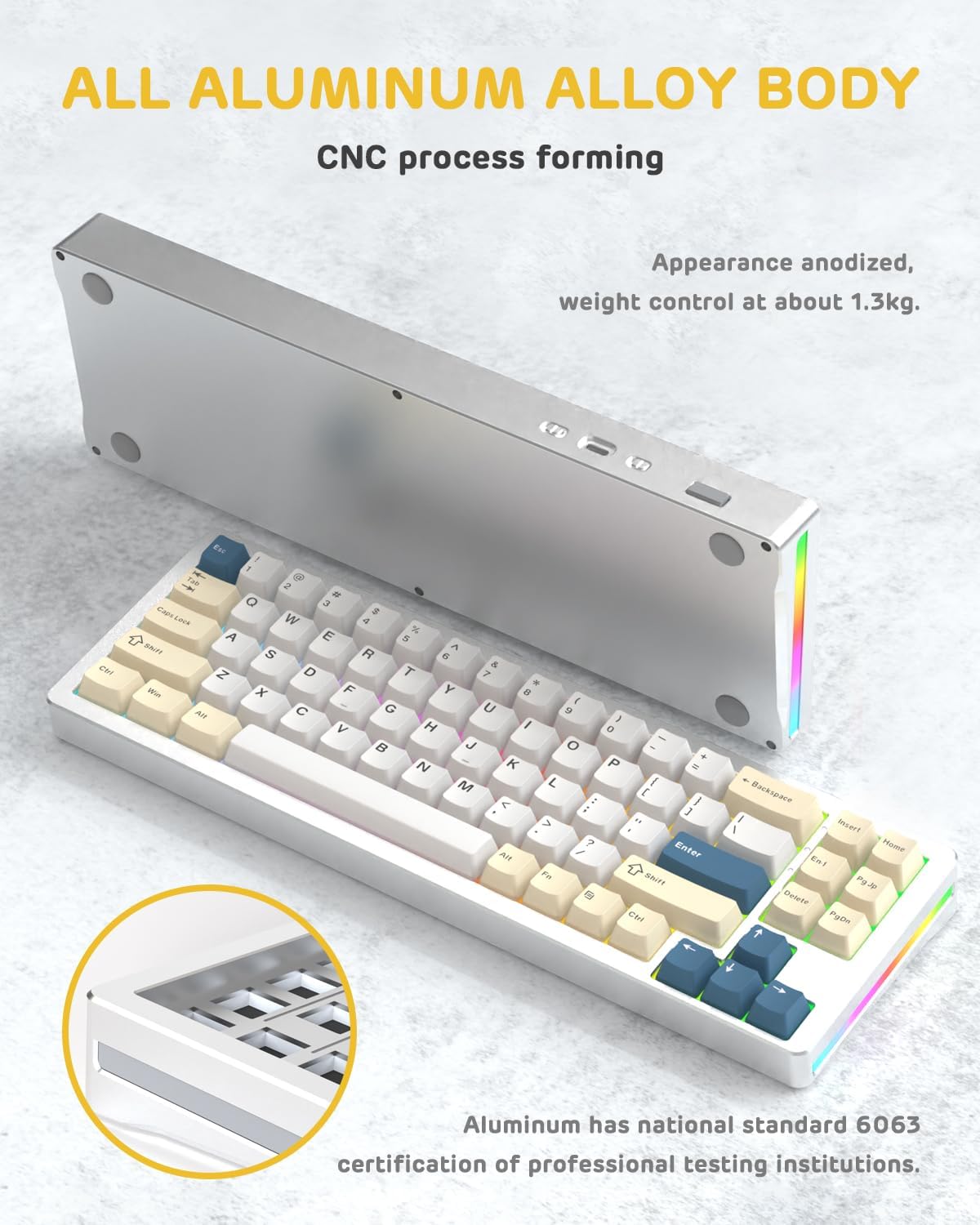
Irudia: Alde bat view of the M71 keyboard highlighting its full aluminum alloy body and CNC process forming.

Irudia: Leherketa bat view illustrating the multi-layered gasket mount structure, including the PBT keycaps, aluminum alloy upper cover, customized switch body, PC positioning board, PORON filled cotton, anti-static IPEX switch underpad, PET singing pad, PCB board, PORON shaft seat cushion, PET sound backing pad, wing light strip, and aluminum alloy base.
Konfigurazioa
1. Connectivity Modes:
The M71 keyboard supports three connection modes: Bluetooth, 2.4G wireless, and wired USB-C.
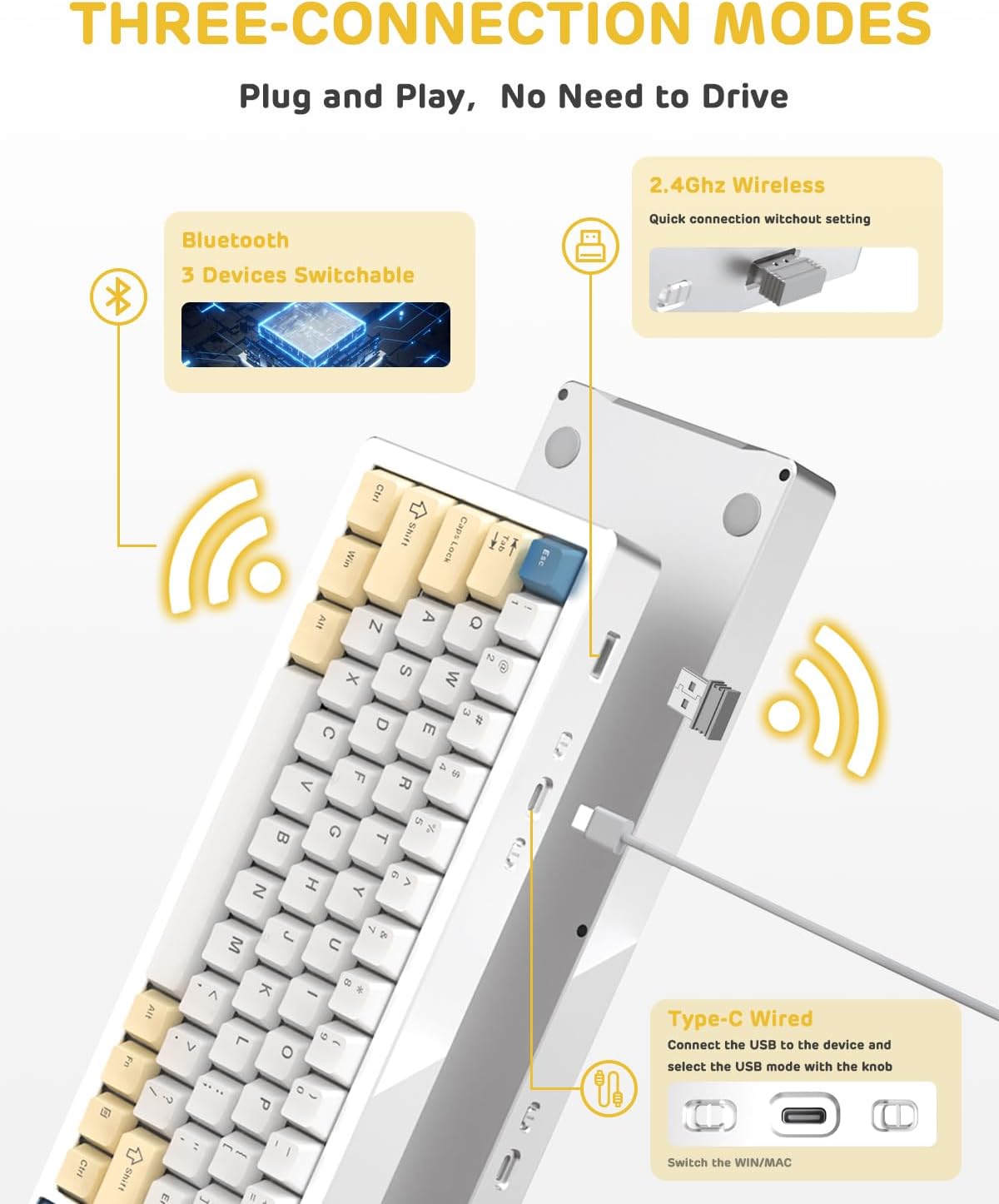
Image: A visual guide to the three connectivity options: Bluetooth for up to 3 devices, 2.4GHz wireless with a receiver, and wired Type-C connection.
Kable bidezko konexioa:
- Connect the provided Type-C cable to the keyboard's USB-C port and to your computer's USB port.
- Ensure the mode switch on the keyboard is set to the wired (USB-C) position.
- Zure sistemak teklatua automatikoki ezagutuko du.
2.4G Haririk gabeko konexioa:
- Locate the 2.4G wireless receiver (dongle) in the package.
- Konektatu 2.4G hartzailea ordenagailuko USB ataka libre batera.
- Set the mode switch on the keyboard to the 2.4G wireless position.
- Teklatua automatikoki konektatu beharko litzateke.
Bluetooth konexioa:
- Set the mode switch on the keyboard to the Bluetooth position.
- Zure ordenagailuan edo gailuan, ireki Bluetooth ezarpenak eta bilatu gailu berriak.
- The keyboard should appear as "ATTACK SHARK M71" or similar. Select it to pair.
- The keyboard can connect to up to 3 Bluetooth devices. Use Fn + 1/2/3 parekatutako gailu batetik bestera aldatzeko.
2. Battery Charging and Status:
The M71 keyboard is equipped with a 4600mAh battery. To charge, connect the keyboard via the USB-C cable to a power source (e.g., computer USB port, USB wall adapter).

Image: A diagram showing how to check the battery level using Fn+ALT(R) and the visual indicators on the keyboard's side LED strip.
- To check the battery level in wireless mode, press Fn + ALT (Right). The side LED strip will indicate the charge level.
- Battery life is approximately 1-2 weeks with lighting enabled and up to 4 weeks with lighting disabled.
Funtzionamendu-argibideak
1. Multimedia Keys:
The keyboard features 12 multimedia keys accessible via the Fn tekla konbinazioak:
- Fn + F1-F12: Access various multimedia functions (e.g., volume control, play/pause, calculator, email).
- Fn + 1/2: Kontrolatu pantailaren distira.
2. RGB Argiztapen Kontrola:
Customize the keyboard's RGB backlight and side LED strip:

Image: The M71 keyboard displaying its RGB backlight and side LED strip, along with a close-up of the PBT keycaps.
- Fn + Ctrl (Right): Switch between different side LED light strip modes.
- Fn + Tab: Toggle white light mode.
- Refer to the full user manual for additional lighting effect controls and customization options via the programmable software.
3. Programmable Software:
The keyboard supports a dedicated driver program for advanced customization. You can download the software from the official ATTACK SHARK website to personalize lighting effects, key assignments, and macros. The keyboard is compatible with Windows 2000/XP/Vista/7/8/10/11, Android, and iOS.
Mantentzea
1. Garbiketa:
- Erabili zapi leun eta lehor bat teklatuaren gainazala garbitzeko.
- For deeper cleaning, remove keycaps using the provided keycap puller and use compressed air to clear debris from between switches.
- Saihestu produktu kimiko gogorrak edo material urratzaileak erabiltzea.
2. Hot-Swapping Switches:
The M71 keyboard features hot-swappable sockets, allowing you to change switches without soldering.

Irudia: Gertutik view of the hot-swappable White Jade linear switches on the M71 keyboard, demonstrating how they can be easily removed and replaced.
- Itzali teklatua edo deskonektatu gailutik.
- Use the switch puller tool to carefully grip the switch and pull it straight up.
- Align the pins of the new switch with the holes on the PCB and press down gently until it clicks into place. Ensure pins are not bent.
- The PCB supports both 3-pin and 5-pin switches.
Video: A demonstration of the disassembly process for the M71 keyboard, showing how to remove keycaps and switches, revealing the gasket mount structure.
Arazoak konpontzea
| Gaia | Irtenbide posiblea |
|---|---|
| Teklatuak ez du erantzuten haririk gabeko moduan. |
|
| Giltzak ez dira erregistratzen edo bi aldiz idazten dira. |
|
| RGB argiztapena ez dabil edo ez dabil ondo. |
|
| Bluetooth parekatze arazoak. |
|
Zehaztapenak
| Ezaugarri | Xehetasuna |
|---|---|
| Eredua | M71 |
| Diseinua | 75% TKL (71 keys) |
| Konektibitatea | Bluetooth 5.0/3.0, 2.4G Wireless, USB-C Wired |
| Etengailuak | Hot-swappable (3/5-pin compatible), Pre-lubed Linear White Jade Switch |
| Giltzak | PBT OEM Keycaps |
| Muntatzeko estiloa | Junta Muntaia |
| Xasisaren materiala | Full Aluminum CNC (6063 alloy) |
| Bateria Edukiera | 4600mAh |
| Argiztapena | RGB Backlight, RGB LED Side Light Strip |
| Bateragarritasuna | Windows 2000/XP/Vista/7/8/10/11, Android, iOS, Mac |
| Produktuaren neurriak | 13.78"L x 4.53"Z x 1.22"A |
| Elementuaren pisua | 2.86 kilo |
Bermea eta Laguntza
Bermeari buruzko informazioa eta laguntza teknikoa lortzeko, jo ezazu ATTACK SHARK ofizialera. webwebgunera edo jarri harremanetan bezeroarentzako arreta-zerbitzura zuzenean. Gorde erosketa-agiria erosketaren frogagiri gisa berme-erreklamazioetarako.
Fabrikatzailea: ERASO MARrazoa
Saltzailea: Ajazz US
Lehen eskuragarri dagoen data: 4ko abuztuaren 2023a


