Sarrera
This manual provides detailed instructions for the installation, operation, and maintenance of your ANJIELO SMART 10-inch Video Doorbell System. This system features a 1080P camera, infrared night vision, 160° wide-angle lens, PIR motion detection, and a 10-inch touch screen monitor for enhanced home security and communication. Please read this manual thoroughly before use to ensure proper functionality and safety.
Paketearen edukia
- 1 x 10-inch TFT-LCD Touch Screen Indoor Monitor
- 1 x Outdoor Doorbell Camera (2MP 1080P)
- 1 x Power Adapter (DC 12V, 2A)
- Muntatzeko Torlojuak eta Aingurak
- 4-wire Connection Cable
- 1 x 32 GB Mikro SD txartela
- Erabiltzailearen eskuliburua (dokumentu hau)
Segurtasun Informazioa
- Ziurtatu energia guztia deskonektatuta dagoela instalazioa edo mantentze-lanak egin aurretik.
- Ez jarri barneko monitoreak hezetasunean edo muturreko tenperaturetan.
- Erabili emandako korronte-egokigailua soilik.
- Mantendu produktua haurrengandik urrun.
- Refer to a qualified electrician for complex wiring if unsure.
Konfigurazioa eta Instalazioa
1. Kanpoko ate-txirrinaren kameraren instalazioa
The outdoor doorbell camera is designed for surface or flush mounting. Choose a location near your entrance that provides a clear view of visitors and is protected from direct heavy rain. The unit has an IP66 waterproof rating.
- Markatu zulatzeko puntuak horman, muntatzeko euskarria txantiloi gisa erabiliz.
- Beharrezkoa bada, zuloak egin eta hormako aingurak sartu.
- Lotu muntatzeko euskarria horman torlojuekin.
- Connect the 4-wire cable from the doorbell to the designated wiring in your wall. Ensure correct polarity.
- Lotu txirrinaren kamera euskarrira.
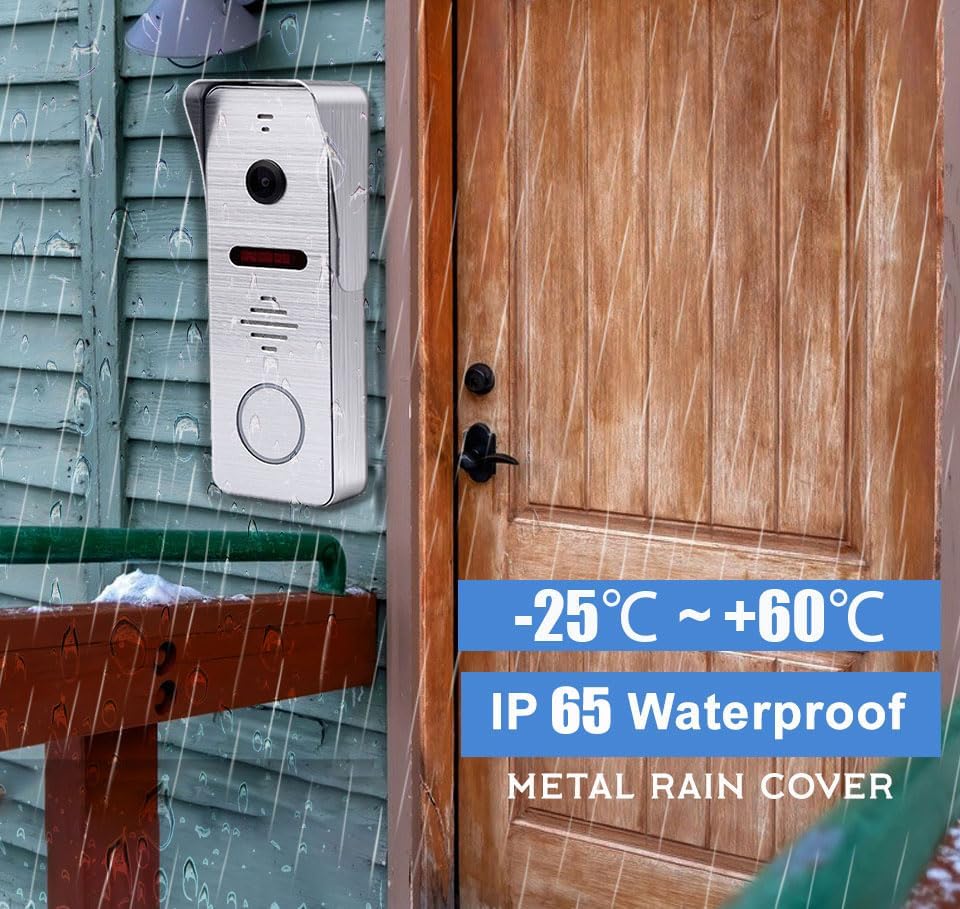
1. irudia: The outdoor doorbell camera is designed for outdoor use with an IP65 waterproof rating, capable of withstanding temperatures from -25°C to +60°C. It is shown mounted on a wooden wall next to a door.
2. Barruko Monitorearen Instalazioa
The indoor monitor is designed for surface mounting. Select a central location within your home where the monitor is easily accessible and visible.
- Mark and drill holes for the monitor's mounting bracket.
- Finkatu muntatzeko euskarria horman.
- Connect the 4-wire cable from the outdoor doorbell to the indoor monitor.
- Connect the DC 12V power adapter to the monitor and plug it into a power outlet.
- Muntatu barneko monitorearen euskarria.

2. irudia: The indoor monitor displays the visitor, while the outdoor doorbell is ready for interaction. A smartphone app allows for remote control, including unlocking.
3. App Configuration (Tuya Solution)
The indoor monitor supports Wi-Fi connectivity and integrates with the Tuya Smart app for remote monitoring and control.
- Download the "Tuya Smart" app from your smartphone's app store (iOS or Android).
- Erregistratu edo hasi saioa zure Tuya Smart kontuan.
- On the indoor monitor, navigate to the Wi-Fi settings and connect to your home Wi-Fi network.
- Follow the in-app instructions to add your video doorbell system. This typically involves scanning a QR code displayed on the monitor or entering a device ID.
- Once connected, you can receive calls, view bizi footage, and control the system remotely via the app.
Funtzionamendu-argibideak
1. Visitor Interaction
- Txirrinaren soinua: When a visitor presses the outdoor doorbell button, the indoor monitor will ring, and the Tuya Smart app on your smartphone will receive an immediate call notification.
- Bi norabideko komunikazioa: Answer the call from the indoor monitor or your smartphone app to see, hear, and speak to the visitor.
- Urruneko monitorizazioa: Erabili aplikazioa to view live video from the doorbell camera at any time.

3. irudia: The system enables seamless two-way communication, allowing you to see, speak to, and hear visitors directly from your indoor monitor or smartphone.
2. Mugimenduaren detekzioa eta grabaketa
- PIR Mugimendu Detekzioa: The doorbell features PIR motion detection combined with radar detection to accurately identify human movement near your entrance.
- Real-time Alarm: Upon detecting motion, the system will send an alert to your smartphone app and record the event. Recorded videos can be reviewed on the indoor monitor.
- Grabaketa automatikoa: All captured moments are saved to the included 32GB Micro SD card in the local monitor.

4. irudia: Motion sensors provide notifications when movement is detected, with event logs accessible via the smartphone app.
3. Funtzionamendu moduak
The indoor monitor offers three selectable operating modes:
- Residence Mode: Standard operation with full alerts and ringing.
- Non-residence Mode: When you are away, the doorbell camera will automatically record visitor calls and motion events, notifying you via the app without ringing the indoor monitor.
- Isiltasun modua: The doorbell and monitor will not produce sound, providing a quiet environment. App notifications for calls and motion detection will still be active.
4. Angelu zabala View eta Gaueko Ikusmena
- 160° Ultra Zabala ViewAngelua: The camera provides a 160° horizontal field of view and a 100° vertical field of view, ensuring comprehensive coverage of your entrance area.
- Gaueko infragorria: Equipped with 8 enhanced infrared lights, the doorbell camera provides clear 1080P HD images even in low-light conditions or complete darkness, without color deviation.

5. irudia: The 160° wide-angle lens and infrared night vision ensure clear visibility day and night, capturing a broad area around your door.
5. Call Forwarding
If a visitor presses the call button and the primary indoor monitor is not answered, the call can be forwarded to another indoor monitor within the system, allowing other users to interact with the visitor.

6. irudia: The call forwarding feature allows a visitor's call to be transferred to another indoor monitor if the initial one is not answered.
Mantentzea
- Garbiketa: Erabili biguna, damp cloth to clean the indoor monitor screen and the outdoor doorbell camera lens. Avoid abrasive cleaners or solvents.
- Eguraldiaren babesa: While the outdoor unit is IP66 waterproof, regularly check for any debris or obstructions around the camera lens and microphone/speaker.
- Firmware eguneraketak: Check the Tuya Smart app periodically for any available firmware updates for your system to ensure optimal performance and security.
- SD Txartela Kudeatzeko: Aldian behin berriroview and manage recordings on the 32GB Micro SD card. Format the card if necessary to free up space or resolve recording issues.
Arazoak konpontzea
- No Power to Monitor:
- Ensure the power adapter is securely plugged into both the monitor and a working electrical outlet.
- Egiaztatu entxufea beste gailu batekin.
- No Video/Audio from Doorbell:
- Verify that the 4-wire connection between the outdoor doorbell and indoor monitor is secure and correctly wired.
- Restart both the outdoor doorbell (by temporarily disconnecting power) and the indoor monitor.
- Aplikazioak ez ditu jakinarazpenak jasotzen:
- Ensure the indoor monitor is connected to Wi-Fi.
- Check your smartphone's notification settings for the Tuya Smart app.
- Verify that the app is running in the background or has necessary permissions.
- Ensure the monitor is not in "Silence Mode" if you expect audible alerts from the monitor.
- Mugimendu-detekzioa ez dabil:
- Check motion detection settings in the indoor monitor and Tuya Smart app.
- Ziurtatu sentsorearen eremua oztoporik gabe dagoela.
- Adjust sensitivity settings if false alarms or missed detections occur.
- Gaueko ikusmenaren kalitate eskasa:
- Ensure the camera lens is clean and free from dirt or smudges.
- Check for any reflective surfaces close to the doorbell that might interfere with the infrared lights.
Zehaztapenak
| Ezaugarri | Xehetasuna |
|---|---|
| Pantaila | 10 inch TFT-LCD Touch Screen |
| Ebazpena | 1024 x 680 |
| Eraztunak | 7-chord melody rings |
| Konexioa | 4-wires, WIFI (Tuya solution) |
| Panelen materiala | Acrylic/ABS cover |
| Instalazioa | Gainazaleko muntaketa |
| Sarrera boltage | AC 100-240V 50/60Hz |
| Lan bolumenatage | DC 12V, 2A |
| Neurriak | 198 x 130 x 21 mm (7.8 x 5.1 x 0.8 hazbeteko) |
| Ezaugarri | Xehetasuna |
|---|---|
| Ebazpen Horizontala | 2MP 1080P |
| Irudi-sentsorea | CCD/Colorful CMOS sensor |
| Sentsorearen tamaina | 1/3 hazbetekoa |
| Ikusizko Angelua | 160 degrees (140° horizontal, 100° vertical) |
| Gaueko Ikusmena | IR Cut, B/W Night Vision (8 enhanced IR lights) |
| Panelen materiala | Metala |
| Instalazioa | Gainazaleko/Enpotratutako muntaketa |
| Neurriak | 135 x 47 x 33 mm (5.7 x 3.6 x 1.5 hazbeteko) |
| Funtzionamendu-tenperatura | -40 °C eta 50 °C (-40 °F eta 122 °F) |
| IP balorazioa | IP66 Iragazgaitza |
Beste zehaztapen batzuk:
- Konektibitate-protokoloa: Wi-Fi, Wired (4-wire connection)
- Gailu bateragarriak: Smartphone (iOS/Android), Tablet
- Biltegiratzea: 32GB Micro SD card (included)
- Kontrol-metodoa: Touch (monitor), App
- Modelo zenbakia: AHD7+94206
- ASIN: B0CF1VS7D1
Bermea eta Laguntza
For warranty information and technical support, please refer to the documentation provided with your purchase or contact ANJIELO SMART customer service directly.
Fabrikatzailea: ANJIELO SMART
Lehen eskuragarri dagoen data: 8ko abuztuaren 2023a


