OTOFIX D1 PROS ECU Coding Diagnostic Scanner User Manual
Model: OTOFIX D1 PRO
Konfigurazio, funtzionamendu, mantentze eta arazoak konpontzeko gida osoa.
1. Produktua amaitu daview
The OTOFIX D1 PROS is an advanced ECU Coding Diagnostic Scanner designed for professional automotive diagnostics. It offers a wide range of functions including bi-directional control, extensive service resets, and advanced coding capabilities for various vehicle makes and models. This tool is engineered for efficiency and accuracy in vehicle system analysis and repair.

Figure 1: OTOFIX D1 PROS Diagnostic Scanner, VCI, and included carrying case.
2. Konfigurazioa eta hasierako erabilera
Follow these steps to set up your OTOFIX D1 PROS scanner for the first time:
- Despaketatzea: Carefully remove all components from the carrying case. The package includes:
- 1 x OTOFIX D1 PRO Tablet (Main Unit)
- 1 x OTOFIX V1 Vehicle Communication Interface (VCI)
- 1 x AC/DC Power Adapter (12V)
- 1 x C motako USB kablea
- 1 x Auxiliary Power Outlet Adapter
- 2 x Ordezko fusibleak
- 1 x USB to Ethernet Adapter
- 1 x Soft Cloth
- 1 x Erreferentzia gida azkarra
- 1 x Ontziratze zerrenda
- 1 x Maleta garraiatzeko
- Tableta kargatzea: Connect the AC/DC Power Adapter to the tablet's charging port and plug it into a power outlet. Ensure the tablet is fully charged before first use. The battery capacity is 15000mAh.
- Piztu: Pizteko, sakatu eta eutsi tabletaren pizteko botoiari.
- Hasierako konfigurazioa: Follow the on-screen prompts to select your language, time zone, and connect to a Wi-Fi network. A stable internet connection is required for software updates and online functions.
- VCI konexioa: Plug the OTOFIX V1 VCI into the vehicle's OBDII port. The VCI will establish a Bluetooth connection with the D1 PROS tablet. Ensure the VCI's indicator lights confirm a successful connection.
3. Gailuaren funtzionamendua
The OTOFIX D1 PROS offers a comprehensive suite of diagnostic and service functions. Navigate through the intuitive Android 10.0 interface using the 10.1-inch touchscreen display.
3.1. OE-Level Diagnostics
Perform comprehensive diagnostics on all available vehicle systems, including Engine (ECM), Anti-lock Braking System (ABS), Supplemental Restraint System (SRS), Immobilizer (IMMO), Electronic Parking Brake (EPB), Tire Pressure Monitoring System (TPMS), and more. The AutoScan 2.0 feature allows for rapid all-system communication, detecting most system malfunctions within 10 seconds.

2 Irudia: Gainetikview of OE-level diagnostic capabilities for various vehicle systems.
Key diagnostic functions include:
- ECU informazioa: Retrieve detailed information about the Electronic Control Units.
- Irakurri/Garbitu kodeak: Read Diagnostic Trouble Codes (DTCs) and clear them after repairs.
- Zuzeneko datuak: View hainbat sentsore eta osagaitatik denbora errealeko datu-jarioak.
- Active Tests (Bi-directional Control): Send commands to vehicle actuators to test their functionality, such as radiator fan activation, injector tests, mirror tests, and more. This significantly aids in troubleshooting.

3. irudia: Adibamples of active tests and bi-directional controls available.
3.2. ECU Coding and Special Functions
The D1 PROS supports both online and offline ECU coding, allowing for the rematching or recoding of replacement modules (e.g., CEM, ECM, TCM, ABS) and enabling/disabling specific vehicle functions (e.g., automatic mirrors, seatbelt warnings).
- Online Kodeketa: Supported for brands like VW, Audi, Skoda, Peugeot, Citroen, DS.
- Lineaz kanpoko kodeketa: Supported for brands like VW, Audi, Bentley, Lamborghini, Bugatti, Porsche, Daihatsu, Benz, Maybach, Land Rover, Jaguar, Subaru, Ford, Mazda, Hyundai, Kia, Chrysler, Opel, Vauxhall, Mitsubishi.
- VAG Guided Functions: Provides step-by-step guidance for matching, calibration, and basic settings on VAG vehicles, simplifying complex procedures.
- Hidden Functions Refresh: Unlock or modify hidden features on compatible vehicles.
3.3. 40+ Hot Services and Resets
Access a wide array of common maintenance and service resets, including but not limited to:
- Aparkaleku-balazta elektronikoaren (EPB) berrezarpena
- Olioa Berrezarri
- Diesel partikula-iragazkia (DPF) birsortzea
- Gidatze-angelu-sentsorea (SAS) Kalibrazioa
- Tire Pressure Monitoring System (TPMS) Reset
- Bateriaren Kudeaketa Sistemaren (BMS) Berrezarri
- Injektorearen kodeketa
- Gasaren Egokitzapena
- Suspensioaren kalibrazioa
- Brake Bleed
- TEC-learn
- Buruaamp Egokitzapena
- Ondorengo tratamendua
- Kilometroa
- Airbag berrezarri
- Eta beste asko.

4. irudia: Adibamples of the 40+ service and reset functions.
3.4. FCA and Renault SGW Access
The OTOFIX D1 PROS is a licensed scan tool providing diagnostic access to 2018+ FCA (Fiat Chrysler Automobiles) and 2015+ Renault SGW (Security Gateway) equipped models. This allows for diagnostics without needing to dismantle the vehicle's security gateway module.
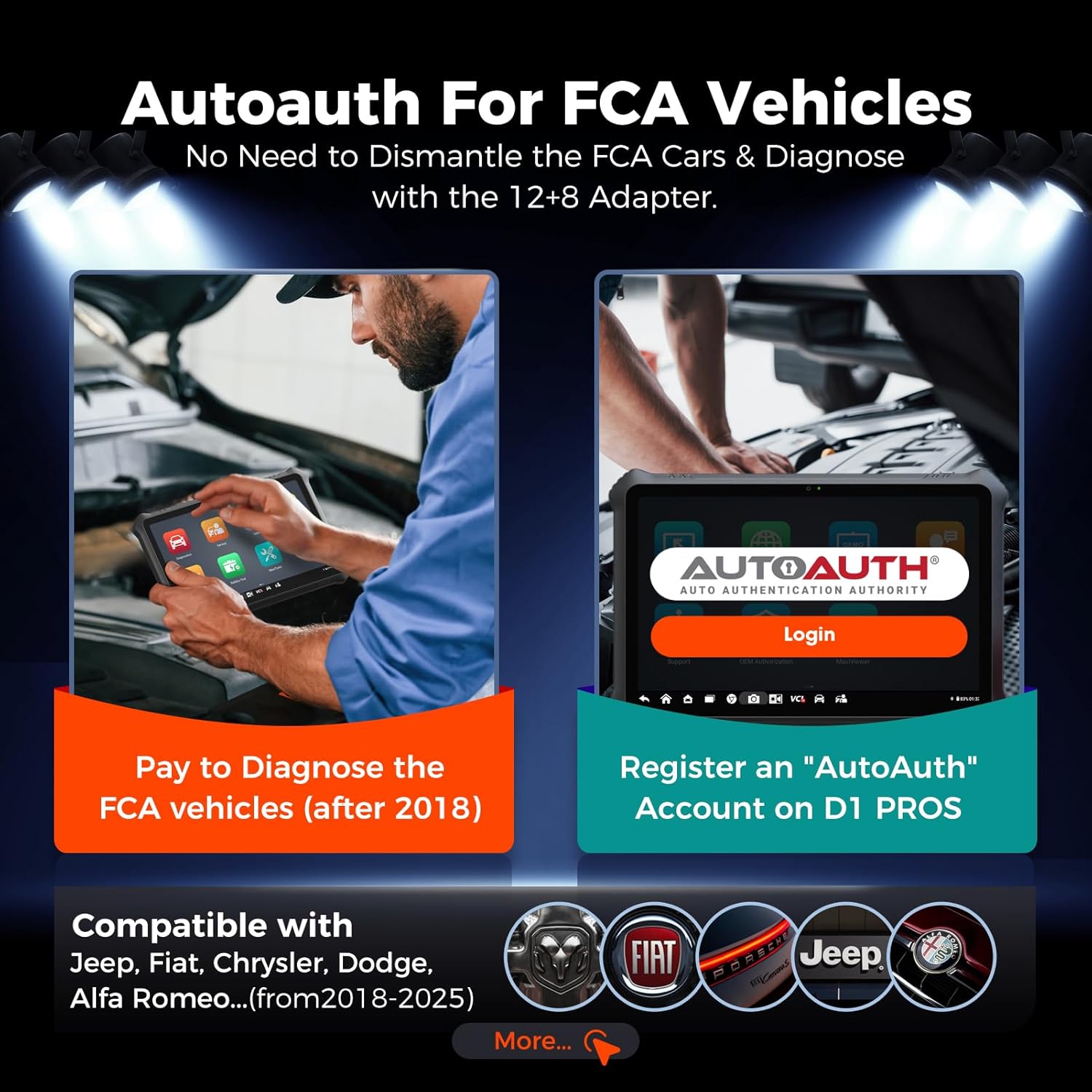
Figure 5: Process for AutoAuth access for FCA vehicles.
3.5. Pre-Post Scanning and Cloud Report Management
The device supports Pre-Post Scanning, which clearly records the vehicle status before and after diagnostics. This feature assists mechanics in developing repair plans and informing customers about the work and cost. Reports can be saved, printed, or emailed. Diagnostic reports can also be stored in the Cloud Server, allowing for easy access, printing, or sharing via QR code or message.
3.6. Video Integration
Note: No official product video URLs were provided in the product data. If available, relevant official product videos from the seller would be embedded here to demonstrate specific features or operations, with a maximum width of 420px and a detailed text description.
4. Mantentzea
To ensure the longevity and optimal performance of your OTOFIX D1 PROS scanner, adhere to the following maintenance guidelines:
- Software eguneraketak: Regularly check for and install software updates. The D1 PROS includes 2 years of free software updates from the date of purchase. Updates often include new vehicle coverage, bug fixes, and enhanced functionalities. The device will continue to function even if updates are not renewed after the initial period.
- Garbiketa: Use the provided soft cloth to clean the touchscreen and device body. Avoid abrasive cleaners or solvents.
- Biltegiratzea: Gorde gailua jatorrizko zorroan erabiltzen ez duzunean, leku fresko eta lehor batean, hautsetik, hezetasunetik eta kalte fisikoetatik babesteko.
- Bateria zaintzea: Bateriaren iraupen optimoa lortzeko, saihestu bateria maiz erabat deskargatzea. Kargatu gailua aldizka, batez ere denbora luzez gordeko bada.
5. Arazoak
If you encounter issues with your OTOFIX D1 PROS, consider the following common troubleshooting steps:
- Gailua ez da pizten: Ensure the battery is charged. Connect the AC/DC adapter and try powering on again.
- VCI konexio arazoak: Verify the VCI is securely plugged into the vehicle's OBDII port. Check the VCI's indicator lights. Ensure Bluetooth is enabled on the tablet and the VCI is paired. Try restarting both the tablet and the vehicle's ignition.
- Communication Errors with Vehicle: Confirm the vehicle's ignition is on (engine off or running as required by the specific test). Check the OBDII port for any physical damage. Ensure the correct vehicle make, model, and year are selected in the software.
- Function Not Working as Expected: Some advanced functions like ECU programming or specific coding features may have vehicle-specific requirements or limitations. Ensure your software is up-to-date. If a function is advertised but not working, verify vehicle compatibility and consult the support team.
- Errendimendu motela: Close any unnecessary applications running in the background. Ensure sufficient storage space is available (128GB internal memory).
6. Zehaztapenak
Detailed technical specifications for the OTOFIX D1 PROS Diagnostic Scanner:

Figure 6: Key hardware features of the OTOFIX D1 PROS.
| Ezaugarri | Xehetasuna |
|---|---|
| Eredua | OTOFIX D1 PRO |
| Sistema eragilea | Android 10.0 |
| Prozesadorea | 8 nukleoko CPUa |
| Memoria | 4GB RAM / 128GB ROM |
| Bistaratzea | 10.1-inch LCD touchscreen, 1920x1200 resolution |
| Kamera | Rear: 16MP |
| Bateria | 15000 mAh litio-ioi |
| Konektibitatea | Bluetooth, Wi-Fi, USB C motakoa |
| Neurriak | 11.8 x 8.7 x 2 hazbete |
| Elementuaren pisua | 2.6 kilo |
| Onartutako protokoloak | CANFD, DoIP, and more |
| UPC | 850051166275 |
7. Bermea eta Laguntza
Bermea: The OTOFIX D1 PROS comes with a 1-year quality backup from the manufacturer. Please retain your proof of purchase for warranty claims.
Software eguneraketak: Enjoy 2 years of free software updates included with your purchase. After this period, updates can be purchased, but the device will remain functional with its last updated features.
Laguntza teknikoa: For any questions, technical assistance, or support inquiries, please contact the OTOFIX support team:
- Posta elektronikoa: otofixaftersales-amz@outlook.com
- Eskuragarritasuna: Astelehenetik ostiralera, 9:00etatik 6:00etara (EST)
When contacting support, please provide your product model (OTOFIX D1 PROS) and any relevant details about your issue to facilitate a quicker resolution.


