1. Sarrera
This manual provides comprehensive instructions for the setup, operation, and maintenance of your Xprinter XP-Q801K Thermal Receipt Printer. This printer is designed for efficient and reliable receipt printing in various business environments, featuring high-speed direct thermal printing and a USB interface for easy connectivity.

1. irudia: Aurrealdea view of the Xprinter XP-Q801K Thermal Receipt Printer, showing the paper output slot and control buttons.
2. Konfigurazioa
2.1 Paketatzea
Carefully remove the printer and all accessories from the packaging. Verify that all components are present:
- Xprinter XP-Q801K Thermal Receipt Printer
- Elikatze-moldagailua
- USB kablea
- Paper Roll (starter)
- Erabiltzailearen eskuliburua (dokumentu hau)
2.2 Inprimagailua konektatzea
Before connecting, ensure the printer is powered off. Locate the ports on the rear of the printer.
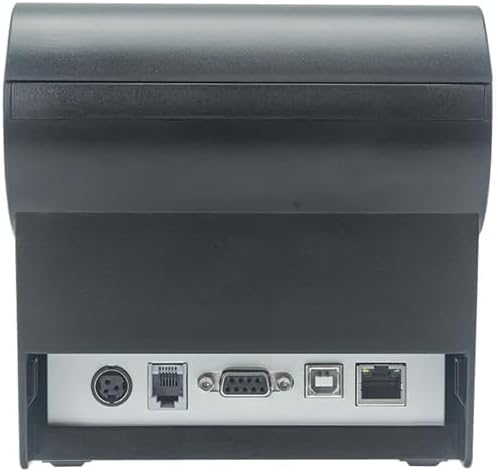
2. Irudia: Atzealdea view of the printer, highlighting the power, USB, and other interface ports.
- Konektatu energia: Insert the power adapter cable into the printer's power input port (DC 24V/2.5A) and plug the adapter into a suitable electrical outlet (AC 100-240V, 50-60Hz).
- Konektatu USBa: Connect one end of the provided USB cable to the USB port on the printer and the other end to an available USB port on your computer.
- Cash Drawer (Optional): If using a cash drawer, connect its cable to the cash drawer port (DC 24V/1A) on the printer.
2.3 Paper-erroilua kargatzea
The printer uses 80mm wide thermal paper rolls.
- Open the paper cover by pushing the cover open button (usually located on the side or front).
- Insert the thermal paper roll with the printing surface facing the print head. Ensure the roll is seated correctly in the paper compartment.
- Atera paper zati txiki bat ebakitzailetik.
- Itxi paper-estalkia ondo, bere lekuan klik egin arte.
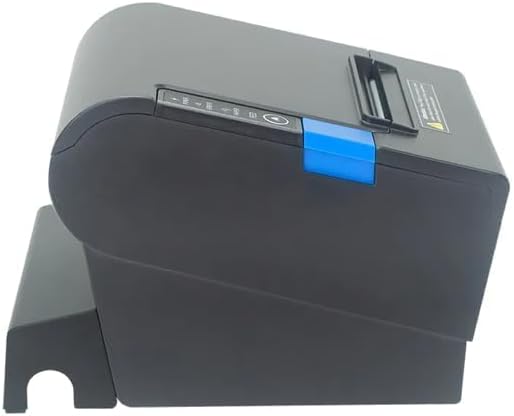
3. irudia: Aldea view of the printer, illustrating the paper cover mechanism.
2.4 Gidariaren instalazioa
The printer requires a driver to communicate with your computer. Drivers are typically available for Windows, Linux, Android, and Mac operating systems.
- For Windows users, the printer often supports plug-and-play installation or requires a specific Windows driver.
- For Linux, Android, and Mac, SDKs (Software Development Kits) are usually provided for integration.
Kontsultatu fabrikatzailearen website or the included driver CD/USB drive for the latest drivers and installation instructions specific to your operating system.
3. Inprimagailuaren funtzionamendua
3.1 Piztu/Itzaltzea
Locate the power switch on the side or rear of the printer. Flip the switch to the 'ON' position to power on the printer. The 'POWER' indicator light will illuminate. Flip to 'OFF' to power down.
3.2 Adierazle-argiak eta botoiak
The front panel typically features several indicator lights and buttons:
- POTENTZIA: Inprimagailua piztuta dagoela adierazten du.
- ERROREA: Illuminates or flashes to indicate an error condition (e.g., paper out, print head overheating, cutter error).
- PAPERA: Indicates that the paper roll is low or out.
- FEED botoia: Press to manually feed paper. Hold to perform a self-test print (if supported by model).
3.3 Oinarrizko inprimaketa
Once the printer is connected and drivers are installed, you can print receipts from your POS software or application. Ensure the printer is selected as the default or active printer in your system settings.
The printer supports various print speeds up to 300 mm/s and automatic paper cutting after each print job.
4. Mantentzea
Mantentze-lan erregularrak errendimendu optimoa bermatzen du eta inprimagailuaren bizitza luzatzen du.
4.1 Inprimatze-burua garbitzea
The print head should be cleaned regularly, especially if print quality degrades.
- Itzali inprimagailua eta deskonektatu korronte-kablea.
- Ireki paperezko estalkia.
- Kotoi-puska bat erabili arinkiampened with isopropyl alcohol (ethanol) to gently wipe the thermal elements of the print head.
- Utzi inprimatze-burua guztiz lehortzen estalkia itxi eta berriro korrontea konektatu aurretik.
4.2 Cleaning the Cutter
Paper dust can accumulate around the cutter blade, affecting its performance.
- Itzali inprimagailua eta deskonektatu korronte-kablea.
- Carefully remove any visible paper dust or debris from around the cutter blade using a soft brush or compressed air.
- Do not use liquids on the cutter.
4.3 Garbiketa orokorra
Garbitu inprimagailuaren kanpoaldea oihal leun eta lehor batekinamp oihal. Saihestu produktu kimiko gogorrak edo garbitzaile urratzaileak erabiltzea.
5. Arazoak
Atal honek zure inprimagailuarekin izan ditzakezun arazo ohikoenei buruzko informazioa ematen du.
| Arazoa | Kausa posiblea | Irtenbidea |
|---|---|---|
| Inprimagailua ez da pizten. | Power cable not connected; Power outlet faulty; Power switch off. | Ensure power cable is securely connected. Test power outlet. Turn power switch to 'ON'. |
| Inprimaketarik ez. | Paper out; Paper loaded incorrectly; Driver not installed or incorrect; USB cable loose; Printer not selected. | Load new paper roll. Re-load paper correctly. Install/reinstall correct driver. Check USB connection. Select printer in software. |
| ERROR light is on/flashing. | Paper out; Paper jam; Print head overheating; Cutter error. | Load paper. Clear paper jam. Allow printer to cool down. Check cutter for obstructions. |
| Inprimatze-kalitate eskasa. | Dirty print head; Low quality paper; Old paper roll. | Clean the print head (see Section 4.1). Use high-quality thermal paper. Replace old paper rolls. |
Konponbide hauek saiatu ondoren arazoa konpontzen ez bada, jarri harremanetan bezeroarentzako arreta-zerbitzuarekin.
6. Zehaztapenak
| Ezaugarri | Xehetasuna |
|---|---|
| Inprimatzeko metodoa | Zuzeneko Termikoa |
| Paperaren Zabalera | 80 mm |
| Inprimatzeko abiadura | 230 mm/s, 260 mm/s, 300 mm/s |
| Interfazea | USBa |
| Lerro-tartea | 3.75 mm (adjustable by commands) |
| Character Size (ANK) | Font A: 1.5 × 3.0 mm (12 × 24 dots) Font B: 1.1 × 2.1 mm (9 × 17 dots) |
| Character Size (Chinese/Traditional Chinese) | 3.0 × 3.0 mm (24 × 24 dots) |
| Barra-kode motak | UPC-A / UPC-E / JAN13 (EAN13) / JAN8 (EAN8) / CODE39 / ITF / CODABAR / CODE93 / CODE128 |
| 2D barra-kodea | QR Code / PDF417 |
| NV Flash Memory | 256 KB |
| Sarrerako potentzia | AC 100-240V, 50-60Hz |
| Irteera Potentzia | DC 24V/2.5A |
| Diru-kutxaren irteera | DC 24V/1A |
| Pisua | 1.0 kg |
| Neurriak (P × L × H) | 194.5 × 145 × 146.4 mm |
| Funtzionamendu-tenperatura | 0~45°C |
| Funtzionamenduaren hezetasuna | 10~80% RH |
| Cutter Bizitza | 1.5 milioi mozketa |
| Inprimatu buruaren bizitza | 150 km |
| OS bateragarritasuna | Windows, Linux, Android, Mac |


