Sarrera
This manual provides essential information for the setup, operation, maintenance, and troubleshooting of your Star Micronics mC-Label3 MCL32CBI Direct Thermal Printer. Please read this manual thoroughly before using the printer to ensure proper and safe operation.
Paketearen edukia
Egiaztatu behean zerrendatutako elementu guztiak zure paketean sartuta daudela:
- mC-Label3 Multifunctional Printer
- AC egokigailua
- Elikatze-kablea
- USB Cables (C-C 1.0m and C-A 1.8m)
- LAN kablea (1 m)
- Simple Setup Sheet Safety Guide

Irudia: Aurrealdea view of the Star Micronics mC-Label3 printer, showcasinbere diseinu trinkoa eta etiketa irteerako zirrikitua g.
Konfigurazioa
1. Inprimagailua konektatzea
The mC-Label3 MCL32CBI printer offers multiple connectivity options:
- USB-C: Connect the printer directly to your PC, Android, or iOS device using the provided USB-C to USB-C or USB-C to USB-A cables.
- Ethernet (LAN): For network connectivity, connect the printer to your router or network switch using the supplied LAN cable.
- Bluetootha: The MCL32CBI model supports Bluetooth connectivity for iOS and Android devices. Ensure Bluetooth is enabled on your device and pair with the printer.

Irudia: Atzealdea view of the mC-Label3 printer, highlighting the LAN, USB, and power ports for various connection types.
2. Media kargatzea
The printer supports various media types, including linerless labels, die-cut labels, continuous labels, and thermal receipt paper.
- Open the top cover of the printer by lifting the latch.
- Place the media roll into the media compartment, ensuring the leading edge feeds out from the top.
- Pull a small amount of media past the print head and close the top cover securely.
- Ensure the media is properly aligned within the guides.

Irudia: Goitik behera view of the mC-Label3 printer with its cover open, illustrating the internal mechanism for loading thermal paper or label rolls.
Funtzionamendu-argibideak
1. Piztu/Itzaltzea
Connect the power cable to the printer and a power outlet. Press the power button located on the front of the printer to turn it on. The status indicator light will illuminate.
2. Etiketak eta ordainagiriak inprimatzea
The mC-Label3 MCL32CBI printer is designed for efficient label and receipt printing. It supports various applications and cloud services.
- Softwarearen bateragarritasuna: Works seamlessly with PC, Android, and iOS applications.
- Hodeiko zerbitzuak: Utilize Star Micronics Cloud Services to design and manage labels.
- One Touch Label: This feature allows storing pre-made receipts and labels for quick and easy printing directly from the printer.
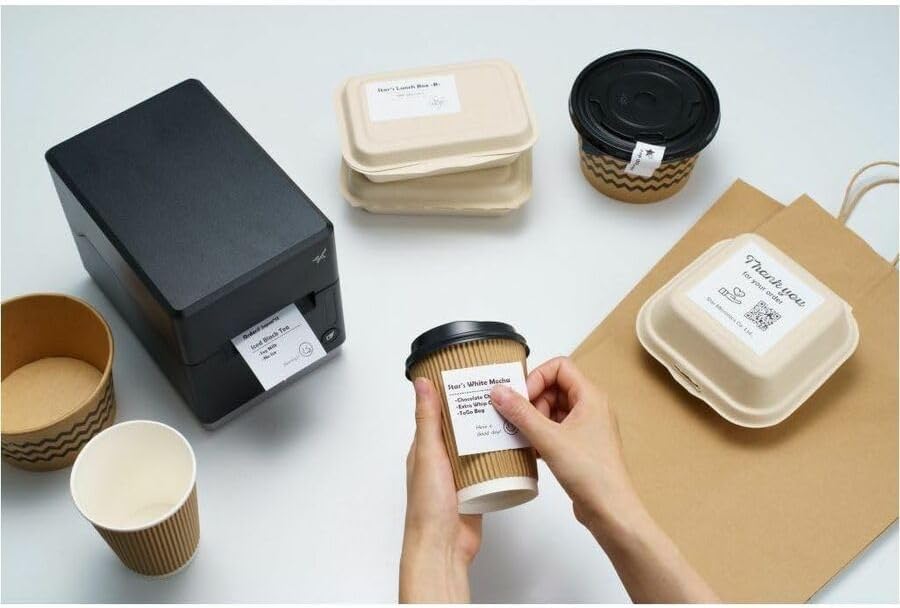
Image: A hand pressing the feed button on the mC-Label3 printer, demonstrating the printing of a 'Thank you' label.

Image: The mC-Label3 printer shown in a practical setting, printing labels for food containers and coffee cups, illustrating its versatility.
Mantentzea
1. Inprimagailua garbitzea
Regular cleaning ensures optimal performance and extends the life of your printer.
- Erabili lipurrik gabeko zapi leun bat dampened with isopropyl alcohol to clean the print head.
- Garbitu inprimagailuaren kanpoaldea zapi leun eta lehor batekin.
- Saihestu garbitzaile edo disolbatzaile urratzaileak erabiltzea.
2. Replacing Media
When the media roll is depleted, follow the media loading instructions in the Setup section to replace it.
3. Effortless Repairs
The mC-Label3 is designed for effortless, no-tools-required repairs with minimal upkeep, simplifying any necessary component replacements.
Arazoak konpontzea
Atal honek aurki ditzakezun arazo ohikoenei irtenbideak eskaintzen ditu.
| Arazoa | Kausa posiblea | Irtenbidea |
|---|---|---|
| Inprimagailua ez da pizten | Kable elektrikoa ez dago konektatuta; Entxufearen arazoa | Ziurtatu kablea ondo konektatuta dagoela; Saiatu beste entxufe bat erabiltzen. |
| Ez dago inprimatze-irteerarik | Out of media; Media loaded incorrectly; Driver issue | Load new media; Re-load media correctly; Reinstall printer drivers. |
| Inprimatze-kalitate eskasa | Dirty print head; Low quality media | Clean the print head; Use recommended thermal media. |
| Konektibitate arazoak | Incorrect cable connection; Bluetooth not paired; Network configuration | Check USB/Ethernet cables; Re-pair Bluetooth; Verify network settings. |
Zehaztapenak
| Ezaugarri | Xehetasuna |
|---|---|
| Ereduaren izena | mC-Label3 |
| Elementuaren eredu-zenbakia | MCL32CBI |
| Inprimatzeko Teknologia | Zuzeneko Termikoa |
| Inprimagailuaren irteera | Monokromoa |
| Inprimatze-abiadura maximoa monokromoa | 23 ppm |
| Zuri-beltzeko gehienezko inprimaketa-bereizmena | 203 DPI (203 x 203 DPI) |
| Inprimatutako euskarriak | Labels (Linerless, Die-Cut, Continuous), Thermal Receipt |
| Konektibitate Teknologia | Bluetooth, Wired (USB, Ethernet) |
| Hardware interfazea | USBa, Ethernet |
| Gailu bateragarriak | PC, Android, iOS |
| Kontrolagailu mota | iOS, Android |
| Produktuaren neurriak | 6.7"S x 5.6"Z x 8.3"A (17.0 x 14.2 x 21.1 cm) |
| Elementuaren pisua | 7.2 libra (3.27 kg) |
| Memoria Biltegiratzeko Ahalmena | 64 MB |
| Kolorea | Beltza |
| Fabrikatzailea | STAR MICRONICS |
| Jatorrizko Herrialdea | Txina |
Bermearen informazioa
The Star Micronics mC-Label3 MCL32CBI printer comes with a manufacturer's warranty. For specific terms and conditions, please refer to the warranty card included in your package or visit the official Star Micronics webgunea.
Berme mota: Fabrikatzailea
Laguntza
For further assistance, technical support, or to download the latest drivers and firmware, please visit the official Star Micronics support webwebgunean edo jarri harremanetan bere bezeroarentzako zerbitzuarekin.
Star Micronics Official Webgunea: www.starmicronics.com
Laguntza esteka: www.starmicronics.com/support


