1. Sarrera
This manual provides essential information for the safe and efficient operation of your THOMSON 40FD2S13 40 Inch LED Full HD Easy TV. Please read it thoroughly before using the television and retain it for future reference.
Your THOMSON Easy TV is designed for straightforward entertainment, featuring a Full HD display, multiple connectivity options, and a triple tuner for versatile signal reception.

Irudia: Aurrealdea view of the THOMSON 40FD2S13 40 Inch LED Full HD Easy TV, showcasinbere pantaila eta diseinu dotorea.
2. Segurtasun informazioa
Jarraitu beti oinarrizko segurtasun neurriak telebista hau erabiltzean sute, deskarga elektriko eta lesio arriskua murrizteko.
- Ez jarri telebista euri edo hezetasunera.
- Ez ireki armairua; konponketa guztiak langile kualifikatuei eskatu.
- Ziurtatu aireztapen egokia telebistaren inguruan.
- Mantendu telebista eguzki-argitik eta bero-iturrietatik urrun.
- Deskonektatu telebista tximista-ekaitzetan edo denbora luzez erabili gabe dagoenean.
- Position the TV on a stable, level surface or securely wall-mount it.
3. Paketearen edukia
Egiaztatu elementu guztiak paketean daudela:
- THOMSON 40FD2S13 40 Inch LED Full HD Easy TV
- Urruneko Kontrola
- Elikatze-kablea
- Erabiltzailearen eskuliburua (dokumentu hau)
- TV Stands (if applicable, check packaging)
- Screws for TV Stands (if applicable)
4. Konfigurazioa
4.1 Telebista-euskarriak instalatzea
If you are not wall-mounting the television, attach the included stands to the bottom of the TV. Ensure the stands are securely fastened with the provided screws to prevent the TV from tipping.

Image: Diagram showing the dimensions of the THOMSON 40FD2S13 TV, including stand measurements, to assist with placement.
4.2 Horman muntatzea
For wall mounting, use a VESA-compatible wall mount kit (not included) that matches the TV's specifications. Follow the instructions provided with your wall mount kit carefully. Ensure the wall can support the weight of the TV.
4.3 Periferikoak konektatzea
Your THOMSON TV offers various connection ports for external devices. Refer to the image below for port locations and types.
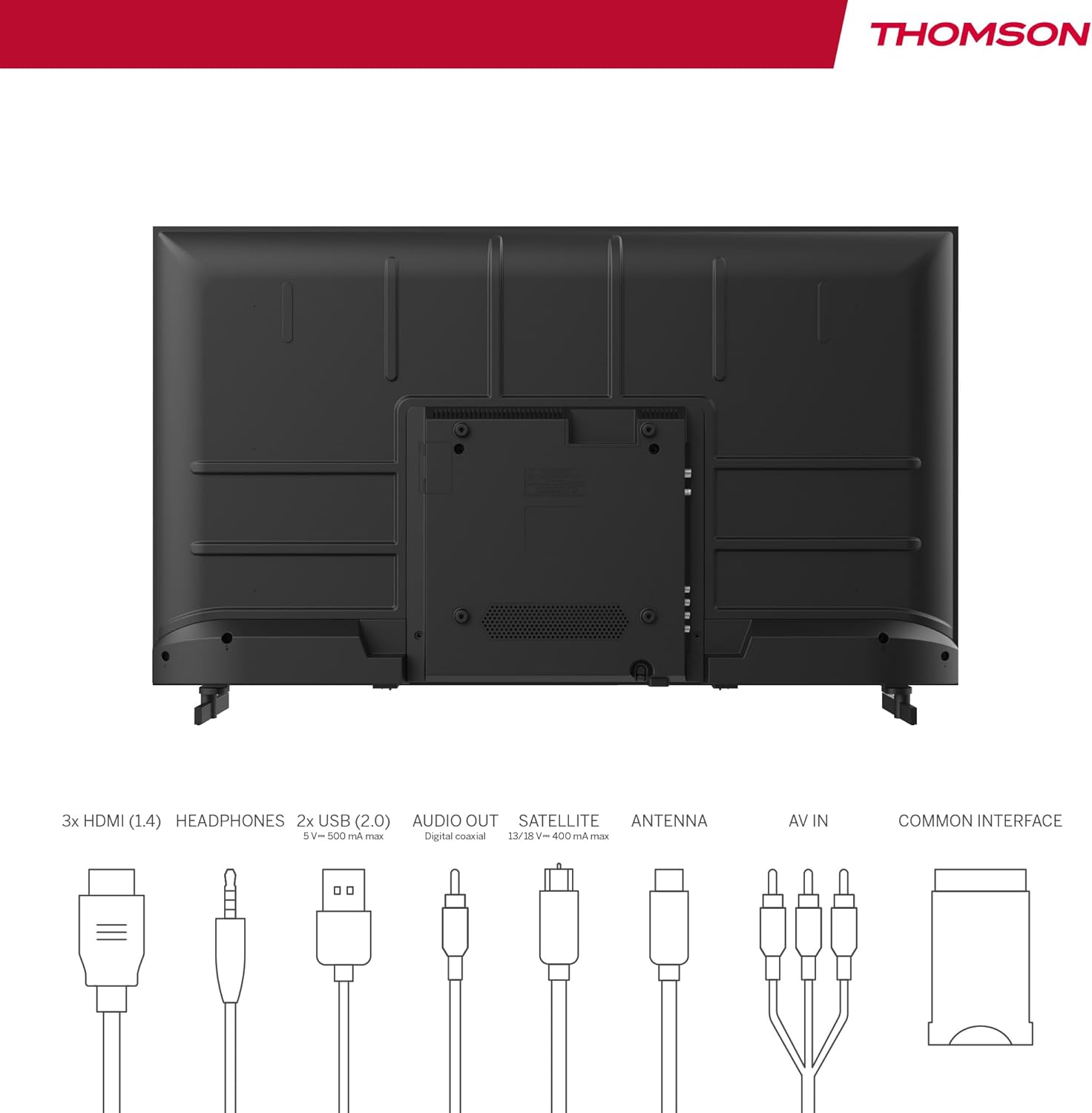
Image: Rear panel of the THOMSON 40FD2S13 TV, illustrating the location of all input and output ports, including HDMI, USB, Audio Out, Satellite, Antenna, AV IN, and Common Interface.
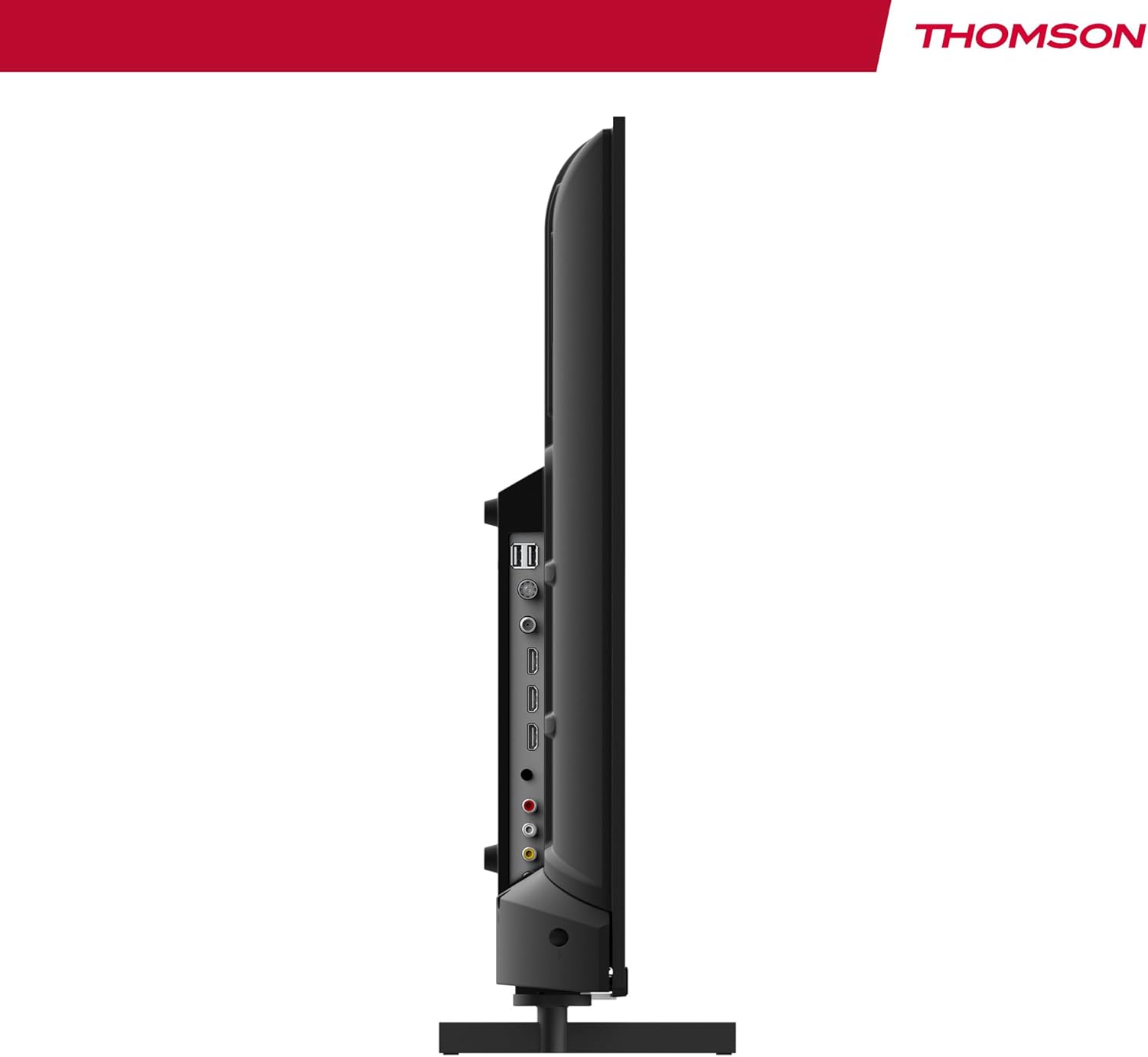
Irudia: Albokoa view of the THOMSON 40FD2S13 TV, highlighting the conveniently located side ports for easy access.
- HDMI (x3): Konektatu Blu-ray erreproduzitzaileak, joko kontsolak, set-top kutxak edo HDMI gaitutako beste gailuak.
- USB (x2): Konektatu USB biltegiratze gailuak multimedia erreproduzitzeko.
- AV IN: Konektatu gailu zaharragoak bideo konposatu eta audio estereo kableekin.
- Entzungailuak: Konektatu entzungailuak entzuteko modu pribatuan.
- Audio-irteera digitala: Konektatu kanpoko audio-sistema batera soinua hobetzeko.
- Antenna (DVB-T2): Connect a terrestrial antenna for digital broadcast reception.
- Satellite (DVB-S2): Connect a satellite dish for satellite broadcast reception.
- CI+ zirrikitua: Insert a Conditional Access Module (CAM) and smart card for encrypted channels.
4.4 Energia-konexioa
After connecting all necessary cables, plug the power cable into the TV's power input and then into a wall outlet. The TV will enter standby mode.
5. Telebistaren funtzionamendua
5.1 Urruneko kontrola
The included remote control allows you to access all TV functions. It features backlit buttons for easy navigation in dim lighting.

Image: The THOMSON TV remote control, highlighting its ergonomic design and backlit buttons for convenient use.
- Pizteko botoia: Telebista piztu/itzali edo standby moduan jartzen du.
- Zenbaki-botoiak: Hautatu kanalak zuzenean.
- +/- bolumena: Doitu bolumen-maila.
- Kanala +/-: Aldatu kanalak sekuentzialki.
- Menuko botoia: Sartu menu nagusira ezarpenetarako.
- Nabigazio botoiak (Gora/Behera/Ezkerra/Eskuina/Ados): Nabigatu menuetan zehar eta berretsi aukeraketak.
- Iturriaren botoia: Select input sources (HDMI, AV, Tuner).
- INFO botoia: Display current channel information.
- GIDA botoia: Access the Electronic Program Guide (EPG).
- REC botoia: Initiate recording to a connected USB storage device (if supported and configured).
5.2 Initial Setup and Channel Scan
Upon first power-on, the TV will guide you through the initial setup process, including language selection, country, and channel scanning. Select your preferred reception type (Antenna, Cable, or Satellite) and follow the on-screen instructions to scan for available channels.

Image: Close-up of the TV's tuner inputs, indicating compatibility with DVB-T2 (terrestrial antenna), DVB-C (cable), and DVB-S2 (satellite) signals.
5.3 Multimedia erreproduzitzailea
Connect a USB storage device to one of the USB ports to access photos, music, videos, and text files directly on your TV. Use the remote control to navigate the media player interface.
5.4 Ezaugarri bereziak
- Programaren Gida Elektronikoa (EPG): View upcoming program schedules and set reminders.
- Denbora atzerapena: Pause live TV broadcasts (requires a connected USB storage device).
- Gurasoen kontrola: Set restrictions on channels or programs based on age ratings.
- Hotel modua: Configure specific settings for use in hotel environments, such as default volume and input source.
- Dolby Audio: Experience enhanced sound quality with Dolby Audio technology.

Image: A family enjoying content on the THOMSON TV, with the Dolby Audio logo indicating superior sound experience.
6. Mantentzea
To ensure the longevity and optimal performance of your THOMSON TV, follow these maintenance guidelines:
- Pantaila garbitzea: Garbitu pantaila astiro-astiro zapi leun eta pelusik gabeko batekin. Orba egoskorrak izanez gero, garbitu apur batampGarbitu zapi bat urarekin edo pantaila-garbitzaile espezializatu batekin. Ez bota inoiz likidorik zuzenean pantailan.
- Armairua garbitzea: Erabili zapi leun eta lehor bat telebistaren armairua garbitzeko. Saihestu garbitzaile edo disolbatzaile urratzaileak erabiltzea.
- Aireztapena: Ensure the ventilation openings on the back of the TV are not blocked.
- Elikatze kablea: Aldian-aldian egiaztatu kable elektrikoa kaltetuta dagoen. Kaltetuta badago, jarri harremanetan bezeroarentzako arreta-zerbitzuarekin ordezkatzeko.
7. Arazoak
If you encounter issues with your TV, consult the following common troubleshooting steps before contacting customer support.
| Arazoa | Kausa posiblea | Irtenbidea |
|---|---|---|
| Botererik ez | Kable elektrikoa ez dago konektatuta; entxufea ez dabil. | Ensure the power cord is securely plugged into the TV and a working wall outlet. Check the power switch on the TV (if present). |
| Ez dago irudirik, baina soinua badago | Hautatutako sarrera-iturri okerra; atzeko argiaren arazoa. | Press the "Source" button on the remote to select the correct input. Try adjusting brightness/contrast settings. |
| Soinurik ez, baina irudia badago | Volume muted or too low; incorrect audio output settings. | Press the "Volume +" button or unmute the TV. Check audio output settings in the TV menu. |
| Urruneko kontrola ez dabil | Bateriak agortuta edo gaizki sartuta daude; urrutiko agintearen eta telebistaren arteko oztopoa. | Replace batteries with new ones, ensuring correct polarity. Remove any obstructions. Point the remote directly at the TV's IR sensor. |
| Irudi kalitate eskasa / Seinalerik ez | Antenna/cable/satellite connection loose or damaged; incorrect tuner settings. | Check all antenna/cable/satellite connections. Perform a channel scan again. Ensure the correct tuner input is selected. |
8. Zehaztapenak
| Ezaugarri | Xehetasuna |
|---|---|
| Marka | THOMSON |
| Eredua | 40FD2S13 |
| Pantailaren tamaina | 40 hazbete (101 cm) |
| Bistaratzeko Teknologia | LED |
| Ebazpena | 1920 x 1080 (HD osoa) |
| Freskatze tasa | 60 Hz |
| Tuner Teknologia | DVB-C, DVB-S2, DVB-T2 |
| HDMI atakak | 3 |
| USB atakak | 2 |
| Beste Interfaze batzuk | AV IN, Headphone, Digital Audio Out, CI+ Slot |
| Audio Deskodetzea | DD (Dolby Digital) |
| Bozgorailuaren konfigurazioa | 2.0 Inguruko soinua |
| liburukiatage | 230 Volt |
| Energia Eraginkortasun Klasea | E |
| Produktuaren neurriak (x x H x D) | 72 x 42 x 8.2 cm (without stand, approx.) |
| Pisua | 6.9 kg (gutxi gorabehera) |
9. Bermearen informazioa
Your THOMSON 40FD2S13 TV comes with a 3 urteko bermea from the date of purchase. This warranty covers manufacturing defects and ensures that your product meets high-quality standards. Please retain your proof of purchase for warranty claims.
For detailed warranty terms and conditions, please refer to the warranty card included with your product or visit the official THOMSON webgunea.
10. Bezeroarentzako arreta
If you require further assistance, have questions not covered in this manual, or need technical support, please contact THOMSON customer service.
- Lineako laguntza: Visit the official THOMSON support webMaiz egiten diren galderen, arazoak konpontzeko giden eta harremanetarako formularioen gunea.
- Telefono-laguntza: Refer to your product packaging or the THOMSON webeskualdeko bezeroarentzako arreta-zerbitzuko kontaktu-zenbakien webgunea.
When contacting support, please have your TV model number (40FD2S13) and serial number ready.


