1. Sarrera
This manual provides comprehensive instructions for the setup, operation, and maintenance of your AULA F2023 Wired USB Gaming Keyboard. Please read this manual carefully to ensure proper use and to maximize your gaming and typing experience.

Image 1.1: The AULA F2023 Wired USB Gaming Keyboard, showcasing its full layout and RGB backlighting.
2. Paketearen edukia
Ziurtatu elementu guztiak paketean daudela:
- AULA F2023 Wired USB Gaming Keyboard
- Keycap tiratzailea
- Erabiltzailearen eskuliburua (dokumentu hau)
3. Konfiguratzeko argibideak
- Deskonprimitu teklatua: Kontu handiz atera teklatua eta osagarri guztiak paketetik.
- Konektatu ordenagailura: Locate an available USB-A port on your computer. Insert the USB connector of the AULA F2023 keyboard into the USB-A port.
- Gidariaren instalazioa: The keyboard is plug-and-play. Your operating system (Windows, macOS, Linux) should automatically detect and install the necessary drivers. No additional software installation is typically required.
- Lekua: Position the keyboard comfortably on your desk. The integrated phone holder can be used to conveniently place your smartphone.
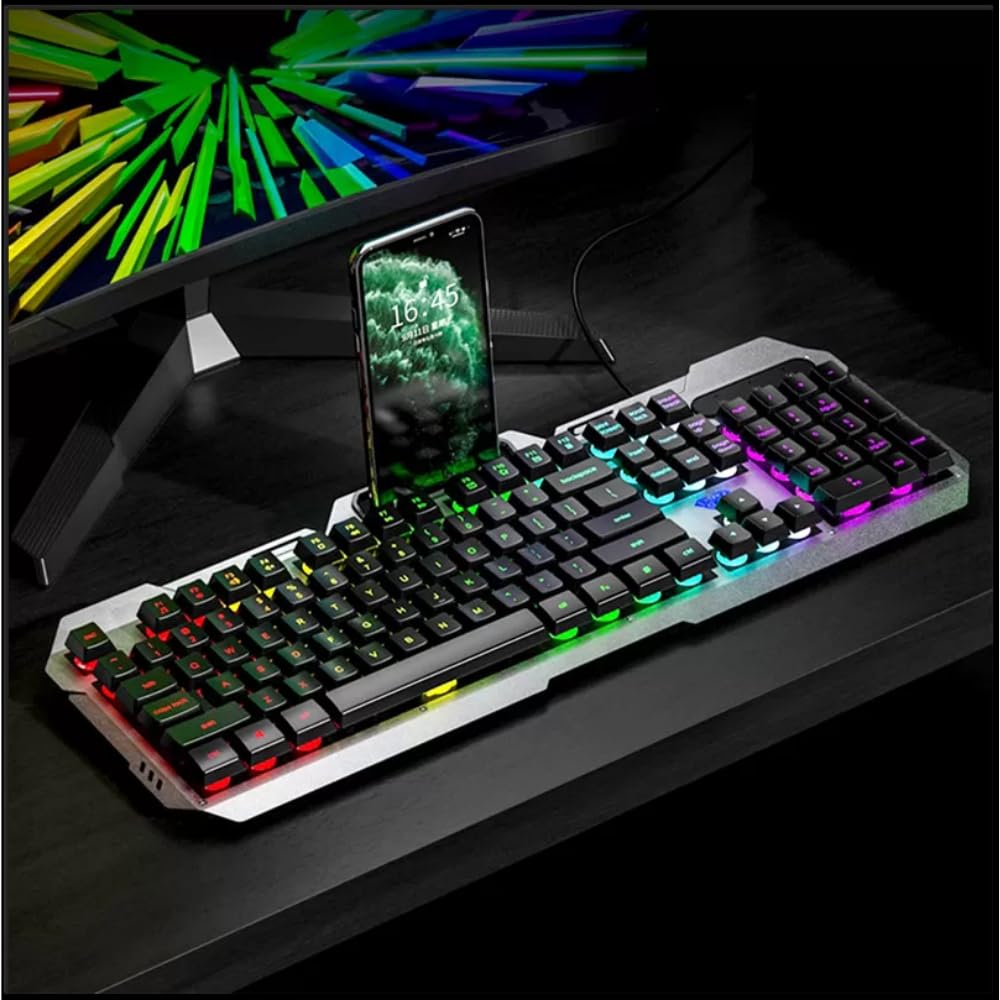
Image 3.1: The AULA F2023 keyboard in use, demonstrating the integrated smartphone holder for convenience.
4. Funtzionamendu-argibideak
4.1. Multimedia Controls
The AULA F2023 keyboard features dedicated function keys for multimedia control. Press the Fn key in combination with the corresponding F-key:
- Fn+F2: Bolumena jaitsi
- Fn+F3: Bolumena igo
- Fn+F4: Isildu
- Fn+F5: Gelditu erreprodukzioa
- Fn+F6: Aurreko Pista
- Fn+F7: Erreproduzitu/Pausatu
- Fn+F8: Hurrengo Pista
4.2. Atzeko argiaren kontrola
The keyboard features customizable RGB rainbow backlighting. Adjust the lighting effects and brightness using the following key combinations:
- Fn + PgG: Increase Brightness / Frequency of lighting effect.
- Fn + PgDn: Decrease Brightness / Frequency of lighting effect.
- Fn + 1: Activates lighting mode, allowing adjustment between 3 types of light effects.

4.1. irudia: Plano hurbila view of the keyboard's function keys, highlighting the Fn key and its role in activating lighting modes and other functions.
4.3. Anti-Ghosting and Win Lock
- 26 teklako iraulketa-anti-ghosting-a: This technology ensures that up to 26 keys pressed simultaneously are registered accurately, which is crucial for intense gaming scenarios.
- Irabazi blokeatzeko funtzioa: The Win Lock function prevents accidental presses of the Windows key during gaming or typing, avoiding interruptions.

4.2. irudia: Xehetasun bat view of the keyboard's keys, illustrating the design that supports 26-key rollover for enhanced gaming performance.
4.4. Bateragarritasuna
The AULA F2023 keyboard is compatible with a wide range of operating systems and devices:
- Sistema eragileak: Windows XP / Vista / 7 / 8 / 10, macOS, Linux
- Gailuak: PC, Laptop, Google TV, Smart TV, PS4, Xbox One
5. Mantentzea
Zure AULA F2023 teklatuaren iraupena eta errendimendu optimoa bermatzeko, jarraitu mantentze-jarraibide hauek:
- Garbiketa: Garbitu teklatua aldizka zapi leun eta lehor batekin. Garbiketa sakonago bat egiteko, erabili aire konprimituzko lata bat teklen arteko hautsa eta hondakinak kentzeko.
- Tekla-tapoia kentzea: Use the included keycap puller to carefully remove keycaps for thorough cleaning. Avoid excessive force to prevent damage.
- Saihestu likidoak: Do not expose the keyboard to liquids. In case of accidental spills, immediately disconnect the keyboard and allow it to dry completely before reconnecting.
- Biltegiratzea: Gorde teklatua leku fresko eta lehor batean, eguzki-argitik eta muturreko tenperaturetatik babestuta, denbora luzez erabiltzen ez duzunean.
6. Arazoak
AULA F2023 teklatuarekin arazoak badituzu, jo ezazu honako ohiko irtenbide hauetara:
- Teklatuak ez du erantzuten:
- Ziurtatu USB kablea ondo konektatuta dagoela bai teklatura bai ordenagailura.
- Saiatu teklatua ordenagailuko beste USB ataka batera konektatzen.
- Berrabiarazi ordenagailua.
- Probatu teklatua beste ordenagailu batean arazoa teklatuan edo ordenagailuan dagoen zehazteko.
- Atzeko argia ez dabil edo iluna da:
- Check if the backlight brightness is set to maximum using Fn + PgUp.
- Ensure no software or system settings are overriding the keyboard's backlight controls.
- Giltzak ez dira behar bezala erregistratzen:
- Clean the affected keys and surrounding areas to remove any debris that might be obstructing key presses.
- If using a KVM switch or USB hub, try connecting the keyboard directly to the computer.
- Keyboard Enters Sleep Mode: The keyboard is designed to automatically enter sleep mode after 5 minutes of inactivity. Press any key to wake it up.
7. Zehaztapenak
Detailed technical specifications for the AULA F2023 Wired USB Gaming Keyboard:
| Ezaugarri | Xehetasuna |
|---|---|
| Marka | AULA |
| Modelo zenbakia | F2023 |
| Konektibitate Teknologia | USB-A (Kableduna) |
| Teklatuaren deskribapena | Gaming, Membrane |
| Materiala | Top-grade Aluminium Alloy Panel |
| Kolorea | Beltza |
| Ghostingaren aurkakoa | 26 teklako biraketa |
| Atzeko argia | RGB Rainbow Backlight |
| Produktuaren neurriak (LxWxH) | 45.7 x 16.6 x 2.8 cm |
| Elementuaren pisua | 562 g |
| Sistema eragileen bateragarritasuna | Linux, Windows XP, Vista, 7, 8, 10, macOS |
| Dakarten osagaiak | Keycap tiratzailea |

Image 7.1: A visual representation of the AULA F2023 keyboard's dimensions, indicating its length, width, and height.
8. Bermearen informazioa
The AULA F2023 Wired USB Gaming Keyboard comes with a 1 Urteko Bermea erosketa-datatik aurrera. Berme honek erabilera normalaren ondoriozko fabrikazio-akatsak eta matxurak estaltzen ditu. Ez ditu estaltzen erabilera okerrak, istripuek, baimenik gabeko aldaketek edo higadura normalak eragindako kalteak.
Mesedez, gorde zure erosketa-froga berme-erreklamazioetarako.
9. Laguntza
For further assistance, technical support, or warranty inquiries, please contact your retailer or the official AULA support channels. Refer to the product packaging or the AULA official webharremanetarako datuak lortzeko gunea.


