1. Sarrera
This manual provides detailed instructions for the installation, operation, and maintenance of your EverBrite 88LED Under Cabinet Lighting. This versatile lighting solution features a motion sensor, remote control, adjustable color temperatures, and dimmable brightness, designed to enhance visibility in various indoor spaces.
2. Paketearen edukia
Mesedez, egiaztatu behean zerrendatutako elementu guztiak zure paketean sartuta daudela:
- EverBrite 88LED Under Cabinet Light Bar
- Urruneko Kontrola
- USB kargatzeko kablea
- Magnetic Mounting Bracket(s)
- Itsasgarriak
- Torlojuak eta hormako aingurak
- Erabiltzailearen eskuliburua

3. Produktuaren ezaugarriak
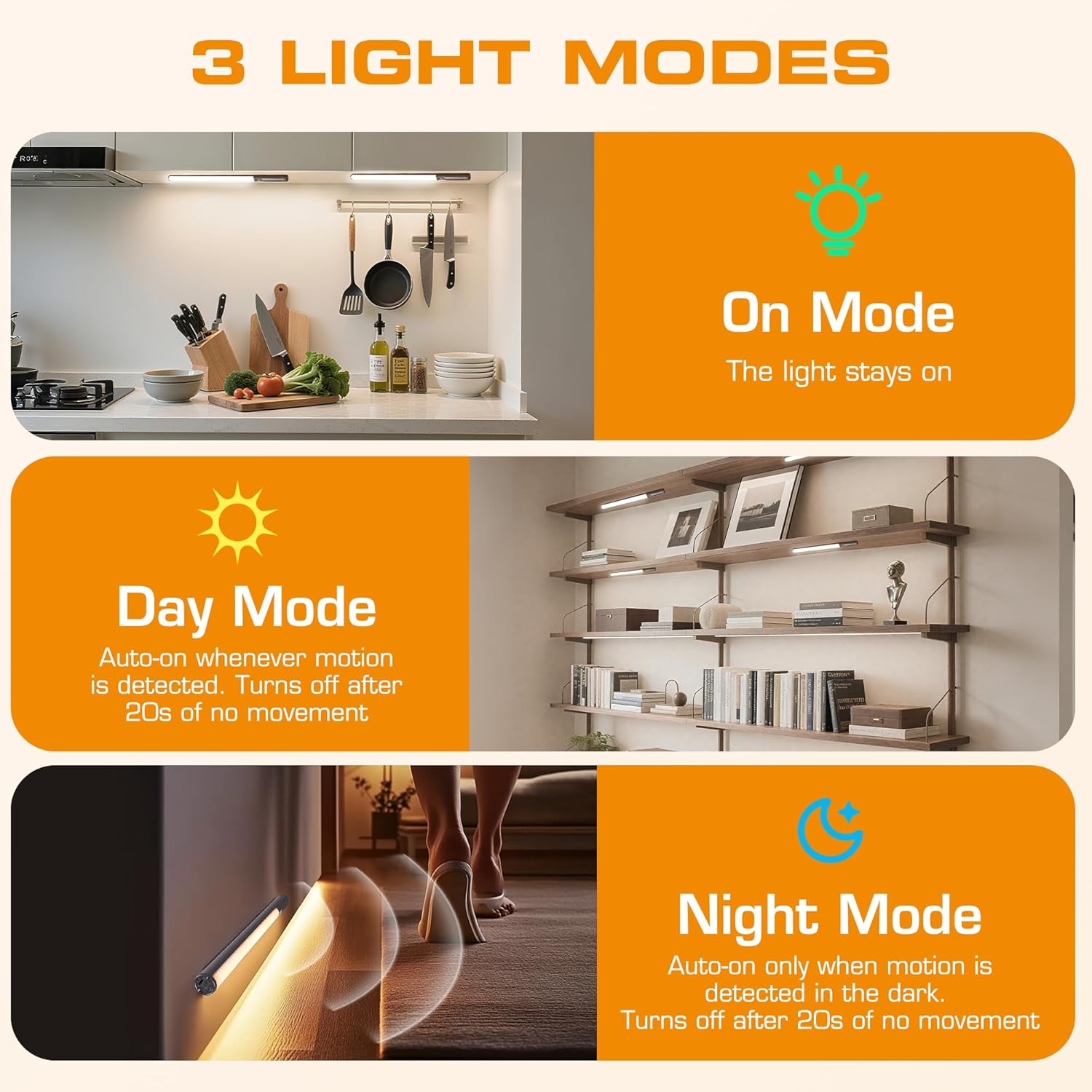
- 3 argiztapen moduak: On Mode (light stays on), Day Mode (motion-activated regardless of ambient light), Night Mode (motion-activated only in dark).
- 3 Kolore Tenperatura: Warm Light (3000K), Natural Light (4000K), Cold Light (6500K).
- Erregulagarria: 10 brightness levels with short press, stepless dimming with long press.
- Kontrol bikoitza: Operable via remote control or direct touch on the light bar.
- Instalazio erraza: Multiple mounting options including magnetic, adhesive, and screw-in.
- Bateria kargagarria: 2600mAh capacity for extended use.
- Aplikazio zabala: Suitable for kitchens, closets, wardrobes, garages, stairwells, and more.
4. Konfigurazioa eta instalazioa
The EverBrite Under Cabinet Light offers flexible installation to suit various surfaces and needs.
- Aukeratu zure muntaketa metodoa:
- Eranskin magnetikoa: For iron surfaces, simply attach the light bar directly. The light has built-in magnets.
- Itsasgarriaren muntaketa: For non-iron surfaces, peel the backing from the adhesive pads and attach them to the magnetic mounting bracket. Then, adhere the bracket to your desired surface. The light bar can then be magnetically attached to this bracket.
- Torlojuen muntaketa: For a more permanent installation, use the provided screws and wall anchors. Determine the mounting location, drill two holes, insert anchors, and fasten the magnetic mounting bracket with screws. Attach the light bar magnetically.
- Kokalekua: Ensure the motion sensor is facing the area where movement is expected for optimal detection. The light bar can be rotated up to 90 degrees on its magnetic mount to direct illumination.


5. Kargatzea
The EverBrite light is equipped with a 2600mAh rechargeable Lithium-Ion battery.
- Locate the USB-C charging port on the end of the light bar.
- Connect the provided USB charging cable to the light bar and a compatible USB power source (e.g., wall adapter, computer USB port).
- The indicator light will show charging status (refer to product for specific indicator behavior).
- A full charge provides approximately 25 hours of continuous light or up to 25 days in motion sensor mode (based on 1 hour of activation per day).


6. Funtzionamendu-argibideak
Your EverBrite light can be operated using either the manual touch controls on the device or the included remote control.
6.1. Manual Control (On-Device)
The light bar features a switch and a touch sensor on one end for direct control.
- Modu aldaketa: Slide the switch to select between 'Off', 'Day Mode' (motion sensor always active), 'Night Mode' (motion sensor active only in dark), or 'On Mode' (light stays on continuously).
- Kolore Tenperatura: In 'On Mode', short press the touch sensor to cycle through the 3 color temperatures: Warm White (3000K), Natural White (4000K), and Cold White (6500K).
- Distira doitzea: In 'On Mode', long press the touch sensor to activate stepless dimming. Release at your desired brightness level.

6.2. Urruneko kontrola
The remote control provides convenient access to all light functions from a distance.
- Piztu/Itzali: Sakatu OFF button to turn the light off. Press the ON botoia pizteko.
- Argiztapen moduak: Erabili botoiak horretarako ON (continuous light), EGUNA (motion sensor always active), or GAUA (motion sensor active only in dark).
- Kolore Tenperatura: Hautatu WW (Warm White), NW (Natural White), or CW (Cold White) to change the light color.
- Distira doitzea: Short press the brightness buttons (sun icons) to cycle through 10 preset brightness levels. Long press for stepless dimming.
- Tenporizadorearen ezarpenak: Sakatu 15min, 30min, edo 60min to set an automatic shut-off timer. Press the Tenporizadorea itzali button to cancel any active timer.

6.3. Mugimendu-sentsorearen moduak
The integrated motion sensor provides hands-free illumination.
- Eguneko modua: The light will turn on automatically when motion is detected, regardless of the ambient light level. It will turn off after 20 seconds of no movement.
- Gaueko modua: The light will turn on automatically only when motion is detected in dark conditions. It will turn off after 20 seconds of no movement.

7. Zehaztapenak
| Ezaugarri | Zehaztapena |
|---|---|
| Marka | EverBrite |
| Modelo zenbakia | E101115A |
| Energia iturria | Bateriaren funtzionamendua (litio-ioizko bateria 1 barne) |
| Bateria Edukiera | 2600mAh |
| Argi iturri mota | LED |
| Kolore Tenperaturak | 3000K (Warm Light), 4000K (Natural Light), 6500K (Cold Light) |
| Kontrol-metodoa | Ukitu, urrutiko agintea |
| Ezaugarri Berezia | Cordless, Motion Sensor, Dimmable |
| Instalazio mota | Surface Mount (Magnetic, Adhesive, Screws) |
| Materiala | Aluminioa |
| Elementuaren pisua | 9.9 ontza |
| Paketearen neurriak | 16.3 x 1.97 x 1.65 hazbete |
| Barruko/Kanpoko erabilera | Barruan |
8. Mantentzea
To ensure the longevity and optimal performance of your EverBrite Under Cabinet Light, follow these simple maintenance guidelines:
- Garbiketa: Wipe the light bar and remote control with a soft, dry cloth. Avoid using abrasive cleaners or solvents, as these may damage the finish or electronic components.
- Bateria zaintzea: Recharge the battery when the light output diminishes. Avoid fully depleting the battery frequently to prolong its lifespan. Store the device in a cool, dry place if not in use for extended periods.
- Sentsoreen mantentze-lanak: Mugimendu-sentsorearen lentea garbi eta oztoporik gabe mantendu detekzio zehatza bermatzeko.
9. Arazoak
If you encounter any issues with your EverBrite Under Cabinet Light, please refer to the following common problems and solutions:
- Argia ez da pizten:
- Ziurtatu bateria kargatuta dagoela.
- Check the mode switch on the light bar; it should be set to 'On', 'Day Mode', or 'Night Mode'.
- If using the remote, ensure the light bar's main switch is in an active mode (not 'Off').
- Motion sensor is not working:
- Verify the light is set to 'Day Mode' or 'Night Mode'.
- In 'Night Mode', ensure the environment is sufficiently dark.
- Check for any obstructions blocking the sensor lens.
- Ensure the motion is within the 9.8ft (3m) detection range and 120-degree angle.
- Urrutiko agintea ez da erantzuten:
- Ensure the light bar's main switch is in an active mode (not 'Off').
- Egiaztatu urrutiko agintearen bateria.
- Ensure there are no obstructions between the remote and the light bar.
- Light is not charging:
- Ensure the USB cable is securely connected to both the light bar and the power source.
- Probatu beste USB kable edo korronte egokitzaile batekin.
10. Bermea eta Laguntza
Bermeari buruzko informazioa, laguntza teknikoa edo laguntza gehiago lortzeko, jo fabrikatzailearen webgune ofizialera. webwebgunera edo jarri harremanetan zuzenean bezeroarentzako arreta-zerbitzura. Gorde erosketa-agiria berme-erreklamazioetarako.


