Sarrera
This manual provides comprehensive instructions for the installation, operation, and maintenance of your Hugolog 2K 3MP Indoor Pan/Tilt Security Camera. Please read this manual thoroughly before use to ensure proper functionality and safety.
Produktua amaituview
The Hugolog 2K 3MP Indoor Pan/Tilt Security Camera is designed for indoor monitoring, offering high-resolution video, advanced motion tracking, and smart detection features. It is suitable for use as a baby monitor, pet camera, or general home security device.

Figure 1: Hugolog 2K 3MP Indoor Pan/Tilt Security Camera (Model HU-PWR6-B)
Ezaugarri nagusiak
- Smart Motion Tracking & Auto-Focus and Zoom: AI-powered tracking follows movement; digital zoom up to 3X for detailed views.
- 2K HD and Starlight Night Vision: 3MP 2K resolution with a Starlight Sensor for enhanced color night vision (40X better than standard cameras) and f/1.4 aperture for clear night footage.
- Smart Motion and Sound Detection & Instant Notification: Advanced AI Human and Pet Detection reduces false alerts. Records and sends push alerts for motion, human presence, or crying babies.
- Bi norabideko elkarrizketa eta alarma sirena: Enables clear two-way communication and features an alarm siren that activates with motion.
- US Cloud Storage & SD Card Storage: Supports encrypted cloud storage in the US and a built-in microSD slot (up to 128GB) for local storage.
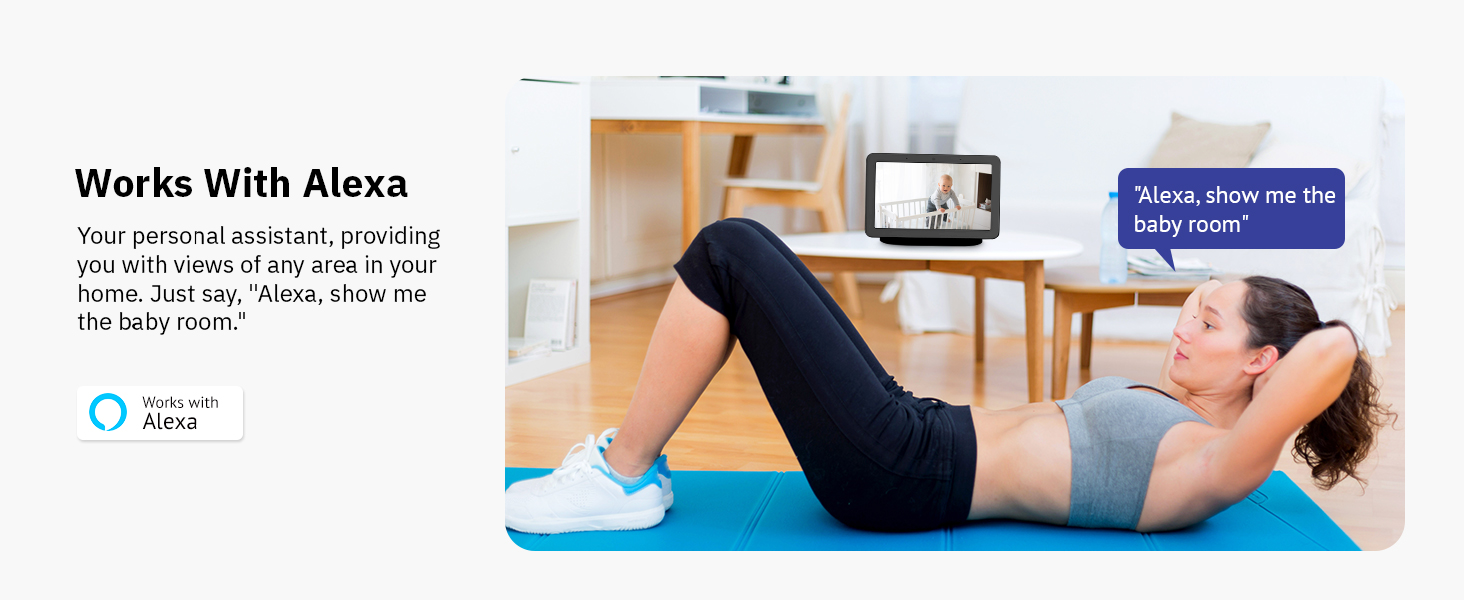
- Alexa-rekin bateragarria: Ahots-kontrolerako Amazon Alexarekin integratzen da eta viewing.
Paketearen edukia
Mesedez, egiaztatu paketearen edukia kutxa irekitzean, elementu guztiak bertan daudela ziurtatzeko:
- Hugolog 2K 3MP Indoor Pan/Tilt Security Camera
- Elikatze-moldagailua
- Mounting Accessories (Screws, Wall Anchors)
- Erabiltzailearen eskuliburua
Konfigurazio Gida
1. Kamera piztea
- Konektatu korronte-egokitzailea kameraren korronte-atakara.
- Entxufatu korronte-egokitzailea hormako entxufe batera. Kamera piztuko da eta abiarazteko sekuentzia hasiko du.
2. Installing the Hugolog Connect App
- Download the "Hugolog Connect" app from your smartphone's app store (iOS App Store or Google Play Store).
- Erregistratu kontu berri bat lortzeko edo hasi saioa dagoeneko baduzu.
3. Kamera aplikazioari gehitzea
- Open the Hugolog Connect app and tap the "+" icon to add a new device.
- Follow the on-screen instructions to connect your camera to your Wi-Fi network. Ensure your phone is connected to a 2.4GHz Wi-Fi network during setup.
- Eskaneatu telefonoan agertzen den QR kodea kameraren lentearekin eskatzen zaizunean.
- Behin konektatuta, zure kamerari izena jarri diezaiokezu eta zuzenean hasi viewing.

Figure 2: Hugolog Connect App interface for device management.
4. Installing a MicroSD Card (Optional)
For local video storage, insert a microSD card (up to 128GB, not included) into the designated slot on the camera. Ensure the camera is powered off before inserting or removing the card.

Figure 3: MicroSD card slot location on the camera.
5. Kamera muntatzea
The camera can be placed on a flat surface or mounted to a wall or ceiling using the provided mounting accessories. Choose a location with a clear view and stable Wi-Fi signal.

4. irudia: Adibample of camera placement in a nursery.
Funtzionamendu-argibideak
Zuzenean View eta Pan/Tilt kontrola
Access the live feed through the Hugolog Connect app. Use the on-screen controls to pan (355° horizontally) and tilt (90° vertically) the camera lens to view different areas of your room.

Figure 5: Pan and tilt functionality for wide area coverage.
Smart Motion Tracking and Auto-Focus
Enable Smart Motion Tracking in the app settings. The camera will automatically follow detected human or pet movement within its field of view. The auto-focus feature ensures clear images during movement and zooming.

Figure 6: Camera demonstrating auto-tracking of subjects.
Gaueko Ikusmena
The camera automatically switches to Starlight Color Night Vision in low-light conditions, providing clear, full-color video even in near darkness. This feature is significantly enhanced compared to standard infrared night vision.

Figure 7: Visual comparison of Starlight Color Night Vision clarity.
Two-Way Audio and Alarm Siren
Use the two-way talk feature in the app to communicate with individuals near the camera. The built-in alarm siren can be manually activated or set to trigger automatically upon detection of suspicious activity.

8. irudia: Bi norabideko audio komunikazioa kameraren bidez.
AI Detection and Notifications
Configure AI detection settings in the app to specify alerts for humans, pets, or sound events (e.g., crying baby). Receive instant push notifications on your smartphone when an event is detected.

Figure 9: AI detection filtering for relevant alerts.
Hodeiko eta tokiko biltegiratzea
Foo grabatuatage can be stored securely in the US Cloud (subscription may be required after trial) or locally on a microSD card. Access and review recordings via the Hugolog Connect app.

10 irudia: Erraz berriroview recorded events through the app's timeline.
Alexa integrazioa
Connect your Hugolog camera to Amazon Alexa for convenient voice control. Use commands like "Alexa, show me the [camera name]" to view zuzeneko jarioa Alexa gaitutako gailu bateragarrietan.

Figure 11: Integrating the camera with Amazon Alexa for smart home control.
Lo modua
Activate Sleep Mode via the Hugolog App to temporarily disable camera recording and live viewing for privacy. You can also manually rotate the camera lens downwards.

Figure 12: Sleep Mode feature for privacy control.
Multi-Device Support and Sharing
The Hugolog Connect app supports viewing up to 16 cameras simultaneously and allows sharing live views with up to 20 users. This is ideal for family monitoring or collaborative security.
13 irudia: Gailu anitzekoa viewing and sharing capabilities.
Mantentzea
- Garbiketa: Erabili zapi leun eta lehor bat kameraren lentea eta gorputza garbitzeko. Saihestu produktu kimiko gogorrak edo material urratzaileak.
- Software eguneraketak: Regularly check the Hugolog Connect app for firmware updates to ensure optimal performance and security.
- Lekua: Ensure the camera is placed in a stable, dry environment, away from direct sunlight, heat sources, and strong electromagnetic fields.
Arazoak konpontzea
| Gaia | Kausa posiblea | Irtenbidea |
|---|---|---|
| Kamera ez da wifira konektatzen | Wi-Fi pasahitz okerra, 5 GHz-ko sarea, seinale ahula. | Ziurtatu 2.4 GHz-ko Wi-Fi pasahitz zuzena duzula. Hurbildu kamera bideratzailera. Berrabiarazi kamera eta bideratzailea. |
| Alerta faltsu maiz | Sensitive motion detection, environmental factors (e.g., shadows, moving branches). | Adjust motion detection sensitivity in the app. Utilize AI Human/Pet Detection to filter irrelevant movements. |
| Poor night vision clarity | Obstructions near the lens, insufficient ambient light for color night vision. | Clear any obstructions. Ensure some ambient light is available for optimal Starlight Color Night Vision. |
| Bi norabideko audio arazoak | Microphone/speaker blocked, low volume settings, network latency. | Check for obstructions. Adjust volume in the app. Ensure stable internet connection. |
Zehaztapenak
| Ezaugarri | Xehetasuna |
|---|---|
| Modelo zenbakia | HU-PWR6-B |
| Bideo Harrapaketa Ebazpena | 3 MP (2K) |
| Barruko/Kanpoko erabilera | Barruan |
| Konektibitate-protokoloa | Wi-Fi (2.4 GHz) |
| Energia iturria | Kable elektrikoa |
| Panorama/Tilt barrutia | 355° Panorama, 90° Inklinazioa |
| Gaueko Ikusmena | Starlight Kolore Gaueko Ikuspena |
| Biltegiratze-aukerak | MicroSD Card (up to 128GB), US Cloud Storage |
| Gailu bateragarriak | Amazon Alexa |
| AI Ezaugarriak | Human/Pet Detection, Motion Tracking |
| Elementuaren pisua | 13.1 ontza |
| Neurriak | 6.65 x 3.82 x 3.78 hazbete (Paketea) |
Bermea eta Laguntza
For warranty information, please refer to the documentation included with your product or visit the official Hugolog website. For technical support, troubleshooting assistance, or to report any issues, please contact Hugolog customer service through their official channels.
Fabrikatzailea: Hugolog
Lineako laguntza: Visit the Hugolog Store on Amazon

Figure 14: Hugolog customer support team ready to assist.


