1. Sarrera
Thank you for choosing the Defender Enjoy S200 Portable Bluetooth Speaker. This manual provides essential information for setting up, operating, and maintaining your speaker to ensure optimal performance and longevity. Please read this manual thoroughly before use.
The Defender Enjoy S200 is a versatile portable speaker featuring Bluetooth 5.3 connectivity, True Wireless Stereo (TWS) pairing, an integrated FM radio, and MP3 playback capabilities via USB flash drive or microSD card. It also includes an LED light and supports hands-free calling. Designed for portability, it offers up to 9 hours of playback on a single charge and convenient USB Type-C charging.
2. Produktua amaitu daview
2.1 Ezaugarri nagusiak
- Bluetooth 5.3: For stable and efficient wireless audio streaming.
- Wireless Wireless Stereo (TWS): Connect two Enjoy S200 speakers for a stereo sound experience.
- Erreprodukzio modu anitz: Bluetooth, FM Radio, USB Flash Drive, MicroSD Card (up to 32GB).
- LED argi integratua: Provides visual ambiance.
- Esku libreko deiak: Telefono deietarako mikrofono integratua.
- Bateriaren iraupen luzea: Up to 9 hours of continuous music playback.
- USB C motako karga: Modern and convenient charging port.
- Diseinu eramangarria: Compact and lightweight with a carrying strap.
2.2 Paketearen edukia
- Defender Enjoy S200 Portable Bluetooth Speaker
- C motako karga-kablea
- Hasierako gida azkarra
- Eramateko uhala

Image: The Defender Enjoy S200 Portable Bluetooth Speaker, showcasing its compact design and front grille with an illuminated LED ring.

Image: An infographic highlighting key features such as multi-colored LED lighting, True Wireless Stereo (TWS) pairing, Bluetooth 5.3, MP3 player, FM receiver, and hands-free calling.
3. Konfigurazioa
3.1 Bozgorailua kargatzea
- Locate the Type-C charging port on the back of the speaker.
- Connect the provided Type-C charging cable to the speaker and the other end to a USB power adapter (not included) or a computer's USB port.
- LED adierazleak kargatze-egoera erakutsiko du. Karga oso batek normalean 3-4 ordu inguru behar ditu.
- Deskonektatu kablea guztiz kargatuta dagoenean.
3.2 Piztu/Itzaltzea
- To power on, slide the ON/OFF switch located on the back of the speaker to the 'ON' position.
- Itzaltzeko, irristatu ON/OFF etengailua 'OFF' posiziora.
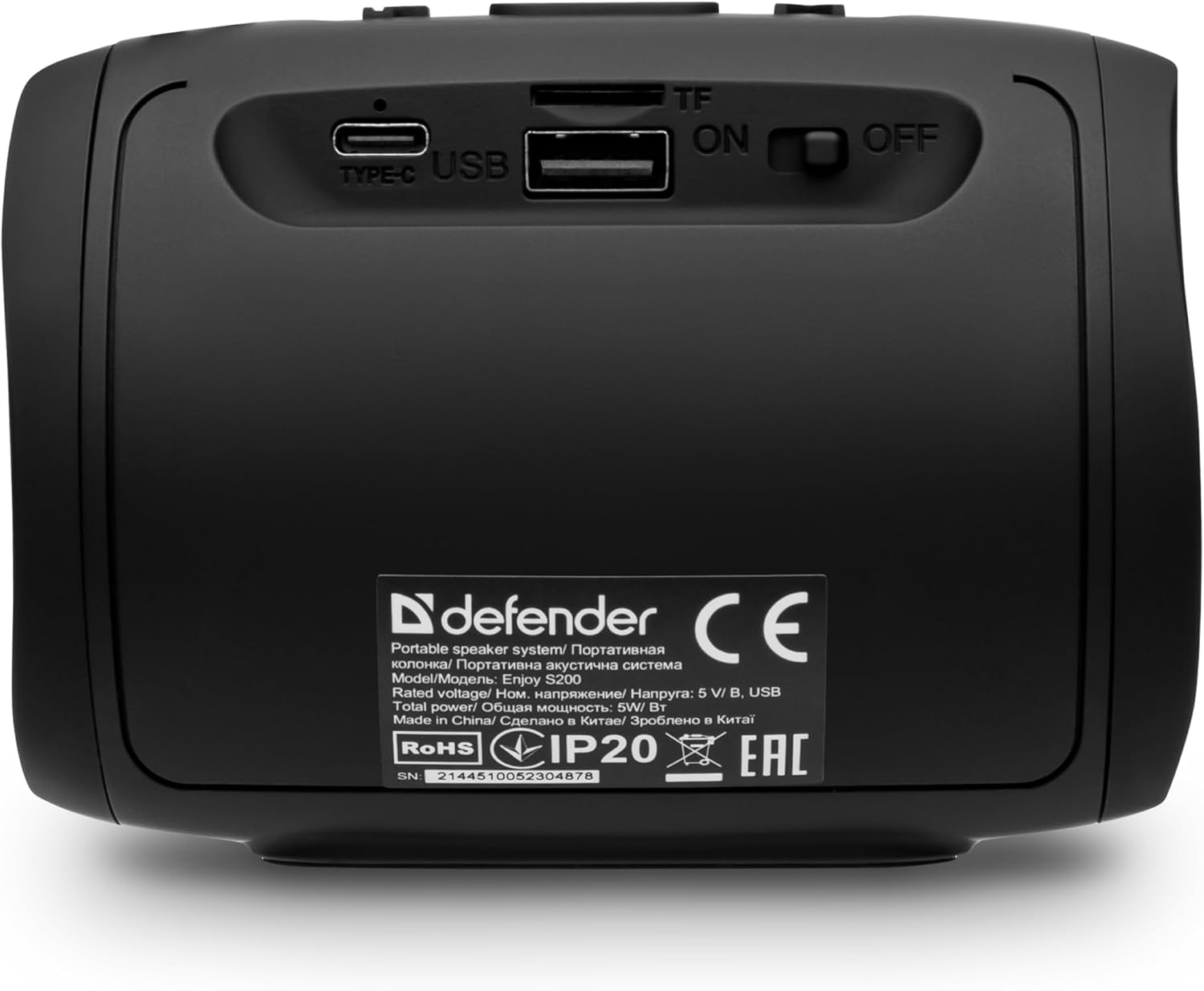
Irudia: Atzealdea view of the Defender Enjoy S200 speaker, showing the Type-C charging port, USB port, TF (microSD) card slot, and the ON/OFF power switch.
3.3 Bluetooth parekatzea
- Ziurtatu bozgorailua piztuta dagoela eta Bluetooth parekatze moduan dagoela (LED keinukari batek adierazten du).
- Zure gailuan (smartphone-an, tabletan, etab.), gaitu Bluetooth-a eta bilatu eskuragarri dauden gailuak.
- Select "Defender Enjoy S200" from the list of devices.
- Once paired, the speaker will emit a confirmation sound, and the LED will stop flashing.
3.4 Benetako Haririk gabeko Estereoa (TWS) Parekatzea
To pair two Defender Enjoy S200 speakers for stereo sound:
- Ziurtatu bi bozgorailuak piztuta daudela eta ez daudela Bluetooth gailu batera konektatuta.
- On one speaker (this will be the primary speaker), press and hold the TWS button (often indicated by a double-arrow icon) until you hear a pairing tone.
- The two speakers will automatically search and connect to each other. A confirmation tone will sound once connected.
- Orain, konektatu zure gailua bozgorailu nagusira Bluetooth bidez, 3.3 atalean azaltzen den bezala. Audioa estereoan erreproduzituko da bi bozgorailuetatik.

Image: A visual representation of two Defender Enjoy S200 speakers pairing wirelessly to create a True Wireless Stereo system, alongside icons for Bluetooth 5.3, MP3 player, FM receiver, and hands-free calling.
4. Funtzionamendu-argibideak
4.1 Button Functions (Refer to top panel controls)
- Pizteko botoia: Long press to power on/off. Short press to play/pause in music mode, or answer/end calls.
- Bolumena igo (+): Short press to increase volume. Long press for next track/station.
- Bolumena jaitsi (-): Short press to decrease volume. Long press for previous track/station.
- Modu (M) botoia: Short press to switch between Bluetooth, FM Radio, USB, and MicroSD modes.
- LED argiaren botoia: Short press to cycle through LED light modes or turn off the LED.
4.2 Bluetooth erreprodukzioa
After successful Bluetooth pairing (Section 3.3), open your music application on your device and begin playback. Use the speaker's volume buttons or your device's volume controls to adjust the audio level.
4.3 FM Irrati modua
- Press the 'M' (Mode) button until you hear the FM radio prompt.
- Sakatu luze Erreproduzitu/Pausatu botoia eskuragarri dauden FM irratiak automatikoki eskaneatu eta gordetzeko.
- Use the Volume Up (+) and Volume Down (-) buttons (long press) to navigate between saved stations.
4.4 USB/MicroSD Playback
- Insert a USB flash drive or a microSD card (up to 32GB) containing MP3 audio files into the respective port on the back of the speaker.
- Press the 'M' (Mode) button until the speaker automatically switches to USB or MicroSD mode and begins playback.
- Use the speaker's control buttons for play/pause, next track, and previous track.
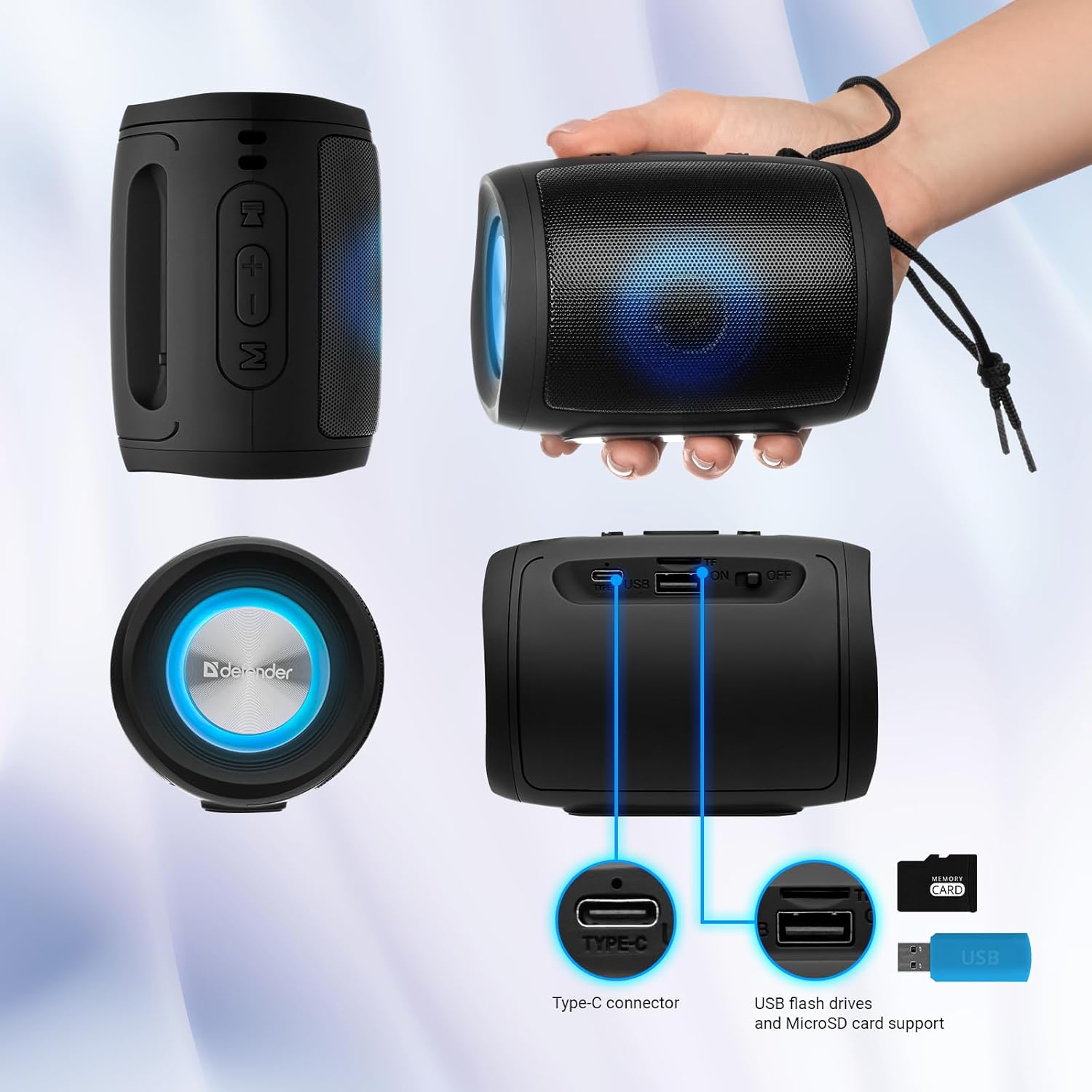
Image: A detailed diagram illustrating the Type-C connector, USB flash drive port, and MicroSD card slot on the Defender Enjoy S200 speaker.
4.5 Eskurik gabeko deiak
When connected to your smartphone via Bluetooth, the speaker's built-in microphone allows for hands-free calls.
- Erantzun deia: Sakatu labur Erreproduzitu/Pausatu botoia.
- Amaitu deia: Sakatu labur Erreproduzitu/Pausatu botoia.
- Deia baztertu: Luze sakatu Erreproduzitu/Pausatu botoia.
5. Mantentzea
- Garbiketa: Erabili zapi leun eta lehor bat bozgorailuen gainazala garbitzeko. Ez erabili garbitzaile edo disolbatzaile urratzailerik.
- Biltegiratzea: Gorde bozgorailua leku fresko eta lehor batean, eguzki-argitik eta muturreko tenperaturetatik babestuta.
- Uraren erresistentzia: The speaker has an IP20 rating, meaning it is protected against solid objects larger than 12.5mm but has no protection against water. Avoid exposure to rain, splashes, or immersion in water.
- Bateria zaintzea: To prolong battery life, fully charge the speaker before first use and recharge it at least once every three months if not used regularly.
6. Arazoak
- Potentziarik gabe: Ensure the speaker is charged. Connect the Type-C cable and allow it to charge for a few minutes before attempting to power on again.
- Soinurik ez: Check the volume levels on both the speaker and your connected device. Ensure the speaker is in the correct mode (Bluetooth, FM, USB, MicroSD).
- Bluetooth parekatzearen arazoak: Ensure the speaker is in pairing mode. Turn off Bluetooth on your device and turn it back on. Try unpairing and re-pairing the speaker. Move closer to the speaker to ensure you are within the 10-meter range.
- FM irratiaren harrera eskasa: Ensure you are in an area with good signal. The charging cable can sometimes act as an antenna; try connecting it for improved reception.
- USB/MicroSD Not Playing: Ziurtatu audioa files are in a compatible format (e.g., MP3). Check that the USB drive or microSD card is inserted correctly and is not corrupted.
7. Zehaztapenak
| Ereduaren izena | Gozatu S200 |
| Elementuaren eredu-zenbakia | 65200 |
| Marka | Atzelaria |
| Konektibitate Teknologia | Bluetooth 5.3, USBa |
| Haririk gabeko Komunikazio Teknologia | Bluetooth, Radio Frequency |
| Hizlari mota | Multimedia |
| Bozgorailuaren tamaina | 2 hazbete |
| Potentzia Irteera | 5 Watt |
| Audio irteera modua | Estereoa |
| Energia iturria | Bateriaz elikatua (litio-ioizko bateria 1 barne) |
| Ezaugarri bereziak | Integrated Microphone, USB Port, Portable Bluetooth, LED Light, FM Radio, MicroSD Card Support, TWS |
| Produktuaren neurriak (L x W x H) | 8 x 11 x 8 cm |
| Pisua | 330 gramo |
| Gehienezko irismena | 10 metro |
| IP balorazioa | IP20 |
8. Bermea eta Laguntza
8.1 Bermearen informazioa
Bermearen xehetasun zehatzak normalean erosketa-dokumentazioan edo fabrikatzailearen liburuxka ofizialean ematen dira. website. Please refer to these resources for information regarding warranty coverage and duration.
8.2 Bezeroarentzako laguntza
For technical assistance, troubleshooting beyond this manual, or inquiries about your Defender Enjoy S200 speaker, please contact Defender Global customer support. Contact information can usually be found on the product packaging, the manufacturer's webgunea edo zure erosketa-agiria.


